mcp-proxy: the reverse mode listens on a port, and its own example column shows binding it to every interface
A bridge between Streamable HTTP and stdio MCP transports
At a glance
- What is it?
- This tool bridges Model Context Protocol transports in both directions, so a client that only speaks stdio can reach a remote SSE server and a local stdio server can be reached remotely. The reverse mode is the one to read carefully, because the port it opens has no authentication described anywhere and the documentation's own example binds it to all interfaces.
- Who is it for?
- Use the forward mode, which lets a stdio only client reach a remote MCP server over SSE, and treat that as what this tool is for. Before using the reverse mode, decide whether you need it at all, because it opens a network port in front of a local server process and the documentation describes no authentication for that port while showing all interfaces in its example.
- Can I use it commercially?
- Yes. MIT is a permissive licence: you can use, modify and sell software built on it, as long as you keep its copyright and licence notices.
- Is it still maintained?
- Yes. The repository last received commits 6 days ago.
- What is it written in?
- Mainly Python, according to GitHub's language statistics.
Answers come from the project's GitHub data, last synced on November 15, 2026, and from our analysis. They are not legal advice.
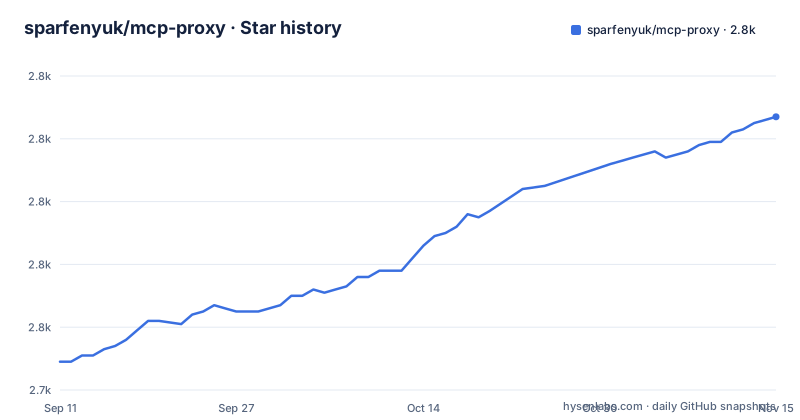
Star history
- sparfenyuk/mcp-proxy2,827 ★ · +78
| Repository | 2026-09-11 | 2026-11-15 |
|---|---|---|
| sparfenyuk/mcp-proxy | 2.7k | 2.8k |
78 Stars in the last 65 days, measured from the daily GitHub snapshot. Compare with other projects
Editorial analysis
The reverse mode opens a port in front of a local stdio server
There are two directions, and they are not symmetric in risk. The forward mode runs a proxy that reads stdio from a client and speaks SSE to a remote MCP server, which exists so a client such as Claude Desktop can reach a remote server over SSE even though it cannot do that natively. The reverse mode does the opposite: it opens a port and listens for SSE requests, and spawns a local stdio server that handles the actual MCP requests. So in one direction the tool is a client of a remote service, and in the other it is a network service in front of a local process. The reverse mode requires a port argument to be set before it will start at all.
The host argument defaults to loopback and the example column says 0.0.0.0
The reverse mode takes a host argument for the address the server will listen on, and the argument table gives 127.0.0.1 as the default. The same row shows 0.0.0.0 in its example column. Those two entries are the whole difference between a service only this machine can reach and one every host on the network can reach, and the documentation puts them in the same row. Nothing in the visible configuration for that mode describes a token, a password or any other check on an incoming SSE request, while the forward mode has an OAuth client id, a client secret, a token URL and an environment variable for a bearer token. The asymmetry is the thing to notice: the mode that receives connections is the one with no credential story, and its example invites binding beyond loopback.
The environment pass through flag gives the child every variable
There are two separate ways environment variables reach the local stdio server, and one of them is indiscriminate. The repeatable env argument passes specific variables, in a name and value pair, to the process being spawned. A second flag passes through all environment variables when the server is spawned, and the example column shows the negated form, which suggests the default is to pass them. That default matters because the process a user most often wants to expose is one holding credentials of some kind, and a full environment pass hands it everything the parent had, including any token that was placed there for an unrelated reason. There is also a working directory argument for the child process, and arguments for the child's own command line are placed after a separator.
The bearer token can arrive by environment variable instead of on the command line
The forward mode accepts an authorization header as a command line argument, with an example value of a bearer token, and it also accepts the same token through an environment variable. That alternative is the better of the two, and the documentation says so by describing the variable as something that can be used instead of the header argument. A command line argument is visible to anything that can read the process table, and in the client configuration that launches this proxy the arguments are written into a JSON file, so a token in the arguments is a token on disk in a file a user is likely to share or back up. The example configuration puts the token in the environment block instead:
{
  "mcpServers": {
    "mcp-proxy": {
      "command": "mcp-proxy",
      "args": [
        "http://example.io/sse"
      ],
      "env": {
        "API_ACCESS_TOKEN": "access-token"
      }
    }
  }
}
The three OAuth arguments for the other authentication path have the same property, since they are written into that same arguments array.
Three labelled project URLs all point at the same repository page
The packaging metadata declares four URL fields. Homepage, Source and Documentation are set to the same address, the repository page, and only the changelog field points somewhere different, at the releases list. So three labels a package index will render as links to documentation lead to a README rather than to anything more specific. The repository itself records no homepage at all outside that manifest, so the only place this project states a web address is the place where it states it three times. That is a small thing, but it is the sort of duplication that makes a package look documented when it is not: the documentation the index offers a reader is the same file that already told them the table of contents ends in a Testing section.
One package installs two different commands
The manifest declares two console scripts. The first maps the name mcp-proxy to a main function, and the second maps the name mcp-reverse-proxy to a client function, both in the same module. That naming follows the two directions the tool supports, and it means installing the package puts both a server-side proxy and a client on the path. It also means the container image, whose entry point names the first command, ships the second one as well without saying so. The package itself is a typed distribution, with the package data table carrying a py.typed marker for every package, and it declares support for Python 3.10 through 3.14 with a floor of 3.10.
Runtime dependencies have floors and no ceilings
The runtime dependency list has three entries and every one of them is a lower bound with no upper limit. The authentication library has a floor of 0.23.1, the MCP package itself a floor of 1.27.1, and the ASGI server a floor of 0.47.0. There is no ceiling on any of them, so a resolver is free to take the next major version of the MCP package when one appears, and this tool is exactly the kind of program that breaks when the protocol package it wraps moves underneath it. The development group is pinned the same way, with floors on the test runner, the async plugin and the coverage tool. The build backend is setuptools, declared in the usual two line form with no other build requirement listed.
The container pins Python 3.13 while the package claims support through 3.14
The image is built in two stages. The first runs on a uv image tagged for Python 3.13 on alpine and installs the project from its lockfile, with a comment explaining that the dependency install is kept separate from the source copy so that layer caching works. It also installs a container init from the alpine package manager. The final stage is a plain Python 3.13 alpine image, and it does not copy the uv image at all. It takes the virtual environment from the first stage and copies the init binary from two separate locations, then puts the environment's bin directory at the front of the path and runs the proxy through that init as the entry point. So the shipped runtime is 3.13 while the metadata advertises 3.14, and the version skew lives in the image rather than in the code.
Editorial conclusion
Use the forward mode, which lets a stdio only client reach a remote MCP server over SSE, and treat that as what this tool is for. Before using the reverse mode, decide whether you need it at all, because it opens a network port in front of a local server process and the documentation describes no authentication for that port while showing all interfaces in its example. If you do need it, keep the bind address on the loopback default, and think about the environment pass through flag before pointing it at a server that holds credentials. The transport flags and the version floor on the MCP dependency are otherwise a small, readable surface.
Frequently asked questions
What does sparfenyuk/mcp-proxy actually do?
It switches between two MCP transports. In one mode it reads stdio from a client and connects to a remote MCP server over SSE or Streamable HTTP. In the other it opens a port, listens for SSE requests, and spawns a local stdio server to handle the MCP requests.
How do I install sparfenyuk/mcp-proxy?
The table of contents names three routes: installing from PyPI, installing from the GitHub repository for the latest version, and installing as a container. The installation sections themselves sit further down the README, so the exact commands are not in the part shown here. The package declares a console script named mcp-proxy.
Can mcp-proxy authenticate to a remote MCP server?
Yes. The forward mode takes a bearer token either through a headers argument or through an API_ACCESS_TOKEN environment variable, and it also takes an OAuth2 client id, client secret and token endpoint URL. The README also links a changelog field pointing at the releases list for release notes.
Does the listening side of mcp-proxy require a token?
No authentication is described for it. The reverse mode documents a port argument, a host argument defaulting to 127.0.0.1 with 0.0.0.0 given as the example, an environment argument, a working directory argument and an environment pass through flag. None of the visible configuration for that mode mentions a credential.
What are mcp-proxy's runtime dependencies?
Three, all with lower bounds and no upper limits: httpx-auth at 0.23.1 or newer, mcp at 1.27.1 or newer, and uvicorn at 0.47.0 or newer. The package requires Python 3.10 or newer and its metadata is marked as a beta development status.
Official sources
Add this badge to your README
If you maintain this project, the badge below links readers to this analysis and shows its maintenance status from the daily GitHub snapshot. Paste the markdown into your README; add ?metric=license or ?metric=stars to the image URL for a different field.

[](https://hysenlabs.com/projects/sparfenyuk-mcp-proxy)Star history chart for your README
[](https://hysenlabs.com/projects/sparfenyuk-mcp-proxy)Was this useful?