OpenAI Agents SDK: four runners, and the extras that gate them
Project brief: A lightweight, powerful framework for multi-agent workflows. On Windows, use DockerSandboxClient with the openai-agents[docker] extra or a hosted sandbox client instead; see Sandbox clients for setup details.
At a glance
- What is it?
- The OpenAI Agents SDK is the Python framework for multi-agent workflows, MIT licensed and installable with a single pip command. Its shape is decided by four run modes, a set of extras that gate features by Python version, and a Makefile that treats the published API surface as a contract.
- Who is it for?
- Take the OpenAI Agents SDK if your Python team is building agent workflows on OpenAI models and can live with a pre-1.0 package: version 0.24.0, with releases on 2026-10-02, 2026-10-02 and 2026-10-15, and an API surface the project checks between releases. Pin an exact version and lock the transitive floors yourself, because pip installs from ranges and uv.lock only covers contributors.
- Can I use it commercially?
- Yes. MIT is a permissive licence: you can use, modify and sell software built on it, as long as you keep its copyright and licence notices.
- Is it still maintained?
- Yes. The repository received new commits within the last day.
- What is it written in?
- Mainly Python, according to GitHub's language statistics.
Answers come from the project's GitHub data, last synced on November 13, 2026, and from our analysis. They are not legal advice.
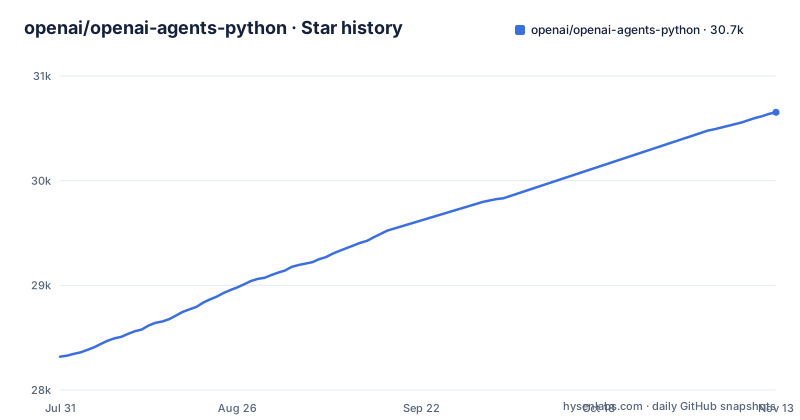
Star history
- openai/openai-agents-python30,653 ★ · +2,335
| Repository | 2026-07-31 | 2026-11-13 |
|---|---|---|
| openai/openai-agents-python | 28.3k | 30.7k |
2,335 Stars in the last 105 days, measured from the daily GitHub snapshot. Compare with other projects
Editorial analysis
pip install openai-agents, then you import agents
The distribution name on PyPI is openai-agents and the import name is agents, which catches people out when they write their first requirements file. Python 3.10 or newer is required. A virtual environment is three commands:
python -m venv .venv
source .venv/bin/activate  # On Windows: .venv\Scripts\activate
pip install openai-agents
If you use uv, the README gives the same thing in two lines, which also creates the project around it:
uv init
uv add openai-agents
Before any of the four run modes will do anything, the OPENAI_API_KEY environment variable has to be set, because every path ends in a model call. The shortest possible first run is a text agent, one instruction string and a synchronous runner:
from agents import Agent, Runner

agent = Agent(name="Assistant", instructions="You are a helpful assistant")

result = Runner.run_sync(agent, "Write a haiku about recursion in programming.")
print(result.final_output)

# Code within the code,
# Functions calling themselves,
# Infinite loop's dance.
There is also a notebook version of that same hello world under examples/basic/ for people who do not want a script.
The dependency list is floors, and pip users get no lockfile
pyproject.toml pins its direct dependencies with ranges: openai>=3.0.0,<4, pydantic>=2.12.2, <3, griffelib>=2, <3, typing-extensions>=4.12.2, <5, requests>=2.0, <3, websockets>=15.0, <17, and mcp>=1.30.0, <3 (excluding 2.0.* and 2.1.*). Under a comment calling them security floors for transitive runtime dependencies sit six more, certifi>=2026.10.19 plus these five:
"httpx2>=2.12.0",
"pyjwt>=2.15.0",
"python-multipart>=0.0.31",
"starlette>=1.3.1",
"urllib3>=2.8.0",
Floors, not ceilings, means a plain pip install resolves to whatever is newest inside those ranges on the day it runs. The repository does carry a uv.lock at the root, but that lock belongs to the contributors who run `make sync`, which is `uv sync --all-extras --all-packages --group dev`. It does nothing for a team installing from PyPI.
So two teams that both record openai-agents 0.24.0 can end up with different websockets or different openai patch releases, and a bug that reproduces on one machine can vanish on another. If reproducibility matters to you, freeze the transitive set yourself. The manifest also carries a comment about protobuf exclusions retaining patched 5.x and 6.x releases against GHSA-7gcm-g887-7qv7, which is a reminder that this list is maintained against advisories rather than written once.
The any-llm extra needs Python 3.11 while the package floor is 3.10
requires-python is >=3.10 and the classifiers run from 3.10 through 3.14 with Operating System :: OS Independent and Typing :: Typed. Now look at the any-llm extra: both of its requirements, any-llm-sdk>=1.11.0, <2 and pygments>=2.20.0, carry the marker python_version >= '3.11'.
Install that extra on Python 3.10 and the markers simply drop out. You get a working SDK and no any-llm provider path, with no error at install time. If your organisation standardises on 3.10, check that before you promise anyone a second provider.
The other extras each pull their own stack, so choosing a feature is also choosing dependencies: voice brings numpy>=2.2.0, <3 and websockets, viz brings graphviz>=0.17, litellm brings litellm>=1.83.0 with aiohttp and filelock. The README spells out two of these install commands:
pip install 'openai-agents[voice]'
pip install 'openai-agents[redis]'
UnixLocalSandboxClient is macOS and Linux, so Windows runs a different client
A SandboxAgent is for work that needs a workspace: inspecting files, running commands, applying patches, and keeping state across longer tasks. What the agent can reach is declared in a manifest, and the example builds one with a git entry:
Manifest(entries={"repo": GitRepo(repo="openai/openai-agents-python", ref="main")})
Two things follow from that. The ref is a branch name, so the contents of a sandbox workspace move with main, which is convenient while you experiment and unhelpful when you want the same workspace back tomorrow. And the manifest is the capability list: an entry that is not in it is not in the workspace, so widening what an agent can do means editing this structure rather than prompting it differently.
The platform split is the sharper edge. The example uses UnixLocalSandboxClient, which the README states is supported on macOS and Linux. On Windows you are told to use DockerSandboxClient with the openai-agents[docker] extra, or a hosted sandbox client instead. That is three implementations of one interface, and a team split across operating systems is running different code for the same agent until they standardise on the Docker client or the hosted one.
Four runners, and the difference is the wrapper
The SDK documents four ways to run an agent, and the split between them is about transport rather than intelligence. A text Agent with Runner.run_sync is for workflows that need neither a persistent connection nor a workspace, and it hands back one result object whose final_output is the string you print. A SandboxAgent adds the container. A RealtimeAgent with RealtimeRunner is for low-latency server-side voice and multimodal work over WebSocket, built around gpt-realtime-2.1. A VoicePipeline with SingleAgentVoiceWorkflow turns audio into text, runs an agent workflow over it and streams generated speech back.
The voice example builds its agent with the same Agent(name=..., instructions=...) call as the text one, which is the useful part: your agent definition is portable across run modes and only the wrapper changes. The cost of that portability shows up in the wrapper. Realtime means you own a WebSocket session and consume an event stream, so event.type is switched on inside an async for. Voice means a numpy buffer in and audio events out, and it needs the voice extra for numpy. Only the text path is a plain function call that returns when the answer is done.
Set OPENAI_API_KEY before any of them. These are the four primary ways to run agents that the README documents.
The Makefile treats the published API surface as a contract
Two targets exist to pin the API a release exposes, and both refuse to run without being told which version:
uv run python .github/scripts/update_released_api_contract.py --version "$(VERSION)"
uv run python .github/scripts/update_released_api_contract.py --version "$(VERSION)" --check
Omit VERSION and the target stops with a message telling you the format, VERSION=0.20.0 in its example. The check variant adds --check, so the same script both writes the contract and asserts it has not drifted. A third pair, prepare-prospective-released-api-contract and check-prospective-released-api-contract, unsets OPENAI_API_KEY, reads the installed version through importlib.metadata, writes .tmp/prospective_released_api_contract.json and feeds that file into the integration tests.
Two consequences for an adopter. Because the prospective check unsets the API key, the contract is verified without a model call, so it tells you the shape of the API and nothing about how it behaves against the live service. And the whole apparatus only makes sense for a package that versions its surface deliberately: at 0.24.0, with releases on 2026-10-02, 2026-10-02 and 2026-10-15, treat every minor as a window where something moves and pin an exact version rather than a range. The lint target is just as telling, running ruff plus a bespoke check_optional_truthiness.py over src/agents, so a project-specific check runs alongside ruff.
Pull requests are limited to repository collaborators
The contributing section is short and has one hard edge in it. Bug reports and feature requests go through GitHub issues. Pull requests are limited to repository collaborators, which means an outside engineer who finds a bug in 0.24.0 cannot send a fix upstream.
That single line changes how you plan a dependency. The options narrow to filing an issue and hoping, forking and maintaining the patch yourself, or wrapping the SDK so the behaviour you need lives in your code instead. Any of those is a maintenance line item that a plain pip dependency would not have been, and it is worth putting in the decision before the first agent ships rather than the first bug.
The repository does give outside contributors somewhere to look in the meantime. The examples directory is organised by topic, with agent_patterns, handoffs, hosted_mcp, memory, model_providers, realtime, sandbox, tools and voice, plus run_examples.py for running them, and CONTRIBUTING.md and SECURITY.md both sit at the root.
The 100+ model claim rests on two extras and one examples directory
The README calls the SDK provider-agnostic and says it supports the OpenAI Responses and Chat Completions APIs as well as 100+ other LLMs. The README's opening does not list those models, so check the documentation for your own provider before relying on the number.
What you can check is the mechanism. Two extras carry third-party routing, litellm and any-llm, and a directory named examples/model_providers/ exists. The honest reading is that a provider is supported if it comes through one of those two paths, and anything else is a model implementation you write yourself against the SDK's interface. Plan your provider abstraction on that basis rather than on the headline number.
Two of the other one-line concepts deserve the same scepticism. Sessions are described as automatic conversation history management across agent runs, which is the right place to look for what your chat history does. Tracing is described as built-in tracking that lets you view, debug and optimize runs, and that line does not say where the traces are stored or who can read them. Settle that before you push conversation history through it.
Editorial conclusion
Take the OpenAI Agents SDK if your Python team is building agent workflows on OpenAI models and can live with a pre-1.0 package: version 0.24.0, with releases on 2026-10-02, 2026-10-02 and 2026-10-15, and an API surface the project checks between releases. Pin an exact version and lock the transitive floors yourself, because pip installs from ranges and uv.lock only covers contributors. Skip it if you are on Windows and need the local sandbox without Docker, if you are pinned to Python 3.10 and need the any-llm provider path, or if you need to send a pull request, because the project limits those to collaborators. Before you commit to it, decide which of the four run modes you need and set OPENAI_API_KEY, since those are the four primary run modes the README documents.
Frequently asked questions
Is the OpenAI Agents SDK free?
The package itself is MIT licensed, so the code carries no licence cost. Running an agent still needs an OPENAI_API_KEY, and the SDK is built on the OpenAI Responses and Chat Completions APIs, so the model calls are a separate bill from the library.
How do I install openai-agents in Python?
You need Python 3.10 or newer, then either a venv with pip install openai-agents, or uv init followed by uv add openai-agents. Set the OPENAI_API_KEY environment variable before running any example, and add extras such as 'openai-agents[voice]' or 'openai-agents[redis]' when you need that support.
openai agents python vs langchain: how do they differ?
The README does not compare it with LangChain; the SDK's own surface shows its approach. Delegation runs through handoffs or agents used as tools, tools can be functions, MCP servers or hosted tools with mcp>=1.30.0, <3 as a direct dependency, conversation history across runs is handled by sessions, and runs are followed through built-in tracing.
Official sources
Add this badge to your README
If you maintain this project, the badge below links readers to this analysis and shows its maintenance status from the daily GitHub snapshot. Paste the markdown into your README; add ?metric=license or ?metric=stars to the image URL for a different field.

[](https://hysenlabs.com/projects/openai-openai-agents-python)Star history chart for your README
[](https://hysenlabs.com/projects/openai-openai-agents-python)Was this useful?