The openai-node client: generated types, two text APIs, and three ways to authenticate
Official JavaScript / TypeScript library for the OpenAI API
At a glance
- What is it?
- OpenAI's official JavaScript and TypeScript library for its REST API, generated from an OpenAPI spec. The right fit for a new Responses API codebase, and the place where a hand-rolled conversation history and a Node-only certificate path will cost you.
- Who is it for?
- Take openai-node if you are writing TypeScript against the OpenAI API and can accept Node 22 as a floor plus a client whose minor versions move twice in a day: v7.46.0 and v7.47.0 both landed on 2026-10-31. Pin an exact version instead of a caret range.
- Can I use it commercially?
- Yes. Apache-2.0 is a permissive licence: you can use, modify and sell software built on it, as long as you keep its copyright and licence notices.
- Is it still maintained?
- Yes. The repository received new commits within the last day.
- What is it written in?
- Mainly TypeScript, according to GitHub's language statistics.
Answers come from the project's GitHub data, last synced on November 13, 2026, and from our analysis. They are not legal advice.
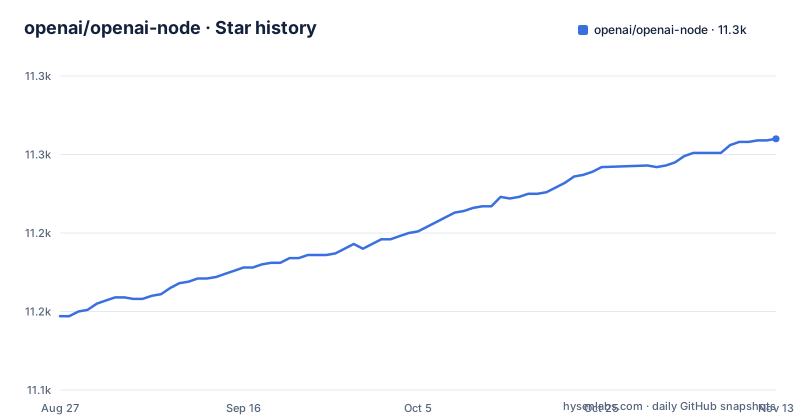
Star history
- openai/openai-node11,260 ★ · +113
| Repository | 2026-08-27 | 2026-11-13 |
|---|---|---|
| openai/openai-node | 11.1k | 11.3k |
113 Stars in the last 78 days, measured from the daily GitHub snapshot. Compare with other projects
Editorial analysis
Generated from an OpenAPI spec, so api.md is the surface to read
openai-node is not hand-written against the API. It is generated from the OpenAPI specification kept in openai/openai-openapi, which is why the first technical claim in the README is about provenance rather than features.
The practical consequence is where you look when a method name is in doubt. The README points at api.md in the repository root for the full API of the library, and at the examples/ tree for runnable code, while sending anyone who wants to learn the API itself to platform.openai.com. Three documents with three jobs: api.md for the client surface, examples/ for working programs, the platform docs for what the parameters mean.
Examples are split by feature area rather than by tutorial order: assistants, audio, azure, bedrock, chat-completions, client, fine-tuning, images, live, mtls, realtime, responses. That list is also the quickest way to see the scope. Realtime, audio and fine-tuning sit next to text generation, so this is a typed wrapper over a platform rather than a chat helper with extras.
Generation buys you type coverage on every endpoint. It also means the types can run ahead of the hand-written guidance, which is why api.md and the examples tree are worth reading as a pair.
npm install openai, then responses.create against gpt-5.5
One command gets you the client:
npm install openaiThe library reads OPENAI_API_KEY from the environment by default, so on most services there is nothing to configure before the first request. Deno takes the same package straight from npm:
import OpenAI from 'npm:openai';The first example in the README targets the Responses API, which it names as the primary API for interacting with OpenAI models:
import OpenAI from 'openai';

const client = new OpenAI({
  apiKey: process.env['OPENAI_API_KEY'], // This is the default and can be omitted
});

const response = await client.responses.create({
  model: 'gpt-5.5',
  instructions: 'You are a coding assistant that talks like a pirate',
  input: 'Are semicolons optional in JavaScript?',
});

console.log(response.output_text);
Three things to read out of that sample. The apiKey line is marked as the default and can be omitted, so the constructor works on an environment variable alone. instructions carries the standing direction while input carries the turn. And output_text is a convenience field that saves you walking the output array to find the reply.
Images go through the same endpoint rather than a separate one, as content parts typed input_text and input_image, with detail set to auto and the picture passed as an image_url.
Filtering response.output to messages drops items the next request needs
If you manage Responses API conversation history yourself, the failure mode is spelled out: preserve output items in order, because filtering `response.output` to messages can drop required reasoning or tool-call items and cause the next request to fail.
Two supported ways out. The SDK ships a `toResponseInputItems()` helper that normalizes all replayable output items before you add them to the next request. For a simple continuation you can pass `previous_response_id` instead and let the service hold the history. The repository points at examples/responses/manual-conversation-state.ts for the worked version.
For a codebase that hand-rolls history, the bug does not appear where you wrote the filter. It appears on the following turn, after a reasoning item or a tool call has been discarded, and the failing request is one you did not think was wrong.
The older Chat Completions API is described as the previous standard, supported indefinitely, so existing chat.completions code is not being retired underneath you:
import OpenAI from 'openai';

const client = new OpenAI({
  apiKey: process.env['OPENAI_API_KEY'], // This is the default and can be omitted
});

const completion = await client.chat.completions.create({
  model: 'gpt-5.5',
  messages: [
    { role: 'developer', content: 'Talk like a pirate.' },
    { role: 'user', content: 'Are semicolons optional in JavaScript?' },
  ],
});

console.log(completion.choices[0].message.content);
Two differences from the sample above: the role is named developer rather than system, and the reply arrives at completion.choices[0].message.content instead of response.output_text.
workloadIdentity and apiKey are mutually exclusive on the same client
For cloud-managed Kubernetes, Azure and GCP, the README offers workload identity authentication: short-lived tokens from a cloud identity provider instead of long-lived API keys. The constraint that shapes your configuration comes first, because the `workloadIdentity` parameter is mutually exclusive with `apiKey`. A config layer that always injects OPENAI_API_KEY will collide with it, so the branch has to be explicit rather than defaulted.
Subject-token workload identity needs three fields: `identityProviderId`, `serviceAccountId`, and `provider`. The providers come from openai/auth. `k8sServiceAccountTokenProvider` takes the path to a mounted service account token file, `azureManagedIdentityTokenProvider` and `gcpIDTokenProvider` take no arguments, and a custom provider is an object with `tokenType` set to jwt plus your own `getToken` function.
Refresh timing has its own trap. The default buffer is 1200 seconds, twenty minutes, before expiration, and the effective buffer is capped at half of the actual token lifetime:
import OpenAI from 'openai';
import { k8sServiceAccountTokenProvider } from 'openai/auth';

const client = new OpenAI({
  workloadIdentity: {
    identityProviderId: 'idp-123',
    serviceAccountId: 'sa-456',
    provider: k8sServiceAccountTokenProvider('/var/token'),
    refreshBufferSeconds: 120.0,
  },
});
So the 120.0 written there applies only when the token outlives 240 seconds. On anything shorter the SDK uses half the lifetime instead, which errs toward safety but is not the number you configured. Know that before tuning the buffer down to shave refresh latency.
X.509 workload identity is Node-only and pinned to one endpoint
Certificate-backed authentication is the third option, for applications enrolled for X.509 workload identity, and it is the narrowest of the three. The README states three limits in one sentence: this is a Node.js-only integration, it requires the optional `undici` peer, and it currently supports only the global `https://mtls.api.openai.com/v1` API endpoint.
Each of those closes a door. Browser and edge runtimes are out, because there is no Node transport behind them. Traffic that must stay on a regional endpoint cannot use this path at all, which leaves a team with data residency rules nothing here. And since undici is an optional peer rather than something the package carries, making sure it is installed is on you.
The entry point also differs from the other providers: `workloadIdentity.fromX509` in openai/auth/x509-transport, taking `certificateChain`, `privateKey`, `identityProviderId` and `serviceAccountId`, after which the client is built from a credential plus a project. The sample reads those values from environment variables named OPENAI_X509_CLIENT_CERTIFICATE_CHAIN_PEM, OPENAI_X509_CLIENT_PRIVATE_KEY_PEM, OPENAI_X509_IDENTITY_PROVIDER_ID, OPENAI_X509_SERVICE_ACCOUNT_ID and OPENAI_X509_PROJECT_ID. Once constructed, the SDK owns the credential's verified TLS transport, caches short-lived tokens in memory, isolates certificate generations, and bounds retries and cancellation.
A CommonJS entry point, a Node 22 floor and a publish script that refuses to run
What package.json declares is worth reading before upgrading anything. The package is named openai, sits at version 7.47.0, and is licensed Apache-2.0. It sets main to dist/index.js, types to dist/index.d.ts, and type to commonjs. `engines` requires node >= 22.0.0, so anyone still on Node 20 moves before this installs at all.
Release cadence is the larger upgrade cost. v7.45.1 shipped on 2026-10-27, then v7.46.0 and v7.47.0 both shipped on 2026-10-31. Two minor versions in one day, on a surface generated from a specification that moves on its own. Pin an exact version in production rather than a caret range. When you do move, MIGRATION.md, NODE_VERSION_POLICY.md and CHANGELOG.md sit at the repository root, with release-please-config.json beside them.
Contributors and consumers run different package managers by design. The repository declares [email protected] alongside pnpm-lock.yaml and pnpm-workspace.yaml, while the README tells consumers to npm install. Publishing is manual: prepublishOnly exits non-zero and prints that you should run pnpm build and publish from dist. The prepare script is the counterpart for git installs, building and swapping to dist when check-is-in-git-install.sh finds a checkout, which is what makes installing from a git URL work without a local build step.
Calling the REST API with fetch instead of taking the dependency
The README opens by saying what the library is: convenient access to the OpenAI REST API from TypeScript or JavaScript. That phrasing names the alternative, which is to call those REST endpoints yourself with fetch and keep no package at all.
The difference in approach is ownership. Hand-rolled calls mean you maintain request and response shapes by hand, you give up the types generated from the OpenAPI spec, and retries, timeouts, error shapes and authentication become your code to get right. In exchange the dependency tree stays empty and you can send a request shape the library has not caught up with yet. For a locked-down build, or for one endpoint you need this afternoon, that trade can be worth making. Past a handful of endpoints the generated surface usually earns its keep.
The Python SDK is not an alternative here. That is a different repository; this one is the JavaScript and TypeScript library and documents no Python entry point.
One more division of labour worth keeping straight: the platform documentation at platform.openai.com holds the API reference and the request semantics, while this repository holds the client surface. When a parameter behaves unexpectedly, the answer is more often in the first place than the second.
Editorial conclusion
Take openai-node if you are writing TypeScript against the OpenAI API and can accept Node 22 as a floor plus a client whose minor versions move twice in a day: v7.46.0 and v7.47.0 both landed on 2026-10-31. Pin an exact version instead of a caret range. Skip it if you need X.509 workload identity outside Node.js. Before writing any conversation loop, read examples/responses/manual-conversation-state.ts, because filtering response.output down to messages is what breaks the second turn.
Frequently asked questions
What is openai-node?
openai-node is OpenAI's official JavaScript and TypeScript library for the OpenAI REST API, generated from the OpenAPI specification. It exposes the Responses API as the primary path, with the Chat Completions API kept as the previous standard and supported indefinitely.
Which Node.js version does the openai-node package require?
package.json sets engines to node >= 22.0.0, so Node 20 users have to upgrade before installing it. Contributors work in a repository that declares [email protected], while consumers are told to npm install openai.
How does openai-node authenticate without a long-lived API key on Kubernetes, Azure or GCP?
Pass workloadIdentity instead of apiKey, the two being mutually exclusive on the same client. Subject-token setups need identityProviderId, serviceAccountId and a provider such as k8sServiceAccountTokenProvider, azureManagedIdentityTokenProvider or gcpIDTokenProvider from openai/auth.
Does openai-node work in Deno?
Yes, Deno imports the package straight from npm with `import OpenAI from 'npm:openai';`. X.509 workload identity is the exception, since that integration is Node.js-only, needs the optional undici peer, and currently reaches only the global https://mtls.api.openai.com/v1 endpoint.
Official sources
Where developers are discussing it
Posts on Hacker News, dev.to and Lobsters that link to this repository, found by our scan of those communities. 1 in the last 30 days; newest first.
- State of AI Instruction Quality: Coding Agent Comparisondev.to · Oct 21, 2026 · 6 points · 0 comments
Add this badge to your README
If you maintain this project, the badge below links readers to this analysis and shows its maintenance status from the daily GitHub snapshot. Paste the markdown into your README; add ?metric=license or ?metric=stars to the image URL for a different field.

[](https://hysenlabs.com/projects/openai-openai-node)Star history chart for your README
[](https://hysenlabs.com/projects/openai-openai-node)Was this useful?