OpenBCI GUI: getting brainwave data out of the box and onto your screen
A cross platform application for the OpenBCI Cyton and Ganglion. Tested on Mac, Windows and Ubuntu/Mint Linux.
At a glance
- What is it?
- The OpenBCI GUI is the desktop application that comes with the OpenBCI brain sensing boards, and the problem it solves is as much about packaging as about signal processing. It acquires from the hardware, filters it in real time, pushes it out to other programs over four transports, and gives you a widget framework so you can write your own experiment without writing the whole application.
- Who is it for?
- OpenBCI GUI suits a researcher, student or hobbyist who has an OpenBCI board and wants working acquisition and visualisation on the same day, and who wants the data on the wire rather than trapped in an application. It is a poor fit if you need a reproducible acquisition pipeline, because the application is a Processing sketch rather than a scriptable tool, and a poor fit for a long unattended recording.
- Can I use it commercially?
- Yes. MIT is a permissive licence: you can use, modify and sell software built on it, as long as you keep its copyright and licence notices.
- Is it still maintained?
- Activity is slowing. The repository last received commits 7 months ago.
- What is it written in?
- Mainly HTML, according to GitHub's language statistics.
Answers come from the project's GitHub data, last synced on November 7, 2026, and from our analysis. They are not legal advice.
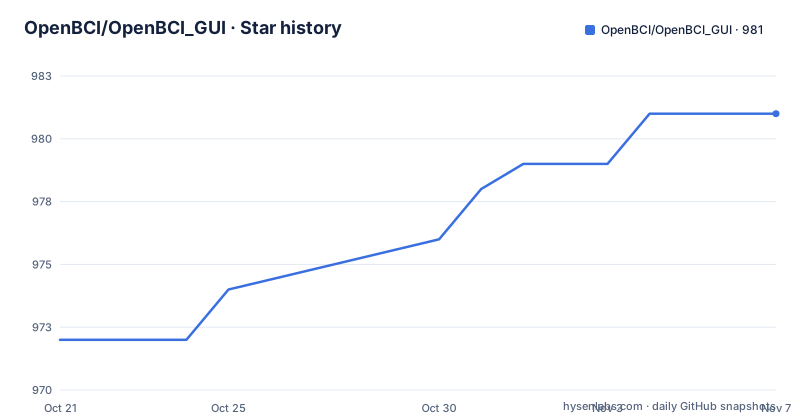
Star history
- OpenBCI/OpenBCI_GUI981 ★ · +9
| Repository | 2026-10-21 | 2026-11-07 |
|---|---|---|
| OpenBCI/OpenBCI_GUI | 972 | 981 |
9 Stars in the last 17 days, measured from the daily GitHub snapshot. Compare with other projects
Editorial analysis
The problem is a list of user stories
The readme states the problem as a list of what users want, and reading it in order tells you what the project is actually for.
OpenBCI device owners want to visualise their brainwaves. The researchers, hackers and students who buy the devices want to use them to acquire data as soon as the device arrives. Users work on macOS, Windows and Linux. They want to filter the incoming data in real time. They want to make their own experiments to test their theories or duplicate published research at home. They struggle to get the prerequisites properly installed so that they can get data from their own board. And they want to stream the data into their own custom applications, with MATLAB named as the example.
Two of those points deserve emphasis. The third one, wanting to use the device on arrival, is a packaging problem rather than a technical one, and it is the reason the application exists as a downloadable, pre-configured program rather than as a set of libraries. The last one, streaming into custom applications, is what separates this from a viewer, and it is the reason the networking layer is a first-class feature rather than an export button.
The readme puts the conclusion bluntly: even if the very best researchers and hackers buy an OpenBCI, there is still a lot of work needed to be done to visualise the data.
What the application gives you
The solution section is the counterpart, and each item answers one of the problems above.
It visualises data from every OpenBCI device, and the list names the Ganglion board, the Cyton board, and the Cyton with Daisy, the daisy-chained configuration that doubles the channel count. It runs as a native application on macOS, Windows and Linux. It provides filters and other data processing tools to clean raw data in real time, which is the single most important feature for brainwave work, since a raw signal is unreadable until it is filtered.
Then there is the networking system, which moves data out of the GUI into other applications over UDP, OSC, LSL and Serial. Four transports is more than most people need, and the choice of them is telling: UDP and OSC cover the two common real-time audio and control protocols, Lab Streaming Layer covers the neurophysiology research ecosystem specifically, and Serial covers the case where you want the data to go to a microcontroller.
The widget framework lets users create their own experiments, and the application can output data to a saved file for later offline processing. That last one matters more than it sounds, because the widget experiments are for exploring, and the saved file is for the analysis you actually publish.
The readme's summary of the intent is that the GUI should let you quickly visualise and use your device, and further allow you to build on the framework to implement your own ideas.
Who writes it, and what kind of project this is
The people section is short and it explains the character of the project.
Mainly, they are OpenBCI. The original code writer was Chip Audette, along with Conor Russomanno and Joel Murphy, and a further four people have made major contributions: AJ Keller, Gabriel Diaz, Daniel Lasry and Richard Waltman.
Two things follow from that. The first is that this is a company project with a hardware business behind it, which is why the readme points at the shop for every board it mentions and why the goal is stated as providing a stable and powerful interface for any OpenBCI device. The second is that the project asks for help in a very specific way.
The what do we need section says you, in whatever way you can help, and then lists the areas: programming, user experience, software sustainability, documentation and technical writing, and project management. The stated primary goal is to provide a stable and powerful interface for any device, and they say they are excited to support the professional development of any and all of their contributors. If you are looking to learn to code, try out working collaboratively, or translate your skills to the digital domain, they say, we are here to help.
The contribution route is documented rather than implied, with a contributors' guidelines file, a roadmap file and a code of conduct, and the readme is explicit that the code of conduct applies to all interactions, both on and offline.
Installing it means running a Processing sketch
The installation section is the part that will surprise anybody expecting a normal desktop application, and it is worth reading before you commit to it.
The instruction is to follow the guide to run the OpenBCI GUI from the Processing IDE, with a note that it is now compatible with Processing 4. So the application is a Processing sketch, and the development environment is Processing, which is a Java-based coding environment.
That choice explains the whole shape of the project. It explains why the primary language listed in the repository is HTML, since the readme and the documentation are what you read, and why the system requirements are modest: a processor of 1.6 GHz or faster, 2 GB of RAM and 400 MB of hard drive space as a minimum. It also explains the troubleshooting notes further down, because a Java runtime problem is the kind of thing that a Processing application hits and a native one would not.
The tested platforms are listed as macOS 10.15.7 or later, Windows 8.1, 10 and 11 in 64-bit, and Ubuntu Desktop 18 or later. And there is a hard requirement that is easy to miss in a requirements list: OpenGL acceleration is required.
For a project aimed at students and hackers, the Processing route is a deliberate choice about the audience rather than about the technology. Processing is the tool most people have already met when they arrive at physical computing, and the readme's complaint that users struggle with prerequisites is the complaint the choice answers.
Troubleshooting, and the Java runtime trap
The troubleshooting section is short and has two items, one of them a rule about how to report problems and the other a specific bug with a specific fix.
The rule first. When you open an issue on the repository, you are asked to use one of the issue or feature templates, and the readme says plainly that otherwise the issue will be closed and you will be asked to make a new one using a template. The stated reason is that it maintains a standard of communication and helps resolve issues in a timely manner.
That is a hard line to take, and it is worth weighing before you file anything. It keeps a repository tidy, and it is also a way of turning away the low-quality reports that hardware projects attract in quantity, so a contributor who has a real problem but has not read the templates will have to do that reading first.
The bug is more specific. If you are on a Mac and you see a spinning wheel of death when trying to open a dialog box to view files, for example the select playback file button, the fix is to update the Java Runtime Environment. The explanation given is that Java was not packaged with a version of the GUI producing the error, which means that some builds of the GUI ship without a bundled Java runtime.
For anything beyond that, the readme points at the GUI troubleshooting document in the documentation site, and the installation guide is itself a document in that site with an invitation to suggest changes to it, which is a good sign for a project whose main difficulty is setup.
The repository layout and where the project stands
The top level of the tree reflects a working application with supporting tools rather than a library.
There is the main application directory, a unit test directory, a networking test kit, a release directory, a tools directory and an images directory. There is a changelog, a contributing guide, a code of conduct, a roadmap and a licence file, and a drawio diagram of the application, both the editable source and a rendered image, described as a work in progress diagram of the most important parts of the GUI.
The unit tests and the networking test kit are the two entries worth pointing at. The networking test kit suggests the four transports are treated as a subsystem that can be checked independently, which is the right way to build something that has to be reliable in real time. The unit test directory suggests the same about the processing and filtering side.
The release history shows a long-running project with a version 7 in alpha. Version 5.2.2 came out in August 2023, 6.0.0 beta 1 in September 2023, and 7.0.0 alpha 1 in November 2025, with the last push on 2026-04-10 and the repository not archived. The gap between the 6.0 beta and the 7.0 alpha, and the fact that the newest tag is still an alpha, tells you the project is in a long transition rather than in maintenance.
The licence is MIT, and the readme also points at a tutorial for making your own GUI widget, which is where the extensibility claim in the solution section is documented in detail.
Editorial conclusion
OpenBCI GUI suits a researcher, student or hobbyist who has an OpenBCI board and wants working acquisition and visualisation on the same day, and who wants the data on the wire rather than trapped in an application. It is a poor fit if you need a reproducible acquisition pipeline, because the application is a Processing sketch rather than a scriptable tool, and a poor fit for a long unattended recording. Before you install, check the Java runtime on your machine, because the readme calls out a specific dialog bug caused when Java is not packaged with the GUI, and read the widget tutorial, since the framework is where the real extensibility is.
Frequently asked questions
What does the OpenBCI GUI do?
It visualises data from OpenBCI devices, the Ganglion board, the Cyton board and the Cyton with Daisy, runs as a native application on macOS, Windows and Linux, provides filters and data processing tools to clean raw data in real time, streams data to other applications over UDP, OSC, LSL and Serial, offers a widget framework for custom experiments, and can save data to a file for offline processing.
How do I install and run the OpenBCI GUI?
Through the Processing IDE, following the guide for running the GUI from Processing, and the readme notes that it is now compatible with Processing 4. The system requirements are a 1.6 GHz or faster processor, 2 GB of RAM and 400 MB of disk space, and OpenGL acceleration is required.
Can I stream OpenBCI data into my own application?
Yes. The GUI provides a networking system that moves data out of the application into other programs over UDP, OSC, LSL and Serial, with streaming into custom applications such as MATLAB named as a goal of the project. There is also a networking test kit in the repository.
Why does the OpenBCI GUI hang on a Mac when opening a file dialog?
The readme identifies this as a spinning wheel of death caused by a Java Runtime Environment that was not packaged with the version of the GUI producing the error, and the fix is to update the Java runtime. More general troubleshooting is covered in the GUI troubleshooting document in the documentation site.
Official sources
Add this badge to your README
If you maintain this project, the badge below links readers to this analysis and shows its maintenance status from the daily GitHub snapshot. Paste the markdown into your README; add ?metric=license or ?metric=stars to the image URL for a different field.

[](https://hysenlabs.com/projects/openbci-openbci-gui)Star history chart for your README
[](https://hysenlabs.com/projects/openbci-openbci-gui)Was this useful?