StaffDeck's public mode binds 0.0.0.0, its host variables still carry another product's name, and its news list stopped six releases ago
Enterprise Digital Employee Platform
At a glance
- What is it?
- OpenBMB/StaffDeck is an AGPL-licensed platform for turning SOPs into state-machine-driven digital employees, where the Linux packages default to a loopback bind and offer three listening modes, the agent install prompt asks your coding agent to request a model key from you, and the two environment variables that override the host and port are named after a different product entirely.
- Who is it for?
- StaffDeck suits an organisation that already has its processes written down and wants them turned into reviewable, traceable digital employees rather than a chat interface, and the parts that make it defensible are the ones the page describes plainly, state machine execution with visual editing and version management, retrieval that cites sources and can be debugged, and a human takeover path. Three things to settle first.
- Can I use it commercially?
- Yes, with strict conditions. AGPL-3.0 is a network copyleft licence: if people use a modified version over a network, for example as a hosted service, you must offer them its source code under the same licence.
- Is it still maintained?
- Yes. The repository last received commits 7 days ago.
- What is it written in?
- Mainly Python, according to GitHub's language statistics.
Answers come from the project's GitHub data, last synced on November 15, 2026, and from our analysis. They are not legal advice.
Star history
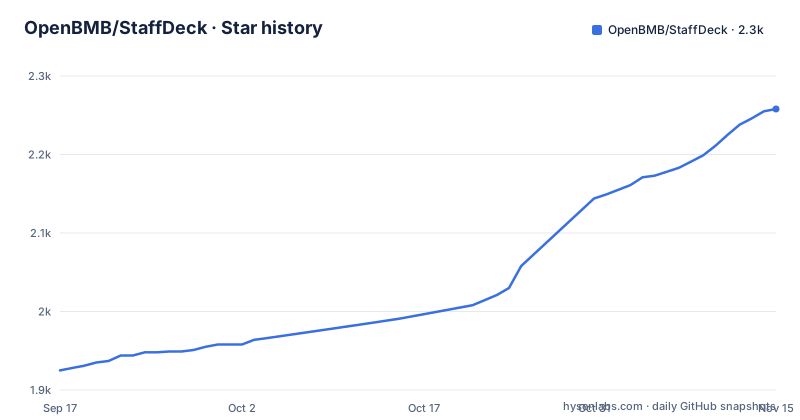
- OpenBMB/StaffDeck2,258 ★ · +333
| Repository | 2026-09-17 | 2026-11-15 |
|---|---|---|
| OpenBMB/StaffDeck | 1.9k | 2.3k |
333 Stars in the last 59 days, measured from the daily GitHub snapshot. Compare with other projects
Editorial analysis
Loopback by default, and two of the three modes bind every interface
The Linux packages listen on 127.0.0.1 out of the box, which is the right default and the page says so plainly. The listening mode is then chosen with a setup command that works on a headless host as well as in a terminal:
staffdeck setup
staffdeck setup --mode local --port 5173
staffdeck setup --mode lan --port 5173
staffdeck setup --mode public --port 5173 --public-url https://staff.example.com
The three modes are worth reading carefully. `local` listens only on the machine. `lan` and `public` both listen on 0.0.0.0, so they produce the same listener and the difference between them is not the bind address. The difference is what happens to the public URL: in an interactive terminal the public mode tries to infer one, and if it cannot, or when the host is headless, you have to pass it explicitly. For a public deployment the page asks for an HTTPS reverse proxy in front, and for single sign-on the same public URL has to be set as the OIDC redirect URI.
One operational detail catches people out: the choice is saved per user and applied on the next launch, so changing the mode does not move the currently running listener.
The host and port overrides are named after a different product
The page lists the environment variables that override the launch at runtime for code-based deployments, and two of the three do not match the project's name:
ULTRARAG_HOST
ULTRARAG_PORT
STAFFDECK_PUBLIC_URL
The public URL variable is prefixed correctly. The host and the port are prefixed with a different product name, which reads like a leftover from an earlier name for the same service. It is not broken, and the same three are named in the agent install prompt, so anything that sets them programmatically will work. It does mean that grepping the repository for the project name will not find them, and that anyone writing a container definition or a service file from the project name alone will guess the wrong variables.
The naming pattern is otherwise consistent about the split between the two halves of the application. The Python side is `backend/`, its example configuration is `backend/.env.example`, and the model endpoint is configured in that file before the first startup. The web side is a separate npm project named `frontend-enterprise`, with its lockfile held at the repository root.
The news list ends at v0.5.0 and six patch releases have shipped since
The news list on the page is a milestone list, not a changelog. Its entries are v0.2.0 for harnessv2 and an IM system, v0.3.0 for SOP editing and a sandbox, v0.4.0 for multi-staff cooperation, and v0.5.0 for faster and more stable execution. The last of those is dated 2026-09-01.
The actual release history has moved past it. Three of the most recent releases are v0.5.4, v0.5.5 and v0.5.6, published on three consecutive days in September 2026, so six patch releases exist above the highest version the news list mentions. The default branch is not archived and its most recent push is dated 2026-09-29, which is after all of them, so the branch is ahead of every tag as well.
Two small things in that list are worth knowing if you go looking for the code. The v0.4.0 line misspells running, and the v0.2.0 line writes harnessv2 as a bare word rather than as a name, which is the only place on the page where an internal component is referred to at all.
The earliest entry is the one that dates the project as open source work: 2026-07-15, when the code was opened and the page asked for a star. Everything before that is inside the window the repository has been public.
Two toolchains, and the frontend install is a ci rather than an install
A source install pulls in a Python environment and an npm project, and the exact commands differ by platform only in how the interpreter is addressed.
python3 -m venv backend/.venv
backend/.venv/bin/python -m pip install -e "backend[dev]"
npm --prefix frontend-enterprise ci
cp backend/.env.example backend/.env
The virtual environment lives inside the backend directory rather than beside it, and the backend is installed in editable mode with its development extra, from the repository root. The frontend is not installed with `npm install`; it is installed with `npm ci`, which installs exactly what the lockfile records and fails rather than updating it. Since the lockfile sits at the repository root while the project it belongs to is the `frontend-enterprise` directory, any drift between the two is a hard failure at install time.
The Windows variant is a direct translation, using the launcher and the scripts directory of the environment, and `Copy-Item` in place of `cp`. The runtime requirements are Python 3.11 or newer, Node.js 20 or newer, and an OpenAI-compatible Chat Completions endpoint with a key. The page is explicit that there is no CUDA requirement for the application itself, with hardware needs left to whichever model service you point it at.
The install prompt tells your agent to ask you for the model key
One of the sections is a prompt to paste into Cursor, Claude Code or Codex, and the prompt itself is the setup documentation. It instructs the agent to read the repository readme, clone it, prepare Python 3.11 or newer and Node.js 20, create the environment, install both toolchains, copy the example configuration, and then ask the user for the OpenAI-compatible model endpoint and API key if they are missing.
The last two lines are the part that makes it a procedure rather than a description. It tells the agent to start the stack with a detached script, the shell one on macOS, Linux or WSL and the PowerShell one on Windows, and then to verify two endpoints before reporting success: the health endpoint and the workspace gallery endpoint. So the definition of a successful install is written into the prompt, and an agent following it will check rather than assume.
Treat that as a description of the intended shape rather than a guarantee, since it asks an agent to fetch a script from the default branch and run it. The page also keeps the two deployment routes separate, with the desktop downloads for people who just want the application and this prompt for people deploying it themselves.
A committed archive sits next to the skills directory it duplicates
The top level of the repository has a `skills/` directory and, immediately beside it, a committed `skills.zip`. Two copies of the same content, one of them a binary archive, tracked in version control.
That is the kind of file that ages badly. A directory and its archive can drift apart, and there is no rule on the page saying which one is authoritative, so an agent or a person following the install steps has to guess. The rest of the root is more disciplined, with a `backend/` directory, a `frontend-enterprise/` directory, `docs/`, `scripts/` and `packaging/` for the desktop builds, plus `.cursor/` for editor rules and an `AGENTS.md` for coding agents.
The four markdown files at the root are the other untidy corner. They are design documents rather than user documentation: a model API protocol design, a design for multi-agent team decisions, a QA design, and a development note for a Feishu channel. The last one is the reason the v0.2.0 news entry mentions an IM system, and none of the four is linked from the table of contents.
The table of contents also lists itself as an entry, nested under the about section, which is a small sign of a document assembled by hand rather than generated.
Linux is Debian and Ubuntu only, on x86_64
The download table has four rows and they do not cover the platform matrix evenly.
macOS has two builds, Apple Silicon and Intel, both as disk images. Windows has one, an x64 setup executable. Linux has one, a deb for x86_64 labelled for Debian and Ubuntu. So there is no Linux build for arm64, no rpm, and no AppImage, which leaves Fedora, Arch and every arm64 Linux machine without a published artefact from this table.
The three requirement platforms for building from source are broader than the download table, listing macOS, Linux, WSL and Windows PowerShell, so a distribution without a package is still installable from source. That is a slower path than a download, and on an arm64 Linux machine it is the only path.
Two more details sit around the download table. The project's own site is linked over plain HTTP rather than HTTPS, while the deployment guidance for a public instance asks for an HTTPS reverse proxy in front of it. And the product is positioned as an enterprise platform, with an enterprise frontend build, under AGPL-3.0, which is worth reading before it goes anywhere near an internal network.
Editorial conclusion
StaffDeck suits an organisation that already has its processes written down and wants them turned into reviewable, traceable digital employees rather than a chat interface, and the parts that make it defensible are the ones the page describes plainly, state machine execution with visual editing and version management, retrieval that cites sources and can be debugged, and a human takeover path. Three things to settle first. The listen mode defaults to loopback and two of the three modes bind every interface, so decide that deliberately and remember the change applies on the next launch. The host and port environment variables are named after a different product, which is the kind of leftover worth finding before you rely on them. And the news list is not a changelog, so read the releases themselves.
Frequently asked questions
How do I change which address StaffDeck listens on?
Run staffdeck setup from a terminal, or pass a mode and port directly. Linux packages listen on 127.0.0.1 by default; local keeps that, while lan and public both listen on 0.0.0.0. The choice is saved per user and applied on the next launch.
What does StaffDeck need to run?
Python 3.11 or newer, Node.js 20 or newer with npm, and an OpenAI-compatible Chat Completions endpoint with an API key. The page states there is no CUDA requirement for the application itself, since hardware needs depend on the model service you select.
How is StaffDeck installed from source?
Clone the repository, create a virtual environment at backend/.venv, install the backend editable with its dev extra, install the frontend with npm ci against the frontend-enterprise project, and copy backend/.env.example to backend/.env before configuring the model.
Which platforms has StaffDeck published desktop builds for?
macOS on Apple Silicon and on Intel as disk images, Windows on x64 as a setup executable, and Linux on x86_64 for Debian and Ubuntu as a deb. No Linux arm64 build is listed.
What licence is StaffDeck released under?
AGPL-3.0, recorded in the project metadata with a LICENSE file at the repository root. The project was opened as source on 2026-07-15, and the news list records the releases since then.
Official sources
Add this badge to your README
If you maintain this project, the badge below links readers to this analysis and shows its maintenance status from the daily GitHub snapshot. Paste the markdown into your README; add ?metric=license or ?metric=stars to the image URL for a different field.

[](https://hysenlabs.com/projects/openbmb-staffdeck)Star history chart for your README
[](https://hysenlabs.com/projects/openbmb-staffdeck)Was this useful?