Sixteen platforms can be exported, four can be imported, and the release build is unsigned
Wandao (Universal Importer): a one-click Markdown import/export tool across many knowledge-base platforms, automating what would otherwise be manual copy-pasting (Youdao Cloud, Feishu, Yuque, Alibaba Cloud knowledge base, Zhihu Planet, Evernote, ima, OneNote, WizNote, CSDN, Zhihu, WeChat Official Accounts), preserving folder structure, images and formatting.
At a glance
- What is it?
- A desktop tool that pulls knowledge bases out of Chinese documentation and note platforms into local Markdown and pushes them back into a much smaller set. Platform support arrives as downloadable plugins with rollback, credentials stay local, and the official installers are not code signed even though the tag pipeline runs checksum, software bill of materials and provenance gates.
- Who is it for?
- This is a migration tool for people who have already decided their documentation should not live behind one company's login, and the honest way to read it is as an exporter with a small importer attached. Sixteen platforms read out, four write in, one answered with a tutorial pointing at its own official export, and the rest of the long tail answered with migration guides rather than code.
- Can I use it commercially?
- Yes, with strict conditions. AGPL-3.0 is a network copyleft licence: if people use a modified version over a network, for example as a hosted service, you must offer them its source code under the same licence.
- Is it still maintained?
- Yes. The repository last received commits 23 days ago.
- What is it written in?
- Mainly Python, according to GitHub's language statistics.
Answers come from the project's GitHub data, last synced on November 15, 2026, and from our analysis. They are not legal advice.
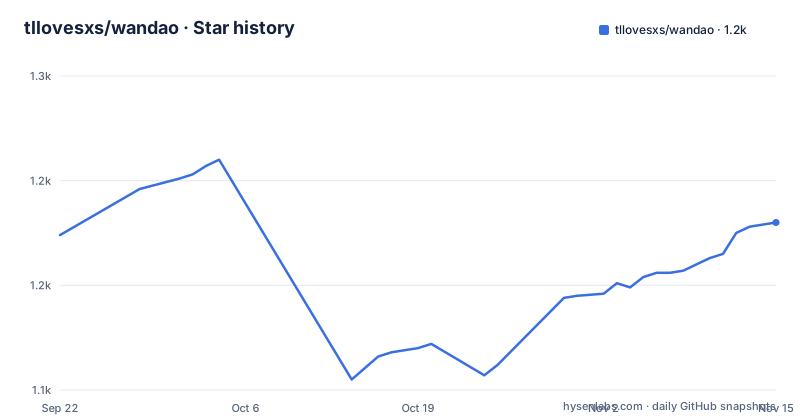
Star history
- tllovesxs/wandao1,180 ★ · +6
| Repository | 2026-09-22 | 2026-11-15 |
|---|---|---|
| tllovesxs/wandao | 1.2k | 1.2k |
6 Stars in the last 54 days, measured from the daily GitHub snapshot. Compare with other projects
Editorial analysis
Sixteen platforms can be exported, four can be imported, one is answered with a tutorial
The support tables are organised by direction, and the asymmetry between them is the most useful thing in this document.
Sixteen platforms have exporters, plus a row promising more through the plugin centre. Four have importers: a wiki product where batch import restores a multi-level directory structure, a documentation platform where it creates or updates documents and uploads images and attachments, a note-taking service where it batch imports Markdown with attachments, and a knowledge base where it uploads local documents into a base or an existing folder. Everything else is not implemented, and the document says so with a plus row rather than a blank.
One platform is handled by pointing at its own official Markdown export and migration capability rather than by writing an adapter. And the row after it is more interesting: platforms that are not suitable for automation can still get a migration tutorial. So there are three answers a platform can get, and only one of them is code.
The exporter rows are specific enough to be worth scanning, because the limits are stated per platform rather than assumed. One note-taking export preserves notebooks, sections and page hierarchy and is the only one limited to a single operating system. A public-account exporter handles a single public article, keeps body images, and explicitly does not read history or comments. A blog exporter handles a single article and continues automatically after a security verification or a login. A local vault exporter archives the vault, copies resources and rewrites references, which is the one row that has to rewrite your links rather than just write files.
So the realistic use is a one-way migration with a fidelity note per source, and a handful of platforms you can round-trip.
Credentials stay on the machine, and the tool states it will not break a login
The safety section is short and it is the part of this project that decides whether you can use it at work.
Four claims. The tool does not crack logins or bypass platform permissions. You should process only content you are entitled to access. You should comply with each platform's terms and its copyright requirements. And you should not use exported content for unauthorised redistribution, for sale, or for public posting.
Then the operational one, which is the sentence that separates this from a scraper: do not send high-frequency requests by reducing the delays.
That last instruction implies the tool has pacing controls that a user could turn down, and the capability table confirms it, describing sending as conservative with randomised intervals, configured time windows, a daily cap and a page visit before a send. So the containment is a set of knobs and the document asks you not to defeat them.
The credential story is stated as a capability rather than a promise. Local-first is one of the ten headline features: credentials and task data are stored on your computer. And the instruction for contributors is concrete: never put cookies, passwords, tokens, API keys or application secrets into an issue, a pull request, a screenshot or a log. For a tool that drives authenticated sessions across sixteen platforms, that is the right rule and it is the one most likely to be broken by a careless screenshot in a bug report.
Three documents back this up and are linked by name: a compliance note, a security policy, and a local data storage policy. A project that names its own storage policy is a project that expects you to ask where your notes went.
The release build is unsigned, and the difference from a smoke build is a gate battery
The packaging section is unusually precise about what is and is not guaranteed, and the two halves do not match.
There is a local, unsigned smoke build for Windows, produced by installing dependencies in the desktop directory and invoking a build target whose name says unsigned. The document is explicit that packages from that path, and from the manual workflow, carry an unsigned marker and may only be used for smoke, never published.
Then the release path. The official tagged workflow also produces unsigned Windows and macOS installers. What it adds is a battery of gates: version consistency, a real install and resource smoke test, checksums, a software bill of materials, and provenance attestation.
So the tag pipeline is more rigorous than the local one and still ships unsigned binaries. That is a coherent position for a project that wants supply-chain evidence without paying for signing, and it is a different position from the one a user experiences, because the only way to know a build went through those gates is to trust the tag rather than verify the binary.
The macOS note is the concrete consequence. The current official release is not signed with a developer identity and not notarised. The instructions are: download only from this project's releases page, move the application into the applications folder, and if the system blocks it, confirm the source in the privacy and security settings and choose to open anyway. And then an explicit prohibition: do not work around it by clearing the quarantine attribute.
That last sentence is the right instinct. The tool asks for one confirmation click rather than teaching anyone to disable a check.
The toolchain is pinned harder than anything else in the project. A toolchain file at the repository root fixes one exact Rust version, and the document says continuous integration uses the same fixed version, with format, test and lint gates required for changes that touch the desktop shell's Rust source. A quality-check script is to be run before committing or packaging anything.
One pinned dependency, and it exists for exactly one platform
The dependency situation is the cleanest thing in this repository, and it is nearly empty.
The project file declares a single runtime dependency, pinned to an exact version, and it is a backup library for one note-taking service. That is it. No HTTP client, no browser driver, no HTML parser, no data framework.
There is a second declaration of the same single line in a separate requirements file, with a comment at the top saying to keep the two in sync, and the comment also records that a later Python minor is used by the desktop runtime while the earlier one is only recommended for source use. So the dependency is declared twice and maintained by hand, and the interpreter differs between the two distribution modes.
What the emptiness implies is worth stating, because it shapes the maintenance burden. If the only library is a note-taking backup tool, then every other platform is reached either over HTTP by hand-written code or through an automation browser that the release bundles with its runtime. There is no web framework in the list because there is no server; there is no browser driver in the list because the browser arrives with the packaged release rather than as a Python dependency.
That is a coherent choice for a desktop tool that has to run without the user installing anything, and it is also a choice that pushes all the platform-specific work into code the project owns rather than into adapters somebody else maintains.
The Python side is twenty single-file modules sitting at the repository root
The packaging file enumerates the layout, and it is flat.
Twenty top-level modules are declared as single-file modules: the main entry point, seven export modules, three import modules, one knowledge-base module, a GUI helper, and five modules with names that describe their job rather than their layer, covering logging, reporting, checkpointing, the command line and credentials. Separately, only two things are real packages: the core, and the plugin tree.
The repository tree confirms it. The exporters for the cloud workspace, the wiki, the note-taking service, the note service, the cloud notes service, the knowledge community and the collaborative notes are each their own file at the root. So are the three importers. So is the module that drives the automation browser, and the one that stores checkpoints.
What makes that workable is the plugin system. Package data is declared to carry a plugin manifest, a per-provider manifest and a per-provider readme, so a platform adapter is a directory with JSON in it rather than a Python module. That is what lets a new platform arrive without touching the root of the repository, and it matches the in-app plugin centre, which can search, install, update and roll back platform plugins.
The rest of the tree is consistent with a project that ships two desktop shells and two test suites: there is a Python test directory and a JavaScript one, a desktop-shell directory with its own Rust source tree, a providers directory, a schemas directory, a scripts directory, and a prompts directory holding the learning prompt that the front page links to. Two other dependency files sit at the root alongside the project file, one of them a lock.
Two build targets, and the documentation still describes the previous desktop line
The distribution is narrow and says so.
Two installers: one for Windows on x64, one for Apple Silicon Macs requiring a recent macOS. No Intel Mac build and no Linux desktop build. Ordinary users need neither Python nor Node because the release bundles its own runtime, which is the whole reason the two-target limit is tolerable.
Source development is the third route, described as being for contributors, for debugging plugins, and for the case where no suitable release exists. It needs three runtimes plus the platform's desktop prerequisites: a Python minor version, a specific Node minor version, and the pinned Rust version. On Windows you run a batch file in the repository root; on macOS you make a shell script executable and run it. Both routes are the same clone and the same directory change, and a mirror repository on a domestic git host is offered for network conditions, under a different account handle from the GitHub one.
The macOS route is three lines plus one permission change, and it is the shortest path to the source tree:
git clone https://github.com/tllovesxs/wandao.git
cd wandao
chmod +x ./start-wandao.sh
./start-wandao.sh
The documentation lag is the thing to note. The source section describes the desktop application for the 1.4 line as being based on one particular shell framework, while the current version is 1.5.1, and the repository root contains a desktop-shell directory whose Rust source subtree is the one the extra quality gates apply to. So the version in the manifest, the version in the newest release tag and the version named in the build instructions are three different references, and only two of them are current.
None of that blocks an install. It does mean that the build instructions for contributors are a version behind, and the quality-check step they point at is the thing most likely to catch the difference.
The learning feature is a prompt file, and the sponsorship block sits above it
Two things on this page are not about migrating documents, and both are worth reading carefully.
The first is the learning feature. Export your course material, project documentation and source code into one directory, then hand that directory plus a prompt file, checked into the repository, to an AI assistant that can read local files. The claim is that it will explain the business flow, the core implementation and the technical trade-offs by combining the teaching documents with the real code. It is a prompt, not a feature, and it is the cheapest possible integration: no code, no API, no model binding.
The second is the sponsorship block immediately above it, which describes a third-party model platform that aggregates models behind one interface with multi-line routing, and which carries a redemption code for a small amount of credit. The block also states, in its own words, that the tool remains fully open source and free and that the learning feature is not tied to any model or API service.
That disclaimer is the honest part and it is easy to miss, because the sponsor's call to action appears twice in the block and the disclaimer once. The claim to verify is specific and easy to check: no model or API service is required to use the migration tool, and no account is needed for the learning feature beyond whatever assistant you already use.
The rest of the page is a request for a star with the note that it matters a lot to the author, a contact table giving two repository locations, an email address and a messaging handle, and a star-history badge at the bottom. That is the shape of a project maintained by one person, which is consistent with everything else here: one dependency, two build targets, a self-run quality script, and a contribution process that asks claimants to post progress within two days.
Editorial conclusion
This is a migration tool for people who have already decided their documentation should not live behind one company's login, and the honest way to read it is as an exporter with a small importer attached. Sixteen platforms read out, four write in, one answered with a tutorial pointing at its own official export, and the rest of the long tail answered with migration guides rather than code. That asymmetry is a design choice the project makes visible instead of hiding behind a checkmark, which makes it easy to judge fit. Two things to check before you rely on it. Only two desktop targets are built, so anything else means source development with a Rust toolchain pinned to one exact version. And the official installers are unsigned, which on macOS means a gatekeeper prompt and on Windows means a warning, and the mitigation the project offers is to confirm the source in the system settings rather than to disable the check. Verify your export on a small knowledge base first, and keep the local Markdown as the canonical copy rather than re-importing into a second platform immediately.
Frequently asked questions
What platforms can wandao export from?
Sixteen, plus a row promising more through the plugin centre: a paid knowledge community, a documentation platform, a wiki product, a cloud workspace service, two note services, a collaborative notes service, a note service limited to Windows, a knowledge base product, two cloud document services, a workspace service, a local vault, a question-and-answer site, a developer blog platform, and a public-account platform. Limits are stated per platform, including one exporter that does not read article history or comments.
Which platforms can wandao import into?
Four: a wiki product where batch import restores a multi-level directory structure, a documentation platform that creates or updates documents and uploads attachments, a note service that batch imports Markdown with images and attachments, and a knowledge base product that uploads local documents into a base or existing folder. One further platform is handled by pointing at its own official export capability instead.
Does wandao bypass platform logins or permissions?
No, and it says so in its safety section: it does not crack logins or bypass platform permissions, asks you to process only content you are entitled to access, to follow each platform's terms and copyright requirements, not to redistribute or sell exported content without authorisation, and not to increase request frequency by lowering the delays. Credentials and task data are kept on your own computer.
Is the wandao download signed or notarised?
No. The current official release is not signed with a developer identity and is not notarised. The instructions are to download only from the project releases page, move the application into the applications folder, and if the system blocks it, confirm the source in the privacy and security settings. The document explicitly says not to work around this by clearing the quarantine attribute.
What are wandao's system requirements?
Two desktop installers are published: Windows on x64, and Apple Silicon Macs on a recent macOS. Ordinary users need neither Python nor Node because the release bundles its own runtime. Source development needs a Python minor version, a specific Node minor version, an exactly pinned Rust version, and the platform's desktop prerequisites.
Official sources
Add this badge to your README
If you maintain this project, the badge below links readers to this analysis and shows its maintenance status from the daily GitHub snapshot. Paste the markdown into your README; add ?metric=license or ?metric=stars to the image URL for a different field.

[](https://hysenlabs.com/projects/tllovesxs-wandao)Star history chart for your README
[](https://hysenlabs.com/projects/tllovesxs-wandao)Was this useful?