OpenNOW after the Qt rewrite: one repository, six client targets, uneven signing
Custom GeForce Now Client Named OpenNOW
At a glance
- What is it?
- A community GeForce NOW client moved off Electron onto Qt Quick and a native Rust streamer, spread across six client targets whose packaging, signing, and prerequisites each differ.
- Who is it for?
- OpenNOW suits a reader who wants a native, controller-capable client and already pays for GeForce NOW. Verify before depending on it: the Qt app is described as still under development with no Chromium or WebRTC fallback, nightlies are unsigned, the macOS DMG is unnotarized and Apple Silicon only, and the signed candidate workflow covers Windows and Linux.
- Can I use it commercially?
- Yes. MIT is a permissive licence: you can use, modify and sell software built on it, as long as you keep its copyright and licence notices.
- Is it still maintained?
- Yes. The repository last received commits 1 day ago.
- What is it written in?
- Mainly Rust, according to GitHub's language statistics.
Answers come from the project's GitHub data, last synced on November 25, 2026, and from our analysis. They are not legal advice.
Star history
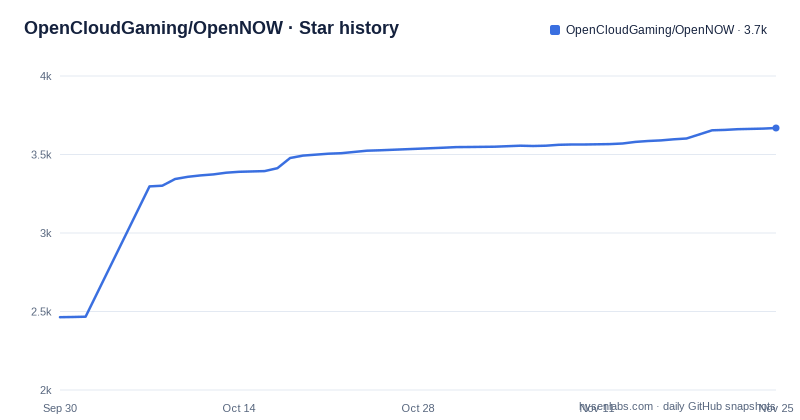
- OpenCloudGaming/OpenNOW3,669 ★ · +1,205
| Repository | 2026-09-30 | 2026-11-25 |
|---|---|---|
| OpenCloudGaming/OpenNOW | 2.5k | 3.7k |
1,205 Stars in the last 56 days, measured from the daily GitHub snapshot. Compare with other projects
Editorial analysis
Retired Electron builds sit next to the Qt ones in the release list
Version 1.0.0 replaced the retired Electron app with a Qt Quick interface and a native Rust streaming engine, and the first look at the new interface was published outside this repository as an announcement post. That history leaves a trap in the release list. Packages are named with an `OpenNOW-Qt-` prefix precisely because older releases can still carry the Electron build, so the release notes are what tell you which client an asset holds. The three most recent tags line up oddly: v1.0.2-nightly.810.1 was published on 2026-09-24, while both v1.0.2 and v1.0.3-nightly.853.1 carry 2026-10-03 timestamps, so a nightly for the 1.0.2 line appears before the 1.0.2 tag itself and the two same-day entries sit about an hour apart. When no Qt nightly has been published at all, the fallback is an artifact from a successful `qt-ci` run on the `dev` branch, which means signing in to GitHub and taking whatever that run produced, with none of the release-page context around it.
The interface boards are Paper designs, not captures of the running client
Every interface picture here comes from the OpenNOW Paper design file. The boards were arranged to follow the current Qt layouts, but they are not captures of the app, and the games, account details, and statistics visible in them are sample content rather than proof that a title is available or that a stream performs well. The limit is worth stating plainly: nothing in those visuals supports a judgment about latency, bitrate behavior, or how your own account's catalog will look. What the boards do convey is layout intent, and there are two arrangements to know about, a desktop library driven by keyboard and mouse and a controller-first console layout, both running inside the same application rather than as separate builds. Hardware requirements, experimental features, and platform limitations sit outside the top-level document, in the Qt app guide under `opennow-qt/README.md`, so they are not visible from the repository root.
Three runtime pieces, and no second implementation to fall back on
Qt draws the interface and owns windows, navigation, focus, and overlays. A Rust core runs as a separate process, manages accounts, settings, and catalog requests, and prepares the session, with Qt speaking to it over a versioned JSON protocol. The native Rust streamer is a third piece: it handles NVST transport, decoding, audio, gameplay input, and recording, and Qt loads it into the desktop process through a versioned C ABI. Video stays on the GPU and menus are drawn over it in one window, so the app embeds no browser and opens no second video window. The cost of that arrangement is stated by the project itself. There is no Chromium or WebRTC fallback, and platform-specific streaming and GPU bugs are expected while the Qt app is still under development. A failure has no alternate path to degrade into, which makes the acceptance checklist that a published build has not necessarily passed the document to read before trusting a build. The repository root splits the sources into `opennow-qt/` and `native/`, and also carries a `playnite/` directory that the top-level document never describes.
Unsigned nightlies, an unnotarized DMG, and checksums that say nothing about the publisher
Nightly platform packages are unsigned, and each platform shows that differently. Windows may raise an unknown-publisher warning before the installer runs. The macOS app is not notarized, so the documented route when Gatekeeper blocks it is System Settings, then Privacy and Security, then Open Anyway, offered only when the system makes that option available, and the same passage says not to disable Gatekeeper globally. Coverage is uneven on top of that: published update-enabled nightlies use signed update manifests, older builds without a pinned signing key need one manual upgrade, and the signed 1.0.0 candidate workflow currently builds Windows and Linux only. One sentence is easy to skim past and worth repeating. Checksums alone detect a corrupted download, and they do not verify who published a package. A matching hash tells you the bytes arrived intact, not that they came from this project.
Package formats hand the dependency burden to different machines
The formats assume different things about the host. On Windows x64 and ARM64 you get an `.msi` or a portable `.zip`, and the ZIP has to be extracted in full before `bin/OpenNOW.exe` will run. On Linux x64 and ARM64 the recommended format is the `.AppImage`, which you make executable and launch, while the `.deb` shifts the dependency burden onto your distribution, which must provide Qt 6.8+ and SDL3. That is why the guidance for stock Ubuntu 24.04 points at the AppImage instead. On macOS the DMG is nightlies-only, targets macOS 13 and later on Apple Silicon, and Intel Macs are not included at all. Architecture coverage is therefore inconsistent across the platform table, since Windows and Linux ship both x64 and ARM64 while macOS ships one. Someone on an older Intel Mac is outside the packaged set rather than waiting on it.
The build recipe exists twice and the two copies disagree about Node
Use `main` for the release source and `dev` for ongoing work. The prerequisites are Qt 6.8+ with Quick, Multimedia, and ShaderTools, CMake 3.24 with a C++20 toolchain, and SDL3, Cargo, plus the media dependencies for your platform. Linux adds `pkg-config`, `libwayland-dev`, and `wayland-protocols` even for X11 builds, which reads like a mistake until you meet a minimal system.
git clone --branch main https://github.com/OpenCloudGaming/OpenNOW.git
cd OpenNOW
cmake -S opennow-qt -B build/opennow-qt -DCMAKE_BUILD_TYPE=Debug
cmake --build build/opennow-qt
ctest --test-dir build/opennow-qt --output-on-failure
The same steps are duplicated in the root `package.json`, named `opennow-workspace` and marked private, through npm scripts that wrap the identical commands.
{
  "build": "npm run qt:configure && npm run qt:build",
  "qt:configure": "cmake -S opennow-qt -B build/opennow-qt -DCMAKE_BUILD_TYPE=Debug",
  "qt:build": "cmake --build build/opennow-qt",
  "qt:test": "ctest --test-dir build/opennow-qt --output-on-failure",
  "qt:package": "cmake --build build/opennow-qt --config Release --target package"
}
The README states that Node.js and npm are not needed to build or run the desktop app, with JavaScript reserved for tools such as the localization checker, while that same file requires node 22.22.0 or newer. The two routes run identical work and disagree about the runtime, so `npm run build` turns a plain CMake build into a Node toolchain requirement. Repository tooling also reaches outside the app through `crowdin:upload` and `crowdin:download`, matching the `crowdin.yml` at the root, alongside `native:check` and `native:build` wrappers for the two Cargo manifests. The root directory also holds an MIT LICENSE next to a THIRD_PARTY_NOTICES file, plus a `locales/` directory and a `scripts/` directory that carries the translation checker those two scripts are paired with.
Your subscription decides the catalog, the settings, and what you can verify
Everything the client shows arrives through your own GeForce NOW account. Subscription, region, and hardware determine which games you can use and which stream settings are available, so the catalog belongs to the account rather than to this repository. In the console layout you can set resolution, frame rate, bitrate, and codec, limited to what your account and device support, and you can browse the catalog, save favorites, and organize libraries into collections. Recording is built in as well: screenshots and a recording of the source stream to Matroska files live in Media, and a diagnostic report can be copied from Settings, then About, which is where you would look for evidence when a stream fails on one machine. Verification follows the same account rule. The ctest suite needs no subscription, but testing login and gameplay requires a GeForce NOW account, and the list of what stays runnable without one opens with the smoke tests and the screenshot fixtures and then ends on an unfinished item. Other targets sit outside this app: an iOS beta through TestFlight built from a SwiftUI prototype on the `kief5555/ios` branch, an Android app on Google Play, and OpenNOW-Switch running as native Horizon OS homebrew on a modded Switch from its own repository.
Editorial conclusion
OpenNOW suits a reader who wants a native, controller-capable client and already pays for GeForce NOW. Verify before depending on it: the Qt app is described as still under development with no Chromium or WebRTC fallback, nightlies are unsigned, the macOS DMG is unnotarized and Apple Silicon only, and the signed candidate workflow covers Windows and Linux. Read the release notes for the `OpenNOW-Qt-` prefix, build from `main` and run ctest locally, and treat the acceptance checklist as the real gate rather than the presence of a published asset.
Frequently asked questions
Is OpenNOW made or endorsed by NVIDIA?
No. OpenNOW presents itself as a community-built GeForce NOW client, with Qt Quick for the interface and Rust for account services and streaming. It states that it is not affiliated with, endorsed by, or sponsored by NVIDIA, and that NVIDIA and GeForce NOW are trademarks of NVIDIA Corporation.
Which platforms does OpenNOW publish builds for?
Windows x64 and ARM64 as an .msi or a portable .zip, Linux x64 and ARM64 as an .AppImage or .deb, and macOS 13 or later on Apple Silicon as a .dmg. Separately, the iOS beta comes through TestFlight, the Android app is on Google Play, and OpenNOW-Switch runs as native Horizon OS homebrew on a modded Switch.
Do I need a GeForce NOW subscription to use OpenNOW?
Yes, you need your own GeForce NOW account. Subscription, region, and hardware decide which games and which stream settings you can use, so the client has nothing to show without an account behind it, and testing login and gameplay requires one.
Why does an OpenNOW nightly trigger an unknown publisher warning on Windows?
Nightly platform packages are unsigned, so Windows may show an unknown-publisher warning. Published update-enabled nightlies use signed update manifests, older builds without a pinned signing key need one manual upgrade, and checksums alone detect corrupted downloads without verifying who published a package.
Does OpenNOW run on Intel Macs?
No. The macOS DMG targets macOS 13 and later on Apple Silicon, and Intel Macs are not included in the packaged set. The signed 1.0.0 candidate workflow currently builds Windows and Linux only, so a Mac build arrives through the nightlies.
Official sources
Add this badge to your README
If you maintain this project, the badge below links readers to this analysis and shows its maintenance status from the daily GitHub snapshot. Paste the markdown into your README; add ?metric=license or ?metric=stars to the image URL for a different field.

[](https://hysenlabs.com/projects/opencloudgaming-opennow)Star history chart for your README
[](https://hysenlabs.com/projects/opencloudgaming-opennow)Was this useful?