Quip Node Manager: download, Docker mode, and the compose file it rewrites
A simple GUI client to manage a Quip Network node
At a glance
- What is it?
- Quip Node Manager is a Rust and Tauri desktop app that stages a Quip node's miner, validator and dashboard containers into ~/quip-data and starts them. It suits operators who want one window over a single node, and suits nobody who plans to hand-edit the staged compose file.
- Who is it for?
- Adopt it if you run one Quip node and want the port grouping, log drawer and digest checks in a single window. Skip it if you intend to edit the staged compose file directly, because Start discards those edits and the override file replaces a command list instead of merging into it.
- Can I use it commercially?
- Yes, with strict conditions. AGPL-3.0 is a network copyleft licence: if people use a modified version over a network, for example as a hosted service, you must offer them its source code under the same licence.
- Is it still maintained?
- Yes. The repository last received commits 1 day ago.
- What is it written in?
- Mainly Rust, according to GitHub's language statistics.
Answers come from the project's GitHub data, last synced on November 15, 2026, and from our analysis. They are not legal advice.
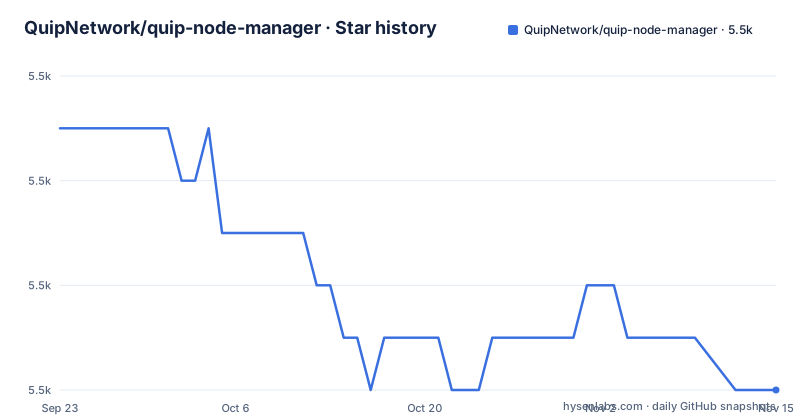
Star history
- QuipNetwork/quip-node-manager5,486 ★ · -5
| Repository | 2026-09-23 | 2026-11-15 |
|---|---|---|
| QuipNetwork/quip-node-manager | 5.5k | 5.5k |
-5 Stars in the last 53 days, measured from the daily GitHub snapshot. Compare with other projects
Editorial analysis
Two run modes decide where the miner binary runs
Quip Node Manager drives a Quip node through `docker compose`, and the run mode setting decides how much of it lives on your own machine. In Docker mode, the default on Windows and Linux, the miner, validator and dashboard all run as containers and the app only talks to Compose. Native mode, the macOS default, starts a standalone miner binary on the host while the validator and dashboard stay in containers, wired back to the host through `host.docker.internal`.
That split has consequences. Native mode needs the validator RPC reachable on a host port, which defaults to 9944 and stays on loopback until you switch on public access. The native miner REST API goes the other way: it binds `0.0.0.0:20100` by default, on every interface, because the dashboard's embedded Caddy has to reach it across the Docker host gateway.
Internal addresses never move. Advanced settings in both interfaces group host ports by service, each with an on/off switch and a host port field, while in-network names stay fixed at `quip-validator:9944` and `quip-miner:8086`. A collision with something already listening on your host gets resolved on the host side only.
Every Start rewrites the staged compose file, so overrides live in a second file
`~/quip-data/` is the directory Node Manager owns, and its location is chosen at first boot. It holds app settings, runtime config, secrets, native binaries and the staged compose files. `stack_assets.rs` copies the bundled compose assets in, and every Start and Apply rewrites `~/quip-data/docker-compose.yml` from the embedded copy. Anything you typed into that file is gone.
The escape hatch is `~/quip-data/docker-compose.override.yml`. Staging never touches it, and Compose merges it over the base:
services:
  quip-validator:
    environment:
      RUST_LOG: debug
Node Manager always passes `-f`, which switches off the automatic override discovery Compose does when it locates the compose file itself. The app appends the override explicitly and places it after the base file, so the override wins.
Two traps sit inside that merge. A `command:` block replaces the whole list instead of merging into it, so changing one validator flag means copying the entire block. And you copy that block from the staged `~/quip-data/docker-compose.yml`, not from `vendor/nodes.quip.network/`, because staging adds flags the vendored copy lacks.
Running the stack by hand is the honest alternative. Clone the submodule, keep your own compose files, edit them whenever you like. You give up the port grouping, the log drawer, the pre-flight checks and the digest monitor, and you get a compose file that stays the way you left it.
The pre-flight checklist stops at the host, never at the images
Before Start, a pre-flight checklist runs. Docker and Compose v2 must be present, plus WSL on Windows, plus the miner binary when Native mode is selected, plus the D-Wave token when QPU mining is configured. It then looks at the node secret, the public IP, the hostname and whether the external port is reachable.
Images are the gap. They are not pre-checked, because Start always pulls them, so the checklist passes on a host where the stack still has to fetch everything before the miner appears. None of the checks tells you how long that wait runs.
Compose v2 is a requirement rather than a preference, and the standalone v1 `docker-compose` binary is not supported. Building from source adds Rust stable, Bun or Node.js, Docker Compose v2 and the platform-specific Tauri v2 dependencies.
Download, chmod, and the SmartScreen click on Windows
Two installer scripts and a manual download are documented. On macOS and Linux:
curl -fsSL https://gitlab.com/quip.network/quip-node-manager/-/raw/main/scripts/install.sh | shOn Windows, PowerShell:
irm https://gitlab.com/quip.network/quip-node-manager/-/raw/main/scripts/install.ps1 | iexBoth hand a remote script straight to a shell. If that trade bothers you, take the binaries from the GitLab Releases page instead.
macOS ships a `.dmg` you open and drag to `/Applications`. Linux prefers the AppImage, which runs on any distro once the execute bit is set:
chmod +x quip-node-manager-linux-x86_64.AppImage
./quip-node-manager-linux-x86_64.AppImage
Debian and Ubuntu get a `.deb`:
sudo dpkg -i quip-node-manager-linux-x86_64.debWindows gets an `.exe` published under the name HADAMARD GATE INCORPORATED. SmartScreen may still refuse it until the certificate builds reputation across enough downloads, and the documented way past the warning is More info, then Run anyway. To check a signature or a checksum by hand, the release page carries the verification steps.
src-tauri drives the stack, and the frontend is three plain folders
The backend is Rust with Tauri v2 commands under `src-tauri/src/`. Two files carry the stack: `compose.rs` drives everything through `docker compose`, and `stack_assets.rs` stages the bundled compose files into `~/quip-data/`. The frontend in `src/` is vanilla HTML, CSS and JavaScript over Tauri IPC with `withGlobalTauri: true`, and the Dashboard tab is an iframe pointed at the running dashboard container.
Config generation matches the quip-protocol TOML format, and a `.env` file is written from your settings on every Start. That is the second place hand edits disappear, right beside the compose rewrite.
The stack definition is not in this repository. `vendor/nodes.quip.network/` is a git submodule tracking the upstream Docker Compose setup, and the Makefile fetches it at the commit this repo locks:
make fetch-submodulesThat target runs `git submodule update --init --recursive`. With Rust, Bun or Node.js and the Tauri v2 prerequisites in place, the day-to-day commands are:
bun install          # Install JS dependencies
bun run dev          # Launch development build
bun run build        # Production build for current platform
`package.json` pins the app at `0.3.2` and depends on `@tauri-apps/cli` and `@tauri-apps/api`, both at `^2`.
The terminal UI drops the dashboard, TLS and in-app updates
There is a terminal mode for machines with no display:
quip-node-manager --cliThe TUI starts and stops the stack, runs the same pre-flight checklist, streams logs and edits node configuration, covering the storage directory, ports, run mode, update channel, CPU and GPU settings and the D-Wave keys.
What it drops is why it is not a full replacement. The dashboard, the health panel, TLS settings and in-app updates stay in the desktop app. On a headless box that removes the certificate path: TLS rides on the dashboard's embedded Caddy, which takes a Let's Encrypt or ZeroSSL certificate once you supply a DNS name and an email, and none of that is exposed in the terminal UI.
Mining settings do survive the move. CUDA is selected whenever an NVIDIA device is enabled in the toggle list, D-Wave mining runs on the CPU image through the `[dwave]` config section, and QPU work carries a monthly time budget.
AGPL-3.0, a pinned submodule, and a fallback builder image
The licence is AGPL-3.0, which matters if you redistribute the app or expose a modified version over a network. Nothing else in the tree changes the terms.
The last push landed on 2026-10-30, the day v0.3.2 was released, and `package.json` reads `0.3.2`. Treat that version number as pre-1.0 churn rather than a stable channel. The background update monitor partly covers the gap: it checks node and dashboard image digests plus manager releases every 30 minutes and can restart the stack when a digest changes, so container updates do not depend on you noticing them.
The Makefile also explains how CI builds. The `build-toolchain-image` job normally builds and pushes the toolchain image, and `make builder-image` exists as a fallback when the runners are unavailable. It needs `docker login registry.gitlab.com` first, and the pinned digest in `TOOLCHAIN_IMAGE` in `.gitlab-ci.yml` has to be bumped by hand afterwards, because CI resolves the digest rather than the tag.
Editorial conclusion
Adopt it if you run one Quip node and want the port grouping, log drawer and digest checks in a single window. Skip it if you intend to edit the staged compose file directly, because Start discards those edits and the override file replaces a command list instead of merging into it. Verify first that Docker Compose v2 is on the machine, since the pre-flight checklist refuses the standalone docker-compose v1 binary.
Frequently asked questions
Does Quip Node Manager need Docker on macOS as well?
Yes, for most of it. Native mode runs the miner binary on the host, but the validator and dashboard still run as containers wired back through `host.docker.internal`. The pre-flight checklist requires Docker and Compose v2 on every platform.
Where does Quip Node Manager keep its configuration?
In `~/quip-data/`, whose location you pick at first boot. That directory holds app settings, runtime config, secrets, native binaries and the staged compose files. The base `docker-compose.yml` there is rewritten on every Start, so changes belong in `docker-compose.override.yml`.
Can I edit the compose file to change one validator flag?
Not in `~/quip-data/docker-compose.yml`, because Node Manager rewrites it from its embedded copy on every Start and Apply. Use `~/quip-data/docker-compose.override.yml` and copy the whole `command:` block, since a command list is replaced rather than merged.
Official sources
Add this badge to your README
If you maintain this project, the badge below links readers to this analysis and shows its maintenance status from the daily GitHub snapshot. Paste the markdown into your README; add ?metric=license or ?metric=stars to the image URL for a different field.

[](https://hysenlabs.com/projects/quipnetwork-quip-node-manager)Star history chart for your README
[](https://hysenlabs.com/projects/quipnetwork-quip-node-manager)Was this useful?