Open edX platform: two Django services and three MFEs
The Open edX LMS & Studio, powering education sites around the world!
At a glance
- What is it?
- openedx-platform is the modular monolith at the centre of Open edX, providing the CMS that powers Studio and the LMS that delivers content. Its own README calls installing it for production not simple, recommends Tutor or a service provider, and documents a bare-metal path as an adventure with limited support.
- Who is it for?
- Adopt openedx-platform if you are running an Open edX site and need to modify the monolith, Studio or the LMS. Do not adopt it as a quick self-hosted install: the README recommends a service provider for production and Tutor for everything else, and the bare-metal route is described as mostly undocumented.
- Can I use it commercially?
- Yes, with strict conditions. AGPL-3.0 is a network copyleft licence: if people use a modified version over a network, for example as a hosted service, you must offer them its source code under the same licence.
- Is it still maintained?
- Yes. The repository last received commits 1 day ago.
- What is it written in?
- Mainly Python, according to GitHub's language statistics.
Answers come from the project's GitHub data, last synced on November 15, 2026, and from our analysis. They are not legal advice.
Star history
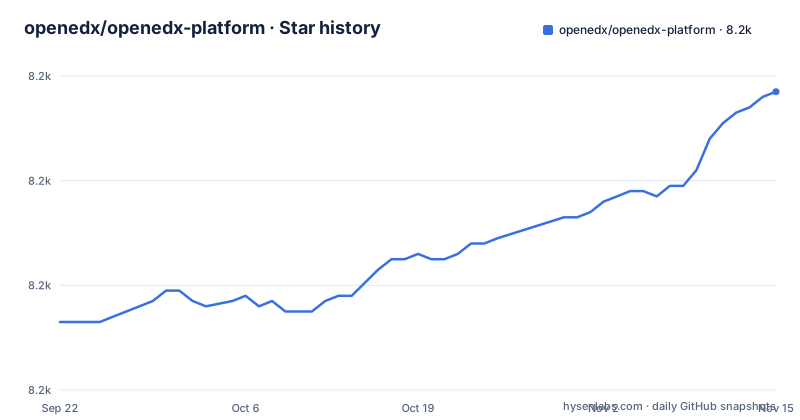
- openedx/openedx-platform8,237 ★ · +44
| Repository | 2026-09-22 | 2026-11-15 |
|---|---|---|
| openedx/openedx-platform | 8.2k | 8.2k |
44 Stars in the last 54 days, measured from the daily GitHub snapshot. Compare with other projects
Editorial analysis
The monolith hosts CMS and LMS, the frontends live elsewhere
The architecture sentence is the one to read first: the platform is composed of a modular monolith, some independently deployable applications, which the README calls IDAs, and micro-frontends based on ReactJS. This repository hosts the monolith at the centre.
Functionally it provides two services. CMS, the Content Management Service, powers Open edX Studio, the authoring environment, and LMS, the Learning Management Service, delivers the content. The repository layout matches: `cms/` and `lms/` at the top level, with `common/`, `conf/`, `openedx/`, `xmodule/` and `themes/` beside them, plus `manage.py` at the root.
The consequence is visible when you run it. Starting the LMS on port 18000 and the CMS on 18010 gives you a mostly-headless platform, because most frontends have been migrated to micro-frontends that are installed and run separately. The README names the minimum set: the Authoring MFE, the Learner Home MFE and the Learning MFE, and says a full list of the MFEs expected to run by default follows below.
Two MySQL databases, and the second one is not obvious
The build instructions ask you to create two MySQL databases and a MySQL user with write permissions to both, then configure Django to use them through the `DATABASES` setting. The migrations then reveal which two:
./manage.py lms migrate
./manage.py lms migrate --database=student_module_history
./manage.py cms migrate
`student_module_history` is a separate database alias, not a table inside the default one. A deployment that creates one database and runs only the first command will fail on the second, so this is worth knowing before the first deploy rather than after it.
The rest of the build is asset work: `npm run build`, or `build-dev`, then `make pull_translations` to download locales and `./manage.py lms collectstatic` plus `./manage.py cms collectstatic`, both of which the README says can be skipped for development sites.
Bare metal is documented as an adventure with limited support
The README is unusually direct about the three routes. For production, installing and running an Open edX instance is not simple, and the strong recommendation is to use a service provider, with free trials linked from the get-started page. If you have the time and expertise, the recommendation is Tutor, the community-supported Docker-based distribution, and the Site Ops documentation.
For development, Tutor's development mode is recommended for all Open edX developers. An experimental bare-metal workflow is being trialled around a dedicated `development.py` settings module built directly on `common.py` using `local.openedx.io` domains, and the README says it is not yet the recommended default.
Then there is the Bare Metal (Advanced) section: possible directly on a Linux host, less common and mostly undocumented, with only limited community support. It is advisable only for developers seeking an adventure and for experienced system administrators willing to take on the configuration complexity. Everything this article describes below belongs to that route.
The broken karma suites are skipped with a printed warning
The JavaScript test story is in package.json, and it contains an admission. `npm test` runs jest and then karma, and the karma script runs the vanilla and require suites, then the xmodule webpack suite, and then echoes: WARNING: Skipped broken lms-webpack and cms-webpack tests, with a link to issue 35956.
So two of the suites in the `test-karma-webpack` set are known broken and are skipped while the rest run. That is a pragmatic choice, and it is also a trap for anyone who reads a green `npm test` as full coverage.
The rest of the toolchain is coherent: jest.config.js and setupTests.js for the jest side, karma driven under `xvfb-run --auto-servernum` with a single run, a 60 second capture timeout, `--max_old_space_size=4096` and the `FirefoxNoUpdates` browser. The build is webpack for JavaScript plus `uv run --active python scripts/compile_sass.py` for the stylesheets.
uv dependency groups decide what gets installed
The Python side is managed with uv, and the group names are the interface you have to choose between. For the build, `uv sync --no-default-groups --only-group assets`. For the production application, `uv sync --no-default-groups --group bundled`. For development, `uv sync --group development --group ci`, which the README equates with `make dev-requirements`.
So the same repository has at least three dependency sets, and picking the wrong one either misses something the server needs or installs a development stack into production. `pyproject.toml` requires Python `>=3.12` and names the project openedx-platform at version 0.13.
On the frontend the split is the usual npm one, `npm clean-install` for production and `npm clean-install --dev` for development, with a `postinstall` that runs `scripts/copy-node-modules.sh`. And some Python packages need system libraries before pip can help: on Debian or Ubuntu, `sudo apt install python3-dev default-libmysqlclient-dev build-essential pkg-config` to satisfy mysqlclient.
Studio SSO is a different procedure in development and production
Connecting Studio to the LMS takes OAuth, and the README gives two procedures that differ in exactly the wrong way to be similar. In development, one `create_dot_application` call hardcodes the client id `studio-sso-key` and the client secret `studio-sso-secret`, with `--skip-authorization` and `--scopes user_id`, and a comment between the user-creation line and that call says DO NOT DO THIS IN PRODUCTION, because it will make the auth insecure.
In production the same command omits the secret, and you copy it afterwards: log into the Django admin at the oauth2_provider application page, open the application you created, and copy its Client secret. Then `SOCIAL_AUTH_EDX_OAUTH2_KEY` and `SOCIAL_AUTH_EDX_OAUTH2_SECRET` are set in a private LMS_CFG yaml file or a private Django settings module.
The service layout follows the same pattern. The LMS runs on 18000 and the CMS on 18010, the OAuth redirect URI points at `http://localhost:18010/complete/edx-oauth2/`, and codejail has to be configured separately for untrusted code execution in sandboxes.
The release tags are named releases, and the visible ones are from 2015
The tags follow a `named-release/<codename>` convention: `named-release/birch` on 2015-03-02, `named-release/cypress.rc1` on 2015-07-14 and `named-release/cypress.rc2` on 2015-07-17. The last push to the default branch was on 2026-11-02 and the repository is not archived, so the default branch is more than a decade ahead of the three most recent tags in the record.
Do not read a version from those tags. The README links documentation to docs.openedx.org/projects/edx-platform, and the repository carries `CHANGELOG.rst` for what changed, along with a Makefile whose target list is a map of the workflows: `migrate`, `migrate-lms`, `migrate-cms`, `check-types`, `lint-imports`, `swagger`, `technical-docs`, `pull_translations`, `push_translations` and the `*-requirements` family.
Licence is AGPL v3, asserted by a badge and by the LICENSE file, with a maintained status badge and a Python CI badge for unit-tests.yml.
Editorial conclusion
Adopt openedx-platform if you are running an Open edX site and need to modify the monolith, Studio or the LMS. Do not adopt it as a quick self-hosted install: the README recommends a service provider for production and Tutor for everything else, and the bare-metal route is described as mostly undocumented. Before planning work, confirm that Tutor development mode is enough for your change, and check which karma suites are currently skipped in package.json.
Frequently asked questions
What is the Open edX platform?
It is the modular monolith at the centre of Open edX, written in Python and JavaScript with extensive use of Django, providing two services: CMS, which powers Studio, the authoring environment, and LMS, which delivers learning content. Independently deployable applications and ReactJS micro-frontends sit outside this repository.
Is open edX free?
The platform code is released under the AGPL v3 licence, with a LICENSE file at the repository root. For running it, the README strongly recommends a service provider and mentions free trials, and otherwise points to Tutor, the community-supported Docker-based distribution, as the supported way to self-manage.
What does it take to run Open edX in production?
The README says installing and running an Open edX instance is not simple and recommends a service provider; for self-management it recommends Tutor with the Site Ops documentation. The bare-metal route needs Ubuntu 24.04, Python 3.12, MySQL 8.0, Mongo 7.x, Memcached and a codejail setup, and is described as mostly undocumented.
Official sources
Add this badge to your README
If you maintain this project, the badge below links readers to this analysis and shows its maintenance status from the daily GitHub snapshot. Paste the markdown into your README; add ?metric=license or ?metric=stars to the image URL for a different field.

[](https://hysenlabs.com/projects/openedx-openedx-platform)Star history chart for your README
[](https://hysenlabs.com/projects/openedx-openedx-platform)Was this useful?