Open Live Writer ships three version schemes and an unsigned macOS alpha
An open source fork of Windows Live Writer
At a glance
- What is it?
- The open-source continuation of a discontinued Windows blogging client, now on its first open-source version, with a Windows line, a separate macOS alpha and three NuGet packages. What the page records about provenance is more precise than what it records about the software, and the build tree carries signing material and three packaging formats at the root.
- Who is it for?
- Adopt this if you have posts in an existing blog and want a desktop editor with the publishing machinery already working, because that is exactly what the fork inherits and it is the reason thousands of people still run it. Two questions to settle first.
- Can I use it commercially?
- Check first. The repository uses a licence we do not classify automatically, so read its LICENSE file before any commercial use.
- Is it still maintained?
- Yes. The repository last received commits 92 days ago.
- What is it written in?
- Mainly C#, according to GitHub's language statistics.
Answers come from the project's GitHub data, last synced on November 15, 2026, and from our analysis. They are not legal advice.
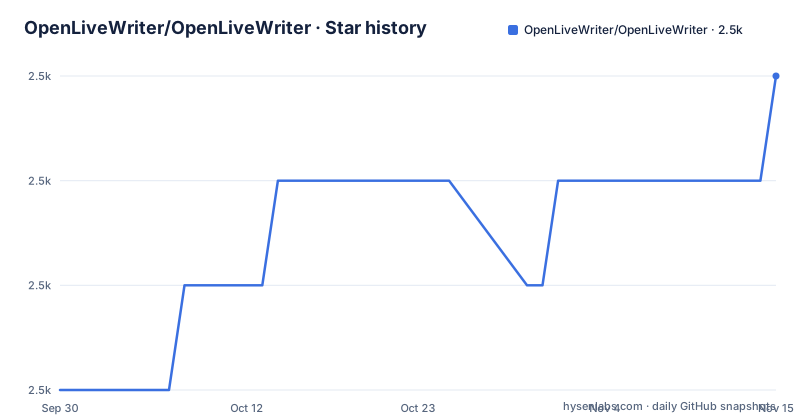
Star history
- OpenLiveWriter/OpenLiveWriter2,542 ★ · +3
| Repository | 2026-09-30 | 2026-11-15 |
|---|---|---|
| OpenLiveWriter/OpenLiveWriter | 2.5k | 2.5k |
3 Stars in the last 46 days, measured from the daily GitHub snapshot. Compare with other projects
Editorial analysis
Three version schemes for one product family
The release list holds three entries that do not agree on how to write a version. The newest is tagged with a leading letter and its title carries a four-part product version, so the tag says one thing and the artefact says another. The second is a different product on a different platform with a version one, published in July 2026, and its title names the platform explicitly. The third is from May 2017, has no letter prefix, and uses a four-part form. That is the shape you get when a long-lived Windows desktop application gains a second platform and keeps its own numbering. The build tree explains it: there is a version file and a script that reads it at the root, so the number comes from a file rather than from the build system. For anyone automating a download, the practical consequence is that the tag name and the product version are different strings and only one of them appears in the file you would automate against.
The macOS build is an unsigned preview for one processor architecture
The macOS section is three sentences and every one of them is a caveat. An early alpha is available from the releases page, for one architecture only. It is described as a preview: the core editor, publishing, drafts and account management work, and it is not yet feature-complete. And it is unsigned, with the instruction to right-click and open it the first time, which is the mechanism macOS offers when an application has no developer signature. So the macOS story in 2026 is: one chip, no signature, no feature parity, and feedback requested through the issue tracker. The Windows side is treated as the mature product by contrast, and its installation note is that you can install it alongside the older original, with a link to that original's download page on a Microsoft address. Nothing about that arrangement is supported by the page beyond the one sentence, and the address it points at belongs to a product line discontinued years ago.
The project links to itself over plain HTTP
The repository's homepage is recorded without a scheme, and the page itself uses plain HTTP in two places: once in the opening line telling you where to read more, and once again inside the news section where it suggests keeping an eye on the website. Every other link on the page is secure. It is a small thing in isolation, and it matters more here than in most projects for two reasons. First, this is a downloadable application, so the page a user is told to fetch from is the page that matters. Second, the same page is where the project tells people to check for news, so a channel that cannot be authenticated cannot be trusted to announce anything, including a security fix. It is also the kind of defect that survives for years because nothing breaks: the links resolve, they simply resolve over a channel that any network on the path could rewrite.
The Latest News section has one sentence in it
The section headed as the place for the latest news contains exactly one statement of fact, that the current version is the first open source version, followed by a pointer to the issue tracker for known problems and a separate roadmap file for current plans. There is no changelog link, no dated entries, and no record of anything shipped since. Meanwhile the repository root contains a roadmap file, a frequently-asked-questions file, a documentation directory and a test-plan directory, so the material a reader wants plainly exists and simply is not surfaced here. The changelog, in other words, lives in the issue tracker and the release titles, which is workable for a project whose releases are infrequent and dated, and unhelpful for one whose Windows line has been shipping version after version into 2026.
Three packaging channels and signing material at the root
Look at the root file list as a distribution diagram. There is an application package manifest, which is the descriptor for a store-style install on Windows. There is a directory named for a well-known Windows package manager, which is where a command-line install recipe would live. And there are three package specification files at once: one for the application, one for an installer package, and one for an SDK package, so the build emits three artefacts rather than one. Alongside them sit a file named for a strong-name key and a directory named for a signing client, which means signing material is part of the checked-in tree. That combination tells you the project takes Windows packaging seriously enough to support three channels, and it is also why the build has a batch script, a PowerShell script and a settings-and-targets pair rather than a single modern project file.
Three ways to start a build and one solution to open
The building section is four sentences. Run the batch script found in the repository directory. The project can also be opened in Visual Studio, and the solution lives at a specific path under the managed source tree, with a note that if the IDE reports errors you should run the batch script from a command prompt and the problem resolves itself. Set the startup project to the application and run it. That last advice is the kind of thing that only gets written after someone has hit it, and the suggestion to fall back to the batch script is equally a scar rather than a design. The root has the corresponding scripts: a batch file for building, one for running, one for building string resources, one to derive the version, and a PowerShell variant of the build. So the supported entry points are a batch file first and the IDE second, which is the reverse of where a .NET codebase normally sits.
The history section is the most accurate part of the page
Every claim in the history paragraph is a name or a date, which is why it is worth reading while the rest of the page is thin. A small team created the product that became Live Writer, the team was acquired in 2006 and organised alongside another product group, one named engineer joined and the team grew, and the work ended with the 2012 release when the platform was refocused on a smaller set of touch-oriented applications. The page then records that the tool kept being used with no active development, and cites data from a blogging platform at the time suggesting it was still the most-used authoring application from Windows two years after development stopped. Revival as open source began in early 2015 with about half a dozen volunteers in their own time, and the code was donated to a foundation in December 2015. That chain is the context for the current state: a volunteer-maintained fork of a codebase whose last Microsoft-owned release was a decade ago.
Governance points outward and the licence is a lowercase text file
Two details about how the project is constituted. The code of conduct is adopted from an external community standard and is linked through the foundation that supports the project rather than held in the repository, and there is no code of conduct file at the root even though the contributing guide is there. And the licence is a lowercase text file rather than a conventional licence file name, which is consistent with the repository index recording no licence at all: a scraper looking for a standard file name finds nothing, and the licence is only discoverable by opening the file the page links. Neither is a legal problem. Both are the small frictions that make a project harder to assess from a search result, and they are worth knowing if you are deciding whether a fork of a discontinued commercial product is a safe base for your own work.
Editorial conclusion
Adopt this if you have posts in an existing blog and want a desktop editor with the publishing machinery already working, because that is exactly what the fork inherits and it is the reason thousands of people still run it. Two questions to settle first. If you are on a Mac, you are signing up for an alpha that is unsigned, limited to one processor architecture, and explicitly not feature-complete, so read the issue tracker before migrating anything. If you are on Windows, note that the newest tag carries a four-part product version and that the distribution story runs through a store manifest, a package-manager recipe and three NuGet packages, so an unattended install has three possible routes with no single documented one. And whatever you do, treat the project's own site as unverified, because the canonical address in the repository metadata and in the page itself are plain HTTP.
Frequently asked questions
What is an open live writer alternative?
This repository is one: it is the MIT licensed open-source fork of Windows Live Writer, the desktop blogging client Microsoft discontinued after its 2012 release, revived by volunteers from 2015 and donated to a foundation that supports it. The Windows line's newest tag is v0.7.0 with a four-part product version, and the page notes you can install it alongside the older original from Microsoft, whose download link points at a discontinued product line.
What does Open Live Writer do?
It is a desktop application for writing, previewing and posting to your blog, and the page describes the current version as the project's first open source version. It is supported by the .NET Foundation, uses the foundation's code of conduct, and is documented as an open source project built by volunteer contributors.
Is Open Live Writer available for macOS?
As an early alpha, for Apple Silicon only, from the releases page. The page says the core editor, publishing, drafts and account management work, that it is not yet feature-complete, and that it is unsigned so you have to right-click and open it the first time. Feedback is requested through the repository's issue tracker.
How do I build Open Live Writer from source?
By running the batch script in the repository root. The project can also be opened in Visual Studio, with the solution at a specific path under the managed source tree, and the note that if the IDE reports errors you should run the batch script from a command prompt instead. To run from the IDE you set the startup project to the application; the main program file is named in the same paragraph.
Official sources
Add this badge to your README
If you maintain this project, the badge below links readers to this analysis and shows its maintenance status from the daily GitHub snapshot. Paste the markdown into your README; add ?metric=license or ?metric=stars to the image URL for a different field.

[](https://hysenlabs.com/projects/openlivewriter-openlivewriter)Star history chart for your README
[](https://hysenlabs.com/projects/openlivewriter-openlivewriter)Was this useful?