Open Note Block Studio: a note block music editor for Minecraft
An open-source Minecraft music maker.
At a glance
- What is it?
- Open Note Block Studio is an open source continuation of Minecraft Note Block Studio, the tool for composing music from Minecraft note blocks, written in GameMaker Language and stable while the project prepares a Qt rewrite. It suits a Minecraft world builder who wants to compose a datapack score and see it in the game, and its release process is split across a stable and a beta track.
- Who is it for?
- Adopt Open Note Block Studio if you compose music for Minecraft using note blocks and want a maintained editor with datapack export. Skip it if you need a plugin or a modern toolchain, because the current version is frozen while the project moves to Qt, and expect the current stable build to stop receiving features.
- Can I use it commercially?
- Yes. MIT is a permissive licence: you can use, modify and sell software built on it, as long as you keep its copyright and licence notices.
- Is it still maintained?
- Yes. The repository last received commits 9 days ago.
- What is it written in?
- Mainly Game Maker Language, according to GitHub's language statistics.
Answers come from the project's GitHub data, last synced on November 7, 2026, and from our analysis. They are not legal advice.
Star history
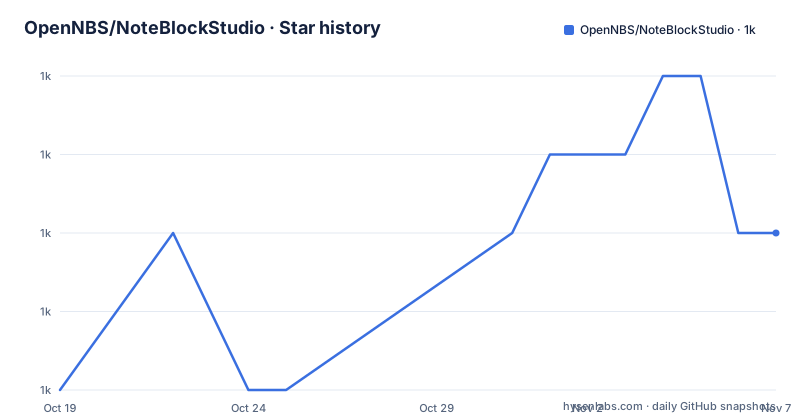
- OpenNBS/NoteBlockStudio1,029 ★ · +2
| Repository | 2026-10-19 | 2026-11-07 |
|---|---|---|
| OpenNBS/NoteBlockStudio | 1k | 1k |
2 Stars in the last 19 days, measured from the daily GitHub snapshot. Compare with other projects
Editorial analysis
What the project continues
Open Note Block Studio is described as an open source continuation of Minecraft Note Block Studio with exciting new features. That word continuation is the whole history. Minecraft Note Block Studio was the tool many players used to lay out note blocks, with the instrument, the pitch and the length of each note placed on a grid, and then to export what they had made as a datapack or a schematic the game could play. The primary language is recorded as Game Maker Language, the licence is MIT, the last push was on 2026-10-16, and the releases are v3.12.0 Beta 5, Beta 4 and Beta 3, all on 2026-08-05 or 2026-07-21, so the versioning tracks a major line with beta builds rather than stable point releases. The topics list carries the formats involved, with nbs, note-block, midi, mp3, datapack, datapacks and schematic.
A stable program that is deliberately frozen
The project status section is the most important thing in the README and it is unusually blunt. The current version is considered stable and feature-complete, and as such it is no longer accepting contributions or new features other than minor bug fixes. That is a deliberate choice and the reasoning is stated. In order to future-proof the project and allow further improvements, the maintainers are in the process of rewriting the program using the Qt framework, and the README points at a discussion for the future plans. So the state of the project is two programs in sequence. The one you can download today is done, and the one that will replace it is a rewrite in a different framework, which is a decision that usually takes a year or more of quiet work before the replacement appears. The practical implication is that if you are starting a new project around this editor, you are starting it on a program that will be replaced, and your exported datapacks are the part that survives.
Downloading, and the platform situation
The download route is the GitHub releases page, and there is a badge pointing at the latest version and a downloads count beside it. The platform situation is where the project is least settled, and the README says so directly: support for macOS and Linux is in beta right now, and there is a TestFlight on macOS for people who want to join. So Windows is the settled platform and the other two are in beta, which for a desktop tool with a Qt rewrite in progress is the expected shape. The beta designation matters for a specific reason. The macOS TestFlight route means the build is distributed through Apple's system rather than as a plain download, so the build is distributed through Apple's system rather than as a plain download. There is also a Discord server for support and for sharing creations, and the project has a website at opennbs.org, a Twitter account and a YouTube channel.
The GameMaker project on disk
The repository is a GameMaker project rather than a source tree in the usual sense, and the file list reflects that. There is the project file itself, `Minecraft Note Block Studio.yyp`, and then the standard GameMaker directories: `objects/` for the object definitions with their sprites and events, `scripts/` for the code, `sprites/` for the images, `rooms/` for the editor layout, `options/` for the project settings, `datafiles/` for the data the application reads, `extensions/` for third-party extensions, and `fonts/` for the typefaces. A GameMaker project is a binary-ish project file plus a directory of assets, so the repository is not something you diff meaningfully in a pull request, which shapes how contributions have to be made. The `datafiles/` directory is the one worth knowing about, because it holds the data files the application reads,.
Contributing, and the branch that matters
Contributing to this project has a prerequisite that rules some people out immediately, and the README states it directly: the project is written in the GameMaker Language, and you must have GameMaker installed in order to open the project and make changes. That is a real barrier to contribution, because GameMaker is a commercial tool and the project file format is not something you edit in a text editor. The version is pinned too, with OpenNBS using the GameMaker runtime version 2022.0.3 LTS, and the README explains that older versions are reachable from the release notes page. The branch guidance is the part that catches people out. Active development takes place on the `development` branch, while the `main` branch uses an older GameMaker runtime, and contributors are asked to use the `development` branch. The default branch of the repository is `main`, so a contributor who opens the repository in a browser and starts editing has started in the wrong place.
The process for proposing a change
The contribution process asks you to open an issue and discuss your suggestion before making a pull request, and the issue page has a chooser rather than a blank form, which suggests the maintainers want the discussion routed to the right kind of issue rather than answered in a comment thread. This is a reasonable process for a project in the middle of a rewrite, because the answer to a feature request is often a question about whether the feature belongs in the frozen GameMaker version at all, in the Qt rewrite, or in neither. The same reasoning applies to bug reports, which also go through the Issues page. The financial side of the project is a small open source funding page with GitHub Sponsors and an Open Collective, and both carry supporter badges, which is the normal shape for a project whose developers are volunteers with day jobs.
What to expect if you adopt it
The realistic picture for an adopter is that the editor is finished and works, that it exports what you need, and that it will not gain new capabilities. The exports are the durable part of the workflow, since a datapack or a schematic of note blocks is a set of data the game reads, and it does not care which editor produced it. So the pragmatic approach is to use the current build for composing and to treat the Qt rewrite as something to check back on rather than to plan around. The one thing to verify before committing is platform support, because if you are on Linux or macOS you are on a beta build and the README is explicit that those are in beta. The MIT licence means you can fork and modify it freely, and with a GameMaker project file and a source directory that is a practical option if the frozen feature set is genuinely blocking you, although you would be maintaining a fork of a program that is about to be rewritten.
Editorial conclusion
Adopt Open Note Block Studio if you compose music for Minecraft using note blocks and want a maintained editor with datapack export. Skip it if you need a plugin or a modern toolchain, because the current version is frozen while the project moves to Qt, and expect the current stable build to stop receiving features. Before you contribute, check which branch you need, since active development takes place on the `development` branch while `main` uses an older GameMaker runtime, and note that the project requires the GameMaker runtime version 2022.0.3 LTS to open.
Frequently asked questions
Is Open Note Block Studio still being developed?
The current version is considered stable and feature-complete and no longer accepts contributions or new features other than minor bug fixes. The maintainers are rewriting the program using the Qt framework, and the README points to a discussion about the future plans.
Which platforms does Open Note Block Studio support?
Support for macOS and Linux is in beta right now, and there is a TestFlight on macOS to join. Downloads come from the GitHub releases page.
What do I need to contribute to Open Note Block Studio?
The project is written in the GameMaker Language, so you must have GameMaker installed to open the project and make changes, using the GameMaker runtime version 2022.0.3 LTS. Active development takes place on the development branch, while the main branch uses an older GameMaker runtime.
How do I report a bug or suggest an improvement in Open Note Block Studio?
Use the Issues page, which offers a chooser rather than a blank form, and for anything beyond a minor fix the README asks you to open an issue and discuss the suggestion before making a pull request. There is also a Discord server for support.
Official sources
Add this badge to your README
If you maintain this project, the badge below links readers to this analysis and shows its maintenance status from the daily GitHub snapshot. Paste the markdown into your README; add ?metric=license or ?metric=stars to the image URL for a different field.

[](https://hysenlabs.com/projects/opennbs-noteblockstudio)Star history chart for your README
[](https://hysenlabs.com/projects/opennbs-noteblockstudio)Was this useful?