OpenOCD: how a board config becomes a GDB session, and who owns the binary
Official OpenOCD Read-Only Mirror (no pull requests)
At a glance
- What is it?
- OpenOCD turns a JTAG or SWD probe into a GDB server on port 3333, but the config you need lives in whichever copy you installed, and this repository takes no pull requests.
- Who is it for?
- OpenOCD is the right tool when your target is silicon rather than a process, and the right one for you only if the config you need exists in the copy you have installed. On a common board, one package and one -f line are enough to reach a GDB session.
- Can I use it commercially?
- Check first. The repository uses a licence we do not classify automatically, so read its LICENSE file before any commercial use.
- Is it still maintained?
- Yes. The repository received new commits within the last day.
- What is it written in?
- Mainly C, according to GitHub's language statistics.
Answers come from the project's GitHub data, last synced on October 23, 2026, and from our analysis. They are not legal advice.
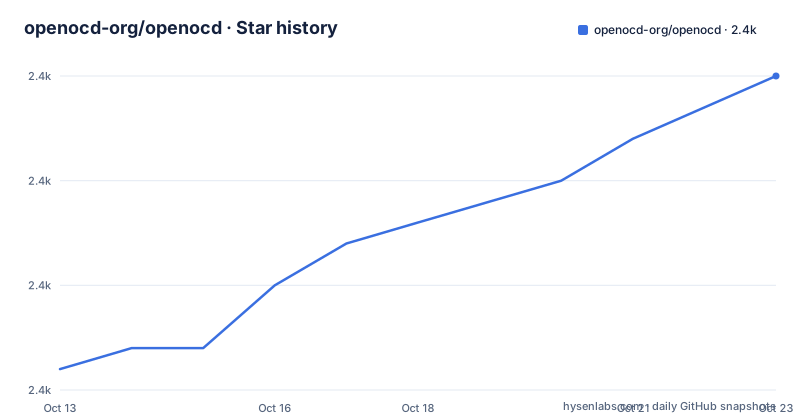
Star history
- openocd-org/openocd2,365 ★ · +14
| Repository | 2026-10-13 | 2026-10-23 |
|---|---|---|
| openocd-org/openocd | 2.4k | 2.4k |
14 Stars in the last 10 days, measured from the daily GitHub snapshot. Compare with other projects
Editorial analysis
The GDB server is one of three network front ends
OpenOCD is built in layers. A JTAG interface driver sits at the bottom, TAP support sits above it, then come flash chip drivers and an embedded Tcl interpreter for scripting. On top of all that sits the part an engineer touches first, the network front end, and the project names three of them: telnet, Tcl, and GDB. GDB is the front end the quickstart exercises, on port 3333, and it is what makes OpenOCD act as a remote target for a source-level debugging session.
Connect a debugger to it like this:
(gdb) target extended-remote localhost:3333That single port serves any client that speaks the GDB protocol, and the README places IDA Pro next to GNU GDB as such a client. So the debugger you type in is a separate decision from the probe you plug in. What OpenOCD contributes is the wire-level path from an adapter to a GDB remote target, and everything the GDB side offers for stepping, watchpoints and gprof profiling rides on that path.
Two other capabilities hang off the same server. One is SVF playback for automated boundary scan and for programming FPGA and CPLD parts, a different job from running your own code on a core. Another is the Tcl interpreter, which is why the configuration itself is a program rather than a static file.
Config files load in layers, and the transport is a command
A board the project has a config for collapses into one file. Start OpenOCD with the board config and it supplies the adapter driver, the transport and the target together:
openocd -f board/stm32f4discovery.cfgFor anything else you assemble the chain yourself, and the README is explicit that you need both the interface config and the target config. Transport selection does not live in a file. It arrives as a command passed with -c, and it has to match the hardware in front of you:
openocd -f interface/ftdi/jtagkey2.cfg -c "transport select jtag" \
-f target/ti/calypso.cfgopenocd -f interface/stlink.cfg -c "transport select swd" \
-f target/stm32l0.cfgThose two invocations differ in more than names. One pairs an FTDI JTAGkey2 adapter with a TI Calypso target over jtag; the other pairs an ST-LINK adapter with an STM32L0 target over swd. A file named interface/stlink.cfg does not by itself put the adapter into swd mode, because the transport keyword arrives separately on the command line, and getting that wrong is a startup failure before any target state exists.
The top-level file listing shows a tcl/ directory but does not expand it, so the board/, interface/ and target/ directories named in these paths are not visible in this repository view. Where they sit in an installed copy is something the package you installed decides, not something you can read off this tree.
Install from the package manager, and let the packager own support
The README's first answer to installation is the operating system package manager, and four are named with the exact package each one uses:
sudo apt install openocd
sudo dnf install openocd
brew install open-ocd
pacman -S mingw-w64-x86_64-openocd
Debian and Ubuntu use apt, Fedora uses dnf, macOS goes through Homebrew under the name open-ocd, and Windows goes through MSYS2's pacman. The first run after that is the one-line board start from the previous section, followed by the GDB attach on port 3333. There is no separate daemon to configure, and the server answers as soon as the configs load.
Support stops where the build stops, and that is the first thing to settle when something misbehaves. The README says that if you use one of these binary packages you must contact the packager for support or for newer binary versions, and that the developers do not provide direct support for packaged binaries. A bug in a packaged build and a bug in the mainline are different reports going to different places, and confusing the two wastes a week.
A read-only mirror whose README still asks for patches
The repository description reads Official OpenOCD Read-Only Mirror (no pull requests). That same tree's README nevertheless carries a section addressed to packagers, and it asks them to send patches, including config files, upstream, to participate in the discussions, and to enable all the options OpenOCD supports even those unrelated to their particular hardware. Those instructions only make sense against the upstream development tree, which is where the patch flow lands. Keeping the layout is all the mirror does, and it accepts no changes, so a contributor reading this copy learns the request but not the destination.
The top-level listing matches a copy rather than a fork you can push to. It carries .github/, .travis.yml, .checkpatch.conf, .editorconfig, HACKING, COPYING and LICENSES/, and it places a .gitmodules file beside jimtcl/, src/, tcl/, doc/, contrib/, testing/ and tools/. Nothing in the listing says which paths that submodule configuration covers. Evidence of hand editing sits in the packager section, which contains the broken instruction please work to inform the OpenOCD developers know how to improve.
Build instructions are the weakest part of this copy. The README's building section stops mid-word: The INSTALL file contains generic instructions for runn. No INSTALL file appears in the top-level listing, so a source build is referred to but never shown here. If you need the from-source path, the INSTALL file named in that fragment is the place to look, and it is not in the view this repository describes.
Three manual formats, one of them built with doxygen
Documentation ships inside the build rather than as one file. By default the build prepares documentation in Info format and installs it the standard way, so `info openocd` reaches the manual without an extra target. Other formats are opt-in, and each one opens a viewer that you name through an environment variable:
make pdf && ${PDFVIEWER} doc/openocd.pdf
make html && ${HTMLVIEWER} doc/openocd.html/index.html
The Developer's Manual is a separate target, and the README puts a check in front of it: doxygen must already be installed, and `doxygen --version` is the way to confirm it.
make doxygen && ${HTMLVIEWER} doxygen/index.htmlThat last one is where the internal architecture and code details live, and the Doxyfile.in file at the top of the tree is its input. Those same two manuals are published at openocd.org, and the README is clear that the online copies reflect the latest development versions. That distinction has teeth for a packaged install: the manual you read online can describe configs that your package manager never shipped, and the Info manual inside the package can describe adapters that have since been renamed. When a config file will not load, the version of the manual you are reading decides where you should look.
Breadth across adapters, targets and flash drivers
Coverage is the argument for the project, and the lists are long. Adapters run from purchased probes such as J-Link, FTDI FT232R, Bus Blaster, CMSIS-DAP, XDS100v2 and Xilinx XVC/PCIe down to three entries that put the job on general-purpose pins: Linux GPIOD, sysfsgpio and Remote Bitbang. Exactly one adapter entry carries a capability note, ST-LINK (SWO tracing supported), and exactly one carries a revision suffix, XDS100v2.
Debug targets span AArch64, ARM11, ARM7, ARM9, Cortex-A/R (v7-A/R), Cortex-M (ARMv{6/7/8}-M), XScale, FA526, Feroceon/Dragonite, ARCv2, AVR32, RISC-V, Xtensa, ESP32, ESP32-S2, ESP32-S3, ST STM8 and two DSP families. Flash drivers range from CFI and NAND to Raspberry RP2040, and one entry covers three memory types at once: STM32 QUAD/OCTO-SPI for Flash/FRAM/EEPROM.
The cost of that breadth is that nothing in these lists tells you which file to load. The README's only guidance is that if you have a popular board you start OpenOCD with its config, and for everything else you are expected to know the adapter driver, the transport and the target layout well enough to source two files and choose a transport yourself. With dozens of probe names and dozens of target families, the config names, not the hardware, are the part you have to get right, and a skim of the supported-hardware list will not tell you which combination already exists.
Upgrade cost lands on the packager, not on the developers
In this mirror, the tag list holds the candidate tag v0.12.0-rc3 dated 2022-12-20, the numbered tag v0.12.0 dated 2023-01-14, and a moving tag named latest dated 2026-09-26. No NEWS file beyond NEWS-0.12.0 exists in the tree, which matches the newest numbered tag rather than the floating one, and it means the in-tree change notes stop well before the newest commit.
That gap is the whole upgrade question. Stay on the packaged build and you are told both that it is often more stable than the bleeding-edge Git mainline, where active development happens, and that older OpenOCD versions are not suitable for diagnosing issues in the current release. Move to the mainline and you get the recent configs, with the packager no longer in the loop and no support path for a binary you produced yourself. Nothing in the repository documents a rollback procedure, and the upgrade guidance points at distribution maintainers and interface vendors instead. The only escalation route the project names is the developer mailing list [email protected].
Before you upgrade, work out which date your installed copy came from and whether it carries config files for your adapter and target. Config files accumulate as probes and parts are added, and neither the quickstart nor the documentation URLs record which files a given packaged build included, so the honest check is to look at the config directories in the copy you actually have.
Editorial conclusion
OpenOCD is the right tool when your target is silicon rather than a process, and the right one for you only if the config you need exists in the copy you have installed. On a common board, one package and one -f line are enough to reach a GDB session. On an unusual probe, read the support split first, because this repository takes no pull requests and a packaged binary belongs to whoever built it. Check the tag dates, then check which board, interface and target files your binary actually carries.
Frequently asked questions
How do I connect GDB to an OpenOCD server?
Start OpenOCD with a board config or with an interface config plus a target config, then run `target extended-remote localhost:3333` in GDB. The GDB server is one of three network front ends, the other two being telnet and Tcl, and only the GDB port is given in the quickstart.
How do I install OpenOCD on macOS and Windows?
On macOS Homebrew installs the package `open-ocd`, and on Windows the README routes you through MSYS2 with `pacman -S mingw-w64-x86_64-openocd`. Debian and Ubuntu use `sudo apt install openocd` and Fedora uses `sudo dnf install openocd`.
Which transport does OpenOCD use with an ST-LINK adapter?
The transport is a command rather than a config file, so an ST-LINK run passes `-c "transport select swd"` next to the interface and target files. Loading `interface/stlink.cfg` on its own does not select swd.
Who supports a packaged OpenOCD binary?
The packager does. The README says that users of a binary package must contact the packager for support or for newer binary versions, and that the developers do not provide direct support for packaged binaries.
Can I send a patch to the openocd-org/openocd repository?
No. The repository is described as an official read-only mirror that takes no pull requests, and the README directs patches upstream instead. It still keeps upstream working files such as .travis.yml and .checkpatch.conf.
Official sources
Add this badge to your README
If you maintain this project, the badge below links readers to this analysis and shows its maintenance status from the daily GitHub snapshot. Paste the markdown into your README; add ?metric=license or ?metric=stars to the image URL for a different field.

[](https://hysenlabs.com/projects/openocd-org-openocd)Star history chart for your README
[](https://hysenlabs.com/projects/openocd-org-openocd)Was this useful?