openpets lets plugins reach a model without ever seeing the key
Local first, desktop companion platform with animated pets, plugin SDK and coding-agent integrations.
At a glance
- What is it?
- A desktop companion application with nine bundled plugins and a plugin SDK that runs third-party JavaScript in a sandboxed window while the host renders everything the plugin describes. The workspace manifest is still named after version two, the readme documents a version three SDK in a version four release, and the macOS install note tells you to strip the quarantine flag.
- Who is it for?
- openpets is worth a look if the pet is the point and the plugins are the payload, because the plugin platform is where the engineering went.
- Can I use it commercially?
- Yes. MIT is a permissive licence: you can use, modify and sell software built on it, as long as you keep its copyright and licence notices.
- Is it still maintained?
- Yes. The repository last received commits 2 days ago.
- What is it written in?
- Mainly TypeScript, according to GitHub's language statistics.
Answers come from the project's GitHub data, last synced on November 15, 2026, and from our analysis. They are not legal advice.
Star history
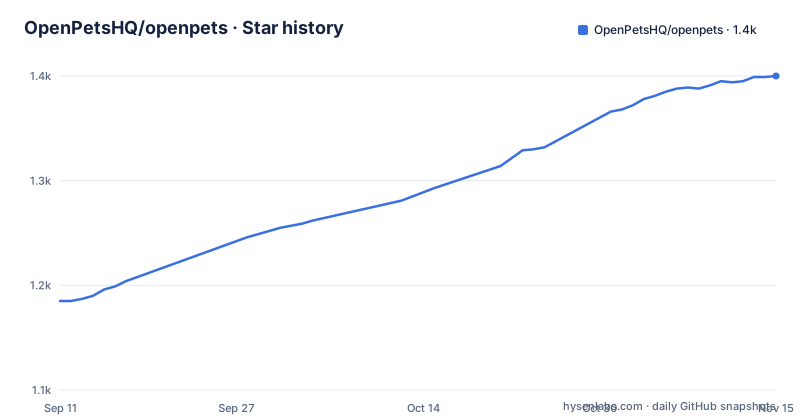
- OpenPetsHQ/openpets1,400 ★ · +215
| Repository | 2026-09-11 | 2026-11-15 |
|---|---|---|
| OpenPetsHQ/openpets | 1.2k | 1.4k |
215 Stars in the last 65 days, measured from the daily GitHub snapshot. Compare with other projects
Editorial analysis
The workspace manifest is still named after version two
The root package manifest is the workspace file, and three of its fields describe a project that no longer exists in that form.
Its name says version two. Its description says version two. And the version field says four.
The releases agree with the version field and not with the other two. The three most recent are four point zero point one, four point zero point zero, and three point five point zero, with the four point zero release on 2026-09-23 and the patch six days later.
So the identity string of the workspace, which is what appears in lockfiles, in workspace tooling output and in anything that reads the private root manifest, is two major versions behind the code it contains.
That is a rename nobody did rather than a bug anyone would notice, and it matters more than usual in a workspace, because the root manifest is the one artifact every member resolves against. A package manager reading the workspace name has no way to notice that the description is stale, because nothing else in the file contradicts it.
The rest of the manifest is conventional for a workspace of this shape: a module type declaration, a pinned package manager at a major version, an engine floor of Node 20, a repository URL, and an MIT licence. The scripts are where the size of the project shows, with a dozen or so desktop, documentation and plugin targets.
The readme documents a version three SDK inside a version four release
The feature list names the plugin SDK as version three, and the plugin section describes version three tooling, while the newest release is version four.
The plugin section also has its own version marker that points the same way. It says version three ships with a modular official plugin catalog.
And the repository root carries seven readme files, one per language, all at the top level rather than in a documentation directory: English, Japanese, Korean, Simplified Chinese, Traditional Chinese, Brazilian Portuguese, and a Latin American Spanish variant distinguished by a region code. So there are seven copies of the version mismatch to keep in step.
Nothing in the visible text says what changed at the major version boundary. The section on the SDK surface lists a context object with around twenty members, and the section on the plugin platform names the SDK package and describes four security properties, but neither states which of them arrived in version three and which in version four.
For someone writing a plugin, the practical question is which surface version three plugins target and whether version four of the application still runs them. The readme's own claim about compatibility is about scripts written for a different tool entirely, which is a different promise: it says the plugin runtime accepts what another system accepts, not that version three plugins survive a version four upgrade.
The root listing also has a design document and an improvements file beside the readmes, so the answer may be in one of those rather than in the page a user would read.
Four guards, and the host draws everything the plugin describes
The plugin security section is four bullets and each one is a specific mechanism rather than a principle.
The first is the runtime: each JavaScript plugin runs inside a sandboxed window host environment, one window per plugin.
The second is the strongest of the four and the one with the most far-reaching consequences. Plugins describe actions, heads-up displays and notifications, and the desktop host renders them. Plugin code cannot render raw markup and cannot execute arbitrary scripting inside a pet window. So a plugin has no way to draw its own interface at all; it emits a description of one and the host decides what that looks like.
The third is the permission model. Permissions must be declared in the plugin's manifest and approved by the user at install time, so a plugin cannot acquire a capability after the fact. Three APIs are named as sensitive and require their own explicit consent toggles: listening through the microphone, the clipboard, and a dynamic speech capability on the pet.
The fourth is the network guard. Fetch requests are limited to hostnames the developer declared, and are guarded against reaching local addresses, which is the request forgery protection in one line.
Together these four mean the plugin model is restrictive by design rather than by documentation. A plugin can ask for a lot, but it draws nothing, it holds no key, and it cannot quietly grow a new capability after install.
Plugins reach the model through the host and never see the key
Two entries in the SDK surface are worth reading together.
One handle lets a plugin hook into the model provider the user has configured in the host, and the readme names three providers as supported. The critical clause is the rest of it: without exposing API keys to the plugin source.
The other handle is named for secrets and is the counterpart to it.
So the arrangement is that the plugin asks the host to make a model call, the host holds the credential, and the plugin never reads it. That is a genuinely good boundary for a plugin ecosystem, because a plugin that cannot read a key cannot leak one, and it removes the most common reason plugin authors ask for broad permissions.
It also moves the trust decision. What a plugin can do with a model is bounded by the provider the user configured and the host's own implementation of the call, not by anything in the plugin. A plugin author writing an assistant-style pet does not need a network permission for the provider host at all, because the call goes through the host.
The wider surface is large enough to be worth reading before installing anything from a catalog. Alongside those two there are pets and pet instances, user interface primitives including alerts and bubbles and panels and status displays, host-managed audio, a scheduling API, a JSON key-value store with change subscriptions, events, assets, a message bus, network access with streaming, notifications, voice with both synthesis and speech recognition, an authentication flow using a public-code browser flow, file access through native pickers only, and system, command, status and logging access.
Two of those deserve a note for a plugin author. The file handle is limited to what the user picks in a native dialog, which is the right design for a plugin that wants to read a document. The authentication handle runs a browser flow, which means a plugin can start an OAuth exchange against a third party and receive the result, and that is a capability the three named sensitive APIs do not cover.
Five timer forms including cron, and a test harness that advances the clock
The scheduling API accepts five kinds of trigger: run once, run repeatedly at an interval, run daily, run on a cron expression, and run at a specific time.
Four of those are ordinary. The fifth is a cron expression, in a platform whose headline feature is an animation that idles and wanders across your desktop.
The consequence is that the plugin platform is a general background job runner with a user interface, and the pet is the delivery surface rather than the constraint. A plugin can schedule work that runs whether or not the window is open, and the cron form means it can express the same kinds of recurring schedule a system cron daemon would.
That is not criticism, because the readme does not pretend otherwise. The feature list calls the runtime a place for permissions, quotas, storage, schedules, commands, panels, events, audio and notifications, and schedules sit in that list alongside commands and panels. A launch plugin that opens a project folder at a certain hour is exactly the use case, and it needs a daily or cron trigger to be useful.
The developer tooling takes the determinism problem seriously. The test harness is described as letting you write deterministic tests without launching the desktop application, by mocking the host, advancing clocks, triggering actions and verifying reactions. Advancing the clock is the part that matters given the five timer forms: a test can trigger a daily or cron schedule and see the reaction without waiting for it.
The other two commands are the obvious ones, and both are one line each:
npx @open-pets/cli plugin new "My Plugin" --template tamagotchi
npx @open-pets/cli plugin validate ./my-plugin
A scaffolding command creates a plugin from one of six official layouts, and a validation command checks the manifest layout, the permissions and the configuration schemas before packing.
The macOS install note removes the quarantine flag
The download section lists four official artefacts and one community package.
Two macOS disk images, one for Apple Silicon and one for Intel. A Windows installer executable for 64-bit. And a Linux AppImage for 64-bit x86. Plus a community-maintained package for Arch-based distributions, installed with a helper, and credited to an individual maintainer by name rather than to the project.
Two details in that list matter.
The first is the Linux architecture. The only official Linux artefact is for x86-64, so an Arm Linux machine has no official build and the Arch package is a binary package for a different distribution family. The macOS side gets both architectures.
The second is the signing note. It says the Windows release installers are signed, and that macOS builds may still be unsigned and can trigger a security warning, and then gives a terminal command to remove the quarantine attribute from the installed application.
That command is the documented remedy for exactly the warning the operating system raises about an unverified application, and it works by clearing the flag that produces the warning. So the page tells a user how to turn off the prompt rather than how to satisfy it, which is a reasonable position for a project that cannot yet sign, and a poor default for anyone who installs from the release page without reading that line.
The application itself is described as fully functional out of the box with no agent setup required, which is the pitch the download section leads with: a pet appears immediately.
A launch plugin that opens local paths, and nine bundled ones to audit
The bundled catalog has nine plugins and they are worth reading as a permission exercise rather than as a feature list.
Three are timers and reminders: a habit tracker that nudges you to stretch or move, a pomodoro-style focus timer, and snoozable bell notifications with custom tones.
Three are novelty: a fortune cookie that produces daily advice, a magic eight ball, and a tamagotchi-style pet with hunger, affection and energy tracked through a live status pin.
One is a check-in that periodically asks about your mood.
One reminds you to drink water on a customisable schedule.
And one, launch, allows registering shortcut commands to open local folders, projects or applications.
That last one is the outlier. Everything else in the catalog acts on the pet and on you. Launch acts on the filesystem, taking a path and opening it, and it does that on a trigger the user defines. None of the three APIs the security section names as sensitive covers it: listening through the microphone, the clipboard, and dynamic speech.
So the capability that reads a user-supplied path and hands it to the operating system is not behind an explicit consent toggle by name, even though the path can point anywhere the desktop application can reach. Whether that is covered by a broader permission declaration in the manifest is not something the visible page says, and the validation command checks the manifest's permissions, which is where the answer would have to live.
The catalog is described as a modular official lineup configurable from a desktop control centre, and the pets themselves are browsable in a gallery that previews animation frames and assigns a pet to each workspace or agent window.
A dozen release scripts, a skills lockfile and a notes file at the root
The root of the repository is where a project stops being a product and starts being a working directory, and this one shows both.
The scripts in the workspace manifest split into four groups: desktop development targets including separate ones for the control centre and the plugin work, packaging targets that build before packaging, release targets for the desktop and for the npm packages, and roughly ten plugin targets covering locale checks, plugin tests, a dry-run sync, release validation in both offline and live modes, packaging, and publishing.
That plugin block is the largest part of the manifest, and three of those targets run the same script with different flags, one of them against a live registry rather than a dry run. A plugin ecosystem with its own sync and publish pipeline is a second product inside the first one.
The documentation has its own toolchain. A documentation configuration file at the root drives a dev server, a build and a preview command, and the deploy target publishes the built output to a pages host, naming a project, a branch, and a flag that allows the deploy to proceed with a dirty working tree.
Alongside that, the root has two agent directories, a skills directory with a lockfile for it, two dot-directories whose purpose is not explained anywhere in the visible page, and three plain documents that read like working notes: a design document, a code map, and an improvements file. There is also a plain text file at the root whose name says what it is at every scale, and a second ignore file alongside the standard one.
The last thing in the scripts is the one to know about if you build from source. There is a development target that disables the plugin catalog and points the plugin search at a local directory, and that directory is not in the repository's root listing.
Editorial conclusion
openpets is worth a look if the pet is the point and the plugins are the payload, because the plugin platform is where the engineering went. Four guards are documented rather than implied: each plugin runs in a sandboxed window host, the host renders every piece of interface so plugin code cannot inject markup or script into a pet window, permissions are declared in a manifest and approved at install with three named APIs held behind separate consent toggles, and network calls are confined to hostnames the developer declared with local addresses guarded against. That is a coherent and unusually well-described small-plugin model.
The interface is broad enough to be worth auditing before you install anything from the catalog. It includes a scheduling API with five trigger forms including cron, a secrets-aware handle on the host's configured model provider, an authentication flow with a public-code challenge, file access only through native pickers, and host-level system and command surfaces. The model handle is the clever one and also the widest: a plugin can make model calls without ever holding a key, which means the key boundary is the host, and a plugin's real capability is bounded by what its manifest asked for rather than by what it can read.
Three smaller things. The bundled lineup includes a plugin that registers commands to open local folders and applications, so treat the launch plugin as privileged even though it is not listed among the three sensitive APIs. The readme's macOS instruction strips the quarantine attribute from the installed app, which is the correct step for an unsigned build and also turns off the prompt that would have warned the user. And on Linux there is one official x86-64 image and nothing else, with a community package covering the rest.
Frequently asked questions
What is openpets and what do the official plugins do?
A desktop companion application where an animated pet idles across the workspace and bundled plugins turn it into something useful. The nine official plugins cover a habit routine, a pomodoro focus timer, reminders with custom tones, mood check-ins, a water reminder, daily advice, a magic eight ball, a tamagotchi-style pet with hunger and energy, and a launch plugin that opens local folders or applications.
How does openpets keep third-party plugins contained?
Four documented mechanisms. Each plugin runs in a sandboxed window host, the host renders all plugin-described interface so plugin code cannot inject markup or script, permissions must be declared in the manifest and approved at install with three sensitive APIs behind their own consent toggles, and network requests are limited to developer-declared hostnames and guarded against local addresses.
Can an openpets plugin use an AI model without an API key?
Yes. There is a handle that lets a plugin hook into the provider the user configured in the host, naming Anthropic, OpenAI and Ollama as supported, and it does so without exposing API keys to the plugin source. A companion secrets handle is the counterpart.
How do I build a plugin for openpets?
Scaffold one from an official layout with the plugin CLI, of which there are six, then validate it to check the manifest layout, permissions and configuration schemas, then test it with the SDK's test harness, which mocks the host, advances clocks, triggers actions and verifies reactions without launching the desktop app.
What can a plugin schedule in openpets?
Five trigger forms on the scheduling API: once, every interval, daily, on a cron expression, and at a specific time. The test harness can advance clocks, so a scheduled reaction can be triggered deterministically in a test without waiting.
Is there a Linux arm64 build of openpets?
Not officially. The official Linux artefact listed is a single 64-bit x86 AppImage, while macOS gets disk images for both Apple Silicon and Intel. Arch-based distributions have a community-maintained binary package installed through a helper, credited to an individual maintainer.
Official sources
Add this badge to your README
If you maintain this project, the badge below links readers to this analysis and shows its maintenance status from the daily GitHub snapshot. Paste the markdown into your README; add ?metric=license or ?metric=stars to the image URL for a different field.

[](https://hysenlabs.com/projects/openpetshq-openpets)Star history chart for your README
[](https://hysenlabs.com/projects/openpetshq-openpets)Was this useful?