Harnss runs three agent engines in one window, and warns it is mid-rewrite
Open-source, desktop client/UI build to harness Claude Code, Codex and any other Agent accepting Agent Client Protocol. Run multiple AI coding agents side by side with rich tool visualization, MCP integrations, built-in terminal, git, browser and just about anything else you may need.
At a glance
- What is it?
- A desktop client for Claude Code, Codex and any protocol-compatible agent, with tool calls rendered as cards, per-project MCP servers, a terminal, a browser and git built in. Its own readme opens by announcing a large rewrite before anything else.
- Who is it for?
- Harnss fits someone who runs more than one coding agent and loses context when switching, since sessions keep separate state and the app's value is the shell around them rather than the agents themselves. It does not fit anyone needing a signed installer, because the binaries are unsigned and two platforms need a deliberate override on first launch.
- Can I use it commercially?
- Yes. MIT is a permissive licence: you can use, modify and sell software built on it, as long as you keep its copyright and licence notices.
- Is it still maintained?
- Yes. The repository last received commits 5 days ago.
- What is it written in?
- Mainly TypeScript, according to GitHub's language statistics.
Answers come from the project's GitHub data, last synced on November 13, 2026, and from our analysis. They are not legal advice.
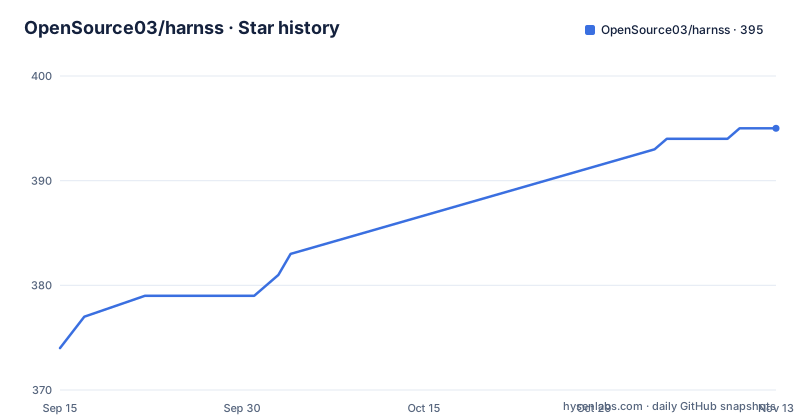
Star history
- OpenSource03/harnss395 ★ · +21
| Repository | 2026-09-15 | 2026-11-13 |
|---|---|---|
| OpenSource03/harnss | 374 | 395 |
21 Stars in the last 59 days, measured from the daily GitHub snapshot. Compare with other projects
Editorial analysis
The readme opens with a rewrite notice
Before the feature list, there are two admonitions, and the first one is unusual.
The first says the project is pending a large rewrite intended to improve usability, performance and the codebase itself, toward something more production ready, with more information to follow. The second says it is in early development and that issues are expected, with an invitation to report them.
That framing matters more than a feature list would. A pending rewrite means the code you read today may not be the code you have in three months, and the version number in the manifest is a beta rather than a release.
The release titles support that reading. The two most recent are both betas of the same version, one shipping thinking previews, smart notifications and project drag and drop, the other shipping split view, chat folders and a glass tinting option. The last non-beta was several releases earlier.
So the sensible framing is a usable prototype with an acknowledged redesign ahead, rather than a product with a bug list.
Three engines, three protocols, three credential paths
The engine table is the most useful thing in the write-up, because each row has a different protocol and a different thing you must already have.
Claude Code runs through the Anthropic Agent SDK and needs a Claude account, either a subscription or an API key. Codex runs through a JSON-RPC app-server and needs the Codex CLI on your path plus an OpenAI API key or a ChatGPT account. ACP agents speak the Agent Client Protocol and need whatever that agent needs.
The first two are built in. The third is the extension point, which is why the app can be described as supporting any compatible agent without knowing anything about it.
Sessions run in parallel, and each one keeps its own state, history and context, so switching between them does not mean losing the other. That claim is the product.
The cost of the design is that Harnss is a shell. It provides the window, the panels and the visualisation, and the agent behind each session is the agent you already use on its own. Anything Harnss cannot display well is a reason to leave, and anything you want the agent to do is still the agent's job.
Tool calls render as cards, and Jira gets its own view
The visualisation claim is specific rather than cosmetic. Every tool call renders as an interactive card, file edits show word-level diffs with syntax highlighting, shell output appears inline instead of in a scrollback, and nested subagent tasks display with step-by-step progress.
There is a dedicated changes panel that summarises file changes per turn, which is the piece that matters most in practice. What an agent did is usually the question you have after it finishes, and a per-turn summary answers it faster than reading a diff.
The same principle is applied to integrations. A general MCP server would normally return JSON that the app has no way to render meaningfully, so instead named services get dedicated interfaces, with Jira and Confluence given as the examples. Server status and the number of tools each server exposes are visible at a glance.
The design assumption is that a tool's output is only useful if it is shaped for the person reading it, and the cost of that assumption is that an unrecognised server falls back to whatever generic rendering exists.
Three permission levels and a plan mode
Autonomy is controlled by three named settings rather than a single toggle.
Ask First stops before acting. Accept Edits permits file changes. Allow All removes the prompt entirely. Plan mode is separate from the three and changes what the agent does rather than when it asks: the agent drafts a plan before making any changes.
The modes can be switched at any point without interrupting context, which is the part that separates this from restarting a session. The stated benefit is that you can move from asking on every step to accepting edits mid-task and back again without losing the thread.
Long-running work is handled by a different mechanism. Task agents spawned during a session keep running in the background and are tracked in their own panel, so you can work in a different session while they finish, rather than watching a terminal.
Two smaller conveniences sit alongside. Images can be attached to chat and marked up with a freehand annotation tool before sending, and voice input works either through native macOS dictation or an on-device Whisper model, the latter needing no API key.
Unsigned binaries mean two platform workarounds
The install note is the part most likely to cost someone an hour.
Pre-built binaries are currently unsigned. On macOS the guidance is to right-click the app and choose Open, which bypasses the Gatekeeper warning on first launch. On Windows the instruction is to click More info and then Run anyway if Defender flags the installer.
Neither is unusual for an unsigned desktop build, but both are deliberate steps a user will not guess, and both produce a warning first. No reason is given for shipping unsigned rather than signing the builds.
Installation otherwise is a download. Get the release for your platform from the releases page, point the app at a folder on disk, choose an engine, and start working.
Two details in the project layout suggest this is built to be forked as well as used. The repository carries instruction files for two coding agents alongside its own directory, and a skills lock file, which is the shape of a repository expected to be extended rather than only installed.
Configuration lives in Settings, not in files
Adding an agent is a form, not a file edit.
The settings area has two tabs for agents. One browses the community registry and installs from it. The other creates a custom agent by specifying the binary command, arguments, environment variables and an icon, or by pasting a JSON definition that fills the form in.
The stated principle is that all configuration is managed through settings with no config files involved, and the same applies to the MCP servers, which are configured per project from a panel in the right-hand toolbar rather than from a shared JSON file.
That is a real trade-off rather than a free win. Settings make a machine reproducible for the person who set it up and opaque to anyone else, and a team that wants a checked-in configuration will find that the app's stated design does not offer one.
The registry examples given are a CLI agent run behind an experimental flag, a second agent with its own subcommand, and a container-based agent configured from a YAML file, which is a reasonable spread of what the protocol is meant to cover.
Electron plus Vite plus tsup, with native modules rebuilt on install
The build is a conventional desktop stack and the manifest describes it accurately.
The renderer is built with Vite and the main process is bundled with tsup under its own config, with a dev script that runs both concurrently and then launches Electron after a short delay with logging enabled. Distribution goes through electron-builder with a single config file and per-platform scripts, plus a fast variant that packages without producing installers.
Two package scripts are worth noting. The test command runs against a Vitest config dedicated to the Electron side rather than the renderer. And the postinstall step rebuilds native modules, with a platform condition that skips a specific flag on macOS, which is the shape of a dependency that behaves differently per platform.
The manifest also declares three agent SDKs as direct dependencies, one for each protocol Harnss speaks, plus a transformers package for the on-device voice model and an editor component. A pnpm workspace file and a lock file at the root indicate a monorepo layout even though the root package is a single application.
The last commit on the default branch, which is named master rather than main, is dated 2026-08-10.
Editorial conclusion
Harnss fits someone who runs more than one coding agent and loses context when switching, since sessions keep separate state and the app's value is the shell around them rather than the agents themselves. It does not fit anyone needing a signed installer, because the binaries are unsigned and two platforms need a deliberate override on first launch. The decision to make first is whether to adopt now or wait, since the project states it is pending a large rewrite toward a more production-ready codebase. If you adopt, start with the built-in engines and per-project MCP configuration, and check the beta version you pin against the release notes.
Frequently asked questions
Which agent engines does Harnss support?
Claude Code through the Anthropic Agent SDK, Codex through a JSON-RPC app-server, and any agent speaking the Agent Client Protocol. The first two are built in; ACP agents come from a community registry or are configured by hand.
What does Harnss need in order to run Codex?
The Codex CLI available on the path, plus an OpenAI API key or a ChatGPT account. Claude Code instead requires a Claude account, either a subscription or an API key.
What are the Harnss permission levels?
Ask First, Accept Edits and Allow All, switchable at any point without interrupting context. Plan mode is separate and makes the agent draft a plan before making changes.
Are the Harnss release binaries signed?
No, they are currently unsigned. On macOS you right-click the app and choose Open on first launch, and on Windows you choose More info then Run anyway if Defender flags the installer.
Which ACP agents can Harnss install?
Any listed in the community registry the app browses. Documented examples include Gemini CLI behind its experimental flag, Goose through its own subcommand, and Docker cagent for container-based agents.
Can Harnss resume sessions started in the Claude Code CLI?
Yes. It can import and resume conversations previously started in the command-line tool, and it offers full-text search across session titles and message content.
Official sources
Add this badge to your README
If you maintain this project, the badge below links readers to this analysis and shows its maintenance status from the daily GitHub snapshot. Paste the markdown into your README; add ?metric=license or ?metric=stars to the image URL for a different field.

[](https://hysenlabs.com/projects/opensource03-harnss)Star history chart for your README
[](https://hysenlabs.com/projects/opensource03-harnss)Was this useful?