OpenXcom's data, user and config search order, and what breaks when you move them
Open-source clone of the original X-Com 👽
At a glance
- What is it?
- OpenXcom re-implements two Microprose strategy games in C++ and SDL, and its whole start-up story is directory search order: three folder types, per-platform fallback lists, and resource files the engine never ships. Read those three lists closely, because they do not agree with each other.
- Who is it for?
- OpenXcom is worth adopting if you already own UFO: Enemy Unknown or Terror From the Deep and want a rule set you can reopen, edit and mod without reinstalling. It is the wrong choice without those original resource files, because the engine carries none of its own and offers no demo path.
- Can I use it commercially?
- Yes, with conditions. GPL-3.0 is a copyleft licence: if you distribute software that includes it, you must release that software's source code under the same licence. Running it internally without distributing it does not trigger that obligation.
- Is it still maintained?
- Yes. The repository last received commits 25 days ago.
- What is it written in?
- Mainly C++, according to GitHub's language statistics.
Answers come from the project's GitHub data, last synced on October 21, 2026, and from our analysis. They are not legal advice.
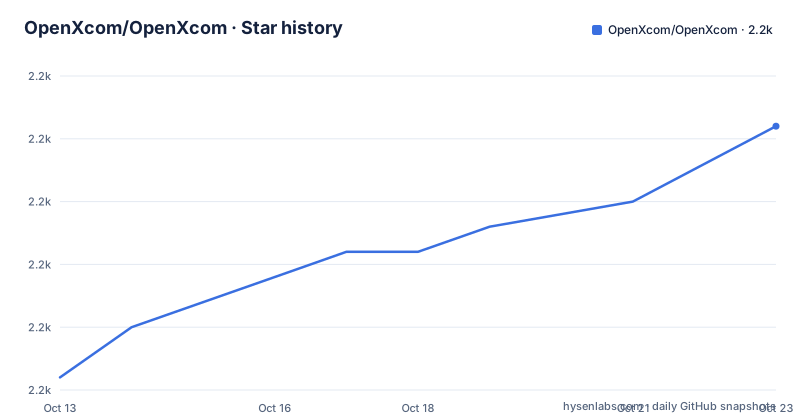
Star history
- OpenXcom/OpenXcom2,235 ★ · +7
| Repository | 2026-10-13 | 2026-10-21 |
|---|---|---|
| OpenXcom/OpenXcom | 2.2k | 2.2k |
7 Stars in the last 8 days, measured from the daily GitHub snapshot. Compare with other projects
Editorial analysis
The resource files you must already own
OpenXcom re-implements two Microprose strategy titles in C++ and SDL, and it bundles none of their content. The engine expects a vanilla copy of the resource files from either or both originals: UFO: Enemy Unknown, sold in the USA as X-COM: UFO Defense, and X-COM: Terror From the Deep. That constraint defines who the project is for. Anyone who already bought one of the two games on disc or through Steam gains a code engine they can build, inspect and extend. Anyone without that copy has nothing to aim the binary at, since no asset pack ships in the repository.
The code is published under a GPL-3.0 licence, while a portion of the drawing code is modified SDL_gfx material used under LGPL with the author's permission, so the borrowed part is accounted for separately from the project's own terms. Both statements cover code only. Nothing here settles what a player may do with Microprose's assets, and a player who lacks them has no lawful copy to migrate from.
The shape of the codebase is ordinary desktop C++. The default branch is `master`, the primary language is C++, and the repository topics file it under sdl and strategy-game-engine work rather than anything research related.
Steam folders and the copy that must stay unmodded
On Windows the installer detects a Steam copy by itself and copies the resources across, so setup finishes before the first launch. Doing it by hand means opening the right folder in your Steam library:
UFO: "Steam\SteamApps\common\XCom UFO Defense\XCOM"
TFTD: "Steam\SteamApps\common\X-COM Terror from the Deep\TFD"
Copy the UFO subfolders into the UFO subdirectory of OpenXcom's data or user folder, and the TFTD subfolders into the TFTD subdirectory of the same area. Either game supplies enough on its own, and the two sets stay separate rather than merging.
One warning is stated flatly. Do not hand the engine a copy patched with XcomUtil, because altered resources may trigger bugs and crashes. A player who ran that utility years ago has to restore a vanilla copy before anything else works, which means re-extracting the originals or digging out a backup. Nothing in the repository explains how to repair a patched install, so the restoration step is entirely yours.
First match wins for user and config, all of them for data
OpenXcom looks in three kinds of location. The user folder holds mods, savegames and screenshots, the config folder holds the game configuration, and the data folder holds the UFO and TFTD data files, the standard mods and common resources. The search rules for those three types differ, and that difference is the part worth understanding before you reorganise anything.
For user and config, the engine walks a list and stops at the first entry that already exists. If none of them exists, it creates one and uses that. For data it searches through every directory on the list, which is what allows resources to sit on separate disks.
One flag redirects the data search without touching the other two:
openxcom -data "$HOME/bin/OpenXcom/usr/share/openxcom"A fully self-contained tree overrides all three at once:
openxcom -data "$HOME/games/openxcom/data" -user "$HOME/games/openxcom/user" -config "$HOME/games/openxcom/config"The catch hides in that rule difference. Because a user path is chosen on first match, pointing `-user` at a directory that does not exist gets you a fresh empty one, with no mods and no saves inside, even when a populated user directory waits further down the search list. The data search has no such blind spot, which is why the two flags behave differently in practice.
Mods ship one directory deeper than the engine expects
Mod support is where the reimplementation parts company with running the original binaries. A set of standard mods ships with the project, built around functionality that XcomUtil and UFOExtender traditionally provided.
Installation starts in the mods subdirectory of your user directory. Extract a mod into a new subdirectory, and the name matters only in that it has to be unique. The wrinkle is how archives are packed. Some carry an extra directory at the top, so a correct extraction can still leave this shape:
mods/LulzMod/data/TERRAIN/
mods/LulzMod/data/Rulesets/
The engine expects the contents one level higher:
mods/LulzMod/TERRAIN/
mods/LulzMod/Rulesets/
WinZip offers an Extract to option that creates a directory named after the archive, which handles the folder but not the nesting inside it. Once the layout is right, the entry appears on the Options -> Mods page and can be switched on in-game. Wider distribution runs through the mod portal at `openxcom.mod.io`, where hundreds of community mods are published, each free to carry its own idea of what a ruleset should hold.
Options are global and reach back into old savegames
Configuration happens both inside the game and outside it. The actual option list is not kept in the repository; the pointer goes to a wiki page, Options_(OpenXcom), and a reader working from the source tree alone learns only that a variety of settings and extras exist.
The behaviour worth attention is scope rather than content. These options are global, and they affect any old or new savegame. Turning one on today does not merely shape a campaign begun afterwards; a save written months earlier reads the same configuration when it loads. No per-save snapshot of settings is described anywhere in the documentation, so anyone experimenting with a switch can shift the ground under a campaign they meant to leave exactly as it was.
That makes the settings page a global switchboard rather than a per-campaign one. Two saved games played side by side cannot carry different values for the same option, and nobody reading the wiki page would guess that from the layout of an options menu.
The path tables disagree about Windows 8 and the XDG fallbacks
Read the Windows tables side by side and a gap shows up. The user and config folder list stops at Windows Vista/7: the My Documents path for Windows 2000/XP, the Documents path for Vista/7, then the game directory and `./user`. The data folder list immediately below carries on to Windows Vista/7/8. A Windows 8 account is therefore handed an explicit home path for data files and no stated one for saves or configuration, falling back to `./user` or the game directory by inheritance rather than by instruction.
The macOS tables have a second wrinkle. $XDG_DATA_HOME/openxcom is listed first when that variable is defined, and the Application Support entry right after it carries the condition that it applies only when the variable is not defined, while the user and config lists higher up repeat the same Application Support path with no condition attached. Linux sidesteps the overlap by pointing user at XDG_DATA_HOME and config at XDG_CONFIG_HOME, with $HOME/.config/openxcom as the config fallback and $HOME/.openxcom still in the user list.
All three platforms put the DATADIR build flag inside the data search only, never in the user or config lists. Linux runs to 8 candidates for data, from $XDG_DATA_HOME/openxcom down to the current directory. A packager who compiles with DATADIR set still has to decide separately where a player's saves are written, and the search order that decides that is not documented in the repository.
SDL 1.2 floors, yaml-cpp and the Windows launchers
Compiling needs 5 libraries, 2 of them with version floors. SDL comes as `libsdl1.2`, audio as `libsdl-mixer1.2`, images as `libsdl-image1.2`, drawing as `libsdl-gfx1.2` at 2.0.22 or later, and rulesets are read through `yaml-cpp` at 0.5.3 or later. Note the target: `libsdl1.2` is the older SDL line, and the project links the SDL_gfx page that tracks the move from sdl_gfx to sdl2_gfx, so this dependency set is not an SDL2 one.
Build files for 4 toolchains sit in the tree: Microsoft Visual C++ 2010 or newer, Xcode, Make through `Makefile.simple`, and CMake through `CMakeLists.txt`. Alongside them are `Run-Win32-Debug.bat` and `Run-Win64-Debug.bat` for firing up a fresh build without opening an IDE, plus development directories named cmake, deps, docs, install, obj, res, scripts and src.
The repository publishes no GitHub releases, so the change history sits in the `CHANGELOG.txt` file at the root, and pre-compiled dependency packages are reached through the wiki's Compiling_(OpenXcom) page rather than from a release feed. A build therefore has two inputs beyond the source: those dependency floor numbers, and a wiki page nobody controls through the repository.
Where the Microprose binaries and the wiki still fit
This is not one reimplementation crowding out another. The Microprose games remain the reference point, because OpenXcom reads their resource files rather than recreating them, which makes owning the originals a prerequisite rather than an alternative you can route around. Where the two approaches part company is in what happens afterwards. The reimplementation carries a mod engine, a bundled standard mod set aimed at functionality that XcomUtil and UFOExtender used to handle, and a portal with hundreds of community entries. None of that surface exists in the shipped games.
A player who only wants to finish a campaign the way it was authored can do that with the original binaries and never configure a search order. A player who intends to change rulesets, rework content, or keep a campaign on a machine with explicit data, user and config paths needs the C++ and SDL engine, and only one of the two offers it.
Documentation splits the same way. The repository holds a README and a README-macOS.md, while the deep reference material sits on the `ufopaedia.org` wiki under pages for Options_(OpenXcom) and Compiling_(OpenXcom). Anyone auditing behaviour before committing to the engine has to read both halves, which is also why this project cannot be judged from the source tree alone.
Editorial conclusion
OpenXcom is worth adopting if you already own UFO: Enemy Unknown or Terror From the Deep and want a rule set you can reopen, edit and mod without reinstalling. It is the wrong choice without those original resource files, because the engine carries none of its own and offers no demo path. Before you commit, check three things: whether the directory list for your platform names your account, whether the copy you hand it is vanilla rather than XcomUtil patched, and whether your mod appears on Options -> Mods after you lift its extra directory level.
Frequently asked questions
Where do I put the X-COM resource files for OpenXcom?
Copy the UFO subfolders into the UFO subdirectory and the TFTD subfolders into the TFTD subdirectory, both inside OpenXcom's data or user folder. A copy from either original game is enough, and it has to be a vanilla one rather than a copy modified with XcomUtil.
Can I point OpenXcom at my own directories with command line flags?
Yes. Passing `-data`, `-user` and `-config` overrides the default locations for those three folder types, and a single `-data` argument redirects the resource search on its own. Since the user and config search stops at the first directory that already exists, a path you point at will be created if it is missing.
Why does my OpenXcom mod not show up in the mods list?
Archives packed with an extra directory at the top leave the contents nested too deep, so files need to be moved up a level inside the new mod directory. Each mod also needs its own uniquely named folder, and it still has to be switched on from the Options -> Mods page in-game.
What do I need to build OpenXcom from source?
Five libraries: `libsdl1.2`, `libsdl-mixer1.2`, `libsdl-image1.2`, `libsdl-gfx1.2` at 2.0.22 or later, and `yaml-cpp` at 0.5.3 or later. Build files are included for Microsoft Visual C++ 2010 or newer, Xcode, Make through `Makefile.simple`, and CMake through `CMakeLists.txt`.
Where does OpenXcom store savegames and configuration on Linux?
The user folder is searched as $XDG_DATA_HOME/openxcom, then $HOME/.local/share/openxcom, then $HOME/.openxcom, then `./user`. The config folder uses $XDG_CONFIG_HOME/openxcom or the $HOME/.config/openxcom fallback, and the first entry that already exists wins.
Official sources
Add this badge to your README
If you maintain this project, the badge below links readers to this analysis and shows its maintenance status from the daily GitHub snapshot. Paste the markdown into your README; add ?metric=license or ?metric=stars to the image URL for a different field.

[](https://hysenlabs.com/projects/openxcom-openxcom)Star history chart for your README
[](https://hysenlabs.com/projects/openxcom-openxcom)Was this useful?