Sapd/HeadsetControl: Cross-Platform Control for USB Gaming Headsets
Sidetone and Battery status for Logitech G930, G533, G633, G933 SteelSeries Arctis 7/PRO 2019 and Corsair VOID (Pro) in Linux and MacOSX
At a glance
- What is it?
- HeadsetControl gives Linux, macOS, and Windows users a command-line interface for sidetone, battery reporting, lights, equalizers, chat mixing, and microphone settings on supported gaming headsets. Its usefulness depends on exact device and feature coverage, which varies by model.
- Who is it for?
- HeadsetControl is a sensible choice for Linux, macOS, or Windows users whose headset appears in the support table and whose required controls are marked as supported. It is a poor fit for an unsupported model, users seeking a graphical mixer, or people who need a rollback procedure that the README does not provide.
- Can I use it commercially?
- Yes, with conditions. GPL-3.0 is a copyleft licence: if you distribute software that includes it, you must release that software's source code under the same licence. Running it internally without distributing it does not trigger that obligation.
- Is it still maintained?
- Yes. The repository received new commits within the last day.
- What is it written in?
- Mainly C++, according to GitHub's language statistics.
Answers come from the project's GitHub data, last synced on October 23, 2026, and from our analysis. They are not legal advice.
Star history
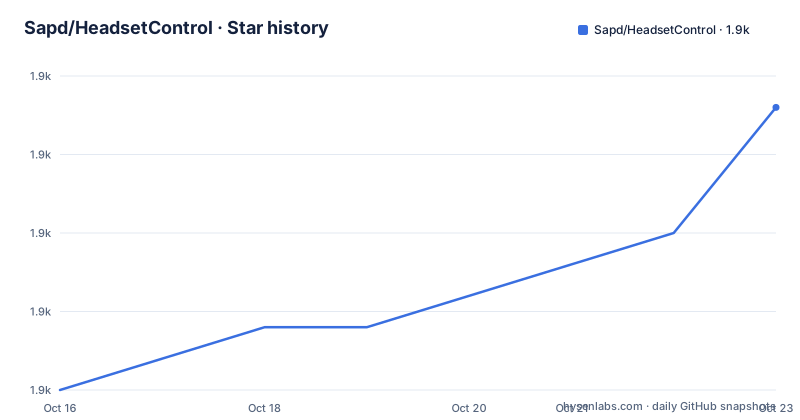
- Sapd/HeadsetControl1,934 ★ · +9
| Repository | 2026-10-16 | 2026-10-23 |
|---|---|---|
| Sapd/HeadsetControl | 1.9k | 1.9k |
9 Stars in the last 7 days, measured from the daily GitHub snapshot. Compare with other projects
Editorial analysis
What HeadsetControl Controls
HeadsetControl is a cross-platform command-line tool for controlling selected USB gaming headsets. Its intended users are people who want headset hardware functions on Linux, macOS, or Windows without relying on a vendor-specific desktop application. The repository description focuses on Logitech G930, G533, G633, G933, SteelSeries Arctis 7 and Pro 2019, and Corsair VOID models, while the README lists a wider set of supported devices.
The feature set includes sidetone, battery status, LED control, equalizer presets and custom curves, inactive-time shutdown, chat mixing, microphone volume, microphone mute LED brightness, rotate-to-mute behavior, voice prompts, and Bluetooth settings. Sidetone is especially relevant to users who want to hear their own microphone signal in their headset. The README says this is achieved without the latency associated with software loopback, although it does not provide a latency measurement or a universal quality guarantee.
This is not a general audio mixer. It controls particular headset features through supported hardware protocols. That distinction matters because a headset can be usable as an audio device while still lacking support for sidetone, battery reporting, or physical controls in HeadsetControl. The supported-devices table is therefore more useful than the general feature list when deciding whether the project can solve a specific problem.
Device Coverage and Feature Boundaries
The support matrix is model-specific rather than brand-specific. For example, the README lists the Logitech ASTRO A50 Gen 4 with sidetone, battery, chat mix, equalizer preset, equalizer, parametric equalizer, microphone volume, volume limiter, and sidetone status. The same row does not claim every feature. The Logitech G533 row lists sidetone, battery, and inactive time, while its equalizer and lighting cells are blank. Users should treat blank cells as features not documented for that entry, not capabilities that can be assumed to work.
Several models have partial coverage. The Logitech G431, G432, and G433 row shows sidetone but no battery support. The Corsair Virtuoso XT and SE row lists battery status but no sidetone. SteelSeries Arctis Nova 3 lists sidetone, equalizer preset, equalizer, microphone mute LED brightness, and microphone volume, but no battery entry. These differences show why the exact model name and hardware revision matter.
The repository topics identify HID and HIDAPI, and the build documentation requires the HIDAPI library. This places device access close to the center of HeadsetControl's design. On Linux, the documented `make install` process also installs udev rules for non-root access. A headset can therefore be visible to the operating system while still lacking a protocol implementation or permission path that HeadsetControl requires.
Installing HeadsetControl on Linux
The README presents package-manager installation as the quickest route. On Ubuntu or Debian, it documents the Sapd PPA, followed by installation of `headsetcontrol`. The PPA is the first step because the README identifies it as the project's Ubuntu or Debian package source. After installation, the reader should have the `headsetcontrol` command available through the system package manager.
sudo add-apt-repository ppa:sapd/headsetcontrol
sudo apt update && sudo apt install headsetcontrol
Fedora users are directed to the `thesapd` COPR and install the same package. The RHEL-family instructions first install EPEL because the README says `hidapi` ships there. Arch Linux uses an AUR package, NixOS adds `pkgs.headsetcontrol` to `environment.systemPackages` and `services.udev.packages`, and Gentoo uses the `nitratesky` overlay. FreeBSD has a documented `pkg` command.
A Linux source build requires a C++20 compiler, CMake 3.12 or newer, and HIDAPI. The repository's documented dependency command for Debian and Ubuntu is:
apt-get install build-essential git cmake libhidapi-devThe source build then clones the repository, creates a build directory, configures with CMake, compiles, and installs:
git clone https://github.com/Sapd/HeadsetControl && cd HeadsetControl
mkdir build && cd build
cmake ..
make
sudo make install
On Linux, the README says that installation also installs udev rules for non-root access. If the rules need to be reloaded, it gives this command:
sudo udevadm control --reload-rules && sudo udevadm triggerThe README does not document a rollback procedure for packages, udev rules, or a source installation.
Installing and Running HeadsetControl on macOS or Windows
macOS users can install HeadsetControl through Homebrew. The documented formula command is specific to the project tap, and the README says `--HEAD` selects the latest development version. A portable universal binary is also available from the Releases page. According to the README, that build supports Apple Silicon and Intel and requires macOS 13.3 or newer.
brew install sapd/headsetcontrol/headsetcontrolWindows users are directed to the Releases page for either an installer or a portable `.exe`. The README does not provide a Windows package-manager command, a portable command-line invocation, or a first-use command. A user who wants a transparent installation path on Windows must therefore inspect the release assets and project documentation rather than assume that a Linux command applies.
For macOS and Windows, the same device support matrix remains the first check. The README marks platforms as `All` for many rows, but it does not explain protocol differences for every model or platform. It also does not document a graphical interface. After installation, the project is intended to be used through its command-line interface, although the README does not show a concrete device-list or sidetone command.
The first useful operation should remain constrained to a feature explicitly marked for the connected model. Changing sidetone on a headset without sidetone support is not documented as a valid use. Likewise, a listed battery feature does not guarantee support for every measurement shown in the general feature description on every device.
CLI, HIDAPI, and Repository Architecture
HeadsetControl is implemented in C++, with separate top-level directories for the CLI, library code, tests, build configuration, and packaging. The README describes operations such as sidetone and battery control, but it does not include command names, option names, output formats, or a complete example session. That omission prevents a reliable command-level tutorial without inventing a flag.
The supported feature matrix still explains the intended data flow at a high level. A supported headset exposes commands or reports through HIDAPI, and HeadsetControl translates a user request into the corresponding device operation. Battery status is a reporting function, while sidetone, equalizer, inactive time, chat mix, and microphone settings are controls. The repository's `lib/` directory indicates that device handling is separated from the command-line layer, and `tests/` indicates that automated tests exist. The README does not identify which models or features those tests cover.
This architecture suits scripts, desktop integrations, and users who prefer a command-line workflow. It also means that installation alone is not enough. A successful first use requires a matching headset entry, HID access, and a documented command for the requested feature. The README does not state whether unsupported operations fail cleanly, whether firmware revisions are detected, or how simultaneous headset connections are represented.
Release Activity and Upgrade Cost
The repository is not archived. Its last push was on 2026-10-14, and the release list includes version 4.1.0 from 2026-08-27, version 4.0.0 from 2026-07-23, and a `continuous` build from 2026-01-07. These dates show recent repository activity and recent named releases, but they do not establish that every supported headset or platform receives the same maintenance attention.
HeadsetControl is licensed under GPL-3.0. The repository contains a `license` file and packaging files including Debian and RPM metadata. The README states that every release includes GPG-signed source, Linux formats such as an AppImage, `.deb`, and `.rpm`, plus macOS and Windows builds. The README does not explain all licensing obligations for distributors, so the license file should be reviewed directly when integrating the code into another product.
Upgrade cost is mostly operational. Linux users may need to keep the package, HIDAPI dependency, and udev rules aligned with the installed version. Source builders need the documented C++20 toolchain and CMake setup. The README offers a rolling `continuous` pre-release that tracks `master`, but it does not document rollback or a compatibility matrix between releases. A named release is the clearer choice for a stable workstation unless a required device change exists only on `master`.
Failure Cases and the Vendor Alternative
The clearest wrong-tool case is an unsupported headset. The README requires users to confirm coverage in the supported-devices table, and blank cells mean that the feature is not listed for that row. A user who only needs basic audio playback may not need HeadsetControl. Someone who needs a visual control panel, automatic profiles, or a documented integration with a particular application is also outside what the README establishes.
Another limitation is the gap between hardware recognition and feature support. HIDAPI access is necessary for the documented HID communication path, and Linux installations include udev rules for non-root access. Permission errors, unsupported revisions, or device-specific protocol differences could prevent a feature from working even when the model family is listed. The README does not describe diagnostic commands, log formats, firmware recovery, or a fallback for an unrecognized device.
A real alternative is the headset vendor's own control software. That approach differs by placing device-specific configuration in a vendor-maintained application rather than a cross-platform command-line program with a centralized support matrix. HeadsetControl fits users who want one command-line workflow across supported operating systems and models. Vendor software is more direct when the manufacturer supports a feature omitted from HeadsetControl's table. The decision turns on exact feature coverage, permissions, and whether a graphical or vendor-specific workflow is required.
Editorial conclusion
HeadsetControl is a sensible choice for Linux, macOS, or Windows users whose headset appears in the support table and whose required controls are marked as supported. It is a poor fit for an unsupported model, users seeking a graphical mixer, or people who need a rollback procedure that the README does not provide. Before adoption, check the exact headset name, platform, and feature columns, then install through the documented package route for that platform. HeadsetControl is GPL-3.0 licensed, and its last push was on 2026-10-14. Confirm that the selected release includes the required device protocol and feature before installing it.
Frequently asked questions
Which headsets does HeadsetControl support?
HeadsetControl supports the models listed in the README's supported-devices table, including Logitech, Corsair, and SteelSeries headsets. Support is feature-specific, so check the exact model row for sidetone, battery, lights, equalizer, and other capabilities.
How do I install HeadsetControl on Ubuntu or Debian?
The README documents adding the Sapd PPA, updating the package index, and installing `headsetcontrol` with `apt`. The Linux installation section includes the exact commands.
Can HeadsetControl report headset battery status?
Yes, battery status is one of the documented features, but the supported-devices table does not mark it for every headset. The general feature description includes charge level, voltage, and time remaining.
Does HeadsetControl have a graphical interface?
The README describes HeadsetControl as a command-line tool and does not document a graphical interface. Its repository includes a `cli/` directory, but the README does not provide a complete command reference.
What license does HeadsetControl use?
The repository identifies HeadsetControl as GPL-3.0 licensed and includes a `license` file. The README does not explain the license's application to a particular integration, so distributors should review the license file directly.
Official sources
Add this badge to your README
If you maintain this project, the badge below links readers to this analysis and shows its maintenance status from the daily GitHub snapshot. Paste the markdown into your README; add ?metric=license or ?metric=stars to the image URL for a different field.

[](https://hysenlabs.com/projects/sapd-headsetcontrol)Star history chart for your README
[](https://hysenlabs.com/projects/sapd-headsetcontrol)Was this useful?