FnNAS documents device support with GitHub issue numbers from two other repositories, and its default table hands you SSH on port 22
Supports running FnNAS on Amlogic, Allwinner, and Rockchip devices. Support a311d, s922x, s905x3, s905x2, s912, s905d, s905x, s905w, s905, s905l, rk3588, rk3568, rk3399, rk3328, h6, etc.
At a glance
- What is it?
- ophub/fnnas is a GPL-2.0 shell project that builds a customised Debian-based Linux image for Arm64 TV box SoCs, last pushed to main on 2026-10-03. The interesting file is the device table: 64 device names across six SoC rows, each one citing an issue number in a sibling repository, with three devices sharing a single link and one row citing a pull request instead.
- Who is it for?
- FnNAS is a credible route to reusing a surplus TV box as a small always-on file server, and the device table is unusually well evidenced for a firmware project. What to check first is the row for your own box, because the support claim is a link to an issue in another repository rather than a test result, and several devices appear twice.
- Can I use it commercially?
- Yes, with conditions. GPL-2.0 is a copyleft licence: if you distribute software that includes it, you must release that software's source code under the same licence. Running it internally without distributing it does not trigger that obligation.
- Is it still maintained?
- Yes. The repository received new commits within the last day.
- What is it written in?
- Mainly Shell, according to GitHub's language statistics.
Answers come from the project's GitHub data, last synced on November 15, 2026, and from our analysis. They are not legal advice.
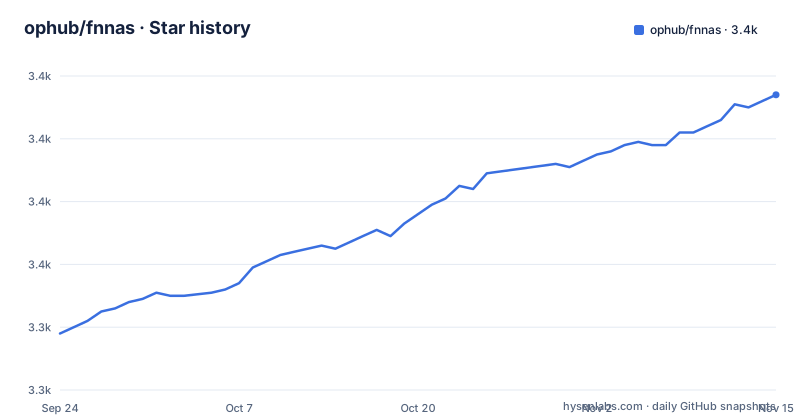
Star history
- ophub/fnnas3,414 ★ · +76
| Repository | 2026-09-24 | 2026-11-15 |
|---|---|---|
| ophub/fnnas | 3.3k | 3.4k |
76 Stars in the last 52 days, measured from the daily GitHub snapshot. Compare with other projects
Editorial analysis
Compatibility is documented as issue numbers in two sibling repositories
The device table is the substance of this README, and its evidence column is unusual. Each device name is not a specification sheet or a test report; it is a link to a GitHub issue number, and most of those issues live in other repositories under the same organisation.
The Amlogic rows point into ophub/amlogic-s9xxx-armbian and ophub/amlogic-s9xxx-openwrt, split between the two depending on the device. One row points somewhere else entirely, to a third-party repository for the E900V22C/D. The credits paragraph at the top of the file confirms the arrangement by thanking the contributors of ophub/amlogic-s9xxx-armbian rather than this repository's own.
What that means in practice is that the support claim is a thread where the port is discussed. It is genuinely better than a bare list of model names, because a reader can read the thread and see what was involved, and it is worse than a matrix, because the thread is where the discussion lives rather than a distilled statement of what works.
The table is also cut off partway. Six SoC rows are visible, holding 64 device entries between them: a311d with 2, s922x with 7, s905x3 with 21, s905x2 with 7, s905l3a with 11 and s905l3b with 16. The repository description names a further set of families the visible rows do not reach, including s912, s905d, s905x, s905w, s905, s905l, rk3588, rk3568, rk3399, rk3328 and h6.
Three s905x3 devices share one issue, and one row cites a pull request
Within the largest row there are small inconsistencies worth knowing about before you rely on it.
The s905x3 row lists 21 devices. Three of them, X88-Pro-X3, X99-Max-Plus and Transpeed-X3-Plus, all resolve to the same issue number, 1621, in the amlogic-s9xxx-armbian repository. That is plausible if one thread covers a family of closely related boxes, but it means the three rows are not independent evidence.
Two more pairs repeat across rows. M411A appears under both s905l3a and s905l3b, and UNT403A appears under both as well, so the same two device names are claimed by two different SoC families. Within the s905l3b row, TY1608 appears twice with two different issue numbers, 1332 and 1568.
The last detail is a link type. Nearly every cell is an issue, but the Khadas-VIM3L entry at the end of the s905x3 row points at a pull request, number 3482. So the table mixes two kinds of link as evidence, and a pull request is a change proposal rather than a support thread.
None of this makes the table wrong. It makes it a map of where the conversation happened, which is a different artifact from a compatibility guarantee.
The defaults give you port 22 and an address from your router, with no shipped credential
There is a small table of default information, five columns wide: system name, default account, default password, SSH port and IP address.
The system is FnNAS.OS. The account is Custom. The password is Custom. The SSH port is 22. The address is to be found on your router.
The account and password rows are the good part, and they matter more here than for a server image. This firmware replaces the Android TV system on a TV box, which means it is flashed onto a device that was previously on a network with whatever credentials the stock image had. Custom credentials mean nothing is published to guess at.
The SSH port row is the part to think about. Port 22 is the default, on a device that is now a file server on your LAN, reachable by anything that can route to it. The file gives no alternate port, no instruction to change it, and no statement about whether the daemon is enabled on first boot or started on demand. If the box is on a network you do not fully control, or a router with port forwarding that someone else configured, that is the setting to change before anything else.
The IP row is honest about a real property of these builds: the address is whatever DHCP handed out, so you find it in your router rather than a fixed address being documented.
The README claims mainstream x86 support and the device table lists only Arm SoCs
The opening paragraph describes FnNAS as offering hardware compatibility with support for mainstream x86 and Arm64 devices. The table that follows it contains no x86 device at all.
Every row is an Arm SoC: a311d, s922x, s905x3, s905x2, s905l3a, s905l3b, and beyond the visible rows the Rockchip and Allwinner families named in the repository description. The repository description is the same story, listing Amlogic, Allwinner and Rockchip parts and nothing else. The stated use case makes it explicit: replace the Android TV system on your TV box and turn it into a private data storage server.
So the x86 claim is either about a different product or about a part of this project not covered by the table. There is a clue in the tree. Alongside `make-fnnas/` and `rekernel/` there is a directory named `renas`, which suggests the x86 or generic-NAS side of the work lives somewhere the README does not describe.
The other feature claims are narrower and checkable: the image is built on the latest Linux kernel from a Debian distribution, it supports writing to eMMC boot, and it supports online kernel updates. The kernel column in the table links every SoC row to a single tag, kernel_fnnas, so one kernel build is presented as serving all of them.
Three release tags, two of them Rockchip and cut two minutes apart
The release names encode the target and a number: fnnas_rockchip_692, fnnas_rockchip_1253 and fnnas_amlogic_693. The pattern suggests per-platform builds with a version or build number attached.
All three were created on 2026-06-25. The two Rockchip ones are 126 seconds apart, at 02:19:50 and 02:21:56, and the Amlogic one follows about four hours later at 06:38:08. That is a build run rather than a release schedule, and it means a Rockchip user and an Amlogic user are not necessarily offered the same moment.
The gap to the present is the more useful number. The last push to main is dated 2026-10-03, so roughly three months of commits sit above the newest tag. There are no nightly or rolling builds mentioned, and the README sends you to the releases page for the latest firmware.
Two other things follow from the naming. There is no single version number for the project as a whole, only a per-platform set, so an answer to "which version am I running" is a tag name rather than a number. And the kernel itself is versioned separately again, through the kernel_fnnas tag that every row in the device table points at.
action.yml at the root of a repository that ships three shell directories
The top-level listing is short: .github/, .gitignore, LICENSE, README.cn.md, README.md, action.yml, make-fnnas/, rekernel and renas.
Three things stand out. There is a README.cn.md beside the English one, so the project is bilingual in the repository itself rather than in a docs site. There is a LICENSE file, consistent with the GPL-2.0 recorded in the repository settings. And there is an action.yml at the root of a repository whose primary language is Shell.
That action file means the build is exposed as a GitHub Action rather than only as something you run locally. That is the shape of a firmware project that expects continuous rebuilds across many SoC targets, which is consistent with the release naming and with the credits paragraph describing sustained contributions and guidance from technical experts.
The three working directories divide the job. `make-fnnas/` is the image build, `rekernel/` is the kernel side, matching the separate kernel_fnnas release tag, and `renas` is the remaining piece that the README never explains.
Note what is not at the root: there is no shell script at the top level, no install script and no documentation of a flashing procedure. The README describes what the image is and which devices it targets, and then points you at the releases page.
The README is two paragraphs, one table and a device list, with no flashing procedure
What the README does contain is worth stating plainly, because the absence is the main fact about it.
It has a bilingual header, an opening paragraph describing the image, a credits paragraph, a five-column default-information table, a paragraph explaining that SoC rows are ordered by performance from high to low, and the device table itself. It closes by inviting forks and stars.
What it does not contain is any installation step. There is no command, no image-writing instruction, no mention of which tool writes the firmware to eMMC, no recovery procedure, and no statement about what happens to the Android TV installation it replaces. The eMMC boot capability is listed as a supported feature, but the mechanics of using it are not here.
The fork invitation is meaningful in that context. The README explicitly welcomes forking for personal customisation, which is a reasonable reading of a firmware project built by contributors across many devices, and it is also a signal that the supported path is the released image rather than a build you produce yourself.
The README links to fnnas.com as the product site and to the releases page for downloads. Documentation beyond that is not in this file.
Editorial conclusion
FnNAS is a credible route to reusing a surplus TV box as a small always-on file server, and the device table is unusually well evidenced for a firmware project. What to check first is the row for your own box, because the support claim is a link to an issue in another repository rather than a test result, and several devices appear twice. Second, decide how you will reach it after flashing: the defaults give you SSH on port 22 and an address from your router, with an account you set yourself. Third, note that the newest tagged firmware is from 2026-06-25 while the branch has moved since.
Frequently asked questions
Which devices does FnNAS support?
The visible table covers six SoC families with 64 device entries between them, including a311d, s922x, s905x3, s905x2, s905l3a and s905l3b. The repository description also names s912, s905d, s905x, s905w, s905, s905l and the Rockchip and Allwinner families including rk3588, rk3568, rk3399, rk3328 and h6.
What are the default SSH settings for FnNAS?
The default information table gives a custom account, a custom password, SSH port 22, and an IP address to be found on your router. No credential is shipped with the image.
How do I install FnNAS on a TV box?
The README contains no installation command or flashing procedure. It describes the image as a customised Debian-based Linux system for Amlogic, Allwinner and Rockchip SoCs, and directs you to the releases page for the firmware.
Does FnNAS run on x86 hardware?
The opening paragraph claims support for mainstream x86 and Arm64 devices, but every row in the device table is an Arm SoC and the repository description lists only Amlogic, Allwinner and Rockchip parts. A directory named renas exists in the tree that the README does not explain.
What licence is FnNAS released under?
GPL-2.0, with a LICENSE file present at the root of the repository. The project is also bilingual, with README.md and README.cn.md side by side.
Official sources
Add this badge to your README
If you maintain this project, the badge below links readers to this analysis and shows its maintenance status from the daily GitHub snapshot. Paste the markdown into your README; add ?metric=license or ?metric=stars to the image URL for a different field.

[](https://hysenlabs.com/projects/ophub-fnnas)Star history chart for your README
[](https://hysenlabs.com/projects/ophub-fnnas)Was this useful?