Armbian on TV boxes: what ophub builds, and what it leaves to you
Supports running Armbian on Amlogic, Allwinner, and Rockchip devices. Support a311d, s922x, s905x3, s905x2, s912, s905d, s905x, s905w, s905, s905l, rk3588, rk3568, rk3399, rk3328, h6, etc.
At a glance
- What is it?
- ophub/amlogic-s9xxx-armbian builds Debian and Ubuntu based Armbian images for Amlogic, Allwinner and Rockchip devices that Armbian does not officially support. It is a build and image distribution project, not a fork of the upstream distribution, and the device table is the real product.
- Who is it for?
- Use this project when you own one of the listed models, and you are prepared to treat the box as a Linux host rather than a TV. Skip it if you need a supported warranty path, a named SoC absent from the table, or an installation guide in the README itself, because the flashing instructions live in the documents directory.
- Can I use it commercially?
- Yes, with conditions. GPL-2.0 is a copyleft licence: if you distribute software that includes it, you must release that software's source code under the same licence. Running it internally without distributing it does not trigger that obligation.
- Is it still maintained?
- Yes. The repository received new commits within the last day.
- What is it written in?
- Mainly Shell, according to GitHub's language statistics.
Answers come from the project's GitHub data, last synced on November 13, 2026, and from our analysis. They are not legal advice.
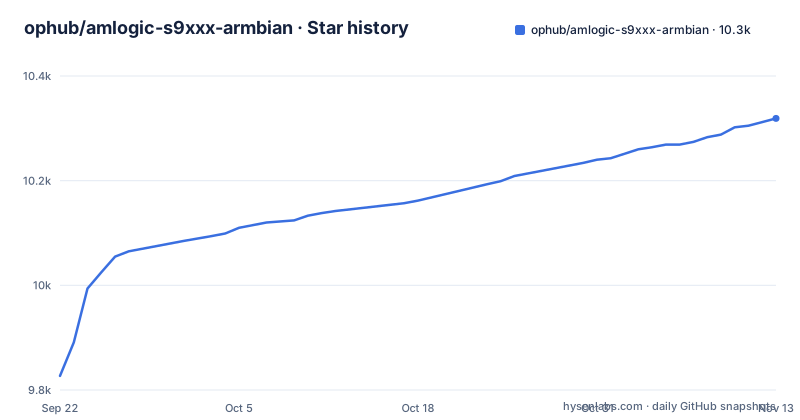
Star history
- ophub/amlogic-s9xxx-armbian10,319 ★ · +492
| Repository | 2026-09-22 | 2026-11-13 |
|---|---|---|
| ophub/amlogic-s9xxx-armbian | 9.8k | 10.3k |
492 Stars in the last 52 days, measured from the daily GitHub snapshot. Compare with other projects
Editorial analysis
Default login is root with the password 1234
The table of default values is the first thing worth reading on this project, and it is short:
| System Name | Default Username | Default Password | SSH Port | IP Address | | --- | --- | --- | --- | --- | | Armbian.OS | root | 1234 | 22 | Obtain from router | | Armbian.Docker | root | 1234 | 22 | Static MacVLAN IP |
Both rows ship root, 1234 and port 22. The password is a placeholder, not a secret, so the first act after booting an image should be changing it, before the box is reachable by anything but the router.
The IP column differs between the two builds. The OS image takes whatever address the router hands out, so you find it from the router's DHCP list. The Docker build expects a static MacVLAN address, which means the addressing is decided before first boot rather than discovered after it.
Release names carry the distribution, not a version you pick
Images are published as GitHub releases, and the naming tells you the two choices that matter: which Debian or Ubuntu base, and which architecture. Three releases carry the same 2026.11 date stamp and were all published on 2026-11-01: Armbian_resolute_arm64_server_2026.11, Armbian_noble_arm64_server_2026.11 and Armbian_bookworm_arm64_server_2026.11.
resolute, noble and bookworm are distribution codenames, not version numbers of this project. There is no single latest build to grab; you decide the userland you want and take the image that carries it. The README points at the releases page for the latest system rather than embedding a download link.
The server suffix is the other half. Everything published under this scheme is an arm64 server image, which fits the project's stated goal of replacing an Android TV system on a box and turning it into a server rather than a media centre with a desktop.
Every supported model links to its own issue thread
Support is not a compatibility claim in a table cell. Each device name in the SoC table is a link to an issue or a pull request, and many of those links point into the sibling OpenWrt project's tracker for the same vendor boxes. SoC families listed include a311d, s922x, s905x3, s905x2, s912, s905d, s905x, s905w, s905, s905l, rk3588, rk3568, rk3399, rk3328 and h6.
Models are ordered by SoC performance from high to low, which is a hint about where to start if you are choosing hardware rather than fixing a box you own.
The rows get narrower as you read them. s905l3a and s905l3b appear as separate entries, each with its own model list and its own set of issue links. That granularity is why the table runs long, and why an entry you half recognise is not good enough.
The consequence for a reader is direct. If your model is not in that table, this project has not documented working for it, and the linked thread is where the real evidence lives: what board revision, what bootloader, what somebody found. Read the thread for your model before you write an image, because the image name tells you nothing about your box.
Kernels are pulled from a separate ophub/kernel repository
The Kernel column of the device table does not point inside this repository. It points at ophub/kernel and its kernel_stable release tag, so the kernel that boots your board is a separate artifact with its own release history.
That separation means that choosing a kernel for an unfamiliar board means choosing a build from another repository, using the per-model links rather than a rule.
The upstream Armbian system itself is what this project preserves. The stated approach is to keep the integrity of the official Armbian system and extend device support underneath it, adding management commands on top, rather than maintaining a divergent distribution.
build-armbian/, compile-kernel/ and action.yml sit in the repository root
The root is short enough to read in one look: CONTRIBUTORS.md, LICENSE under GPL-2.0, three README files, action.yml, and five working directories or scripts, build-armbian/, compile-kernel/, documents/, rebuild and recompile.
Three of those are about producing an image rather than running one. build-armbian/ and compile-kernel/ separate the distribution build from the kernel build, which matches the split in the kernel links. rebuild and recompile carry no file extension and sit directly in the root. Their purpose has to be read from the scripts themselves.
The three README files are English, Chinese and Japanese, which tells you where the project's contributors are, and nothing more.
Booting from a card is reversible, writing to eMMC is not
The system runs on TF/SD/USB storage and on the device's own eMMC, and the project supports writing to eMMC along with kernel updates. Those two paths are not equally reversible. A card can be pulled and re-flashed; the internal storage of the device cannot be recovered from a spare card in your pocket.
Writing to eMMC replaces what is on the internal storage, so make sure you can live without whatever is there now.
So the ordering matters. Boot the image from a card first, confirm the device appears on the network with the expected peripherals, and only then consider moving it to internal storage.
The same TV boxes are also built for OpenWrt, with a different userland
Several device links in the supported table point into amlogic-s9xxx-openwrt, the maintainer's OpenWrt build for the same class of hardware. That is the closest alternative and the difference is entirely in what you get after boot.
OpenWrt is a router distribution: a small userland built around networking, with a package set sized for a gateway. Armbian here is Debian or Ubuntu derived, so you inherit apt and the wider Debian and Ubuntu software ecosystem instead. For a box you want to run services on, that difference decides the project for you. For a box whose only job is routing, it is the wrong trade.
The documentation for detailed usage lives in this repository's documents directory rather than in the README.
Editorial conclusion
Use this project when you own one of the listed models, and you are prepared to treat the box as a Linux host rather than a TV. Skip it if you need a supported warranty path, a named SoC absent from the table, or an installation guide in the README itself, because the flashing instructions live in the documents directory. Verify first the issue thread linked for your exact model in the supported device table, then change the 1234 password over SSH before anything touches the network.
Frequently asked questions
What is Armbian for?
Armbian is a lightweight Linux distribution built specifically for ARM chips, based on Debian or Ubuntu. This project builds it for Amlogic, Allwinner and Rockchip devices such as TV boxes, so an Android TV box can be replaced with a Debian or Ubuntu userland and used as a server.
How do I install Armbian?
The images are published as GitHub releases, named for the distribution codename and architecture, for example Armbian_noble_arm64_server_2026.11. Pick the release matching your base distribution, check the linked issue thread for your exact model in the supported device table, and follow the detailed instructions in the documents directory, which the README does not reproduce.
Is Armbian good for beginners?
The first boot is easy in one sense and unforgiving in another. Both Armbian.OS and Armbian.Docker ship with username root, password 1234 and SSH port 22, and the operating system image takes its address from the router while the Docker image expects a static MacVLAN address. Detailed usage instructions live in the documents directory rather than in the README.
Official sources
Add this badge to your README
If you maintain this project, the badge below links readers to this analysis and shows its maintenance status from the daily GitHub snapshot. Paste the markdown into your README; add ?metric=license or ?metric=stars to the image URL for a different field.

[](https://hysenlabs.com/projects/ophub-amlogic-s9xxx-armbian)Star history chart for your README
[](https://hysenlabs.com/projects/ophub-amlogic-s9xxx-armbian)Was this useful?