nightly.link: shareable download links for GitHub Actions artifacts
Downloads the latest "nightly" build/artifact from a continuous testing workflow
At a glance
- What is it?
- nightly.link is a small service that turns the latest successful GitHub Actions build of a repository into a stable download link that anyone can fetch without a GitHub account, which is the piece GitHub itself does not provide. It suits projects that hand nightly builds to testers, and it runs on an instance the author pays for with a documented privacy policy and a real rate limit.
- Who is it for?
- Adopt nightly.link if your project ships CI builds to people outside your organisation, because the alternative is asking every tester to have a GitHub account and to navigate the run page, which is a real barrier. Do not adopt it as the distribution channel for your released product, since the whole point is that the artifact is the newest one and it changes under the link.
- Can I use it commercially?
- Yes, with strict conditions. AGPL-3.0 is a network copyleft licence: if people use a modified version over a network, for example as a hosted service, you must offer them its source code under the same licence.
- Is it still maintained?
- Yes. The repository last received commits 16 days ago.
- What is it written in?
- Mainly Crystal, according to GitHub's language statistics.
Answers come from the project's GitHub data, last synced on November 7, 2026, and from our analysis. They are not legal advice.
Star history
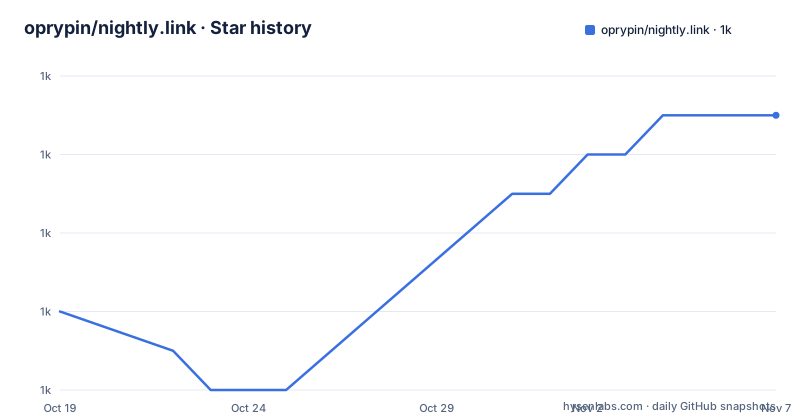
- oprypin/nightly.link1,017 ★ · +5
| Repository | 2026-10-19 | 2026-11-07 |
|---|---|---|
| oprypin/nightly.link | 1k | 1k |
5 Stars in the last 19 days, measured from the daily GitHub snapshot. Compare with other projects
Editorial analysis
The gap in GitHub's own tooling
The service lets you get a shareable link to download a build artifact from the latest successful GitHub Actions build of a repository, and any public repository is accessible by default with no login required for visitors.
The issue section states the problem in two sentences. GitHub has no direct way to link to the latest build from GitHub Actions of a given repository. And even if you do have a link to an artifact, using it requires the visitor to be logged into the GitHub website.
Both halves matter. The first is the convenience problem, and the second is the sharing problem, because a download link that requires a login cannot be pasted into a forum post, a bug report or a chat message and expected to work for the person reading it.
The README traces the origin to a specific upstream discussion, the issue on the artifact upload action titled Artifact download URL only work for registered users. So the service is a targeted fix for a gap in how GitHub exposes workflow artifacts, and it exists because the artifacts themselves are designed for a CI context rather than for distribution.
If you are publishing a link to your own repository's artifacts, the README asks you to install the GitHub App anyway, so that downloads for your repositories do not share the global API rate limit, and it warns that the throttling will likely become very bad over time. That request is the difference between using the service casually and using it as infrastructure.
Two ways to authorise, and what each one is for
The authorisation section describes a design that has two distinct GitHub App modes, and the distinction is easy to miss because the prompts look different.
The service is first an installed GitHub App. That is the mode for a repository you own, where you install it on your organisation or your account. The permissions it requests in that mode are narrow and read-only: for Actions, workflows, workflow runs and artifacts, and for the mandatory Metadata permission, searching repositories, listing collaborators and accessing repository metadata.
The second mode is as an authorised GitHub App, which is what a visitor who wants to see a private repository authorises. The README is refreshingly blunt about what GitHub shows in that prompt. The text says the service would like permission to verify your GitHub identity, to know which resources you can access, and to act on your behalf, and that this blurb is completely generic and will be shown for any GitHub App authorisation regardless of its permissions.
That is worth knowing before you click through a scary-sounding consent screen. The permissions the app asks for are granted even if it is only installed, without being authorised.
The README also explains why identity verification is needed at all: so that only you can view links to private repositories and your organisations, and that other things the service is not even asking for. And it invites you to revoke the authorisation part while keeping the installation, if you are done with the interface, which is a sensible thing to be able to do.
How the download actually happens
The mechanics are described in the authorisation section and they explain the design.
Because GitHub does not provide any permanent and public links to an artifact, this service redirects to time-limited links that GitHub can give to the application, only on behalf of an authenticated user that has access to the repository. So whenever someone downloads an artifact from a repository that you had added, the service uses a token that is associated with your installation of the GitHub App.
That is the whole trick, and it is what makes the public access work for a public repository. The visitor does not log in, the service does, on your behalf, using the token from your installation, and then redirects the visitor to a short lived URL that GitHub issued.
The consequence is that the links are not permanent, and that the service is a proxy rather than a mirror. The artifact is not copied to the service's own storage. It is fetched from GitHub at request time using your credentials, which is why an installed repository can be downloaded by anyone, and also why the rate limit applies to your installation.
What is stored, and for how long
The privacy policy is given as an exhaustive list, which is unusual and welcome.
Server-side, the service stores the full repository names that you gave access to. Client-side, it stores nothing. The server of the main instance also keeps access logs and application logs for up to three months, and the page says it will be updated if this changes.
So the entire state of the service is a list of repository names, plus operational logs. There is no account database, no cookie jar of tracked visitors, and nothing stored on the client, which is what makes the private repository case work: a link to a private repository is only reachable by someone who authorises, and the authorisation is GitHub's, not the service's.
The three month log retention is the one number worth remembering if you are thinking about what a request to the service reveals. Access logs record who fetched what, and they are kept for a quarter.
There is also a pricing section, and the answer there sets the tone for the rest of the project. nightly.link is provided totally free of charge, including the main instance that has been running at the author's own expense. If you rely on the service, the README asks you to support its continued maintenance by donating to the author, through the GitHub sponsors page, and it states that no paid features are currently planned.
The alternative, and what this service is not for
The alternative to a link like this is to publish the build somewhere stable, and that is the right answer for most projects.
A release page, a package registry or an object store gives a versioned, permanent URL that does not change under the reader's feet, that can be cached, that can be signed and that survives the project being abandoned. A link to the latest CI build has none of those properties, because the artifact behind it is replaced every time the pipeline runs.
So the two serve different purposes, and the choice comes down to the audience. A tester who wants to check whether the change you pushed ten minutes ago fixed the bug wants the newest artifact, and a nightly link is exactly that. A user who wants the stable release wants a versioned one, and putting that behind a nightly link would be a mistake.
The README also says the service has no affiliation with the author's employer and none with GitHub either, and the author section names the developer and runner. The contact route is an issue on the repository.
The practical limitations follow from the architecture. The link only resolves while the pipeline is producing successful builds, a failing pipeline means the link points at the last successful one, which is a subtle difference that catches people out. The download is as slow as GitHub's artifact storage, because the artifact is fetched from GitHub rather than served from here. And the service depends entirely on GitHub continuing to expose workflow artifacts the way it does today.
The Crystal implementation and the build
The service is written in Crystal, and the repository layout and Makefile show a small project with a clear shape.
The sources are under src, with the main file named after the service, the tests are under spec, the templates directory holds the HTML templates, and there is a shard manifest and lock file for the dependency management that Crystal uses. The Makefile builds the binary with Crystal, with an error trace flag and an optional release flag.
nightly_link: $(all_sources)
	$(CRYSTAL) build --error-trace $(if $(release),--release )$<
The tests run through the Crystal spec runner, in random order, which is a small detail that matters more in a service with time dependent behaviour than it does elsewhere.
test: $(all_sources)
	crystal spec --order=random
The documentation is generated rather than written by hand. There is a small Crystal program that renders the Markdown files into HTML at build time, and the stylesheet is assembled by concatenating the local style file with the GitHub markdown CSS fetched from a CDN, with a small substitution applied to the selectors so the rules apply to the rendered body. That is a plain static site pipeline, and it means the README and the site cannot drift apart.
The run target shows one more thing about the deployment: the service is started through a separate script that supplies credentials, so the token handling is outside the binary.
The licence is the AGPL, copyright 2020, and the release history is short, with 1.4.10 and 1.4.9 from July 2023 and 1.4.3 from March 2021, and the last push to the repository was on 2026-07-19.
Editorial conclusion
Adopt nightly.link if your project ships CI builds to people outside your organisation, because the alternative is asking every tester to have a GitHub account and to navigate the run page, which is a real barrier. Do not adopt it as the distribution channel for your released product, since the whole point is that the artifact is the newest one and it changes under the link. Before you point it at your own repository, install the GitHub App, because without it your downloads consume a shared global rate limit and the README warns the throttling will likely get bad over time.
Frequently asked questions
What does nightly.link do?
It gives you a shareable link to download a build artifact from the latest successful GitHub Actions build of a repository. Any public repository is accessible by default and visitors do not need to log in, which solves the problem that GitHub has no permanent public link to an artifact and that artifact download URLs work only for registered users.
Why should I install the nightly.link GitHub App on my repository?
So that downloads for your repositories do not share the global API rate limit, and the README warns that the throttling will likely become very bad over time. The app requests read-only access to workflows, workflow runs and artifacts, plus the mandatory read-only metadata permission.
What data does nightly.link store?
Server-side it stores the full repository names you gave access to, and client-side it stores nothing. The main instance also keeps access logs and application logs for up to three months, and the policy page says it will be updated if that changes.
Is nightly.link free?
Yes. The README states that the service is provided totally free of charge, including the main instance which has been running at the author's own expense, asks for donations to the author through GitHub Sponsors to support maintenance, and says no paid features are currently planned.
Official sources
Add this badge to your README
If you maintain this project, the badge below links readers to this analysis and shows its maintenance status from the daily GitHub snapshot. Paste the markdown into your README; add ?metric=license or ?metric=stars to the image URL for a different field.

[](https://hysenlabs.com/projects/oprypin-nightly-link)Star history chart for your README
[](https://hysenlabs.com/projects/oprypin-nightly-link)Was this useful?