The node-oracledb README on main is a banner for a build numbered 26, not for v7
Oracle Database driver for Node.js maintained by Oracle Corporation. Connect your JavaScript and TypeScript applications instantly to Oracle Database.
At a glance
- What is it?
- Oracle's official Node.js driver for Oracle Database, dual-licensed, with a native addon under the hood and roughly fifty runnable examples standing in for documentation. The versioning is the thing to read first: the published line ends at 7.0.1, the tree has jumped to a calendar-style 26.0.0-dev, and the page you land on says outright that information may be incomplete.
- Who is it for?
- Treat this as a vendor driver with unusually good example coverage, which is the part worth taking from it. Two things to verify before you rely on it.
- Can I use it commercially?
- Check first. The repository uses a licence we do not classify automatically, so read its LICENSE file before any commercial use.
- Is it still maintained?
- Yes. The repository last received commits 12 days ago.
- What is it written in?
- Mainly JavaScript, according to GitHub's language statistics.
Answers come from the project's GitHub data, last synced on November 15, 2026, and from our analysis. They are not legal advice.
Star history
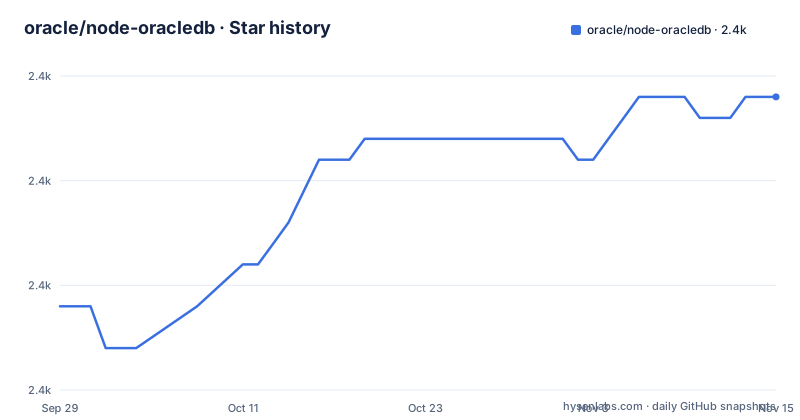
- oracle/node-oracledb2,379 ★ · +10
| Repository | 2026-09-29 | 2026-11-15 |
|---|---|---|
| oracle/node-oracledb | 2.4k | 2.4k |
10 Stars in the last 47 days, measured from the daily GitHub snapshot. Compare with other projects
Editorial analysis
The first thing on the page is a warning that it is unfinished
The README's heading is not the driver you would install. It names a development version and says, in bold, that the release is under development and information may be incomplete. That is an unusual thing to put at the top of the file a person lands on from the repository, and it is there because the default branch is a work in progress rather than a tag. The rest of the page then proceeds as if it were stable documentation: an install line, a dependency and interoperability section with concrete version floors, a feature summary, and a licence statement. So the page you read while evaluating the driver is not the page a user of the released version reads. Nothing on it says where the stable documentation lives, so the reader has to infer it from the release list.
The published line ends at 7.0.1 and the tree is numbered 26
The releases are v6.10.0 in October 2025, v7.0.0 in June 2026 and v7.0.1 in July 2026, which is an ordinary semantic progression with a major bump in the middle. The development version in the tree and in the manifest is 26.0.0-dev. So the numbering changed shape between the last published major and the current work: a three-part semantic number became a year-prefixed one, and the next published version will be 26-something rather than 7-something. That is defensible for a vendor aligning versions with its own release calendar, and it also breaks every assumption a reader holds about a version number. The last commit is dated 2026-09-29, days before the latest release line was frozen, so the tree is being worked on now, which is the other half of what the banner is telling you.
Two modes, and each one has its own database floor
Since version 6.0 the client libraries are optional, and that single change produced the two-mode design. Thin mode is the default: the driver connects directly to the database with nothing else installed, and it needs Oracle Database 12.1 or later. Thick mode is for the advanced functionality that is only available when the driver loads Oracle Client libraries, which are available in the free Instant Client packages, at version 19 or later. Thick mode reaches further back, to Oracle Database 11.2 or later depending on which client version you load, and the page gives the interoperability example: driver on client 19c can talk to 11.2. Older driver versions needed the client libraries always. The practical consequence is that your install decision is really a feature decision, and the floor you can support depends on the mode rather than on the driver alone.
The metadata records no licence and three files record two
The repository index shows no licence for this project. The README says the software is dual-licensed, giving the Universal Permissive License 1.0 or the Apache License 2.0, and pastes the Apache text inline after that statement. The manifest uses the machine-readable form of the same choice, a parenthesised expression offering either licence. The tree carries three licence-adjacent files at the root: the licence text itself, a notice file, and a file listing third-party licences, which is the correct arrangement for a native module that links vendor code. So a machine reading only the index sees nothing, while a human reading the README has the answer with a copyright range of 2015 to 2026. This is worth stating plainly rather than treating as a defect: dual licensing is common for vendor drivers, and the missing index value is a gap in how the licence is reported rather than in the licensing itself.
The runtime floor is Node 14.17 and the development tools are two generations newer
Both the README and the manifest state a floor of Node 14.17, which is a long-standing runtime. The development dependencies tell a different story about what working on the driver requires: the linter is at version 10 of its major line, the test runner at version 12, with the shared linter configuration and the globals package also pinned to specific releases rather than ranges. Every one of those is an exact pin, which is good practice for a repository where a float would silently change what CI runs. The tension is between a runtime floor fixed in 2021 and a toolchain from the current year, and a contributor on the declared minimum Node version cannot run the project's own linter. The page does not address this, and it does not say what Node version the maintainers develop against either, which is the number a contributor actually needs.
It is a native addon, and most users never build it
The driver is not pure JavaScript. The root carries a native build description, a directory named for the Oracle Database proxy interface that the C layer sits on, source, library and packaging directories, a plugins directory, and a JavaScript entry point. Two package scripts run node files to build the binary and then to assemble the distributable package, and a submodule file sits at the root, so the build pulls something from another repository. None of that is the install path, because the README says pre-built packages are available on the package registry and on mirror repositories, with the source also available. So the shape is: most users take a binary from the registry, contributors build it, and the gap between the two is where the submodule and the native toolchain live. The README does not describe the build, which is reasonable if the docs site covers it and worth checking if you plan to patch the driver.
Fifty example files are the documentation
The examples directory is the manual, and its naming is a feature index. There are separate files for advanced queueing in five variants, two for continuous query notifications, two for date and timestamp handling, two for database output in line and piped modes, files for connection pooling, connection configuration, call timeouts, blob access over HTTP, associative array binding, an object type example, an application context example, and three separate files for Microsoft Azure authentication covering a configuration provider, a cloud-native token and token auth. Two more are named for data security, one of them a deep variant. Each is a runnable file rather than a prose section, which means the fastest way to learn a feature is to open the file and read the code, and the slowest way to discover that a feature exists is to read a table of contents.
The project homepage is served over plain HTTP
Two small details that a reader will notice on the way past. The homepage field in the manifest, and the site link in the README's badge row, are both plain HTTP rather than HTTPS, while every documentation and discussion link beside them is HTTPS. That is a cosmetic-level inconsistency rather than a functional one, since the actual documentation lives on the read-the-docs site. The other detail is the test setup, which runs a test runner with its configuration file inside the test directory, and then runs a second node script afterwards that appears to check versions once the suite has finished. A post-test version check is the kind of thing that catches a build producing a binary whose version does not match the manifest, which is exactly the class of bug this repository's version scheme could otherwise ship.
Editorial conclusion
Treat this as a vendor driver with unusually good example coverage, which is the part worth taking from it. Two things to verify before you rely on it. First, which version you actually get: the published line and the tree number have diverged, the page on the default branch is a development banner, and a version number of 26 tells you nothing about which database features you have, so match the driver to the release notes rather than to the number. Second, which mode you are in. Thin mode is the default and needs nothing installed, but a slice of functionality only exists in thick mode, and thick mode drags in Oracle Client libraries plus an older database floor, so the two modes are different products with different version requirements. Everything else, including the licensing, is stated plainly and consistently in the three places it appears.
Frequently asked questions
What is node-oracledb?
It is Oracle's official open-source Node.js add-on for Oracle Database, maintained by Oracle Corporation, usable from JavaScript or TypeScript. It covers SQL and PL/SQL execution, fast data ingestion, document-style database APIs, message queueing, database notifications, starting and stopping the database, high availability and security features, and optional pipelining of database operations.
How do I install node-oracledb?
With `npm install oracledb`. Pre-built packages are published on the package registry and on mirror repositories, and the source is available if you need to build it. Oracle Client libraries became optional in version 6.0; earlier versions of the driver required them.
What is thin mode in node-oracledb?
It is the default from version 6.0 onwards, where the driver connects directly to Oracle Database with no Oracle Client libraries installed. Thin mode requires Oracle Database 12.1 or later, and the README notes that previous driver versions supported older Node.js versions and older client versions.
When do I need thick mode in node-oracledb?
For the advanced Oracle Database functionality that is only available when the driver loads Oracle Client libraries, which are available in the free Instant Client packages at version 19 or later. Thick mode also lowers the database floor, reaching Oracle Database 11.2 or later depending on the client version, with the page noting that client 19c libraries can connect to 11.2.
Which Node.js versions does node-oracledb support?
Node 14.17 and later, stated in the README and in the manifest's engine field, and the page adds that previous versions of the driver supported older Node.js versions. The development dependencies, by contrast, are pinned to recent linter and test-runner majors, so the minimum runtime is not the version a contributor develops against.
Which version of node-oracledb should I install?
The newest published release is v7.0.1, following v7.0.0 and v6.10.0. The default branch is a development build numbered 26.0.0-dev, and the README on that branch warns that the release is under development and information may be incomplete, so the published release list rather than the tree version is what tells you what is shippable.
Official sources
Add this badge to your README
If you maintain this project, the badge below links readers to this analysis and shows its maintenance status from the daily GitHub snapshot. Paste the markdown into your README; add ?metric=license or ?metric=stars to the image URL for a different field.

[](https://hysenlabs.com/projects/oracle-node-oracledb)Star history chart for your README
[](https://hysenlabs.com/projects/oracle-node-oracledb)Was this useful?