clipboardy: one clipboard API across macOS, Windows, Linux, the BSDs and the browser
Access the system clipboard (copy/paste)
At a glance
- What is it?
- clipboardy gives Node and the browser a single write and read interface to the system clipboard, and on Linux it detects Wayland and falls back to X11 tools, while the image methods exist only on macOS and quietly do nothing elsewhere.
- Who is it for?
- clipboardy fits a Node tool that needs to put something on the system clipboard, on whatever machine the user happens to be running, and a browser build that needs the same call site to work. It is a poor fit for a CI server or a headless Linux box, because clipboard operations there need a display server and there is no system clipboard to talk to, and it is a poor fit if you need image handling off macOS, since those methods are no-ops.
- Can I use it commercially?
- Yes. MIT is a permissive licence: you can use, modify and sell software built on it, as long as you keep its copyright and licence notices.
- Is it still maintained?
- Yes. The repository last received commits 92 days ago.
- What is it written in?
- Mainly JavaScript, according to GitHub's language statistics.
Answers come from the project's GitHub data, last synced on October 23, 2026, and from our analysis. They are not legal advice.
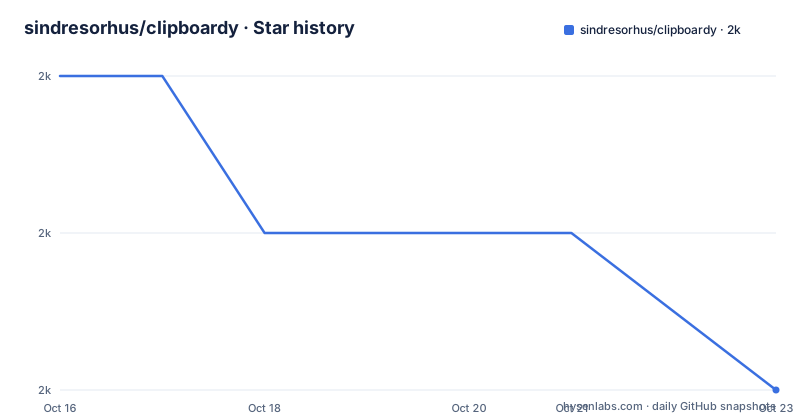
Star history
- sindresorhus/clipboardy1,982 ★ · -2
| Repository | 2026-10-16 | 2026-10-23 |
|---|---|---|
| sindresorhus/clipboardy | 2k | 2k |
-2 Stars in the last 7 days, measured from the daily GitHub snapshot. Compare with other projects
Editorial analysis
The platform list, and what the browser build changes
clipboardy is a cross-platform library to access the system clipboard, for copy and paste. The supported platforms are macOS, Windows, Linux including Wayland, OpenBSD, FreeBSD, Android with Termux, and modern browsers.
The browser is the interesting case, because the whole library is built around the idea of shelling out to a platform tool, and a browser cannot do that. The package manifest handles it with a conditional export map:
"exports": {
	"types": "./index.d.ts",
	"node": "./index.js",
	"default": "./browser.js"
}
So Node resolves to index.js, which is the native implementation, and everything else, a browser bundler, resolves to browser.js. There is a browser.js file at the repository root to do that, and the files list ships index.js, index.d.ts, browser.js, the lib directory and the fallbacks directory.
The consequences for the API are stated in the documentation. Browser usage requires a secure context, so HTTPS, and the synchronous methods are not available in browsers. That is not a limitation of the library but of the Clipboard API, which is asynchronous and permission-gated, and the library passes that through rather than hiding it.
The package is MIT licensed, authored by Sindre Sorhus, the version is 5.3.2, and it requires Node 20 or newer. It is an ES module with sideEffects false, so bundlers can drop it when nothing uses it.
Four text methods, and the difference between them
The core API is four methods on a default-exported clipboard object, two async and two sync.
import clipboard from 'clipboardy';

await clipboard.write('text');

await clipboard.read();
//=> 'text'

// Or use the synchronous API
clipboard.writeSync('text');

clipboard.readSync();
//=> 'text'
The async write returns a Promise of void and the async read returns a Promise of a string. The sync write takes a string and the sync read returns a string.
The sync pair exists because some callers are in a context where awaiting is not possible, a CLI teardown path, a process exit handler, a synchronous script. The documentation is explicit that they do not work in browsers, and the manifest points the browser build elsewhere, so the sync methods are simply absent there rather than throwing.
The image methods are the asymmetric part of the API. writeImages takes an array of file paths and returns a Promise of void, and it is only supported on macOS, where it is a no-op on other platforms. It supports any image type macOS supports, including PNG, JPEG, HEIC, WebP and GIF.
readImages returns a Promise of an array of file paths to temporary PNG files, and the documentation is clear that you are responsible for cleaning them up. That is a real operational detail: the library writes temporary files and does not remove them, so a long-running process calling readImages in a loop accumulates files.
hasImages returns a Promise of a boolean, is macOS only, and returns false everywhere else. So the same call that tells you the clipboard has an image on a Mac tells you it does not on Windows, and the difference is invisible at the call site.
How each platform is actually reached
The FAQ section explains the mechanism per platform, and it is the part worth reading before you deploy.
On Linux the tool detects a Wayland session and uses wl-clipboard when it is available, and if it is not, it gracefully falls back to the X11 tools. It also works with WSLg, the Windows Subsystem for Linux GUI. The Wayland fallback is the reason the package depends on is-wayland, and wl-clipboard has to be installed from your distribution's package manager.
The Linux binary is a bundled version of xsel, and the Windows binary is clipboard_x86_64.exe, whose source is in a separate sindresorhus/win-clipboard repository. Both are shipped in the fallbacks directory.
On Windows, clipboardy first tries the native PowerShell cmdlets, Set-Clipboard and Get-Clipboard, and falls back to the bundled binary if PowerShell is unavailable or restricted. That ordering matters, because the PowerShell path needs no bundled executable while the fallback does, and the powershell-utils dependency is what wraps the cmdlet calls.
The remaining dependencies are the small detection helpers. is64bit picks the right Windows binary, is-wsl detects the Windows Subsystem for Linux, execa runs the child processes, and clipboard-image handles the macOS image path.
There is also a separate project, clipboard-cli, which is described as a CLI for this module, so the same behaviour is available from a shell.
The headless case, and where the library stops
The first limitation is the one the FAQ answers with a plain No. Does this work in headless Linux environments? No. Clipboard operations on Linux require a display server, X11 or Wayland, and headless environments like CI servers or a Raspberry Pi without a desktop environment do not have a system clipboard.
That is not a bug to work around, it is the nature of a system clipboard, and it means a test suite that exercises clipboard code needs a display server or a virtual one. The package has no built-in in-memory clipboard for tests.
The second limitation is the browser. The async methods work in a secure context, so your page has to be served over HTTPS, and the browser will ask the user for permission. The sync methods are absent. So a codebase that calls writeSync somewhere will break when it is bundled for the browser, and the failure is a missing function rather than a helpful error.
The third limitation is the image support, which is macOS only in both directions, and which on other platforms is a silent no-op rather than an error. A cross-platform tool that copies images needs to branch on the platform itself, because the library will not tell it.
The fourth is the temporary files. readImages writes PNG files to a temporary location and hands you the paths, leaving the cleanup to you, so the caller needs a cleanup strategy or it leaks files.
The fifth is the security model of the underlying tools. On Linux the implementation runs wl-clipboard or xsel as a child process, and on Windows it runs PowerShell cmdlets or a bundled executable, so a user running your tool is running processes on their machine and the permission model is the operating system's. On a shared machine, a clipboard read is a read of whatever the user last copied, including a password from a password manager, and the library does nothing to narrow that.
On maintenance, the repository is not archived, the last push was on 2026-07-23 with v5.3.2 released the same day, and the project keeps a related set: clipboard-cli for the command line, clipboard-image for images, and copy-text-to-clipboard for the browser.
Editorial conclusion
clipboardy fits a Node tool that needs to put something on the system clipboard, on whatever machine the user happens to be running, and a browser build that needs the same call site to work. It is a poor fit for a CI server or a headless Linux box, because clipboard operations there need a display server and there is no system clipboard to talk to, and it is a poor fit if you need image handling off macOS, since those methods are no-ops. Before adopting, check whether your target is a desktop with a display server, and if you rely on the sync methods, remember they do not exist in a browser at all.
Frequently asked questions
How do I install and use clipboardy?
Run npm install clipboardy, then import the default export and await clipboard.write('the text') to copy and clipboard.read() to paste. Synchronous variants writeSync and readSync exist for Node, and the package requires Node 20 or newer.
Does clipboardy work on Wayland?
Yes. On Linux, clipboardy automatically detects Wayland sessions and uses wl-clipboard when available, falling back gracefully to the X11 tools if it is not. It also works with WSLg, and you need to install wl-clipboard from your distribution's package manager.
Can I copy images with clipboardy?
Yes, but only on macOS. writeImages takes an array of file paths and readImages returns paths to temporary PNG files that you are responsible for cleaning up, and hasImages checks whether the clipboard holds images. On other platforms these are no-ops, returning an empty array or false.
Does clipboardy work in a headless Linux environment?
No. Clipboard operations on Linux require a display server, either X11 or Wayland, and headless environments such as CI servers or a Raspberry Pi without a desktop environment have no system clipboard to access.
Official sources
Add this badge to your README
If you maintain this project, the badge below links readers to this analysis and shows its maintenance status from the daily GitHub snapshot. Paste the markdown into your README; add ?metric=license or ?metric=stars to the image URL for a different field.

[](https://hysenlabs.com/projects/sindresorhus-clipboardy)Star history chart for your README
[](https://hysenlabs.com/projects/sindresorhus-clipboardy)Was this useful?