OrbbecSDK v1, the branch that keeps the cameras v2 dropped
Orbbec SDK v1&v2 Pre-Compiled Repo
At a glance
- What is it?
- The main branch of OrbbecSDK is version 1 of a pre-compiled C SDK, and it exists for one reason above all: it still speaks Orbbec's original OpenNI protocol, which the separate v2 repository dropped. Everything else about this repository follows from that split, including a 28 row device table where a single product decides whether you are on v1 or v2.
- Who is it for?
- Pick this branch when you own an OpenNI era Orbbec camera, because nothing else in the vendor's stack supports those devices today. Pick the v2 repository for anything bought in the UVC era, and treat the support table as the deciding artefact rather than the product names.
- Can I use it commercially?
- Check first. The repository uses a licence we do not classify automatically, so read its LICENSE file before any commercial use.
- Is it still maintained?
- Yes. The repository last received commits 77 days ago.
- What is it written in?
- Mainly C, according to GitHub's language statistics.
Answers come from the project's GitHub data, last synced on November 15, 2026, and from our analysis. They are not legal advice.
Star history
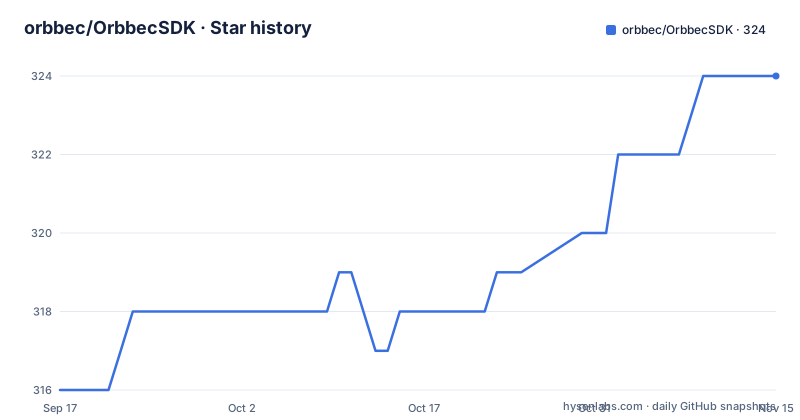
- orbbec/OrbbecSDK324 ★ · +8
| Repository | 2026-09-17 | 2026-11-15 |
|---|---|---|
| orbbec/OrbbecSDK | 316 | 324 |
8 Stars in the last 59 days, measured from the daily GitHub snapshot. Compare with other projects
Editorial analysis
This branch is v1 and the other version lives elsewhere
The repository description says v1 and v2, and the repository itself is only v1.
The main branch is based on Orbbec SDK v1, and it is compatible with Orbbec's original OpenNI protocol devices through built-in code. The stated purpose of that is migration: one set of code can cover both new and old products.
Orbbec SDK v2 is a different repository. It no longer supports the legacy OpenNI protocol devices, and those devices continue to receive bug fix support here, on the v1 branch. The README's advice is to check whether your device is supported by v2 and use the newer release if it is.
So the choice is not new versus old SDK, it is new versus old hardware. The vendor asks you to look up your camera first and pick the branch accordingly, and the first thing in the file is a callout telling you the device support list is the thing to check before you begin.
The timeline is one line: Orbbec SDK became open source with the major update in October 2024, which is what brought compatibility with the newer USB products that follow the UVC standard into this codebase.
For users in China the README recommends the Gitee mirror instead, with no statement about which of the two is canonical.
Five maintenance words, and one that no row uses
The table is graded, and the grades are defined at the bottom of the file.
There are five labels. Recommended for new designs means full support with new features, bug fixes, and performance optimization. Full maintenance means bug fix support. Limited maintenance means critical bug fix support. Not supported means the device is not supported in that version. To be supported means support will be added in the near future.
Four of those five appear in the v1 column. Four hundred and fifty to one is roughly how the catalogue splits: fourteen products at full maintenance, two at limited, one recommended, and eleven not supported.
To be supported appears in the definitions and in no row of the table. Whether that is a leftover from an earlier draft or a category reserved for the next hardware revision, the file does not say.
What the grading does not tell you is whether an unsupported device still works. Not supported is defined in terms of what the vendor will do, not in terms of what the code can do, and for a library that talks to hardware those are different questions. Reading that column as a capability statement rather than a maintenance statement is the easiest mistake to make with this table.
Gemini 2 XL is the one product v1 supports and v2 does not
Almost every row points the same way, and one row does not.
The v2 column recommends new designs for twenty-five of twenty-eight products. The v1 column recommends new designs for exactly one: Gemini 2 XL, which is marked not supported on v2.
The two rows between full support and no support at all are Astra+ and Astra Pro Plus. Both sit at limited maintenance on v1 and not supported on v2, which means the vendor will still take critical fixes for them here and nothing at all there.
That gives you three bands rather than two. Products you should start new designs with, products you can keep shipping on this branch with bug fixes, and products that only exist on v1 at all.
The Gemini 2 XL case is the one to read carefully, because it inverts the guidance. Everywhere else the README is telling you to move to v2. For that product the move is not available, so a team standardising on v2 has no path and has to keep a v1 dependency alive for it.
The newer Gemini 330 and Gemini 435 families show the opposite pattern. Several members, including Gemini 335Le and Gemini 335Lg, are not supported here and recommended for new designs on v2.
The same camera speaks two protocols depending on firmware
One footnote carries the most operationally important warning in the file.
If a device is supported by both SDKs, the minimum supported firmware version may differ between them. The specific case named is the Astra Mini Pro and the Astra Mini S Pro, which use different communication protocols in v1.x.x firmware and v2.x.x firmware. Orbbec SDK v1 supports only v1.x.x firmware and v2 supports only v2.x.x firmware.
So those two products appear in the table as fully supported on v1 and recommended on v2, and neither fact helps you if you pick the branch and then discover the unit is on the other firmware line. The SDK does not fall back. The table also omits a way to check which line a given unit is on.
The README points at an upgrade guide for moving from the OpenNI protocol to the UVC protocol, which is the migration path when you are changing firmware rather than changing SDK.
The broader principle is worth carrying over to the rest of the catalogue. These are devices with field-updatable firmware, and the SDK branch you choose constrains the firmware you can run, not just the code you call.
The support table has broken markup in four places
The device list is an HTML table embedded in the README, and the markup has errors a reader will hit.
The Gemini 330 series is declared with a rowspan of eight, and eight rows follow it. The Femto Azure row that follows has no opening tag at all and closes an unrelated cell, so the table structure breaks there and the Astra Mini series rows that follow are left mismatched. There is also a duplicated closing row tag after the Astra Mini entries, and the Gemini 2 XL row is missing its table row opening.
None of this changes which devices are listed. It changes what renders depending on where you read the file. GitHub is forgiving enough to show the content with some cells misaligned, and stricter renderers or the raw file will not recover it cleanly.
There is a second issue in the definitions list rather than the table. The entry for to be supported ends mid-word, at near futur, with the table definitions and the file ending there.
For a document whose whole job is to be authoritative about compatibility, the format is doing more damage than the content. The information is checkable; the presentation makes it easy to misread which column a value belongs to.
C and C++ examples, with pkg-config and CMake config shipped
The repository is built to be consumed by other build systems rather than to be read as a tutorial.
At the root there is a CMakeLists.txt, a cmake/ directory, an OrbbecSDKConfig.cmake, and an OrbbecSDK.pc.in. The last two are the two standard ways to make a native library findable: a CMake package config for find_package, and a pkg-config template for projects that do not use CMake. There is also a package.xml, which is the manifest format ROS 2 uses, so a build from source can be consumed by a robotics workspace.
The examples directory contains a CMakeLists.txt, its own README and Chinese README, and exactly two subdirectories, c and cpp. There is no Python example here and no ROS example, which is worth knowing if your integration is in either language, because the related search terms around this project are full of Android, Python, and ROS 2 requests that belong to other repositories.
The binaries are committed rather than built from source in the usual sense, since the repository describes itself as a pre-compiled repo. There is a lib/ directory and an include/ directory, plus misc/ and doc/.
The README is duplicated in English and Chinese at the root, and the examples README is duplicated the same way, so the two are expected to be kept in step.
A .clang-format at the root says the C sources are formatted with a committed style.
Release numbers skip and the gaps run to months
The tag history explains a little about how the branch is maintained.
The three most recent releases are v1.10.27 on 30 September 2025, v1.10.35 on 12 February 2026, and v1.10.37 on 29 August 2026. Two things follow. The build numbers skip: 28 through 34 and 36 never appear as releases, which usually means intermediate builds existed and were not tagged, or that some were held back.
The second thing is the interval. Four and a half months between the first two, then six and a half months to the third. For a library whose entire purpose is keeping working across many camera models and firmware lines, a half-year cadence is slow, and it is worth factoring into a maintenance decision.
The last push to main is 31 August 2026, two days after v1.10.37, and the repository is not archived. So the tag and the branch are close together, which is the healthy pattern.
A LICENSE.txt sits at the root, though the licence itself is not named in the text. The v1 branch is described as receiving bug fix support for the OpenNI devices, so its longevity is a policy commitment rather than a version number.
Editorial conclusion
Pick this branch when you own an OpenNI era Orbbec camera, because nothing else in the vendor's stack supports those devices today. Pick the v2 repository for anything bought in the UVC era, and treat the support table as the deciding artefact rather than the product names. Before you commit, check four things. The firmware line your specific unit is on, since the Astra Mini Pro and Astra Mini S Pro speak different protocols in v1.x.x and v2.x.x and the two SDKs accept opposite firmware. Whether your product is the one row where v1 wins, since Gemini 2 XL is recommended on this branch and unsupported on v2. Whether you need anything beyond C and C++, because the examples here cover only those two. And whether you are in China, where the vendor points you at a Gitee mirror instead of this repository.
Frequently asked questions
What is Orbbec SDK?
It is a pre-compiled C SDK for Orbbec depth and RGB cameras. The main branch is v1, which supports Orbbec's original OpenNI protocol devices through built-in code. Orbbec SDK v2 is a separate repository for UVC standard products and no longer supports those legacy OpenNI devices.
How to install Orbbec SDK?
The first instruction is to check the device support list before using the version, because v1 and v2 mark most products differently. The repository ships CMakeLists.txt, OrbbecSDKConfig.cmake and OrbbecSDK.pc.in at the root, with C and C++ examples under examples/, and a package.xml for ROS 2 workspaces.
How do I check whether my Orbbec camera is supported?
The support table grades each product against both branches as recommended for new designs, full maintenance, limited maintenance, or not supported. If a device is supported by both, the minimum supported firmware may differ, and the Astra Mini Pro and Astra Mini S Pro speak different protocols in v1.x.x and v2.x.x firmware.
Official sources
Add this badge to your README
If you maintain this project, the badge below links readers to this analysis and shows its maintenance status from the daily GitHub snapshot. Paste the markdown into your README; add ?metric=license or ?metric=stars to the image URL for a different field.

[](https://hysenlabs.com/projects/orbbec-orbbecsdk)Star history chart for your README
[](https://hysenlabs.com/projects/orbbec-orbbecsdk)Was this useful?