OroChippw/SegmentAnything-OnnxRunner: SAM in C++ with a decoupled encoder
SegmentAnything-OnnxRunner is an example using Meta AI Research's SAM onnx model in C++.The encoder and decoder of SAM are decoupled in this repository.
At a glance
- What is it?
- A C++ runner for Meta's Segment Anything ONNX models that separates the encoder from the decoder, so clicking a second point on the same image does not pay for encoding it again. It is a Windows and CPU only experiment harness, and the README is candid about that, publishing its own measured encoder times so you can see where the cost sits.
- Who is it for?
- Use this repository if you want to see a segmentation model driven interactively from C++ without a Python runtime in the loop, and if the encoder timings are what you need to decide between model variants. Two limits are stated plainly and should shape your plan.
- Can I use it commercially?
- Yes. MIT is a permissive licence: you can use, modify and sell software built on it, as long as you keep its copyright and licence notices.
- Is it still maintained?
- Probably not. The repository last received commits 35 months ago, on December 8, 2023.
- What is it written in?
- Mainly C++, according to GitHub's language statistics.
Answers come from the project's GitHub data, last synced on October 22, 2026, and from our analysis. They are not legal advice.
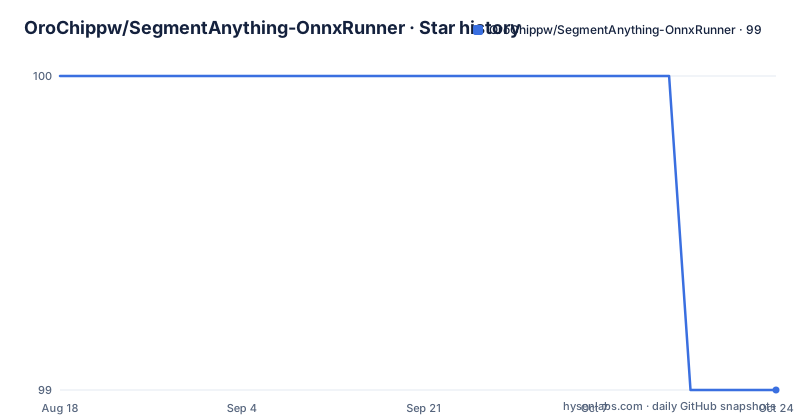
Star history
- OroChippw/SegmentAnything-OnnxRunner99 ★ · -1
| Repository | 2026-08-18 | 2026-10-22 |
|---|---|---|
| OroChippw/SegmentAnything-OnnxRunner | 100 | 99 |
-1 Stars in the last 65 days, measured from the daily GitHub snapshot. Compare with other projects
Editorial analysis
Decoupling is what makes repeated clicks cheap
The stated purpose of the repository is twofold: it is an example of running the SAM ONNX models in C++, and it exists to record the experiment data from running them on a CPU. But the design decision it advertises is the decoupling of the encoder and the decoder. The consequence is spelled out in the model section: because the two halves are decoupled, if you perform multiple interactive clicks on a picture you do not need to re-encode it. That is the whole interactive story. On a segmentation model driven by point prompts, the encode of a full image is expensive and happens once, while each additional click is a small decoder call against cached features. Splitting the checkpoint along that line is what makes an interactive loop feel like an interactive loop rather than a batch job.
The measured numbers put the cost in the encoder
The experiment record gives sizes and speeds for four encoder checkpoints and is the most useful table in the file.
| Encoder | Size | CPU seconds | | --- | --- | --- | | sam_vit_b_01ec64_encoder.onnx | 342MB | 2.5485 | | sam_vit_b_01ec64_encoder-quantize.onnx | 103MB | 2.0446 | | sam_vit_l_0b3195_encoder.onnx | 1.14GB | 6.0346 | | sam_vit_l_0b3195_encoder-quantize.onnx | 316MB | 4.1599 |
The decoders are all around fifteen megabytes and run in roughly eight hundredths of a second. So a decoder call is one to two orders of magnitude cheaper than an encode, which is the quantitative justification for the decoupling, and the quantized variants cut both size and time with the larger model still taking over four seconds. The measurement environment is stated: one of the development machines with a 12 gigabyte card, on an input image of 1920 by 1080 with three channels.
The build instructions contain a typo you will hit
The build is four ordinary CMake commands, with one line that will not work if you paste it.
$ mkdir build
$ cd build
$ cmake ..
$ cmake --build .
# If the specified compilation mode is debug or release, it is as follows
$ cmake --build . --config Debug
$ cmkae --build . --config Release
The release line spells the command incorrectly. The debug line above it is right, so the pair reads as a typo rather than an alternative tool. That matters more here than in most projects because the following run instructions invoke the two executables separately, `Debug/main.exe` and `Release/main.exe`, from inside the build directory. Nothing in the README mentions the mistake, so if your release build appears to do nothing, that word is where to look.
Windows and CPU only, and the README admits it
There is an attention section before the quick start, and it is worth reading before anything else. The interface currently supports CPU execution only, and the code is supported on Windows and may encounter issues when running on Linux. The two development machines are named with their toolchain versions: Windows 10 Professional with CUDA 11.3 and cmake 3.26.2 on one, and Windows 11 Home with CUDA 11.7 and cmake 3.27.1 on the other, both with recent Core processors. The section then adds an important caveat about those numbers, saying the description represents only the development environment of the repository and does not represent any software version restriction information. So the versions are what was used, not a support matrix.
Three arguments are required and six carry defaults
The startup parameter table separates required arguments from optional ones, and the defaults are where most of the behaviour lives. Three are required: the encoder model path, the decoder model path, and the image path. Everything else is optional. Output goes to a directory defaulting to two levels up, and if the folder does not exist it is created. A demo flag, defaulting to true, decides between a graphical interface and a command line mode where you type coordinates directly. A box info flag defaults to false, and when enabled, shift plus a left drag captures a box. A single mask flag defaults to false and is explicitly marked as not recommended. Keeping box information defaults to true. A threshold defaults to 0.9, and results below it are not saved.
Green points are positive and red points are negative
The interaction model is a table of mouse and keyboard bindings, and it is worth internalising before you run the thing. In demo mode, pressing the left mouse button captures the coordinates of a point and sets it positive, drawn as a green dot. The right button does the same and sets the point negative, drawn in red. Holding shift and dragging with the left button captures box information, which consists of an upper-left point and a lower-right point, and that requires the box info flag to be on. Pressing q or escape quits. Pressing c takes the mask output from the previous run and feeds it back as the decoder's mask input so segmentation continues from there. The note attached to that last one matters: clicking directly without pressing c leaves the mask input disabled, which is equivalent to restarting the single-step operation.
The decoder table never names the large models
There is a second measurement table for decoders, and it has a defect worth flagging because it is easy to misread. Four rows are listed, all at roughly fifteen megabytes, with speeds of 0.075, 0.075, 0.086 and 0.082 seconds. The third and fourth rows repeat the two filenames already used in the first two, so the table names only the smaller decoder twice and never names the larger ones at all. That is unfortunate, because the runnable example at the top of the README uses the large encoder paired with a decoder checkpoint of the same large family, and there is no row here telling you what that decoder costs or how big it is. If you are choosing between the two model sizes on decode cost, this table will not answer it.
Checkpoints come from a file share with a passcode
The models are not distributed through a package manager. Both the requirements section and the experiment record point at the same third-party file share, with a passcode embedded in the link itself, and the text notes that all models are available there. The requirements are otherwise modest and pinned: an ONNX runtime build for Windows on x64 at version 1.14.1, OpenCV at 4.8.0, and the C++ standard set to 17. The top-level tree is small and conventional for a CMake project, with a CMake file, a cmake directory, a source directory, an assets folder, a shell script, and both English and Chinese readme files. The licence is MIT. Expect to fetch the checkpoints by hand before anything runs.
Editorial conclusion
Use this repository if you want to see a segmentation model driven interactively from C++ without a Python runtime in the loop, and if the encoder timings are what you need to decide between model variants. Two limits are stated plainly and should shape your plan. It supports CPU execution only, and the code is supported on Windows with possible problems on Linux, so neither a GPU nor a Linux deployment works out of the box. And the model checkpoints come from a third-party file share rather than a package registry, which means fetching them is a manual step you will have to repeat for each machine.
Frequently asked questions
What does segment anything model do?
It produces high quality object masks from input prompts such as points or boxes, and it can also be used to generate masks for all objects in an image. This repository runs the SAM ONNX models in C++ and records the experiment data from running them on a CPU.
How to use segment anything?
This repository builds with CMake, needs three required arguments for the encoder path, decoder path and image path, and is driven either through a graphical demo or a command line mode. Point and box prompts are entered with the mouse in demo mode, or typed as coordinates in cmd mode.
Why decouple the SAM encoder and decoder?
Because then multiple interactive clicks on the same picture do not require re-encoding the image. The checkpoints are shipped decoupled and quantized, and the measured tables show an encode in the seconds range against a decode in hundredths of a second.
Can SegmentAnything-OnnxRunner run on Linux or with a GPU?
Not as it stands. The README states the interface supports CPU execution only, and that the code is supported on Windows and may encounter issues when running on Linux. The listed requirements are an ONNX runtime build for Windows on x64 and OpenCV 4.8.0.
How does the interactive mask chaining work?
Pressing c takes the mask output from the previous run and uses it as the decoder's mask input so segmentation continues. Clicking directly without pressing c leaves the mask input disabled, which the README says is equivalent to restarting the single-step operation. Keys q or escape quit.
Official sources
Add this badge to your README
If you maintain this project, the badge below links readers to this analysis and shows its maintenance status from the daily GitHub snapshot. Paste the markdown into your README; add ?metric=license or ?metric=stars to the image URL for a different field.

[](https://hysenlabs.com/projects/orochippw-segmentanything-onnxrunner)Star history chart for your README
[](https://hysenlabs.com/projects/orochippw-segmentanything-onnxrunner)