ossf/package-analysis, watching what new packages actually do
Open Source Package Analysis
At a glance
- What is it?
- The Package Analysis project detonates new packages from open source repositories inside gVisor sandboxes and records what they touch: files, commands and network addresses. The results land in BigQuery, and the same pipeline can be run locally against a single package.
- Who is it for?
- ossf/package-analysis suits researchers, registry operators and organisations that need behavioural evidence about packages before they enter a build, and it does not suit a developer who wants a quick verdict on one dependency before lunch.
- Can I use it commercially?
- Yes. Apache-2.0 is a permissive licence: you can use, modify and sell software built on it, as long as you keep its copyright and licence notices.
- Is it still maintained?
- Yes. The repository last received commits 1 day ago.
- What is it written in?
- Mainly Go, according to GitHub's language statistics.
Answers come from the project's GitHub data, last synced on November 7, 2026, and from our analysis. They are not legal advice.
Star history
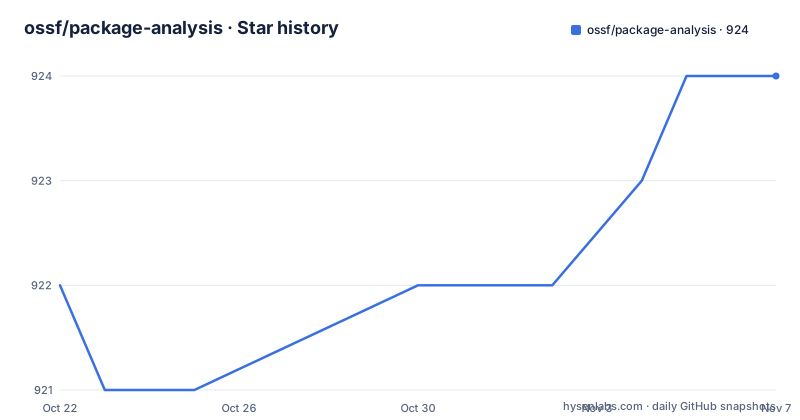
- ossf/package-analysis924 ★ · +2
| Repository | 2026-10-22 | 2026-11-07 |
|---|---|---|
| ossf/package-analysis | 922 | 924 |
2 Stars in the last 16 days, measured from the daily GitHub snapshot. Compare with other projects
Editorial analysis
It looks for files, addresses and commands
The Package Analysis project analyses the capabilities of packages available on open source repositories, and the specific question it asks is behavioural rather than static. It looks for what files a package accesses, what addresses it connects to and what commands it runs.
That framing matters, because it is a different question from the one a vulnerability scanner answers. A scanner tells you whether a known advisory matches a version string. Package Analysis tells you what the code did when it was given the chance to do something, which is the behaviour that separates a package that reads a configuration file from one that reads the SSH keys in your home directory.
The project also tracks changes in how packages behave over time, with the stated purpose of identifying when previously safe software begins acting suspiciously. A package that is quiet on the day it is published and starts phoning home six months later is a different problem from one that is obviously wrong on day one, and only a system that keeps re-analysing will see the second kind.
The stated goals are to improve the security of open source software by detecting malicious behaviour, to inform consumers choosing packages, and to provide researchers with data about the ecosystem. The code is written to work with the Package Feeds project and originally started there, and the README also says it is hoped the components can be used independently, to provide package feeds or runtime behaviour data for anyone interested.
The licence field on the repository says Apache-2.0, and the last push was on 2026-09-25 with the newest release tag, rel-38, dated 2026-05-20.
Four components that can be run together or apart
The architecture is a pipeline with four moving parts, each in its own directory under cmd/ and function/.
The scheduler creates jobs for the analysis worker, taking the list of packages to look at from Package Feeds. The analysis side has two entry points, a one-shot analyze command and a worker that processes a queue. Both collect package behaviour data through static and dynamic analysis of each package. The loader pushes the analysis results into BigQuery.
The pipeline the README describes runs in four steps. Package repositories are monitored for new packages. Each new package is scheduled to be analysed by a pool of workers. A worker performs dynamic analysis of the package inside a sandbox. Results are stored and imported into BigQuery for inspection.
The separation between the scheduler and the workers is the part that makes this scale in a way a single script cannot. Analysis is expensive, because it means actually running untrusted code, so the number of workers is a capacity decision rather than a design detail. The scheduler decides what deserves attention and the workers decide how much attention is available.
The loader completing the picture is what turns a one-off scan into a dataset. Once behaviour records land in BigQuery they can be compared across packages, across ecosystems and over time, which is the only way the change-tracking goal is achievable. The data is published, and the public BigQuery dataset is linked from the README under the heading Public Data, so the results are available to people who never run the project themselves.
gVisor isolation, strace and packet capture
The security of the whole operation rests on the sandbox, and the README names it: gVisor containers ensure the packages are isolated. Detonating a package inside the sandbox allows the project to capture strace and packet data, which can indicate malicious interactions with the system as well as network connections that can be used to leak sensitive data or allow remote access.
Those two data sources map directly onto the three questions the project asks. The syscall trace answers the file and command questions, since it shows what was opened and what was executed. The packet data answers the address question, since it shows what the package talked to and therefore where data could have gone.
Using gVisor rather than ordinary container isolation is a deliberate step up in protection. A container shares the host kernel, so a kernel-level escape in the package under test would reach the host. gVisor interposes a user-space kernel between the container and the real one, so a sandbox escape is much harder, which matters when the entire point of the sandbox is to run code you do not trust.
The repository layout shows where this lives in the tree. There is a sandboxes/ directory, the Makefile defines build/sandbox/% targets that build the sandbox images separately from the analysis images, and the images are pushed to a registry at gcr.io/ossf-malware-analysis. Separating the sandbox image from the analysis image is what lets the sandbox definition change without rebuilding everything that uses it.
There is also an examples/custom-sandbox/ directory, which tells you the sandbox is meant to be swapped for something that fits your own environment.
Configuration is a set of gocloud.dev URL strings
Each subproject is configured with environment variables holding endpoint URLs, and the values follow gocloud.dev compatible URL strings. The documentation points to the DRIVER sections of those URLs rather than the DRIVER-Constructor sections, since the drivers are already in place throughout the subprojects.
The variables split cleanly by role. The scheduler publishes work to a topic and consumes package lists from a subscription, so OSSMALWARE_WORKER_TOPIC sets the topic URL for data consumed by the analysis workers and OSSMALWARE_SUBSCRIPTION_URL sets the subscription URL for data coming out of package-feeds. The analysis side reads from OSSMALWARE_WORKER_SUBSCRIPTION, which is the subscription URL for the data coming out of the scheduler.
Three of the analysis variables are marked optional. OSSF_MALWARE_ANALYSIS_RESULTS sets the bucket URL to publish results to, OSSF_MALWARE_ANALYSIS_PACKAGES sets the bucket URL to get custom uploaded packages from, and OSSF_MALWARE_NOTIFICATION_TOPIC sets the topic URL to publish messages for consumption after a new package analysis is complete.
The gocloud.dev choice is what makes the pipeline portable across message brokers and storage backends without changing code. The README notes that not all drivers are supported, but they can be added quite simply with a minor patch, and points to a one-line change that added kafka for the scheduler as the example. The bucket-and-topic model also means the analysis workers do not need to talk to BigQuery directly; the loader does that, and it can run on different infrastructure.
Running the analysis on a single package yourself
The local path is the practical one for anyone who wants to see what the project does without running the whole pipeline. The easiest way is to use the Docker image gcr.io/ossf-malware-analysis/analysis, which can be built with make build/image/analysis or taken from the published images. That container uses podman to run a nested, sandboxed container for the analysis, and the commands dump the JSON results to /tmp/results with full logs to /tmp/dockertmp.
Against a live package, for example the latest version of Django on PyPI, the command is:
scripts/run_analysis.sh -ecosystem pypi -package DjangoAnd with a specific version pinned:
scripts/run_analysis.sh -ecosystem pypi -package Django -version 4.1.3A local package works the same way, pointing at an archive on disk:
scripts/run_analysis.sh -ecosystem pypi -package test -local /path/to/test.whlThe results are JSON, so they can be inspected directly or piped into the same tooling the pipeline uses. For development, the README points to sample_packages/README.md, which describes a sample package that simulates malicious activity for testing purposes, so you can confirm your setup actually detects something rather than assuming a clean result means a clean package.
Nested containers mean privileged mode and a shared storage path
The Docker notes are where the operational cost of this design becomes concrete, and they are short.
The --privileged option and a compatible filesystem are required to properly run nested containers, since the analysis container starts podman which then starts the sandboxed container. The -v /var/lib/containers:/var/lib/containers mount is also used, and the reason given is that it allows caching the sandbox images and supports local development.
That is the trade. You get isolation of untrusted package code from the host, at the price of running a container with elevated privileges and sharing the container storage directory. A machine dedicated to this work is a reasonable home for it. A developer laptop is a place to think about it first, and the sample package exists precisely so that you can check your own setup in a controlled way.
The dependency list for development is short, Go v1.26.3 and Docker, and the module path is github.com/ossf/package-analysis with go.mod pinning go 1.26.3. The Go dependencies show what the pipeline is built on: cloud.google.com/go/pubsub for the messaging, gocloud.dev with the Kafka pubsub variant for the portable subscriptions, github.com/gopacket/gopacket for the packet data, github.com/package-url/packageurl-go for package coordinates, and github.com/ossf/package-feeds for the feed side.
What a sandbox cannot tell you
The limitation of this approach is inherent rather than a bug, and any evaluation should start from it. A sandbox observes behaviour under the conditions it is given, so a package whose payload is conditioned on something outside the sandbox, on a specific hostname, on a particular date or on a network the sandbox cannot reach, will look benign. Packages that stay dormant until they detect a real environment are exactly the ones this method is weakest against.
The output is also a description of behaviour, not a verdict. A package that reads a dotfile in the home directory is not automatically malicious, and a package that makes no network connections may be benign or may simply not have been triggered. The project publishes raw observations in BigQuery rather than a score, and the case studies linked from the README are the place to see how those observations have been read in practice.
There is a second limit on the consumption side. The data is only as useful as the analysis applied to it. The public dataset makes behaviour queryable, but a query that matches on a file path or a hostname produces candidates, not conclusions, and the interpretation work is left to whoever runs the query.
For a team deciding whether to depend on a specific package, this project is a source of evidence rather than a decision. A suspicious result is worth investigating; a clean result is worth less, because the conditions under which the package was run are narrow by design.
Editorial conclusion
ossf/package-analysis suits researchers, registry operators and organisations that need behavioural evidence about packages before they enter a build, and it does not suit a developer who wants a quick verdict on one dependency before lunch. Before running it yourself, read the Docker notes, since nested containers need privileged mode and the container storage volume, and decide whether the BigQuery-based pipeline or the local run_analysis.sh path fits the question you are asking.
Frequently asked questions
What does the OSSF package-analysis project actually detect?
It analyses the behaviour of packages from open source repositories and looks for what files they access, what addresses they connect to and what commands they run. It also tracks how that behaviour changes over time, to catch packages that start acting suspiciously later.
How is untrusted package code isolated during analysis?
Sandboxing via gVisor containers ensures the packages are isolated. Detonating a package inside the sandbox lets the project capture strace and packet data, which reveal interactions with the system and network connections that could leak data.
How do I run the package analysis locally on a single package?
Use the Docker image gcr.io/ossf-malware-analysis/analysis, which can be built with make build/image/analysis. Then run scripts/run_analysis.sh -ecosystem pypi -package Django, add -version 4.1.3 to pin a version, or use -local /path/to/test.whl for a local archive. JSON results are written to /tmp/results and logs to /tmp/dockertmp.
Where do the package analysis results end up?
The loader component pushes the analysis results into BigQuery, and the project publishes the data in a public BigQuery dataset that is linked from the README. Configuration for the storage and messaging endpoints is done with environment variables holding gocloud.dev compatible URL strings.
What does running package analysis locally require?
The development dependencies are Go v1.26.3 and Docker. The Docker notes state that the --privileged option and a compatible filesystem are required to properly run nested containers, and that -v /var/lib/containers:/var/lib/containers is used to cache the sandbox images and support local development.
Official sources
Add this badge to your README
If you maintain this project, the badge below links readers to this analysis and shows its maintenance status from the daily GitHub snapshot. Paste the markdown into your README; add ?metric=license or ?metric=stars to the image URL for a different field.

[](https://hysenlabs.com/projects/ossf-package-analysis)Star history chart for your README
[](https://hysenlabs.com/projects/ossf-package-analysis)Was this useful?