planning-with-files keeps an AI coding agent's plan in markdown files that outlive /clear and compaction
Persistent file-based planning for AI coding agents and long-running tasks. Crash-proof markdown plans, session recovery after /clear and compaction, per-turn re-injection against context rot, deterministic completion gate. Manus-style. Claude Code, Codex, Cursor, Kiro, OpenCode and 60+ agents via the Agent Skills standard.
At a glance
- What is it?
- planning-with-files is an MIT-licensed Agent Skill that moves an agent's task plan out of the context window and into markdown files on disk, then feeds it back every turn and checks completion with a fixed gate. It ships integration folders for many agents, and it changes quickly enough that version pinning matters.
- Who is it for?
- planning-with-files fits developers who run long, multi-step tasks in Claude Code, Codex, Cursor, Kiro or OpenCode and keep losing the thread after /clear or compaction. It is a weaker fit for short one-shot edits, where a plan file re-injected every turn spends context for little return, and for teams that want a tool that stays still between upgrades.
- Can I use it commercially?
- Yes. MIT is a permissive licence: you can use, modify and sell software built on it, as long as you keep its copyright and licence notices.
- Is it still maintained?
- Yes. The repository last received commits 2 days ago.
- What is it written in?
- Mainly Python, according to GitHub's language statistics.
Answers come from the project's GitHub data, last synced on November 13, 2026, and from our analysis. They are not legal advice.
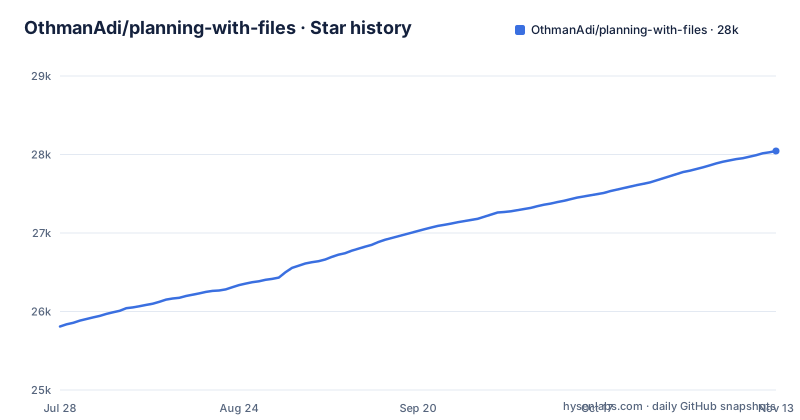
Star history
- OthmanAdi/planning-with-files28,044 ★ · +2,235
| Repository | 2026-07-28 | 2026-11-13 |
|---|---|---|
| OthmanAdi/planning-with-files | 25.8k | 28k |
2,235 Stars in the last 108 days, measured from the daily GitHub snapshot. Compare with other projects
Editorial analysis
The plan lives in markdown files, not in the context window
The core idea is simple and borrowed from Manus, which the project names as its model: an agent working on a long task writes its plan to markdown files on disk instead of holding it only in conversation memory. The project calls these crash-proof markdown plans. If the session dies, the terminal closes or the agent wanders off, the plan is still a file you can open, read and edit.
That has a direct consequence for how you work. The plan becomes an artifact in your project directory rather than a hidden part of the transcript, so you can review it before the agent acts, correct a wrong step by editing text, and see what the agent believed it was doing after the fact. It also means the plan files are something you have to manage: decide whether they belong in version control, and clean them up when a task is done. The v3.28.0 release, titled Archive and restore finished plans, adds a way to put finished plans aside and bring them back.
Recovering a session after /clear and compaction
Long agent sessions lose state in two ways. A user runs /clear to start fresh, or the agent compacts its own history when the context fills up. In both cases the detailed plan the agent was following can vanish or get summarized into something vaguer. planning-with-files targets exactly these two events with what it calls session recovery after /clear and compaction: because the plan is on disk, a fresh or compacted session can pick it up again instead of starting from a lossy summary.
For a reader the practical gain is that /clear stops being a risky move in the middle of a task. You can clear a polluted context and keep the plan. What the skill cannot do is recover work that never made it into the plan files. If the agent made decisions it did not write down, those are gone after a clear just as they would be without the skill, so the value depends on how faithfully the plan is kept current.
Re-injecting the plan on every turn to fight context rot
The second mechanism is per-turn re-injection against context rot. Context rot is the drift that sets in when the original instructions sit far back in a long conversation and get less attention than recent messages. Instead of trusting the agent to remember, the skill puts the plan back in front of it on each turn.
The trade-off follows from the design. Anything injected every turn occupies context every turn, so a large plan file costs space on every single exchange. Keeping plans short and pruning finished steps keeps that cost down. On a short task the overhead buys little, because there is no long history for the plan to get lost in. The repository's hooks/ directory sits next to commands/ and skills/, which points to where this per-turn behavior is wired into each agent, and v3.26.0 shipped hook fixes, a sign that this layer is still being adjusted.
A deterministic gate decides when the task is done
Agents are prone to declaring victory early. planning-with-files adds what it calls a deterministic completion gate: the decision that a task is finished is tied to a fixed check rather than left to the model's own judgment in the moment. Deterministic here means the same plan state gives the same answer every time.
The benefit is that the agent cannot simply say it is done while plan items remain open. The cost is that the gate is only as good as the plan it reads. A plan with missing steps passes the gate with work still undone, and a plan with a step that no longer applies can hold the gate shut until someone edits the file. The exact rule the gate applies is not spelled out in the project description, so read the hooks/ and tests/ directories before relying on it in an unattended run.
One skill, sixteen agent-specific folders
The project names Claude Code, Codex, Cursor, Kiro and OpenCode, and says it reaches more than 60 agents through the Agent Skills standard. The repository root shows how that breadth is built: alongside a generic .agents/ folder there are dedicated directories for .claude-plugin/, .codex-plugin/, .codex/, .cursor/, .kiro/, .opencode/, .gemini/, .continue/, .codebuddy/, .factory/, .hermes/, .mastracode/, .pi/, .qoder-plugin/ and .dsh/.
The gap a reader should notice is between the named list and the larger count. An agent with its own folder has integration work aimed at it. An agent reached only through the shared skill format may get the markdown plan without every hook-driven feature, since re-injection and the completion gate depend on how each agent exposes hooks. If your agent is not in that folder list, test recovery and the gate yourself before trusting them.
Three minor releases in six days
The release pace is fast. v3.26.0, Claude subagent isolation and hook fixes, shipped on 2026-10-28. v3.27.0, Agent-readable plan inventory, followed on 2026-10-30, the same day as the last push. v3.28.0, Archive and restore finished plans, landed on 2026-11-03. The repository is not archived.
For users this cuts both ways. Bugs get fixed and features arrive quickly, but a skill that hooks into your agent's turn loop is not something you want changing under you mid-project. A MIGRATION.md file sits at the root next to CHANGELOG.md, which tells you upgrades can involve more than replacing files. Pin a version for a given project, read both files before moving to a new release, and upgrade between tasks rather than during one.
Templates, examples and the files around the skill
Besides the per-agent folders, the repository carries templates/ and examples/ directories, a docs/ folder, scripts/, tests/, an llms.txt file, a skill-lens.toml file, AGENTS.md, SECURITY.md and CITATION.cff. GitHub reports Python as the primary language, so check whether the hooks and scripts on your machine need a Python interpreter before installing into an environment without one.
The project has no homepage, so the repository is the only place to get it and to read its instructions. Start with the templates/ folder to see what a plan file looks like, and with examples/ to see one in use. That shows you the file format your agent will be reading and writing on every turn, which is the thing you will live with most.
Editorial conclusion
planning-with-files fits developers who run long, multi-step tasks in Claude Code, Codex, Cursor, Kiro or OpenCode and keep losing the thread after /clear or compaction. It is a weaker fit for short one-shot edits, where a plan file re-injected every turn spends context for little return, and for teams that want a tool that stays still between upgrades. Before adopting it, confirm your agent has its own integration folder in the repository, read MIGRATION.md, and pin a release, since v3.26.0, v3.27.0 and v3.28.0 shipped within six days.
Frequently asked questions
What is the planning-with-files skill?
planning-with-files is an MIT-licensed Agent Skill that keeps an AI coding agent's plan in markdown files on disk. It adds session recovery after /clear and compaction, per-turn re-injection of the plan, and a deterministic completion gate.
How to use planning-with-files?
Get it from the OthmanAdi/planning-with-files repository and use the integration folder for your agent, such as .claude-plugin/, .codex-plugin/, .cursor/, .kiro/ or .opencode/. The templates/ and examples/ directories show what the plan files look like.
How does planning-with-files compare with OpenSpec?
The planning-with-files repository description does not mention OpenSpec. Compare the two on its own four mechanisms: markdown plan files on disk, recovery after /clear and compaction, per-turn re-injection, and a deterministic completion gate.
Official sources
Add this badge to your README
If you maintain this project, the badge below links readers to this analysis and shows its maintenance status from the daily GitHub snapshot. Paste the markdown into your README; add ?metric=license or ?metric=stars to the image URL for a different field.

[](https://hysenlabs.com/projects/othmanadi-planning-with-files)Star history chart for your README
[](https://hysenlabs.com/projects/othmanadi-planning-with-files)Was this useful?