NeuralProphet: a PyTorch forecaster pinned to torch below 2.4 and Python below 3.13
NeuralProphet: A simple forecasting package
At a glance
- What is it?
- ourownstory/neural_prophet is an MIT-licensed Python package for interpretable time series forecasting that combines neural networks with Prophet-style components. The latest tagged release is 1.0.0rc10 from 2024-06-27, still classified as beta, and its dependency pins decide where it can be installed.
- Who is it for?
- Use NeuralProphet for sub-daily series with at least two full periods of history when you want to build a model step by step and read the trend, seasonality and regressor components. Do not pick it expecting out-of-the-box accuracy, since the README says it may not be the most accurate model without iteration, and do not pick it if you need Python 3.13, NumPy 2 or torch 2.4 or newer.
- Can I use it commercially?
- Yes. MIT is a permissive licence: you can use, modify and sell software built on it, as long as you keep its copyright and licence notices.
- Is it still maintained?
- Yes. The repository last received commits 11 days ago.
- What is it written in?
- Mainly Python, according to GitHub's language statistics.
Answers come from the project's GitHub data, last synced on November 7, 2026, and from our analysis. They are not legal advice.
Star history
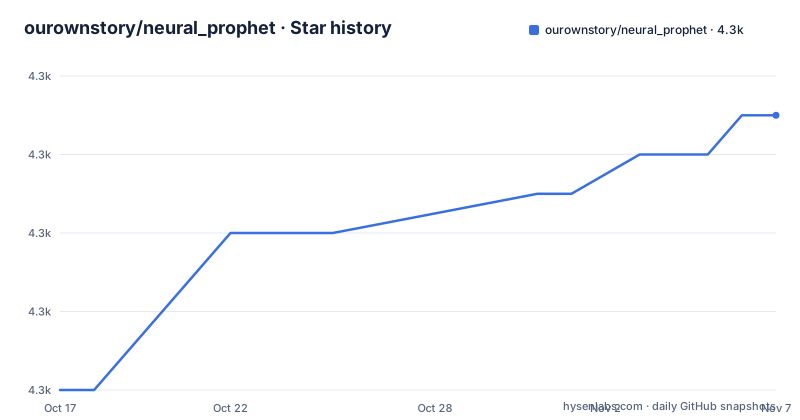
- ourownstory/neural_prophet4,315 ★ · +7
| Repository | 2026-10-17 | 2026-11-07 |
|---|---|---|
| ourownstory/neural_prophet | 4.3k | 4.3k |
7 Stars in the last 21 days, measured from the daily GitHub snapshot. Compare with other projects
Editorial analysis
Autoregression, trend, seasonality, regressors and events are the components you add one at a time
NeuralProphet is described as an easy to learn framework for interpretable time series forecasting, built on PyTorch. It combines neural networks with traditional time-series algorithms and takes its inspiration from Facebook Prophet and AR-Net. The design goal is iterative, human-in-the-loop building. You fit a first model quickly, read the results, improve and repeat.
The model is assembled from named components. Autoregression models autocorrelation, either linearly or with a neural network through AR-Net. Trend is piecewise linear, with optional automatic changepoint detection. Seasonality uses Fourier terms at periods such as yearly, daily, weekly and hourly. Lagged regressors take past observations, for example a temperature sensor, and future regressors take features known in advance, such as a temperature forecast. Both can be linear or neural. Events cover country holidays and recurring custom events.
Components can be local, global or glocal, meaning global plus a regularized local part. Because each piece is separate, plotting the components shows what each one contributed to a forecast, which is the practical meaning of interpretable here.
The project is explicit about a trade. Interpretability and customization come first, so the model may not be the most accurate out of the box, and the README tells you not to hesitate to adjust and iterate until you like the results.
Fit, predict and plot take four lines, and forecasting ahead needs make_future_dataframe
The minimal example begins with an import, then three calls:
m = NeuralProphet()
metrics = m.fit(df)
forecast = m.predict(df)
Plotting uses built-in functions:
fig_forecast = m.plot(forecast)
fig_components = m.plot_components(forecast)
fig_model = m.plot_parameters()
That example predicts on the data it was fitted on. To forecast into the unknown future, extend the dataframe first:
m = NeuralProphet()
metrics = m.fit(df, freq="D")
df_future = m.make_future_dataframe(df, periods=30)
forecast = m.predict(df_future)
fig_forecast = m.plot(forecast)
Here `fit` returns training metrics, so the model must be kept separately in `m`. `freq="D"` declares daily data, and `periods=30` requests thirty future rows. Skipping make_future_dataframe is the usual way to get a forecast that only covers history.
The README leaves out the expected dataframe columns. Its tutorials, in the docs/source/tutorials folder as example notebooks, and a separate neuralprophet-data repository with the datasets and preprocessing examples, are where you learn the input format.
The component plots are an interpretation aid, and fig_model from plot_parameters shows model coefficients.
Higher-frequency data with at least two full periods is where the project says it fits best
The README states the best-suited data: time series of higher frequency, meaning sub-daily, and longer duration, at least two full periods or years. A series with a few months of daily values sits outside that description, since yearly seasonality cannot be learned from under two years.
The framework features add to that. Multiple time series can be fitted with a global or glocal model that shares parameters partly or fully. Uncertainty comes from quantile regression, which estimates values at chosen quantiles and not just a mean. Components can be regularized. There is a time series crossvalidation utility and model checkpointing with validation.
A live loss plot is available as an option. Installing with the live extra lets you enable plot_live_loss in the fit function to see training and validation loss as the model trains, which is aimed at Jupyter notebooks.
The features listed as coming soon include cross-relation of lagged regressors, static metadata regression for multiple series, and logistic growth for the trend component. Until those arrive, growth is piecewise linear only, so a series with a saturating ceiling has no built-in trend type for it.
The last tagged release is 1.0.0rc10 from June 2024, while commits continued into October 2026
The release list is short and old. 1.0.0rc10 was published on 2024-06-27, 0.9.0 (titled Beta 0.9.0) on 2024-06-21 and 0.8.0 (titled Beta 0.8.0) on 2024-02-23. The last push to the main branch is dated 2026-10-27, and the repository is not archived. pyproject.toml gives the version as 1.0.0rc10 with the classifier Development Status 4 - Beta.
The README opens with a caution that the project is still in beta, asks users to report issues, and says the team will do its best to address them quickly. Contributions are welcome.
The release gap matters for installs. pip install neuralprophet fetches the last tagged package, and any changes pushed to main since mid-2024 only arrive through a source install. Which route matches the documented behaviour depends on what changed, and the README points to the releases page for the list of past changes.
The documentation is another weak point it admits. The README says the documentation site may not be entirely up to date, that docstrings should be reliable, and that an improved documentation is in progress. When the docs and the code disagree, read the docstring in the neuralprophet package.
Pins on torch below 2.4, NumPy below 2 and Python 3.9 to 3.12 limit where it installs
The dependency block in pyproject.toml is strict. Python must be 3.9 or newer and below 3.13. numpy is pinned to 1.25.0 or newer and below 2.0.0, pandas to 2.0.0 or newer and below 3.0.0, and torch to 2.0.0 or newer and below 2.4.0. pytorch-lightning and lightning-fabric share the same 2.0.0 to 2.4.0 range.
Other requirements include tensorboard 2.11.2 or newer, torchmetrics 1.0.0 or newer, holidays between 0.41 and 1.0, captum 0.6.0 or newer, matplotlib, plotly, and kaleido at exactly 0.2.1, which a comment says is required for plotly static image export.
Two consequences follow. A project already on NumPy 2 or Python 3.13 cannot install it into the same environment without resolution failures, so it belongs in its own virtual environment. And torch handling needs care: a comment in the file says torch defaults to the already installed version or installs a CUDA version. For CPU-only torch, install that first, then neuralprophet.
The classifiers list Linux and macOS, and the README adds a note for Windows users: please use WSL2. Optional extras are plotly-resampler and live, the latter bringing in livelossplot.
Installing from pip or from a cloned source tree gives two different versions
The default install is one line:
pip install neuralprophetFor notebooks the README recommends the live version:
pip install 'neuralprophet[live]'This enables plot_live_loss in fit. For the most up to date version, install from GitHub:
git clone https://github.com/ourownstory/neural_prophet.git
cd neural_prophet
pip install .
The source install uses the Poetry configuration in the repository, which also defines optional groups for pytest and docs, plus a dev group with ipykernel and nbformat for notebook work.
Because the packaged release is from June 2024 and the repository kept moving, the source install is the only route to unreleased fixes. It is also the route with no release tag to pin, so record the commit hash you installed. If reproducibility matters, pin to the commit and keep the lock file behaviour in mind: poetry.lock sits at the repository root.
Community support runs through GitHub Discussions and Slack, and the paper is the citation
Questions go to GitHub Discussions or to a Slack community. The README describes the Slack as active. A CONTRIBUTING.md, CODE_OF_CONDUCT.md and SECURITY.md are in the root, and contributions are described as very welcome.
Tutorial material is spread across places. A presentation PDF in the notes folder gives a visual introduction, example notebooks live under docs/source/tutorials, and a Colab badge links to open the repository there. The datasets used in tutorials, with data preprocessing examples, are kept in neuralprophet-data.
For academic use, the README asks you to cite the NeuralProphet paper, Explainable Forecasting at Scale, from 2021, which is arXiv 2111.15397. The About section calls the project an open-source community project and invites people to contact Oskar, whose email is on the paper.
The main author listed in pyproject.toml is Oskar Triebe. With a beta classifier and a slow release cadence, treat NeuralProphet as a tool whose behaviour you verify against your own held-out data rather than one with stable guarantees.
Editorial conclusion
Use NeuralProphet for sub-daily series with at least two full periods of history when you want to build a model step by step and read the trend, seasonality and regressor components. Do not pick it expecting out-of-the-box accuracy, since the README says it may not be the most accurate model without iteration, and do not pick it if you need Python 3.13, NumPy 2 or torch 2.4 or newer. Check the dependency ranges in pyproject.toml against your environment before the first install.
Frequently asked questions
What is NeuralProphet?
NeuralProphet is a Python framework for interpretable time series forecasting built on PyTorch. It combines neural networks with traditional time-series components and is inspired by Facebook Prophet and AR-Net.
How do I install NeuralProphet?
Run pip install neuralprophet, or pip install neuralprophet[live] for Jupyter notebooks to get a live loss plot. Windows users are told to use WSL2.
Which Python and torch versions does NeuralProphet support?
pyproject.toml requires Python 3.9 or newer and below 3.13, torch 2.0.0 or newer and below 2.4.0, and NumPy below 2.0.0.
Official sources
Add this badge to your README
If you maintain this project, the badge below links readers to this analysis and shows its maintenance status from the daily GitHub snapshot. Paste the markdown into your README; add ?metric=license or ?metric=stars to the image URL for a different field.

[](https://hysenlabs.com/projects/ourownstory-neural-prophet)Star history chart for your README
[](https://hysenlabs.com/projects/ourownstory-neural-prophet)Was this useful?