Tutor: a Docker-based Open edX distribution with a plugin architecture
The Docker-based Open edX distribution designed for peace of mind
At a glance
- What is it?
- Tutor is the official Docker-based Open edX distribution, AGPL-3.0 licensed and Python, whose goal is to make deploying, customising, upgrading and scaling an Open edX platform easy. It runs entirely on Docker, ships a plugin system, and supports Kubernetes deployments alongside local ones.
- Who is it for?
- Tutor fits an institution or a serious self-hoster who wants to run Open edX on their own infrastructure with an upgrade path that is a single command and a plugin system for customisation, and who accepts operating Docker containers. It does not fit someone who wants a managed learning platform, and its scale is a real constraint, since it is built for hosting a course rather than a video library.
- Can I use it commercially?
- Yes, with strict conditions. AGPL-3.0 is a network copyleft licence: if people use a modified version over a network, for example as a hosted service, you must offer them its source code under the same licence.
- Is it still maintained?
- Yes. The repository last received commits 2 days ago.
- What is it written in?
- Mainly Python, according to GitHub's language statistics.
Answers come from the project's GitHub data, last synced on November 7, 2026, and from our analysis. They are not legal advice.
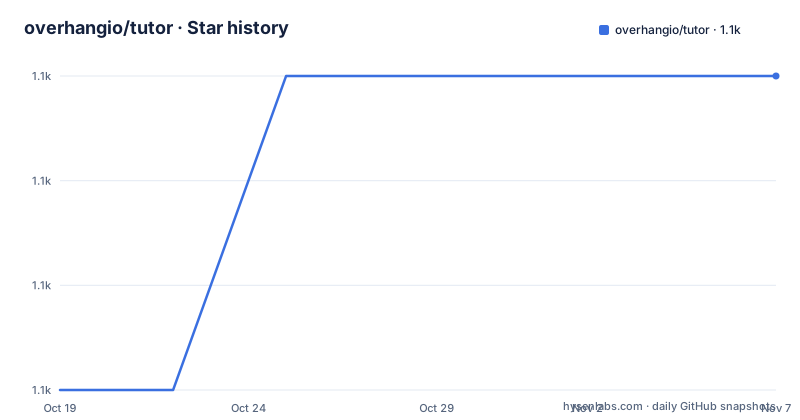
Star history
- overhangio/tutor1,131 ★ · +3
| Repository | 2026-10-19 | 2026-11-07 |
|---|---|---|
| overhangio/tutor | 1.1k | 1.1k |
3 Stars in the last 19 days, measured from the daily GitHub snapshot. Compare with other projects
Editorial analysis
An official distribution for a platform that has many
Tutor is the official Docker-based Open edX distribution, for both production and local development. The goal it states is to make it easy to deploy, customise, upgrade and scale Open edX.
Open edX is a large learning platform, and the reason a distribution exists at all is that installing the platform from its own source tree is a serious undertaking. Tutor's pitch is that the deployment is already solved and what remains is configuration.
The feature list is short and specific, and one item on it sets the tone: the 1-click installation and upgrades. The rest are that it runs entirely on Docker, that it is 100% open source, that it has an extensible architecture with plugins, that it works with Kubernetes, and that no technical skill is required with the zero-click Tutor AWS image.
The batteries-included line is the one to look at closely, because it lists what an institution would otherwise assemble. Theming comes from the Indigo project, SCORM support from the openedx-scorm-xblock, HTTPS, a mobile app through tutor-android, and custom translations. Each of these is a separate repository, and Tutor pulls them together into a working platform.
The licensing has a wrinkle worth knowing early. The repository licence is AGPL-3.0, and the package metadata declares `AGPL-3.0-only`. For a tool that ships Docker images and configuration to run a service, that matters if you modify and expose it.
Edly, the company behind Tutor, also offers a paid Open edX installation service, and the README points to it for professional assistance with setup and management.
Local launch in three steps
The quickstart is the shortest possible answer to how you get a running platform.
1. Install the latest stable release of Tutor. 2. Run `tutor local launch`. 3. You are done.
That second command is the whole point of the local mode. `tutor local` runs the full Open edX stack in Docker on the developer's machine, and `launch` does the work of building the images, starting the containers and wiring them together. The README has a terminal recording of a local launch, which is the fastest way to understand what the command actually does before running it.
The distinction between `local` and the production commands is the one to internalise. The `local` prefix means a development-oriented deployment, with a separate production path for a real installation, and the documentation separates the two throughout. Nothing about `tutor local launch` is a shortcut into production, it is a distinct mode.
For a real deployment the documentation is at docs.tutor.edly.io, and the troubleshooting section is pointed to for problems. Community support goes to the Open edX discussion forum under the Tutor tag, and official support is Edly's installation service.
The repository itself carries the same structure the tool has. There is a `tutor/` package, `tests/`, `docs/`, `requirements/` with the input files, a `changelog.d/` directory for pending changelog entries, a `Dockerfile`, a `tutor.spec` for packaging, and a `Makefile` whose default goal is help.
The plugin architecture is the extension point
Tutor's extensibility is described as an extensible architecture with plugins, and the plugin documentation is a first-class link in the feature list rather than a footnote.
The plugins index in the documentation is where a project would look to extend the platform, and the theming, SCORM, mobile app and translation pieces named in the batteries-included line are themselves plugins, which is a good way to read the extension mechanism. The Indigo theming project, the openedx-scorm-xblock and the tutor-android mobile app are separate repositories that plug into the same system, so the plugin model is not aspirational, it is the mechanism the project itself uses.
That matters for a deployment decision. An institution that needs a custom theme, a specific SCORM behaviour or a bespoke mobile app is looking at writing or adopting a plugin rather than patching a container image, and the patching path in Docker based deployments is a maintenance liability on every upgrade.
The plugin API is also why the AGPL licence is less constraining in practice than it first looks. The distribution is open, and the way to add a feature is a plugin, so an institution with a developer can build what it needs without maintaining a fork of Tutor itself.
The README does not enumerate the plugin API surface or its versioning policy. That documentation lives at the plugin index in the docs site, and reading it is the step to take before designing a plugin.
The Python package and how it is built
Tutor itself is a Python package on PyPI named tutor, and the manifest describes the shape of it.
The console entry point is `tutor = "tutor.commands.cli:main"`, so the CLI is a thin wrapper over a command module. The project requires Python 3.10 or later, and the classifiers list 3.10 through 3.14, with the development status marked as Production/Stable. The package metadata is generated by a custom hatch hook at `.hatch_build.py`, which is how the version and the dependency list are set, and the version itself is read from `tutor/__about__.py`.
The build backend is hatchling and the package is built as an sdist. The README is reStructuredText, which is why it is `README.rst` and why the project metadata points at the readme file with the `text/x-rst` content type.
The Makefile shows the development workflow, and the default goal is help, which is a courtesy for anyone who types `make` first.
The test target runs everything in order of decreasing priority: lint, unit tests, type checks, format checks and a package upload check. The tools are current. Ruff does both the linting and the formatting, mypy runs in strict mode with `--ignore-missing-imports` and `--implicit-reexport` over the source, the template directories and the tests, and the unit tests use the standard library's unittest discovery. There is a separate `test-k8s` target that validates the Kubernetes manifests with `kubectl --dry-run=client --validate=true`, and it is explicitly not part of the standard suite.
Changelog entries are managed with scriv, which creates an entry in `changelog.d/` and collects them into the changelog.
Docker, Kubernetes, and the experimental Tutor image
Running entirely on Docker is the architectural commitment, and the rest of the tooling follows from it.
Kubernetes support is a documented path rather than an afterthought, with a dedicated page in the documentation and the `k8s` command family in the CLI. The `test-k8s` Makefile target exists to validate the generated manifests, which means the Kubernetes output is treated as a build artifact that has to pass a schema check.
The repository's own Dockerfile is where the caution is. The comment at the top says the image is still very much a work in progress, that it was tested on Linux, and that in practice all tutor commands should be replaced by running the image with the Docker socket mounted:
docker run --rm -it -P \
   -v /var/run/docker.sock:/var/run/docker.sock \
    -v /opt/tutor:/opt/tutor tutor
It also notes that the image does not come with any plugin by default, and that it does not include the kubectl binary, so the k8s commands will not work inside it. The base is `python:3.8-slim-stretch`, which is old, and it copies the docker and docker-compose binaries in from pinned images, docker 19.03 and compose 1.24.0. The image exposes 80 and 443, sets `TUTOR_ROOT=/opt/tutor` and uses `tutor` as the entrypoint.
Because the file explicitly describes itself as experimental and says no usage documentation is provided, the reasonable reading is that this Dockerfile is a convenience for people who want to run Tutor from inside a container, not a supported deployment method. The AWS zero-click image is the documented path for people who do not want to install anything.
Maintenance, scale and what to check first
The release history shows a project on a major version cadence. There are three tags inside a month: v22.0.0 on 2026-08-06, v22.0.1 on 2026-08-13 and v22.0.2 on 2026-08-31. The default branch is `release`, which is worth noting, since it means the branch you clone by default is the maintained release line rather than a development branch.
The last push was on 2026-10-15, so the project is being worked on, and the CHANGELOG.md and changelog.d/ directory show that changes are tracked in a structured way rather than only in commit messages.
The scale question is the one the README does not answer and the one to ask before committing. Tutor is described as already used to deploy hundreds of Open edX platforms around the world, which establishes that it works at institutional scale, but there is no statement about the size of a single platform it can serve. A learner-facing LMS with a few thousand concurrent students and a course with a few hundred are very different loads, and the documentation rather than the repository is where that answer lives.
There is also a security file, SECURITY.md, in the repository, and the presence of a `.gitlab-ci.yml` alongside the `.github/` directory shows that the CI runs on both platforms, which is a slightly unusual arrangement and suggests the project supports contributions arriving from either.
The licence file is `LICENSE.txt` and the terms are GNU AGPL version 3, with the metadata narrowing it to AGPL-3.0-only.
Editorial conclusion
Tutor fits an institution or a serious self-hoster who wants to run Open edX on their own infrastructure with an upgrade path that is a single command and a plugin system for customisation, and who accepts operating Docker containers. It does not fit someone who wants a managed learning platform, and its scale is a real constraint, since it is built for hosting a course rather than a video library. Before deploying, read the installation and configuration pages on docs.tutor.edly.io, and if you need anything beyond the base distribution, read the plugin documentation before starting to fork the configuration.
Frequently asked questions
What is Tutor?
It is the official Docker-based Open edX distribution, for both production and local development, with the goal of making it easy to deploy, customise, upgrade and scale Open edX. It is AGPL-3.0-only licensed and published on PyPI as the tutor package.
How do I run Open edX locally with Tutor?
Install the latest stable release, then run `tutor local launch`. That command builds the images, starts the containers and wires the stack together, and a terminal recording of a launch is linked from the README.
How do you extend Tutor?
Through plugins. The theming, SCORM, mobile app and translation pieces Tutor ships with are themselves separate plugin repositories, so the plugin mechanism is what the project itself uses rather than an aspirational extension point.
Does Tutor support Kubernetes?
Yes, with a dedicated page in the documentation and a k8s command family in the CLI. The Makefile also has a test-k8s target that validates the generated manifests with kubectl, though it is not part of the standard test suite.
What is the Tutor Docker image for?
The repository's own Dockerfile is described in its comments as still very much a work in progress, tested on Linux, shipping without plugins and without kubectl. It is a convenience for running tutor from inside a container rather than a supported deployment method.
Official sources
Add this badge to your README
If you maintain this project, the badge below links readers to this analysis and shows its maintenance status from the daily GitHub snapshot. Paste the markdown into your README; add ?metric=license or ?metric=stars to the image URL for a different field.

[](https://hysenlabs.com/projects/overhangio-tutor)Star history chart for your README
[](https://hysenlabs.com/projects/overhangio-tutor)Was this useful?