HaE keeps its HTTP and file extraction code in submodules, not in the repository you clone
HaE - Highlighter and Extractor. Empowers ethical hackers for efficient operations.
At a glance
- What is it?
- HaE is a Burp extension for tagging and extracting data out of HTTP, WebSocket and file messages, split across a network half and a file half. The repository most people land on is an umbrella shell, so a plain clone gives you nothing to load.
- Who is it for?
- Adopt HaE when your review work happens inside Burp and the same question has to be asked of HTTP exchanges, WebSocket frames and file messages, since HaENet covers HTTP (including WebSocket) and HaEFile covers files. Stay on Burp's built in filter when you sweep a single response, and do not reach for it to read a capture taken without a proxy in front.
- Can I use it commercially?
- Yes. Apache-2.0 is a permissive licence: you can use, modify and sell software built on it, as long as you keep its copyright and licence notices.
- Is it still maintained?
- Yes. The repository last received commits 36 days ago.
- What is it written in?
- GitHub does not report a main language for this repository.
Answers come from the project's GitHub data, last synced on November 15, 2026, and from our analysis. They are not legal advice.
Star history
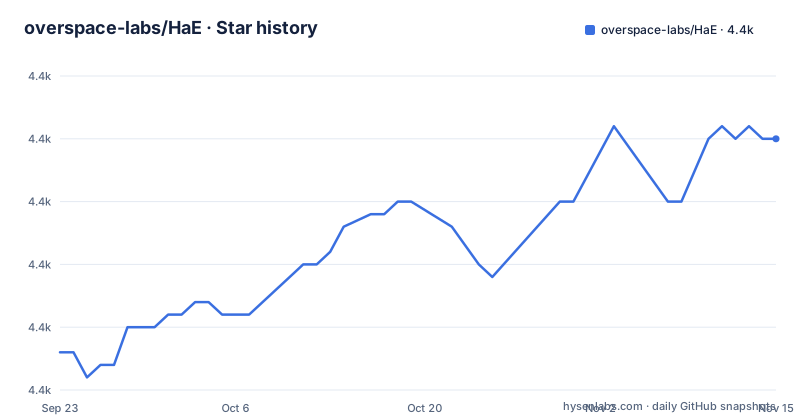
- overspace-labs/HaE4,410 ★ · +17
| Repository | 2026-09-23 | 2026-11-15 |
|---|---|---|
| overspace-labs/HaE | 4.4k | 4.4k |
17 Stars in the last 53 days, measured from the daily GitHub snapshot. Compare with other projects
Editorial analysis
The product directories under src/ stay empty without the recursive flag
The README names one install command, and the flag inside it is the whole installation story. Everything HaE ships lives under src/, and those paths are mounted as Git submodules rather than tracked content:
git clone --recurse-submodules https://github.com/overspace-labs/HaE.gitA .gitmodules file at the root confirms the arrangement. Drop the flag and the clone still succeeds, which is the trap: you get a directory with README.md, LICENSE, APPRECIATION_LIST.md, prek.toml, .github/ and .gitignore, and a src/ that has no code in it. Nothing errors. You only discover the gap when you look for the thing you came to install, and the failure looks like a broken checkout rather than a missed flag. A reader who wants to know what a working checkout looks like should check src/ for two populated subtrees before touching any documentation.
Two extraction halves are versioned in separate repositories
HaE is described as a framework in the data security field with a Lego brick-style modular design, and the split is literal rather than conceptual. Network traffic handling lives in overspace-labs/HaENet, file handling lives in overspace-labs/HaEFile, and neither source tree sits in the repository you just cloned. The practical effect is that version pinning is per repository. There is no single version string covering the pair, so a checkout of HaE gives you whatever each submodule pointer happened to reference on the day you cloned. If your rules were written against the tags and extraction behaviour of one half, you have to reason about the other half separately. Most people who clone this expecting a self-contained tool miss that, because a README full of project addresses reads like a directory listing of one codebase.
One tagging idea applied to HTTP, WebSocket and file messages
The mechanism is fine-grained tagging and extraction across File and HTTP messages, WebSocket included. The two halves face different inputs: an HTTP exchange arrives from a proxy stream and has request and response halves, while a file arrives from disk with no request line and no status code, and a WebSocket frame arrives inside a channel that Burp shows as its own editor. The README does not document how a tag behaves when the same construct appears in more than one place in a message.
Validation lives in a third repository you do not get by cloning
There is a separate repository for the official HaE validator, listed as HaEValidator and labelled AI+. It is not a submodule of HaE and it is not covered by the clone command above, so an operator who assumes validation ships with the framework will find a gap between extraction and checking. This matters more than a missing convenience, because extraction rules run against traffic you did not author, and a rule that matches too broadly will quietly pull neighbouring fields into your output. The README points at the validator repository and says nothing further: no command, no input format, no statement about which rule dialects it accepts. Treat the existence of the repository as the only confirmed fact and read it directly before wiring it into a review pipeline.
Only the file half carries tags, so the two sides version apart
Every dated artefact listed here names the file repository, which carries a lesson about what you cannot see from this side. Because the network half publishes nothing comparable in the same window, you cannot read its change rate from this repository at all, and any claim about how quickly the HTTP side moves would be a guess. That split is the practical cost of the submodule design. Two halves move on independent schedules, submodule pointers decide what each clone receives, and a dated incident review has to record which side each rule came from. A reviewer who assumed one version number covered the framework would be wrong on the first day, and there is no manifest in the umbrella repository that corrects the assumption. Recognition has come as a 2022 KCon Arsenal selection and as the most nominated entry in the 2026 Burp Extension Awards, which says something about how testers find the project and nothing about how the two halves are tested.
Cloning HaE does not load anything into Burp
Here is the failure mode worth planning for. The clone command is the entire documented procedure. The README gives no description of where a Burp extension should be placed, and the top level of the repository holds only .github/, .gitignore, .gitmodules, APPRECIATION_LIST.md, LICENSE, README.md, README_CN.md, prek.toml, resource/ and src/. A prek.toml sits at the root next to .gitmodules, and the README does not document which checks it runs or when. So the honest position after following the documentation exactly is that you have obtained source code for an extension, not an installed extension. If your decision depends on a working first run, that gap is the first thing to close yourself. For tracking upkeep, the last push on the umbrella repository was on 2026-10-10 and the newest listed release is HaEFile 1.0.3 from 2026-08-21.
Where Burp's own filtering differs from a reusable tag set
The alternative worth comparing is Burp Suite's built in response filter and search, which you already have and which needs no install step. The difference is in scope, not in regex power. Built in filtering works against the pane you are looking at, so a sweep over one response is fast and immediate, and redoing it across another transport means repeating it. HaE covers HTTP messages, WebSocket included, through HaENet and file messages through HaEFile, which suits a reviewer whose questions span several of those. The trade runs the other way for a one off inspection, where setting up a maintained rule file costs more than typing into the filter box. HaE also assumes you work inside Burp, so it is not an option for reviewing a packet capture with no proxy in front of it.
Editorial conclusion
Adopt HaE when your review work happens inside Burp and the same question has to be asked of HTTP exchanges, WebSocket frames and file messages, since HaENet covers HTTP (including WebSocket) and HaEFile covers files. Stay on Burp's built in filter when you sweep a single response, and do not reach for it to read a capture taken without a proxy in front. Verify one thing first: run the documented clone with the recursive flag and confirm src/ fills with both submodule trees, since a plain clone leaves that directory empty and the result looks like a broken checkout rather than a missed flag. Then read HaEValidator directly, because it is not part of the clone and nothing here documents how it checks a rule.
Frequently asked questions
What does the HaE repository actually contain when I clone it?
It is an umbrella repository. The product directories under src/ are mounted as Git submodules, and the source code is maintained in the separate overspace-labs/HaENet and overspace-labs/HaEFile repositories.
How do I clone HaE with its submodules?
Clone with the recursive flag so the submodules are pulled in the same operation: git clone --recurse-submodules https://github.com/overspace-labs/HaE.git
What kinds of messages can HaE tag and extract data from?
It performs fine-grained tagging and extraction on File and HTTP messages, and HTTP messages includes WebSocket.
Is there an official HaE rule validator?
Yes. The README points to a separate repository, overspace-labs/HaEValidator, described as the official HaE validator (AI+). It is not included in the submodule clone.
Do the HaE network half and file half share one version number?
No. Source code for each is kept in its own repository, so a tag on one side says nothing about the state of the other.
Official sources
Add this badge to your README
If you maintain this project, the badge below links readers to this analysis and shows its maintenance status from the daily GitHub snapshot. Paste the markdown into your README; add ?metric=license or ?metric=stars to the image URL for a different field.

[](https://hysenlabs.com/projects/overspace-labs-hae)Star history chart for your README
[](https://hysenlabs.com/projects/overspace-labs-hae)Was this useful?