Camaleon CMS: a Rails CMS where the content structure is data, not templates
Camaleon CMS is a dynamic and advanced content management system based on Ruby on Rails
At a glance
- What is it?
- Camaleon CMS is a Rails content management system that lets an editor define content types with custom fields and custom contents type without writing code, and it installs into an existing Rails application as a gem. It requires Rails 6.1 or later, Ruby 3.0 or later, a database and Imagemagick, and its version line is still in the 2.x series.
- Who is it for?
- Camaleon CMS suits a Rails team that wants a WordPress-shaped content workflow inside an existing application, with a real admin interface and a plugin ecosystem, and that is prepared to accept a CMS with a paid plugin tier bolted onto the free one.
- Can I use it commercially?
- Yes. MIT is a permissive licence: you can use, modify and sell software built on it, as long as you keep its copyright and licence notices.
- Is it still maintained?
- Yes. The repository received new commits within the last day.
- What is it written in?
- Mainly Ruby, according to GitHub's language statistics.
Answers come from the project's GitHub data, last synced on November 7, 2026, and from our analysis. They are not legal advice.
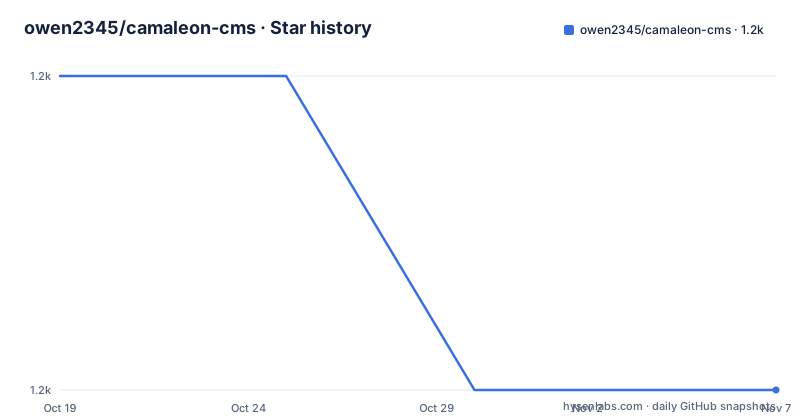
Star history
- owen2345/camaleon-cms1,237 ★ · -1
| Repository | 2026-10-19 | 2026-11-07 |
|---|---|---|
| owen2345/camaleon-cms | 1.2k | 1.2k |
-1 Stars in the last 19 days, measured from the daily GitHub snapshot. Compare with other projects
Editorial analysis
The pitch: build the content structure without coding it
Camaleon CMS is described as a dynamic and advanced content management system based on Ruby on Rails that adapts to your needs, and the README positions it explicitly as an alternative to WordPress for Ruby on Rails developers to manage advanced content easier. The central mechanism is a flexible manager where you can build your custom content structure without coding anything, by custom fields and custom contents type. That is the difference from a Rails application with a blog bolted on. In a conventional setup, adding a field means a migration, a model change, a form change and a view change. Here, the content type and its fields are defined in the admin and stored as data. The README puts the philosophy bluntly, that Camaleon CMS permits you to adapt the CMS to all your needs and not you adapt to the CMS, and that you can create your custom architecture with any custom attributes you need for all content types.
What a Rails team gets: integration, multiple sites and multiple languages
The list of what you can do with Camaleon is aimed squarely at a Rails developer, and the first item is the one that decides whether the project is relevant to you, integrate into existing Rails projects. It is a gem, not an application, so it installs into a codebase you already have rather than replacing it. The rest covers multiple sites in the same installation, so one deployment can serve several properties, and multi-language sites. Then the content model, with the design and creation of the architecture of your project without programming by dynamic contents and fields. Extending or customising the functionality using plugins, and managing your content visualization using themes, which separates the admin from the presentation layer. The last item is easier administration, which is the point of the whole exercise.
The feature set, including the security section that reads like a changelog
The features are grouped in a way that tells you about the project's priorities. There are shortcodes and widgets, drag and drop, sortable and multi level menus, templates and layouts for pages, and advanced user roles. File uploads have built in Local and Amazon S3 support, and there is easy migration from WordPress, which is a signal about where the user base comes from. The security section is unusual in a README because it lists the attack classes the project claims to handle, remote code execution, SQL injections, advanced sessions security, cross site scripting, control of abusive requests and cross-site request forgery, and those correspond to plugins included by default, notably Web Attack Control. The performance section names caching strategies, cache contents, cache queries and manifests to compress and join asset files, and the SEO section covers sitemap generation, SEO configuration, SEO for social media, and HTML5 and Bootstrap 3 compatibility for generated content.
The plugin and theme ecosystem, and where the paid line starts
The plugin list is long and a good number of the plugins are included by default, including Content Cache, Web Attack Control, Post Visibility and Contact Forms, plus separate repositories for SEO, e-commerce, a language and translation editor, email subscriptions, Stripe donations, post ordering, post cloning, a sitemap customizer, an image optimizer, a lazy loader, import and export, a lightbox, external menu permissions, TinyMCE template integration, a download manager and OAuth. The Visual Editor is a paid plugin, and so are the Spree Commerce integration and the Admin AJAX plugin, and the same pattern appears in the theme list, where the eCommerce, eFashion and Shoppy themes are free but CV, Camaleon Site and Sky are paid themes. The themes themselves are split three ways, the Default, Clean and Wordpress themes are built in, and the paid ones live in the theme store alongside the plugin store.
Installing it into a Rails app, one generator at a time
The installation is the standard Rails gem flow with a CMS specific generator in the middle. You create the Rails project with rails new my_project, add the gem to your Gemfile, either the released version or the development version from GitHub, run bundle install, and then run the installer with rails generate camaleon_cms:install. Optionally, before you continue, you can configure your CMS settings in my_app/config/system.json, with the full settings documented in the installation docs. Then you create the database structure with rake camaleon_cms:generate_migrations, with a comment that you can customize the copied migration files before running them, and then rake db:migrate. Finally you start the server with rails server and visit localhost:3000. The instruction to review the generated migrations before running them is the detail worth respecting, since those migrations create the content structure tables.
rails new my_project

bundle install

rails generate camaleon_cms:install

rake camaleon_cms:generate_migrations
rake db:migrate

rails servergem "camaleon_cms"
# OR
# gem "camaleon_cms", github: 'owen2345/camaleon-cms' # latest development versionThe requirements, and the Dockerfile that contradicts them
The stated requirements are Rails 6.1 or later, PostgreSQL, MySQL 5 or later or SQLite, Ruby 3.0 or later, and Imagemagick. The three database options are worth noting because a CMS that runs on SQLite is a reasonable choice for a small site. The Dockerfile in the repository is a different story and worth flagging rather than glossing over. It is built on a Stacksmith Ubuntu 14.04 image, installs ruby-2.3.1-1 from the Bitnami package manager, runs bundle install without the production group, exposes port 3000 and starts the server bound to 0.0.0.0. So the container image predates the stated Ruby 3.0 requirement by more than a decade, and the 14.04 base is long out of support. For anyone actually building a container from this repository, the Dockerfile needs work before it is usable, and the documentation points elsewhere for containerized setup, to a separate rails_app_containerization guide.
The repository layout, the toolchain and where the project stands
The top level of the repository shows a mature Rails engine with a bit of everything. There is app/ for the application code, lib/ for the gem's own library code, config/, db/, bin/, spec/ and test/ directories, a docs/ directory, a gemfiles/ directory for the appraisal style matrix of dependency sets, a camaleon_cms.gemspec, a Gemfile and Gemfile.lock, a Rakefile, and a Dockerfile. There are also some directories that suggest a recently broadened workflow, an .claude/ directory, a .junie/ directory, an .opencode/ directory and an AGENTS.md and CLAUDE.md, plus an openspec/ directory. The toolchain is a mix, with .rubocop.yml and .rubocop_todo.yml for Ruby, .eslintrc.js and a package.json with eslint for the JavaScript, .rspec for RSpec, and a .bundler-audit.yml for dependency auditing, alongside a yarn.lock. The releases are 2.9.2 on 2026-05-01, 2.9.3 on 2026-08-18 and 2.9.4 on 2026-08-25, and the last push to the repository was on 2026-10-14, with the repository not archived and the licence MIT.
Editorial conclusion
Camaleon CMS suits a Rails team that wants a WordPress-shaped content workflow inside an existing application, with a real admin interface and a plugin ecosystem, and that is prepared to accept a CMS with a paid plugin tier bolted onto the free one. It is the wrong choice if you want a small, dependency-light CMS, because the plugin and theme model pulls in a lot, and a poor fit for a project where the paid plugins are the interesting parts, since the visual editor, the Spree integration and the admin AJAX plugin are all listed as paid. Before adopting it, read the installation docs and the example Gemfile linked from the README, and note that the repository also contains a Dockerfile pinned to Ruby 2.3.1, which is far behind the Ruby 3.0 minimum the requirements state.
Frequently asked questions
What is Camaleon CMS?
It is a dynamic and advanced content management system based on Ruby on Rails, positioned as an alternative to WordPress for Rails developers. It lets you build a custom content structure without coding, using custom fields and custom content types, and it installs into an existing Rails project as a gem.
How do I install Camaleon CMS into a Rails application?
Create the project with rails new my_project, add gem "camaleon_cms" to your Gemfile, run bundle install, then rails generate camaleon_cms:install. Configure the CMS settings in config/system.json if you want to, generate the migrations with rake camaleon_cms:generate_migrations, customise them, run rake db:migrate, and start the server with rails server.
What are the system requirements for Camaleon CMS?
Rails 6.1 or later, Ruby 3.0 or later, a database of PostgreSQL, MySQL 5 or later, or SQLite, and Imagemagick. The repository also contains a Dockerfile, but it is based on a 14.04 image and installs Ruby 2.3.1, so it predates the stated Ruby 3.0 requirement and needs work before use.
Which Camaleon CMS plugins are free and which are paid?
Many are included by default, such as Content Cache, Web Attack Control, Post Visibility and Contact Forms, and others like SEO, e-commerce, the translation editor, email subscriptions and OAuth are separate free plugins. The Visual Editor, the Spree Commerce integration and the Admin AJAX plugin are listed as paid plugins, and the CV, Camaleon Site and Sky themes are paid too.
What does Camaleon CMS add to a Rails application?
Integration into existing Rails projects, multiple sites in the same installation, multi-language sites, content architecture defined through dynamic contents and fields without programming, extension through plugins, content visualisation managed through themes, and easier administration, alongside shortcodes, widgets, drag and drop multi level menus, advanced user roles and file uploads to local storage or Amazon S3.
Official sources
Add this badge to your README
If you maintain this project, the badge below links readers to this analysis and shows its maintenance status from the daily GitHub snapshot. Paste the markdown into your README; add ?metric=license or ?metric=stars to the image URL for a different field.

[](https://hysenlabs.com/projects/owen2345-camaleon-cms)Star history chart for your README
[](https://hysenlabs.com/projects/owen2345-camaleon-cms)Was this useful?