designer-skills: 273 skills across 33 plugins, and only 111 of them ship here
Designer Skills Collection: agentic skills, commands, and plugins for design — from research to systems, UI, interaction, and delivery.
At a glance
- What is it?
- The Designer Skills Pack is a marketplace of agentic skills and commands for Claude Code and Gemini CLI, spread over five collections that live in five repositories. This one is the front door and holds nine plugins, and the page's own numbers, tables and install steps do not entirely agree with each other.
- Who is it for?
- designer-skills fits someone who wants an assistant that already knows the vocabulary of design work, and who is willing to install a marketplace rather than copy prompts by hand. Three things to check first.
- Can I use it commercially?
- Yes. MIT is a permissive licence: you can use, modify and sell software built on it, as long as you keep its copyright and licence notices.
- Is it still maintained?
- Yes. The repository last received commits 3 days ago.
- What is it written in?
- Mainly Markdown, according to GitHub's language statistics.
Answers come from the project's GitHub data, last synced on November 19, 2026, and from our analysis. They are not legal advice.
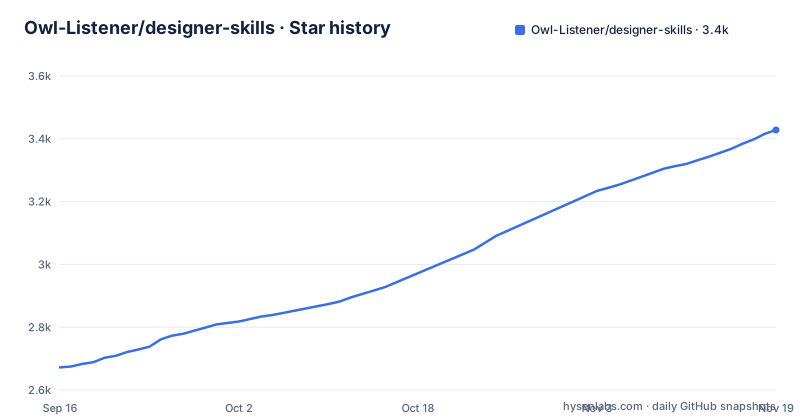
Star history
- Owl-Listener/designer-skills3,428 ★ · +756
| Repository | 2026-09-16 | 2026-11-19 |
|---|---|---|
| Owl-Listener/designer-skills | 2.7k | 3.4k |
756 Stars in the last 64 days, measured from the daily GitHub snapshot. Compare with other projects
Editorial analysis
The page promises three steps and then numbers four
The getting started section says it takes three steps and no terminal, then lays out four numbered items. Step one is getting Claude Code, described as a free app from Anthropic that you download, sign in to and open, done once. Step two is typing one line, which the page is careful about, saying it tells Claude where the skills live and that nothing installs yet:
/plugin marketplace add Owl-Listener/designer-skillsStep three is the install itself: type `/plugin`, open the Discover tab, move with the arrow keys, press space to tick what you want and press enter. Step four is the advice to type `/designer-toolkit:start-here` if you are unsure which skill you need. So the count is defensible if step four is optional help and the first three are the procedure, but the numbering on the page runs to four, and the two follow-on sections both refer back to it as three steps.
Two commands cover every collection, but only one is demonstrated
There are two shapes of install and they have different reach. The marketplace route is the one that covers all five collections, because the marketplace pulls in the plugins from the other four repositories for you, which the page describes as this repo being the front door. A single collection can also be added directly, which is the same command with a different repository in it:
/plugin marketplace add Owl-Listener/inclusive-design-skillsThe Gemini CLI route is the one that does not have that reach. Each plugin is also a Gemini CLI extension, and the instructions clone a repository, make a directory and copy from it:
git clone https://github.com/Owl-Listener/designer-skills /tmp/designer-skills
mkdir -p .gemini/extensions
cp -r /tmp/designer-skills/.gemini/extensions/. .gemini/extensions/
That clone is this repository, and the copy assumes the extensions live under `.gemini/extensions/` inside it, which the tree does carry. Nothing on the page shows the equivalent for the other four collections, so on Gemini CLI you assemble each repository yourself. The no-terminal promise belongs to the Claude Code path only.
The nine plugin tables add up exactly to the totals claimed
The numbers hold up under addition, which is worth stating because marketplace pages usually do not. The design practice collection claims 111 skills and 34 commands across 9 plugins. Reading the plugin table: design-research 14 skills and 4 commands, design-systems 11 and 3, ux-strategy 12 and 3, ui-design 19 and 5, interaction-design 22 and 5, prototyping-testing 10 and 5, design-ops 9 and 3, designer-toolkit 7 and 4, visual-critique 7 and 2. The skills total 111 and the commands total 34, so the table and the summary agree. The same check works one level up: the collection table gives 9 plugins here and 6 in each of the other four collections, which is the 33 the headline claims, and this repository's nine plugins each have a matching top-level directory.
273 skills across 33 plugins, and 111 of them live here
The headline figure and the local figure are different numbers and the page keeps them apart, which is the first thing to understand about this repository. Across the five collections there are 273 skills and 76 commands in 33 plugins. From this repository alone there are 111 skills and 34 commands in 9 plugins. The remaining 162 skills and 42 commands are in the other four collections, each of which lives in its own repository with its own stars and its own detail. So a person who reads the headline and installs only what this repo exports gets under half the catalogue, and the difference arrives through the marketplace rather than through a clone. The other four are AI product design, UX program management, design leadership and inclusive design.
The skill index is arranged by situation, not by category
The page does not lead with the plugin list. It leads with a pointer to a skill index, on the grounds that a person who does not know which skill they need is the normal case, and that every skill is arranged by the situation you are in rather than by topic. It also lists the pairs most often mistaken for each other, which is a rarer thing to find in a collection this size: not only what exists, but which two entries get confused. The onboarding command works the same way from the other direction. Typing `/designer-toolkit:start-here` and saying what you are working on names the stage you are at, gives one command to run now and the two that follow it, and tells you what you can skip. The templates at the root, SKILL_TEMPLATE.md and COMMAND_TEMPLATE.md, plus CONTRIBUTING.md and a CHANGELOG.md, are the authoring side of the same idea.
Installing one plugin needs the marketplace name after an @
Once the marketplace is added, a single plugin installs by name, and the name carries the marketplace as a suffix:
/plugin install ux-strategy@designer-skillsThe page is explicit that the nine plugins here ship from this repository, that none of them has a separate repo, and that there is nothing to clone. That last point is the useful part for anyone who assumed each collection or plugin was its own repository, since four of the five collections genuinely are. The partial-install path is the same shape as the full one: on the Discover list in step three, tick the design ones such as design-research, design-systems, ui-design and interaction-design and leave the rest, installing as few or as many as you like and coming back for more later.
The command table is cut off on the eighth of thirty-four
The commands section lists every command with its plugin and a one line description, and the visible run covers design-ops first with handoff, plan-sprint and setup-workflow, then design-research with discover, interview, synthesize and test-plan. Both of those plugins are complete at three and four commands respectively, matching the plugin table. Then the eighth row, design-systems:audit-system, stops mid sentence in a description about auditing an existing design system for consistency. The remaining 26 commands are not on the page at all, which means the per-plugin counts can be checked but the command names cannot. It also means the commands a reader is most likely to try first, the ones belonging to the largest plugins, are the ones not shown.
Editorial conclusion
designer-skills fits someone who wants an assistant that already knows the vocabulary of design work, and who is willing to install a marketplace rather than copy prompts by hand. Three things to check first. How much you actually get locally: one marketplace add pulls all five collections, while this repository alone supplies nine plugins and 111 of the 273 skills. Whether the counts you were quoted match what you install, since the headline figures are collection-wide and the per-plugin table is the part that is verifiable here. And that the thing you wanted may be named differently than you would guess, which is why there is a skill index arranged by situation rather than by category, and an onboarding command that says which stage you are at. The Gemini CLI route copies a directory by hand and only demonstrates this repository, so the other four collections need their own clone.
Frequently asked questions
What does the designer-skills collection include?
273 skills and 76 commands across 33 plugins, in five collections: design practice, AI product design, UX program management, design leadership and inclusive design. Adding the marketplace brings in all five, while this repository alone ships the design practice collection with 111 skills and 34 commands across nine plugins.
How do I install only part of designer-skills?
Add the marketplace with `/plugin marketplace add Owl-Listener/designer-skills`, then type `/plugin` and use the Discover tab to tick only what you want. A single collection has its own door, for example `/plugin marketplace add Owl-Listener/inclusive-design-skills`, and a single plugin installs as `/plugin install ux-strategy@designer-skills`.
Does designer-skills work outside Claude Code?
Yes. Each plugin is also a Gemini CLI extension: clone the repository into /tmp, create a .gemini/extensions directory in your project, and copy the .gemini/extensions directory from the clone into it.
Which plugins ship from the designer-skills repository?
Nine: design-research with 14 skills and 4 commands, design-systems with 11 and 3, ux-strategy with 12 and 3, ui-design with 19 and 5, interaction-design with 22 and 5, prototyping-testing with 10 and 5, design-ops with 9 and 3, designer-toolkit with 7 and 4, and visual-critique with 7 and 2.
Official sources
Add this badge to your README
If you maintain this project, the badge below links readers to this analysis and shows its maintenance status from the daily GitHub snapshot. Paste the markdown into your README; add ?metric=license or ?metric=stars to the image URL for a different field.

[](https://hysenlabs.com/projects/owl-listener-designer-skills)Star history chart for your README
[](https://hysenlabs.com/projects/owl-listener-designer-skills)Was this useful?