typesafe-ai/skills: one Markdown skill standing in for an API client
Agent skills for building with TypeSafe's System One API
At a glance
- What is it?
- This repository ships a single agent skill for building with TypeSafe System One models, delivered as a Claude Code plugin or through skills.sh. Its value is prompt design and a pointer to current documentation, not any code that calls the API.
- Who is it for?
- Worth a try if your team already builds on TypeSafe System One and wants an agent that drafts routing workflows and fetches current documentation instead of improvising from memory. Skip it if you are evaluating the API itself: four top-level entries and one Markdown file answer nothing about endpoints, authentication, latency or cost.
- Can I use it commercially?
- Yes. MIT is a permissive licence: you can use, modify and sell software built on it, as long as you keep its copyright and licence notices.
- Is it still maintained?
- Yes. The repository last received commits 41 days ago.
- What is it written in?
- GitHub does not report a main language for this repository.
Answers come from the project's GitHub data, last synced on October 21, 2026, and from our analysis. They are not legal advice.
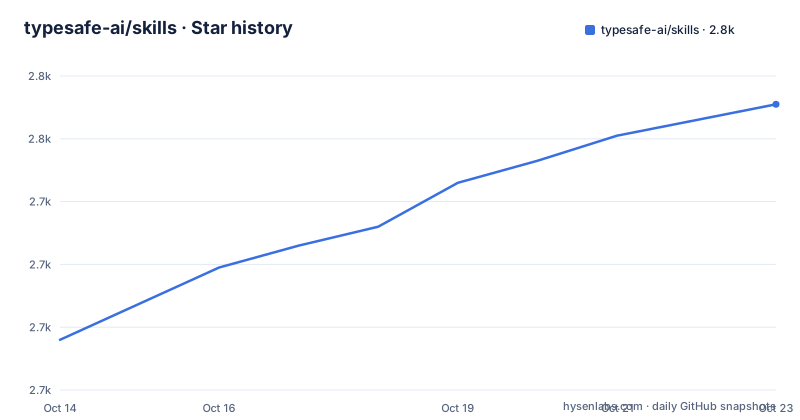
Star history
- typesafe-ai/skills2,761 ★ · +65
| Repository | 2026-10-14 | 2026-10-21 |
|---|---|---|
| typesafe-ai/skills | 2.7k | 2.8k |
65 Stars in the last 7 days, measured from the daily GitHub snapshot. Compare with other projects
Editorial analysis
One Markdown file standing in for an API client
The whole package fits in 4 top-level entries: `.claude-plugin/`, `LICENSE`, `README.md` and `skills/`. There is no package manifest, no build configuration, no test suite and no client for the System One API the repository's own description promises. What reaches your agent is Markdown: a single file at `skills/typesafe-ai/SKILL.md`, and the README's skill table carries exactly 1 row.
Wording shifts between the two texts. The description calls these agent skills for building with TypeSafe's System One API, while the README headline frames the payload as typed decisions and probabilities from System One models. Hold on to that gap. Everything concrete about the API, its endpoints, its payloads, its authentication, comes from typesafe.ai and from the documentation the skill is told to fetch, not from anything stored in these 4 entries.
The audience is narrow and self-selecting: engineers already running System One models who want an agent to draft a routing workflow and pull current documentation instead of answering from memory.
Two install routes and an external guide
Claude Code users get the plugin route, 2 commands that register a marketplace and then install from it:
claude plugin marketplace add typesafe-ai/skills
claude plugin install typesafe@typesafe-ai
Every other agent goes through skills.sh with a single command:
npx skills add typesafe-ai/skills --skill typesafe-aiYou pick the agent at the prompt. Notice where the scoping sentence sits: project-local by default, add `-g` to go global, and it appears under the skills.sh heading alone. Nothing on the page says whether the plugin route is scoped the same way, so two people on one team can end up with different scopes from the same repository.
A third route sits outside the install commands. The README hands you the raw Markdown of the skill file and an installation guide at `https://docs.typesafe.ai/agent-skill#installation`, which it credits with a prompt to copy to your agent, manual installation, and updates. Neither install path is given an update command of its own, so what you have on disk is left to that page.
One skill, three identifiers, one namespace
The file sits at `skills/typesafe-ai/SKILL.md`. The install line identifies it as `typesafe@typesafe-ai`, a plugin name and a skill name joined by an at sign. At run time you type `/typesafe:typesafe-ai`, a namespaced slash command whose prefix is not the folder name. The same string, typesafe-ai, travels as a directory name, as the right half of a plugin identifier and as the tail of a slash command, and only the last one is ever typed by hand. Counting them across the page gives 3 identifiers for 1 skill.
Reconciling the other two from the page alone is not possible. `.claude-plugin/` is never opened anywhere in the README, so nothing on it shows how a plugin name becomes a namespace, or whether the namespace would change if the skill were renamed. Confirming the mapping means running the install and watching which name each step accepts.
And because the table has a single row, nothing here documents what a second skill would look like, how the namespace would be assigned, or whether one plugin can serve both.
Routing tickets by department leaves the thresholds open
The usage example is one sentence long: ask your agent to route incoming support tickets by department, with human review for uncertain decisions. Three moving parts hide inside it. Support tickets are the input stream, department is the typed output, and human review for uncertain decisions is a fallback keyed on probability, the quantity the README's phrase typed decisions and probabilities names.
What the repository never pins down is the part that makes that design real in production. No value is given for uncertain, no threshold is exposed as a configuration key, and no endpoint, call cost, latency figure or failure behaviour appears anywhere in the 4 top-level entries. Take the example as a shape, not as a specification: the thresholds are yours to define, and the skill's stated job is to compose the typed judgment in code around them.
1 of the 3 purposes listed for the skill is finding current docs and cookbooks. That makes retrieval part of the deliverable, which is worth weighing before you rely on it.
A dot-prefixed directory the README never opens
Four entries, one of them hidden. `.claude-plugin/` is the only dot-prefixed item, and it is the only top-level entry that the plugin install route depends on; neither the skills.sh command nor the raw file link mentions it. The README lists no files inside it, names no manifest file and states no plugin version.
That absence is cheap to live with and annoying to audit. It costs nothing on the install path, because the tooling resolves those names for you. It costs something if you want to read a plugin before running it on a workstation, because the answer then lives in files the page never shows and the README's one-row skill table gives no second opinion.
By contrast, `skills/` is fully navigable from the page: one subdirectory, one SKILL.md, one row in the table pointing back at it. The visible half of the repository is that transparent.
Every content link points at a moving branch
2 links carry the actual content, and both resolve against `main`: a blob URL on github.com and a raw URL at `https://raw.githubusercontent.com/typesafe-ai/skills/main/skills/typesafe-ai/SKILL.md`. A branch name moves, so anything you copy by hand is a snapshot of whatever `main` holds at that moment, with no marker to diff against later. The last push landed on 2026-09-12 and the repository publishes no GitHub releases, so there is no tag to pin a copy to and no changelog to read between two states of the skill.
For teams that care about repeatable setups, that is the practical edge. A plugin install goes through tooling that knows about a marketplace; a hand-copied file has no notion of being out of date. Both questions are handed to the installation guide, which is the only place the README promises update instructions.
The same branch reference also means the phrase current, used in the skill's own purpose, tracks an external documentation site rather than this repository.
Hand-copying the raw file instead of installing the plugin
Three access routes exist, and the difference between them is not the content. All of them deliver the same Markdown. What changes is the runtime you finish with.
Install the Claude Code plugin and you get the `/typesafe:typesafe-ai` command, which resolves only inside Claude Code, so moving to a different agent means reinstalling by another route. Use the skills.sh command and the skill registers with whichever agent you choose at the prompt, project-local unless you add `-g`, which keeps the prompt inside the repository where the team can read it. Fetch the raw file and you own it outright: it can be committed, reviewed and pinned in your own tree, but nothing updates it for you and there is no slash command.
So the choice turns on which agent runtime your team standardizes on, and on whether you want the prompt text under version control rather than delivered by a marketplace.
Editorial conclusion
Worth a try if your team already builds on TypeSafe System One and wants an agent that drafts routing workflows and fetches current documentation instead of improvising from memory. Skip it if you are evaluating the API itself: four top-level entries and one Markdown file answer nothing about endpoints, authentication, latency or cost. Before adopting, run one install, confirm that /typesafe:typesafe-ai resolves inside your agent, then read skills/typesafe-ai/SKILL.md and check its thresholds against yours.
Frequently asked questions
What does typesafe-ai/skills actually install?
One agent skill, SKILL.md, held under skills/typesafe-ai/, either as the Claude Code plugin typesafe@typesafe-ai or through the skills.sh command for other agents. No System One client code is part of the repository.
How do I install typesafe-ai/skills for an agent other than Claude Code?
Run npx skills add typesafe-ai/skills --skill typesafe-ai and choose the agent at the prompt. That route is project-local by default, and adding -g installs globally.
Does typesafe-ai/skills contain code that calls the TypeSafe System One API?
No. The top-level entries are .claude-plugin/, LICENSE, README.md and skills/, and the shipped unit is Markdown. Details of the API come from typesafe.ai and the documentation the skill is told to fetch.
How do I update the typesafe-ai skill once it is installed?
The README gives no update command of its own and hands updates to the installation guide at https://docs.typesafe.ai/agent-skill#installation. Its own links to SKILL.md resolve against the main branch, so they carry no version marker.
Which licence covers typesafe-ai/skills?
MIT, named in the repository's LICENSE file. The repository publishes no GitHub releases, so there is no tagged version to compare a licence-bearing copy against.
Official sources
Add this badge to your README
If you maintain this project, the badge below links readers to this analysis and shows its maintenance status from the daily GitHub snapshot. Paste the markdown into your README; add ?metric=license or ?metric=stars to the image URL for a different field.

[](https://hysenlabs.com/projects/typesafe-ai-skills)Star history chart for your README
[](https://hysenlabs.com/projects/typesafe-ai-skills)Was this useful?