httptap splits one HTTP request into five phases and reads TLS off the connection it already opened
Rich-powered CLI that breaks each HTTP request into DNS, connect, TLS, wait, and transfer phases with waterfall timelines, compact summaries, or metrics-only output.
At a glance
- What is it?
- A Python CLI that times DNS, connect, handshake, wait and transfer separately, renders a waterfall or a single line, and can fail a CI job on a per phase budget. Three pure Python dependencies, no shelling out to curl, and a container that runs as uid 1000.
- Who is it for?
- httptap earns its place when you need to know which phase is slow rather than whether the request was slow. The SLO flag and the metrics only mode are what make it usable in a pipeline, since a waterfall nobody reads in a log is no use.
- Can I use it commercially?
- Yes. Apache-2.0 is a permissive licence: you can use, modify and sell software built on it, as long as you keep its copyright and licence notices.
- Is it still maintained?
- Yes. The repository last received commits 2 days ago.
- What is it written in?
- Mainly Python, according to GitHub's language statistics.
Answers come from the project's GitHub data, last synced on October 23, 2026, and from our analysis. They are not legal advice.
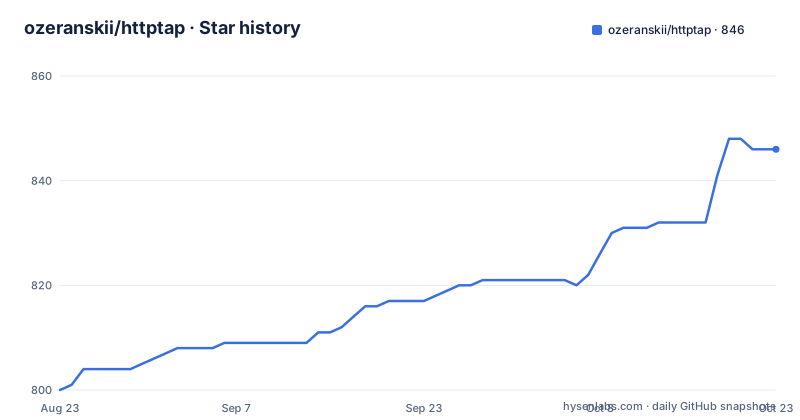
Star history
- ozeranskii/httptap846 ★ · +46
| Repository | 2026-08-23 | 2026-10-23 |
|---|---|---|
| ozeranskii/httptap | 800 | 846 |
46 Stars in the last 61 days, measured from the daily GitHub snapshot. Compare with other projects
Editorial analysis
The five phases come from trace hooks, with a stated fallback
The measurement is the product. A request is divided into DNS resolution, TCP connect, TLS handshake, server wait, and body transfer, and each gets its own number. The timings are built from trace hooks in the HTTP core the client library is built on, and the documentation is explicit that sane fallbacks apply when metal level data is unavailable. That sentence matters more than it looks: a phase with no direct measurement is estimated, so a report showing five numbers does not guarantee five measurements.
Around that core the tool covers the ordinary request surface. All the standard methods are handled, GET, POST, PUT, PATCH, DELETE, HEAD and OPTIONS, and bodies are supported for any of them. Body content can be JSON, XML or arbitrary data, supplied inline or read from a file, with the content type detected automatically rather than declared by hand.
Address family is reported too. The resolver and the TLS inspector both report the address and the family, so an IPv6 versus IPv4 difference is visible in the output instead of being buried in a resolver library default. That is one of the rows the comparison table marks as partial for the curl based alternatives.
Certificate details are read from the connection already open
The TLS section is the part that differentiates it from a verbose curl log, and the design choice is that the data is captured automatically from the live connection rather than by triggering a second handshake. What is collected covers the certificate common name, the subject alternative names, the issuer, the serial number, the validity window and a countdown to expiry, plus the negotiated cipher suite and the protocol version.
An expiry countdown is the practical part. A certificate about to lapse is the kind of thing that shows up as an outage rather than as a warning, and rendering the remaining days next to the timing for a request turns it into something visible during the request you are already investigating. The feature list puts it as no extra handshake for a reason: a diagnostic that doubles the number of connections can change what it is measuring.
The comparison table scores that row as available through curl only in verbose mode, and marks it absent for the other two tools. HTTP/2 is supported in the same way, carried by the client library's HTTP/2 extra rather than by anything in this tool itself.
SLO checking is the one row the comparison table gives away
The threshold flag takes per phase budgets on the command line:
--slo total=500,ttfb=200When a budget is exceeded the process exits non zero, which is what makes it usable as a gate on a CI job, a cron probe or a readiness check. Two details are worth noting. The failure is not silent, because the full report is still rendered before the exit, so a failing pipeline shows the same waterfall you would have looked at interactively. And the budgets are named per phase rather than being a single total, so a regression that trades connection time for wait time can be caught.
What the comparison table does not claim here is priority. In the SLO row, httptap gets a check, curl gets a cross, and httpstat gets a check with the same example syntax. So the threshold feature exists elsewhere in the category, and the comparison is honest about that rather than claiming it as novel.
The same row shows httpstat ahead on nothing else that matters much, with httptap ahead on the waterfall view, the redirect chain with per step timing, and the extensible Python API.
Three Python dependencies, and no shelling out
The dependency list is three packages: an HTTP client with the HTTP/2 and SOCKS extras, a terminal rendering library, and a DNS library. That is the entire runtime requirement set, and it is why the comparison table can claim zero system dependencies. The competing tools in that table reach the network through curl as a subprocess, which means a system package, a version you did not choose, and output you have to parse out of a formatting string.
The console entry point is a single function in the command line module, and the metadata marks the distribution as typed, with type checking declared as a classifier. The supported interpreter range runs from 3.10 through 3.15, and the operating systems listed cover POSIX, macOS and Windows.
Extensibility is claimed through protocol interfaces rather than subclass hooks, with separate seams for DNS, TLS, timing, visualization and export. That is a wider surface than a plugin hook, and it is what the table means by an extensible Python API when it scores the curl column as not offering one.
Six ways in, and the recommended one is the standalone runner
The installation section offers six routes. Homebrew on macOS and Linux, the standalone runner invoked through the Python packaging tool and marked as recommended, an explicit managed environment, a plain pip install, a container image, and building from the source tree. A seventh entry covers shell completion, which is the only optional dependency: an argument completion library behind an extra.
The split matters for CI. A one line runner invocation caches in a way a global install does not, and it needs no virtual environment setup step in a job that exists to measure latency. The pip route is there for environments that already manage Python packages.
Documentation lives on a separate site, which is where the format references and the per format guides are said to be, and the repository carries a mkdocs configuration along with a docs directory. The readme itself is maintained in four languages, English, simplified Chinese, Japanese and Spanish, each as its own file at the repository root.
The container pins both stages by digest and drops to uid 1000
The image is a two stage build where neither stage floats. The builder is a packaging tool image pinned to a Python 3.14 slim base by digest, with the environment set so no interpreter is downloaded, and the runtime stage is the plain Python 3.14 slim base, also pinned by digest. Dependency installation runs with a frozen lock file and explicitly excludes the documentation, lint, test, typing and precommit groups, so none of that ships.
The runtime stage is where the details are. A system group and user are both created with uid and gid 1000, the account is created with no login and no home directory, and the shell is set to the non-login one. The image switches to that user, sets the home directory to a temporary path, sets the working directory to a work folder, and puts the entry point at the installed console script:
USER 1000:1000
WORKDIR /work

ENTRYPOINT ["/app/.venv/bin/httptap"]
So the container writes nothing to a home directory that does not exist, and a caller who needs to save a JSON export has to mount somewhere writable. The license file is copied into the image's documentation directory at the same time as the environment, which is what the metadata's license file declaration asks for.
An affiliate offer sits between the highlights and the comparison
Between the feature list and the comparison table there is a promotional block offering a discount on a commercial Git client bundle, with a referral link and a note that it is exclusive for users of this tool. It is the only such block in the readme and it sits in the position a reader scans on the way to the comparison.
Worth noting for its own sake: the tool it points at is the kind that gives a Git history view, which is the same category of workflow as recording performance baselines and reviewing regression. The offer is not a claim about the tool's behaviour and should not be read as one.
The comparison table that follows is the substantive part, and it is unusually even handed. It scores httptap against curl's write out facility, against httpstat and against httpie, and it does not claim to win every row. Redirect chain timing, the rich waterfall and the extensible API go to httptap. The SLO threshold row is a tie with httpstat. Curl keeps the custom certificate bundle row outright. httpie keeps nothing, which the table states plainly.
Governance, a citation file and a vulnerability exchange directory
The top level carries more process than a small command line tool usually does. There is a governance file, a security policy, a code of conduct, a contributing guide, a changelog and a roadmap, alongside a citation metadata file for academic use and a security insights configuration.
Two of those entries are more unusual. One is a versioned exchange directory for vulnerability exploitability information, which is what a project publishes when it wants to say something specific about which of its advisories are actually exploitable rather than leaving every release flagged equally. The other is the citation file, which is the kind of thing an academic tooling project adds so that a paper can reference it correctly. Both suggest a project that takes supply chain and citation seriously for a package whose runtime footprint is three imports.
The readme's own table of contents has a small defect worth flagging, because it is the kind of thing that makes a long document harder to navigate: advanced usage appears twice as a top level entry, once plain and once with a second occurrence anchor, which means the heading exists twice in the file.
Editorial conclusion
httptap earns its place when you need to know which phase is slow rather than whether the request was slow. The SLO flag and the metrics only mode are what make it usable in a pipeline, since a waterfall nobody reads in a log is no use. Three things to check before adopting it. It is pure Python over three libraries rather than a wrapper around curl, so its measurements come from trace hooks in the HTTP core with stated fallbacks, and a phase you cannot measure will be an estimate. Its feature table concedes one row to httpstat, which also ships an SLO flag, so that capability is not unique here. And the fastest install path is the standalone runner rather than a package install, which matters in CI where you would rather not add a dependency.
Frequently asked questions
Which HTTP phases does httptap time separately?
DNS resolution, TCP connect, TLS handshake, server wait and body transfer, with the numbers built from trace hooks in the HTTP core and stated fallbacks when lower level data is unavailable.
How do I make httptap fail a CI job on a latency budget?
Use the SLO flag with per phase budgets such as total=500,ttfb=200. The process exits non zero on a violation while still rendering the full report, which makes it usable as a gate on CI jobs, cron probes or readiness checks.
What are httptap's runtime dependencies?
Three Python packages: an HTTP client with the HTTP/2 and SOCKS extras, a terminal rendering library and a DNS library. Shell completion is the only optional extra, behind an argument completion library.
Does httptap need a second TLS handshake to report certificate details?
No. The common name, subject alternative names, issuer, serial, validity window, expiry countdown, cipher suite and protocol version are captured automatically from the live connection rather than from an extra handshake.
What Python versions and platforms does httptap support?
The metadata requires Python 3.10 or newer and classifies 3.10 through 3.15, across POSIX, macOS and Windows, with type checking declared and Apache-2.0 as the licence.
Official sources
Add this badge to your README
If you maintain this project, the badge below links readers to this analysis and shows its maintenance status from the daily GitHub snapshot. Paste the markdown into your README; add ?metric=license or ?metric=stars to the image URL for a different field.

[](https://hysenlabs.com/projects/ozeranskii-httptap)Star history chart for your README
[](https://hysenlabs.com/projects/ozeranskii-httptap)Was this useful?