PokéRogue runs in the browser and ships from a private, hotfix-tagged repo
A browser based Pokémon fangame heavily inspired by the roguelite genre.
At a glance
- What is it?
- PokéRogue is a browser based Pokémon fangame built on TypeScript and Vite. The part worth an engineer's attention is the repository around it: four build modes, six dotenv files, a private manifest, a container that switches off the login gate, and a licensing scheme that leaves some assets uncovered.
- Who is it for?
- PokéRogue suits a player who wants a roguelite run with nothing to install, and it suits a developer who wants to read a large TypeScript game codebase with a real test and lint setup around it. It does not suit anyone who needs a packaged mobile build, a documented save migration path, or a licence that covers every asset file.
- Can I use it commercially?
- Yes, with strict conditions. AGPL-3.0 is a network copyleft licence: if people use a modified version over a network, for example as a hosted service, you must offer them its source code under the same licence.
- Is it still maintained?
- Yes. The repository last received commits 1 day ago.
- What is it written in?
- Mainly TypeScript, according to GitHub's language statistics.
Answers come from the project's GitHub data, last synced on November 15, 2026, and from our analysis. They are not legal advice.
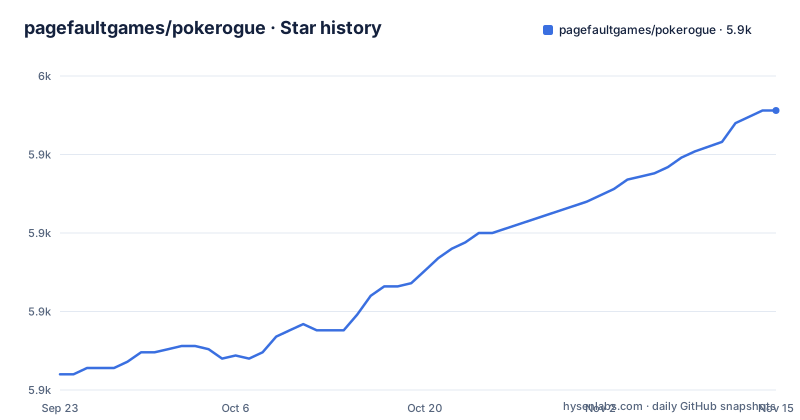
Star history
- pagefaultgames/pokerogue5,939 ★ · +84
| Repository | 2026-09-23 | 2026-11-15 |
|---|---|---|
| pagefaultgames/pokerogue | 5.9k | 5.9k |
84 Stars in the last 53 days, measured from the daily GitHub snapshot. Compare with other projects
Editorial analysis
Four vite modes and six dotenv files decide which build you get
The scripts in package.json do not funnel into one entry point. `start:dev` runs vite with the development mode, `start:beta` with the beta mode, `start:prod` with the production mode, and `start:podman` with the development mode plus a host and port override. Every one of those modes has a matching dotenv file at the repository root: `.env.development`, `.env.beta`, `.env.production`, `.env.test`, `.env.app`, and a plain `.env` that the others sit beside. The build side repeats the same split with `build`, `build:beta`, `build:dev` and `build:app`. Switching mode is how you get a different bundle rather than a different checkout.
"start:dev": "vite --mode development",
"start:beta": "vite --mode beta",
"start:prod": "vite --mode production",
"start:podman": "vite --mode development --host 0.0.0.0 --port $PORT"
That last one is the only script in the file that binds a network interface explicitly, which makes it the one to reach for when the copy has to be opened from another machine.
The container runs the game as a non-root user on port 8000
The Dockerfile pins its toolchain twice, with `ARG NODE_VERSION=24.9` and `ARG OS=alpine`, so the image runs node 24.9 on alpine no matter what your shell has. It adds git, sets the working directory to /app, turns on corepack and prepares pnpm 10.34.5, then installs from the committed lockfile with `--frozen-lockfile` and empties the cache mount afterwards. Ownership of the tree moves to a freshly created appuser before anything runs and the process drops root for good. The environment block is the part that changes how a local copy behaves, because `VITE_BYPASS_LOGIN=1` sits next to `VITE_BYPASS_TUTORIAL=0`, `NODE_ENV=development` and `PORT=8000`.
corepack enable && corepack prepare [email protected] --activate
pnpm install --frozen-lockfile
pnpm run start:podman
The image then exposes that port and starts the podman script, which is how a self-hosted copy comes up bound to all interfaces instead of the loopback address.
Every release is a hotfix, and the manifest sits ahead of all of them
The three newest releases are v1.12.2.3 from 2026-10-31, and v1.12.2.2 and v1.12.2.1, both from 2026-10-27, and each one is titled as a hotfix. The version field inside package.json reads 1.12.2.3, matching the newest tag. Releases arrive as patches on a fixed minor line instead of as feature versions. The beta branch itself took its most recent push on 2026-11-02.
package.json is private, so there is no package to install
The manifest names the project pokemon-rogue-battle, marks it private and sets type to module. That closes off the easy route: there is no published package name to add to a dependency list and no version to pull from a registry, so the source tree is the only way in. A local copy also behaves differently from the hosted one. The game lives at pokerogue.net, while a copy you start yourself is a client with whatever the loaded dotenv file points at. The repository does not say which server a build without the bypass talks to, so treat the backend as something you supply or something you do not have, rather than as a documented dependency.
Saves stay encrypted and the daily run is rebuilt by a script
A handful of scripts exist to reach data the browser otherwise keeps to itself. `decrypt-save` runs vite-node on scripts/decrypt-save.ts, `dailySeed:create` runs scripts/daily-seed/main.ts, `scrape-trainers` reads trainer names, and `eggMoves:parse` parses egg moves. All four go through vite-node instead of a bundler, which marks them as offline data work rather than as game features. Two more sit in the same scripts directory: `test:create` scaffolds a test through scripts/create-test/create-test.ts and `test:profile` drives scripts/profiling/profiling.ts. None of the visible scripts exports a save back into the game, so the tooling is weighted towards reading data and preparing fixtures rather than towards moving player data around.
Setup steps, save handling and the backend are all left out
The README fits on one screen and it does not carry an installation guide. It points at CONTRIBUTING.md, which it says includes instructions to set up the game locally. The README itself leaves several practical questions open: what belongs in each dotenv file beyond the six environment variables the Dockerfile sets, where a save is kept and how to move one, how to roll back a save you regret, which endpoint the client talks to, and how to reset a daily run after it goes wrong. The one visible handle is `decrypt-save`, which reads an encrypted save, and there is no matching script on the writing side. Anyone planning to host their own copy should expect to answer those questions from the client source instead of from documentation.
Assets without a REUSE.toml entry carry no licence at all
Licensing runs through REUSE, so each file carries its own copyright line or has one supplied by a REUSE.toml beside it, and the full picture is reconstructed with the reuse tooling. The tiers split four ways: source code under AGPL-v3.0-only, documentation and comments that document the source under CC-BY-NC-SA-4.0, generated files and files of insignificant originality under CC0-1.0, and assets under CC-BY-NC-SA-4.0 wherever they are licensable at all. The gap worth knowing about is spelled out in the file itself, since assets that no REUSE.toml covers should be read as having no licensing information. Put that together with the non-commercial terms on the documentation and the asset tier, and a fork can read the code under the AGPL while still having no clear right to ship the art that goes with it.
Editorial conclusion
PokéRogue suits a player who wants a roguelite run with nothing to install, and it suits a developer who wants to read a large TypeScript game codebase with a real test and lint setup around it. It does not suit anyone who needs a packaged mobile build, a documented save migration path, or a licence that covers every asset file. Before committing to a fork, read CONTRIBUTING.md and the REUSE.toml files, then start the development mode yourself and check what the .env file it loads points at.
Frequently asked questions
How does Pokerogue work?
It is a browser based Pokémon fangame, so the run happens in a web page rather than in an installed program. The loop is endless battles while gathering stacking items, exploring many different biomes, and fighting trainers and bosses, following the roguelite structure the project describes.
What is Pokerogue based on?
On Pokémon, and on the roguelite genre. The project calls itself a browser based fangame heavily inspired by roguelites, where items stack as a run continues instead of being fixed loadout choices. The client is TypeScript served by vite, with the hosted game at pokerogue.net.
How do I install Pokerogue?
The README does not spell out installation and sends you to CONTRIBUTING.md for local setup. What the repository does show is the shape of it: a private package manifest, pnpm 10.34.5 prepared through corepack, a frozen lockfile install, and a Dockerfile that starts the dev mode on port 8000 as a non-root user.
How do I install Pokerogue on a Steam Deck?
No Steam Deck specific instructions exist in the repository. The closest documented path is the container route, where the podman script starts vite with host 0.0.0.0 and port $PORT, so a device on the same network could reach a copy served from another machine.
How do I use Pokerogue?
To play it, open pokerogue.net in a browser. To work on it, clone the beta branch, install the dependencies with pnpm, and choose the mode you want through start:dev, start:beta or start:prod, since each one loads a different dotenv file from the repository root.
Official sources
Add this badge to your README
If you maintain this project, the badge below links readers to this analysis and shows its maintenance status from the daily GitHub snapshot. Paste the markdown into your README; add ?metric=license or ?metric=stars to the image URL for a different field.

[](https://hysenlabs.com/projects/pagefaultgames-pokerogue)Star history chart for your README
[](https://hysenlabs.com/projects/pagefaultgames-pokerogue)Was this useful?