WeasyPrint: an HTML and CSS rendering engine written to paginate
The awesome document factory
At a glance
- What is it?
- A Python library that turns HTML and CSS into PDF without embedding a browser, aimed at invoices, reports and tickets where page breaks matter more than pixel fidelity.
- Who is it for?
- WeasyPrint is worth reaching for when the output is a document rather than a screenshot of a page, because it was built around page boxes and break rules instead of retrofitting them onto a browser. The trade is stated in the README itself: no WebKit, no Gecko, no headless Chrome to install and version, and correspondingly no guarantee that a page which looks right in a browser will look right here.
- Can I use it commercially?
- Yes. BSD-3-Clause is a permissive licence: you can use, modify and sell software built on it, as long as you keep its copyright and licence notices.
- Is it still maintained?
- Yes. The repository last received commits 8 days ago.
- What is it written in?
- Mainly Python, according to GitHub's language statistics.
Answers come from the project's GitHub data, last synced on October 21, 2026, and from our analysis. They are not legal advice.
Star history
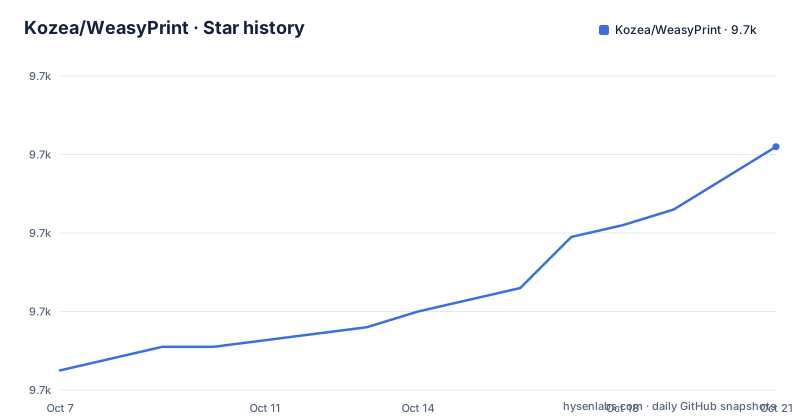
- Kozea/WeasyPrint9,722 ★ · +57
| Repository | 2026-10-07 | 2026-10-21 |
|---|---|---|
| Kozea/WeasyPrint | 9.7k | 9.7k |
57 Stars in the last 14 days, measured from the daily GitHub snapshot. Compare with other projects
Editorial analysis
A layout engine built for page boxes instead of viewports
The README makes one architectural claim early and everything else follows from it: WeasyPrint is based on various libraries but not on a full rendering engine like WebKit or Gecko, and the CSS layout engine is written in Python, designed for pagination, and meant to be easy to hack on.
That is the whole pitch in one sentence, and it is the reason the project has 9,621 stars. The usual way to get a PDF out of HTML in a Python application is to shell out to a headless browser and print to PDF, which drags in Chromium or Firefox, a sandbox, and a rendering pipeline that was designed for a screen. WeasyPrint instead implements the CSS the printing specs care about directly, which means `break-inside`, `orphans`, `widows`, running headers through `@page` margin boxes, and page counters are modelled as first class concepts rather than as browser print settings that mostly work.
The README names the target use cases as statistical reports, invoices and tickets. Those are documents where the page structure is decided in advance and the content varies, which is exactly the regime where a paginating engine beats a browser screenshot. Where WeasyPrint is a weaker choice is a page whose visual design leans on complex flexbox or grid edge cases, because every one of those has to be reimplemented against spec rather than inherited from a mature engine.
Both of the last two releases were security releases
The release history is the part of this repository that deserves the most attention, and it is not because of new features. Version 70.0, published on 2026-09-08, is described as a security update for CVE-2026-55073, tracked as GHSA-r543-q48m-4c9j, with two concrete changes: EPS images are no longer rendered, and the original URL fetcher is always used when available. The release notes tell you who is at risk directly, naming two conditions: embedding untrusted images, and relying on the URL fetcher to filter metadata or stylesheets passed as Python parameters.
Version 69.0, three months earlier on 2026-06-02, was also a security release, for CVE-2026-49452, covering CSS injection through HTML presentational hints when the `--presentational-hints` option is enabled. The fix is listed as avoiding that CSS injection.
Two consecutive security releases for an untrusted input path is the pattern that should shape your deployment decision. If you render user-supplied HTML, you are rendering attacker-controlled input, and both advisories describe ways that input could escape the sandbox you thought the library provided. Version 69.0 also renamed a command-line option along the way: `--srgb` is gone, replaced by `--output-intent=srgb`, with `device-cmyk` available for CMYK documents carrying no ICC profile. Any wrapper script or Dockerfile pinning that flag needs updating.
What the packaging metadata says about running it
The `pyproject.toml` in the tree is more informative than the README for anyone deciding whether WeasyPrint fits their environment. It requires Python 3.10 or newer, builds with `flit_core`, and pins a short list of dependencies that together describe the architecture: `tinyhtml5` for HTML parsing and `tinycss2` for CSS parsing, both from the same small-ecosystem lineage, `cssselect2` for selector matching, `pydyf` for PDF generation, `Pyphen` for hyphenation, `Pillow` and `fonttools[woff]` for images and fonts.
[project]
name = 'weasyprint'
description = 'The Awesome Document Factory'
requires-python = '>=3.10'
dependencies = [
  'pydyf >=0.11.0',
  'cffi >=0.6',
]
The absence of a browser dependency is visible right there in that list. `cffi` is there for the parts that talk to system libraries, which in practice means font handling through FreeType and Fontconfig on Linux and Core Text on macOS. That is the operational detail to plan for: WeasyPrint needs fonts installed on the machine, and which fonts it finds changes the output, so a container image needs the same font set as the design.
The classifier list runs from Python 3.10 through 3.14 and includes PyPy alongside CPython, so the README's claim that the project is tested on both is supported by the packaging metadata rather than merely asserted.
Kozea wrote it, CourtBouillon keeps it running
Ownership is split in a way that says something about the project's stage of life. The README states that WeasyPrint has been created and developed by Kozea, and that professional support, maintenance and community management is provided by CourtBouillon, with the maintainer contact in the packaging metadata pointing at courtbouillon.org rather than at the original employer. The `pyproject.toml` author field still credits Simon Sapin, who wrote the bulk of the original engine, while the maintainer field is CourtBouillon.
That arrangement is what a widely used library looks like after the original sponsor stops being the right home for it. Kozea built it, and now a dedicated firm handles the surrounding work: a documentation site, a code of conduct, commercial support, and an OpenCollective donation page. Two release tags are attributed to CourtBouillon's blog, so the security advisories are being communicated somewhere more than GitHub release notes.
The licensing is the plainest part. BSD-3-Clause, and the README makes a point of it that is worth repeating to anyone about to contribute: copyrights are retained by contributors, no copyright assignment is required, and contributions are licensed under the BSD 3-clause license without additional terms. There is no CLA to sign.
Reading the activity signals without overreading them
The repository metadata reads as healthy. 9,621 stars and 877 forks, 141 open issues, not archived, and a last push on 2026-09-21. Version 70.0 landed on 2026-09-08, thirteen days before that push, which is the cadence you would expect from a project with active security work rather than one merely coasting on its reputation.
The 141 open issues deserve context rather than alarm. WeasyPrint tracks CSS specification compliance work in the same tracker as bugs, and many open issues are requests to support a property the engine does not implement yet. A repository whose issues are largely unimplemented CSS is reporting its remaining scope, not its failure count. Version 70.0 added initial support for CSS Notes with financial support from NLnet, which is an example of the specification tracker pattern: the missing feature becomes a numbered issue, and someone funds it.
The tree itself is small and legible: `weasyprint/` for the package, `tests/`, `docs/`, `pyproject.toml`, and a `LICENSE`. For a library with this much adoption, the absence of a sprawling internal directory structure is a sign that the code stayed close to the spec it implements.
Where the README ends and the documentation begins
The README is short and does not try to be a manual. It points at doc.courtbouillon.org for documentation, weasyprint.org for examples, and the releases page for the changelog, and then stops. There is no usage snippet in it, no API listing, and no statement about which CSS properties are supported.
That split matters for evaluation. The deciding questions about WeasyPrint are all answered outside the repository: which CSS features are implemented, how faithfully page break hints are honoured, how the URL fetcher can be replaced or restricted, and how images and fonts are resolved. None of that is in the README, and all of it is necessary before you commit to replacing a headless browser in a pipeline.
The sample gallery at weasyprint.org is the fastest useful starting point, because it shows documents the maintainers consider representative of what the engine does well, which is a more honest filter than a feature list. If your output resembles those samples, the project is a strong fit. If it resembles a marketing landing page, a browser print path is probably still the better answer.
Editorial conclusion
WeasyPrint is worth reaching for when the output is a document rather than a screenshot of a page, because it was built around page boxes and break rules instead of retrofitting them onto a browser. The trade is stated in the README itself: no WebKit, no Gecko, no headless Chrome to install and version, and correspondingly no guarantee that a page which looks right in a browser will look right here. Start by rendering one representative document and diffing the PDF against what you expected, then read the documentation at doc.courtbouillon.org for the parts of CSS the engine has not implemented.
Frequently asked questions
What is WeasyPrint used for?
The README names statistical reports, invoices and tickets as the target documents, and the project's own description calls it a document factory. In practice it fits templates whose page structure is known in advance and whose content changes per run, because it implements printing-oriented CSS such as page margin boxes and break hints directly rather than relying on a browser print dialog.
Is WeasyPrint free?
Yes. It is BSD-licensed, and the README states that copyrights are retained by contributors with no copyright assignment required to contribute. Professional support, maintenance and community management are offered commercially by CourtBouillon, and donations are collected through OpenCollective, but the library itself carries no cost and no usage restriction.
How can I convert HTML to PDF using WeasyPrint?
WeasyPrint is a Python library rather than a command line tool, so conversion happens by calling its Python API on an HTML document and writing the result out as PDF. The repository README does not include the call signature, so the place to get the current entry points is the documentation at doc.courtbouillon.org, linked from the README.
How do I install WeasyPrint on Windows?
The README does not cover platform-specific installation, but it does cover the two relevant constraints. Version 70.0 notes that Windows tests and executables moved to an MSYS2 UCRT64 environment, and the packaging metadata shows the library depends on font handling through system libraries, so fonts have to be present on the machine for output to be correct.
Official sources
Add this badge to your README
If you maintain this project, the badge below links readers to this analysis and shows its maintenance status from the daily GitHub snapshot. Paste the markdown into your README; add ?metric=license or ?metric=stars to the image URL for a different field.

[](https://hysenlabs.com/projects/kozea-weasyprint)Star history chart for your README
[](https://hysenlabs.com/projects/kozea-weasyprint)