Kaset is a web view with an equalizer bolted on, shipped unsigned
The missing YouTube and YouTube Music macOS app. Kaset A native macOS client for YouTube Music and YouTube, built with Swift and SwiftUI.
At a glance
- What is it?
- A native macOS client for YouTube Music and YouTube written in Swift and SwiftUI, distributed as an unsigned disk image with a documented procedure for clearing macOS's quarantine flag. Almost every feature in the list follows from one architectural choice: the audio comes out of a WebKit view rather than a decoder.
- Who is it for?
- Read this as a well-made wrapper and decide for yourself whether you want the wrapper. The engineering is careful: an update feed in the repository, a version kept in one env file, a cask alongside the source, a documented review policy for generated contributions, and eighteen localizations.
- Can I use it commercially?
- Yes. MIT is a permissive licence: you can use, modify and sell software built on it, as long as you keep its copyright and licence notices.
- Is it still maintained?
- Yes. The repository received new commits within the last day.
- What is it written in?
- Mainly Swift, according to GitHub's language statistics.
Answers come from the project's GitHub data, last synced on November 14, 2026, and from our analysis. They are not legal advice.
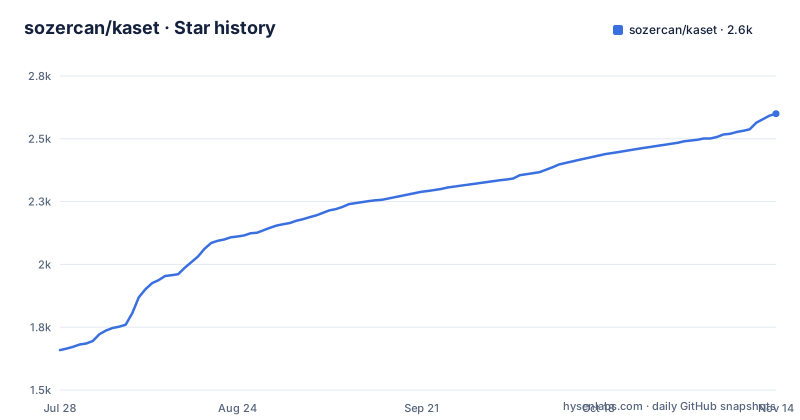
Star history
- sozercan/kaset2,600 ★ · +941
| Repository | 2026-07-28 | 2026-11-14 |
|---|---|---|
| sozercan/kaset | 1.7k | 2.6k |
941 Stars in the last 109 days, measured from the daily GitHub snapshot. Compare with other projects
Editorial analysis
Playback is a web view, which explains most of the feature list
The equalizer is described as system-wide, six-band, parametric, with presets borrowed from a streaming competitor's app, and then qualified in four words: applied to WebKit playback output. That clause is the architecture. There is no native audio decoder and no stream handling, because the audio arrives from a web view, so the equalizer is digital signal processing on that view's output rather than a feature of a playback engine. The same fact explains the extension support, which loads WebKit Web Extensions rather than native ones, and it explains why protected YouTube Music content plays at all: the page is loaded through your own authenticated session, so the subscription you pay for is what unlocks it, not anything the app does to the stream. The lyrics features sit halfway between the two worlds, since plain and synced lyrics need timing data from the page, while the explanations and mood analysis are described as on-device work.
The app is unsigned, and the page walks you through removing the flag
Kaset is not signed or notarized by Apple, and the README says so before it says anything else about first launch. macOS therefore shows a verification warning, and the page treats that as expected rather than as a problem to solve. Two procedures are offered, both one-time. The first is the graphical one: try to open the app, dismiss the warning, then go to System Settings, Privacy and Security, and use the Open Anyway button twice with a password or Touch ID. The second is a single Terminal command that strips the quarantine attribute from the entire bundle:
xattr -dr com.apple.quarantine /Applications/Kaset.appThere is also a third path, and it is the one to prefer if you already use a package manager:
brew install sozercan/repo/kasetThe page says Homebrew handles the security warning for you, so the override steps can be skipped. That difference is the substance of the choice: one route asks you to remove a quarantine flag from an app bundle by hand, the other asks a tool you already trust to do it for you. Neither route changes what the app is, and both mean you are running code Apple has not inspected.
An unsigned app still gets updates, from a feed in the repository
The layout answers the question an unsigned app usually cannot answer, which is how a user finds out a new version exists. The repository carries an appcast feed, which is the standard mechanism macOS apps use to advertise updates, plus a version file kept as a plain environment variable, a directory of casks for the package manager, and a worker directory. That combination is the whole update story: the version a user sees and the version the cask installs both come from the repository, and the feed is what the running app polls. The rest of the tree is a Swift package with its own sources, tests and a separate UI test project, plus the standard application files, an entitlements file, formatting and linting configuration, a documentation directory, a scripts directory, a website directory, and four agent or assistant configuration files at the root. It is a bigger repository than the feature list implies, which is normal for an app that wraps someone else's web product.
macOS 15.4 to run and macOS 26 for the model-backed features
Two version floors, and the second one is not about stability. The application needs macOS 15.4 or later. The Apple Intelligence features, described as on-device for natural language commands, lyrics explanations and playlist refinement, need macOS 26.0 or later, and the lyrics entry repeats the same gate for explanations and mood analysis. So the natural-language surface, which is the most interesting thing in the list, is unavailable on any Mac that cannot run the current system release, and the page does not degrade the feature or explain what happens instead. Elsewhere the hardware expectations are narrow and specific: haptic feedback is limited to Force Touch trackpads, while picture-in-picture, media keys, the Control Center integration and the Dock menu are listed as general system integration. Background playback is precise about its own limits, continuing when the window closes and stopping on quit.
Three automation surfaces, and one of them a web page can reach
The app is built to be driven by other software, and it offers three doors. The first is a custom URL scheme with a documented shape for playing a track by identifier, plus a routing rule that sends app-targeted watch links and short links to the YouTube mode instead of the music mode. The second is scripting support, positioned explicitly against Raycast, Alfred and the Shortcuts app. The third is extension loading, where the documented examples are an ad-blocking extension and a sponsor-blocklist extension, both of which are WebKit extensions rather than native ones. The URL scheme is the surface to think about, because a scheme handler is reachable from a link, so any page or message that can get you to click a link can ask the app to play something. That is not a flaw and it is what makes the app scriptable; it is a reason to know which of your tools can construct such a link.
The contribution policy reviews the prompt before the code
One paragraph of the README describes something most projects do not: an explicit route for machine-written contributions. Alongside the normal pull request workflow, the project accepts what it calls prompt requests, where you share the prompt that generates your changes and maintainers review the intent before running the code. The stated purpose is that the reviewer sees what was asked for before anything executes, which inverts the usual order where diffs are read after the code has already been run locally by whoever wrote it. Whether it works in practice depends on people writing prompts honestly, which is the obvious weakness in any such scheme, and the page does not claim otherwise. It is still a more interesting answer to the question than adding a boilerplate line about generated code, and it is documented as its own section rather than a footnote in the contributing guide.
Eighteen languages, and five documentation pages behind the readme
The localization claim is specific enough to check: eighteen languages are named, from Arabic through Chinese in both scripts, Dutch, English, French, German, Indonesian, Italian, Japanese, Korean, Polish, Portuguese, Russian, Spanish, Swedish, Turkish and Ukrainian, switchable from a settings pane under the general section. That is a real localisation effort for an unofficial client, and it sits alongside a smaller set of choices that are macOS-flavoured rather than cross-platform: the Apple Music-style layout with a translucent player bar, the share sheet, Force Touch haptics, and the Control Center integration. The documentation structure is the other half of that: the README is an index that links out to five separate pages covering the YouTube mode, the keyboard shortcuts, extensions, the URL scheme and scripting, so the feature list is a table of contents rather than a manual. Release numbering is still in the zero range, moving from the last patch of one minor to the next minor about a month apart.
Editorial conclusion
Read this as a well-made wrapper and decide for yourself whether you want the wrapper. The engineering is careful: an update feed in the repository, a version kept in one env file, a cask alongside the source, a documented review policy for generated contributions, and eighteen localizations. Two things to weigh before you install it. The first is that the app is unsigned, so macOS will not vouch for it and the first launch needs a manual override that removes the quarantine attribute from the whole bundle; the Homebrew path exists partly because it handles that for you, which is the quieter of the two routes. The second is the architecture: playback is a web view, so the equalizer is digital signal processing on that output rather than a native decoder, and any feature that depends on the page rather than on audio data is one upstream layout change away from breaking. Everything also assumes a subscription you already pay for, and the project states it is unofficial and unaffiliated.
Frequently asked questions
What is Kaset?
It is an MIT licensed native macOS client for YouTube Music and YouTube, written in Swift and SwiftUI. It offers playback, a system-wide equaliser, lyrics, a queue with a configurable shuffle, library browsing, podcasts, search and system integration, plus an extension loader, a URL scheme and scripting support. The project states it is unofficial and not affiliated with YouTube or Google.
What are the requirements for Kaset?
macOS 15.4 or later, a Google account for YouTube Music and YouTube personalisation, and an existing YouTube Music Premium subscription for full playback of protected content. The Apple Intelligence features, which cover natural language commands, lyrics explanations and playlist refinement, additionally require macOS 26.0 or later.
How do I install Kaset?
Either download the disk image from the latest release page and drag the app into Applications, or use Homebrew with `brew install sozercan/repo/kaset`. The README says Homebrew handles the macOS security warning for you, so the manual override steps are only needed for the disk image route.
Why does macOS warn me the first time I open Kaset?
Because the app is not signed or notarized by Apple, which the README says outright. You can allow it once through System Settings under Privacy and Security using the Open Anyway button twice, or run one Terminal command that removes the quarantine attribute from the bundle. Either way you are running code Apple has not inspected, and the Homebrew route avoids doing that by hand.
Does Kaset support browser extensions?
It loads WebKit Web Extensions, and the page names an ad-blocking extension and a sponsor-blocklist extension as the examples that work. Because playback is a web view rather than a native decoder, the extensions operate on the same surface the app does, which is also why the equaliser is described as processing WebKit playback output.
Official sources
Add this badge to your README
If you maintain this project, the badge below links readers to this analysis and shows its maintenance status from the daily GitHub snapshot. Paste the markdown into your README; add ?metric=license or ?metric=stars to the image URL for a different field.

[](https://hysenlabs.com/projects/sozercan-kaset)Star history chart for your README
[](https://hysenlabs.com/projects/sozercan-kaset)Was this useful?