AstrBot Proactive Chat: a silence timer that fakes a user message, and why prompt quality decides everything
An AstrBot plugin that enables the bot to send proactive messages in private and group chats, featuring context awareness, persistent data, dynamic emotions, do-not-disturb periods, and TTS integration. It also includes an independent WebUI for personalized configuration.
At a glance
- What is it?
- Pancakes-Labs/astrbot_plugin_proactive_chat is an AGPL-3.0 plugin that makes an AstrBot bot start conversations after a chat goes quiet. It handles private and group sessions, keeps its task state across restarts, and comes with its own WebUI.
- Who is it for?
- Install it if you run AstrBot, want your bot to speak first after a quiet period, and are willing to tune the persona prompt until the replies stop sounding out of character. Skip it if you need audited code, since the author says every file was written by AI, or if you run a QQ official bot on an older AstrBot version and cannot work out which session ID to paste.
- Can I use it commercially?
- Yes, with strict conditions. AGPL-3.0 is a network copyleft licence: if people use a modified version over a network, for example as a hosted service, you must offer them its source code under the same licence.
- Is it still maintained?
- Yes. The repository last received commits 1 day ago.
- What is it written in?
- Mainly Python, according to GitHub's language statistics.
Answers come from the project's GitHub data, last synced on November 25, 2026, and from our analysis. They are not legal advice.
Star history
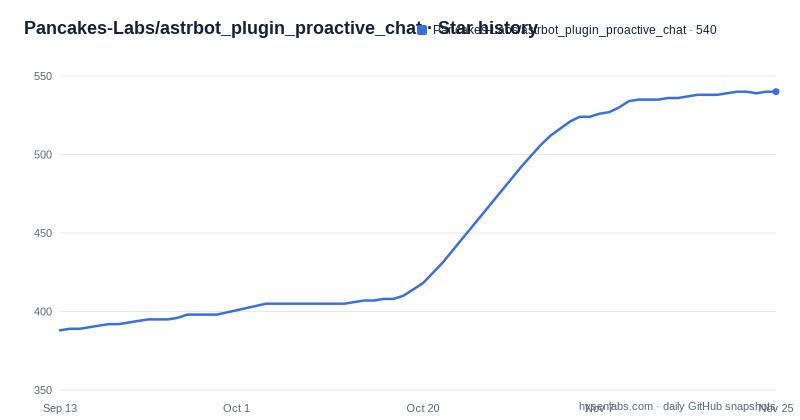
- Pancakes-Labs/astrbot_plugin_proactive_chat540 ★ · +152
| Repository | 2026-09-13 | 2026-11-25 |
|---|---|---|
| Pancakes-Labs/astrbot_plugin_proactive_chat | 388 | 540 |
152 Stars in the last 73 days, measured from the daily GitHub snapshot. Compare with other projects
Editorial analysis
A silence timer picks a random delay, then asks the model to speak first
The plugin watches a chosen session. When that conversation has had no new messages for a long time, it waits a random interval inside a range you set and then starts a conversation on its own. The README says the generated message is context-aware, fits the persona and carries a dynamic emotion.
Each session has its own state, counters and triggers, so one chat going quiet does not disturb another. Multiple private chats and group chats can be served at once, each with its own configuration and a display name. A task can also be created automatically every time the plugin reloads, without anyone sending a message to arm it. The consequence of the random range is that you cannot predict the minute a message arrives, which suits companionship use but not anything schedule-critical.
The proactive message is a simulated user message, so weak prompts break character
The README explains the central weakness itself. Almost every plugin that does proactive messaging works by sending a simulated user message to the model, so you need high-quality prompts to stop the reply from sounding out of character. The author says the main functions work, but that you need good prompts to get the effect you want.
If the results disappoint, the suggested fixes are to adjust the proactive prompt, improve the persona, switch to a more capable model, or supply richer context. Context source is configurable, and the plugin loads the persona you assigned to that session. So the plugin supplies the trigger, the history lookup and the delivery, but the quality of the first line is mostly your prompt and your model, not the plugin.
The unreplied counter drives emotion, and an unreplied limit stops the nagging
Dynamic emotion is not a separate model. The plugin keeps an unreplied counter, and you use it inside the prompt to design different expressions of mood as the count rises. You can also set a cap on unreplied messages, which is what stops a bot from pinging a silent user forever.
Related behavior is stored on disk. Whether you restart AstrBot or only reload the plugin, unexecuted proactive tasks are restored from file. A do-not-disturb window can be set so the bot does not message during those hours. Long replies can be split into several short messages with simulated typing gaps, and the plugin can call your configured TTS service to produce voice. It is also described as compatible with other plugins that decorate proactive messages, such as sticker plugins.
You must paste the UMO from the /sid reply, and only the part inside the quote marks
Before any message is sent, you fill the session list with UMO values. Send the command /sid in the target chat, mentioning your bot in a group or sending it directly in a private chat. If you changed the wake word in the AstrBot platform configuration, use that instead of the slash. The bot replies with something like:
UMO: 「default:GroupMessage:123456789」
UID: 「987654321」
*Use UMO to set whitelist and configure routing, use UID to set admin list(UMO 可用于设置白名单和配置文件路由,UID 可用于设置管理员列表)

Your session information:
Bot ID: 「default」
Message Type: 「GroupMessage」
Session ID: 「123456789」
The part to enter is the text inside the 「」 marks, here default:GroupMessage:123456789. The README warns against pasting the whole reply or copying its example values. A wrong UMO means silence, not an error that points to the cause.
QQ official bots changed their group session ID at AstrBot v4.28.0
For QQ official bots, the /sid output depends on the AstrBot version and on the isolated session switch, platform_settings.unique_session. The README says this is core AstrBot behavior and not the plugin's. The dividing line is AstrBot v4.28.0.
With isolation off, both before and after v4.28.0, the third part of the UMO is the group openid and no group ID line appears. With isolation on before v4.28.0, the third part is only the member openid and contains no group information, so /sid prints a line giving the group's ID that you must use to build the group UMO yourself. From v4.28.0 onward, isolation on makes the third part the member openid and group openid joined by an underscore. The README says the change fixes proactive pushes possibly going to the wrong group in isolated mode, and tells you to copy that whole string rather than one half. If you are on an older AstrBot, the manual group UMO step is yours.
The author states that every file was written by AI and was reviewed by one person
A long note from the author says the plugin's file contents were all written by AI, with the author only designing the architecture, editing some text and polishing the README. A warning block repeats that the plugin and document are AI generated and the content is for reference. The author also says everything went through strict review and that the declarations are formal, and describes the code as reaching a stable architecture after more than a hundred iterations.
The development figures in the README are 77 days of work on the main plugin, about 339 hours and 859,607,913 tokens used. For a reader the consequence is practical: the plugin runs a scheduler, writes state files and starts a local web service, so reading core/ and admin/ before installing on a machine that holds anything sensitive is reasonable. The project is licensed AGPL-3.0, so check those terms before building it into a closed service.
Installation is a market download or a zip, and the dependency list is short
You install through the AstrBot plugin market, or download the zip from the repository's Release page and use the plus button at the bottom right of the plugin page, choosing install from file. Dependencies are mostly already part of AstrBot, and the plugin's own are installed automatically. If something is missing, the README gives:
pip install fastapi uvicorn
# Python < 3.11 额外安装
pip install "tomli>=2.0; python_version < '3.11'"
The requirements.txt lists apscheduler>=3.11.3,<4.0, aiofiles>=25.1.0, fastapi>=0.142.2, uvicorn>=0.54.0 and tomli for Python below 3.11. The fastapi and uvicorn pair backs the independent WebUI. If the plugin does not load, restart AstrBot, then open the plugin configuration page to fill the session UMO list, or use the plugin's own WebUI.
The newest release is a beta, and the README targets recent AstrBot versions
The latest release is v1.3.0-beta.1, published on 31 October 2026, ahead of v1.2.6 on 28 September 2026 and v1.2.5 on 30 August 2026. The last push was on 2 November 2026, and the repository is not archived. The README describes the plugin as in a fairly stable development stage and says it is developed against a newer AstrBot and recommends the latest version for the best experience.
So a stable-minded user should read the beta tag as a warning and consider staying on v1.2.6 until the next non-beta release. The README is mainly Chinese, with English and Japanese versions linked at README_EN.md and README_JP.md, and the repository also has a CHANGELOG.md, a docs folder and a _conf_schema.json that defines the configuration form.
Editorial conclusion
Install it if you run AstrBot, want your bot to speak first after a quiet period, and are willing to tune the persona prompt until the replies stop sounding out of character. Skip it if you need audited code, since the author says every file was written by AI, or if you run a QQ official bot on an older AstrBot version and cannot work out which session ID to paste. Check your AstrBot version and the UMO you copy before filing a bug.
Frequently asked questions
What is AstrBot, the platform this plugin is built for?
AstrBot is the bot framework hosted at github.com/AstrBotDevs/AstrBot. This plugin is designed for it and the README describes AstrBot as having a mature development ecosystem and a plugin market.
How do I get the session ID to configure the Proactive Chat plugin?
Send /sid in the target chat, or your custom wake word, and copy only the text inside the corner quotes after UMO, for example default:GroupMessage:123456789. Do not paste the whole reply.
Is the Proactive Chat plugin's code written by AI?
The README says all file contents of the plugin were written by AI, with the author handling architecture design, some text edits and the README polish. The author states that the content was reviewed.
Official sources
Add this badge to your README
If you maintain this project, the badge below links readers to this analysis and shows its maintenance status from the daily GitHub snapshot. Paste the markdown into your README; add ?metric=license or ?metric=stars to the image URL for a different field.

[](https://hysenlabs.com/projects/pancakes-labs-astrbot-plugin-proactive-chat)Star history chart for your README
[](https://hysenlabs.com/projects/pancakes-labs-astrbot-plugin-proactive-chat)Was this useful?