Paparazzi UAS: Hardware, Simulation, and Ground Control
Paparazzi is a free and open-source hardware and software project for unmanned (air) vehicles. This is the main software repository.
At a glance
- What is it?
- Paparazzi is an open-source C software package for autonomous unmanned air, ground, and surface vehicles. It combines onboard control software, configuration, simulation, and a graphical ground segment for aircraft ranging from small hobby vehicles to heavier platforms.
- Who is it for?
- Choose Paparazzi when you need a configurable software stack for an autonomous vehicle and can work with its C codebase, configuration model, and simulation-first workflow. Do not choose it as a turnkey consumer autopilot or as a replacement for a complete commercial flight system without first checking hardware compatibility, configuration details, and licensing obligations.
- Can I use it commercially?
- Yes, with conditions. GPL-2.0 is a copyleft licence: if you distribute software that includes it, you must release that software's source code under the same licence. Running it internally without distributing it does not trigger that obligation.
- Is it still maintained?
- Yes. The repository last received commits 1 day ago.
- What is it written in?
- Mainly C, according to GitHub's language statistics.
Answers come from the project's GitHub data, last synced on October 23, 2026, and from our analysis. They are not legal advice.
Star history
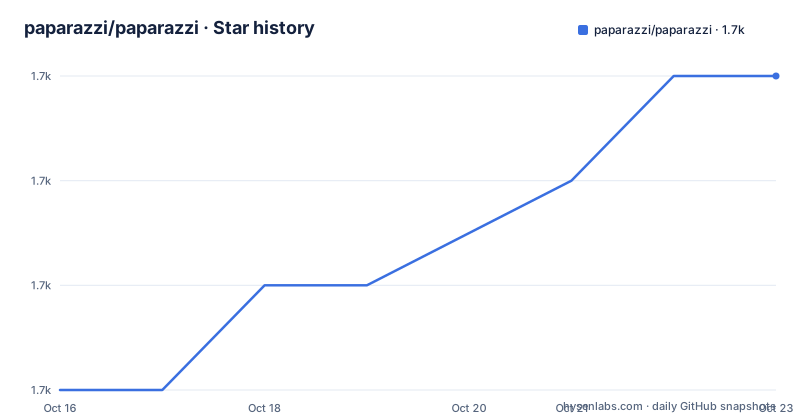
- paparazzi/paparazzi1,721 ★ · +3
| Repository | 2026-10-16 | 2026-10-23 |
|---|---|---|
| paparazzi/paparazzi | 1.7k | 1.7k |
3 Stars in the last 7 days, measured from the daily GitHub snapshot. Compare with other projects
Editorial analysis
What Paparazzi Is For
Paparazzi addresses the software side of building and operating unmanned vehicles. The README describes it as a free and open-source package for Unmanned (Air) Vehicle Systems, and its supported vehicle types include fixed-wing aircraft, rotorcraft, hybrids, flapping vehicles, boats, and surface vehicles. The stated range of vehicles is 11.9 g to 25 kg, with users including hobbyists, universities, and companies. That makes it a research and development platform rather than a narrow library for one aircraft type.
The repository is primarily written in C. Its topics identify autopilot, drones, UAS, UAV, PPRZ, and PPRZLINK, which reflects a system that includes flight-control logic, communication, configuration, and ground-side tooling. Paparazzi is not presented as a hardware product. The README says the software has been used on vehicles of different sizes, but it does not claim that every board or vehicle can be used without adaptation. The airframe, radio, and target configuration remain important parts of using it.
The project is aimed at people who need more control over an autonomous vehicle stack than a consumer flight controller interface provides. A university team may use the simulator and ground station while developing guidance or vehicle code. A hobbyist may select an airframe definition, build a target, and use the same session workflow described in the README. The presence of simulator, upload, and flight-session instructions also means that adoption involves more than compiling an onboard binary. It includes preparing the ground segment and deciding how the vehicle will communicate with it.
Paparazzi's Onboard, Simulator, and Ground Station Structure
The repository layout separates the main kinds of work. The README places airframe, radio, and other descriptions in `conf`, read-only material such as maps and terrain data in `data`, documentation in `doc`, and software in `sw`. Compilation products and cached map tiles belong in `var`. This separation makes the configuration-driven nature of the system visible. A vehicle description is not hidden inside one application screen; it is part of the repository's configuration layer.
The `sw` directory contains onboard software, the ground station, simulation code, and related libraries. The Makefile confirms that these are separate build areas. It defines `AIRBORNE`, `SIMULATOR`, and `TMTC`, with the ground-segment telemetry and control code under `sw/ground_segment/tmtc`. The simulator and onboard code therefore participate in different parts of the workflow, even though both are built from the same source tree.
The documentation also connects Paparazzi to PPRZLINK. The top-level `setup.py` creates a virtual environment named `pprzEnv`, installs Python requirements, updates the `pprzlink` submodule, and installs the PPRZLINK Python package from `sw/ext/pprzlink/lib/v2.0/python`. Based on that visible setup logic, the ground-side tooling depends on Python libraries for serialization, plotting, serial communication, vehicle communication, and the Paparazzi link library. The exact runtime behavior of a flight is not fully documented in the README, so this architecture description is based on the repository layout and build files rather than an inferred protocol specification.
Installing Paparazzi and Starting a Bixler Simulation
The README gives a short source installation route. Clone the repository, enter the directory, and run the included installer. The documentation separately links to installation instructions on the Paparazzi wiki, so this quick sequence is the documented starting point rather than a complete platform-specific setup guide.
git clone https://github.com/paparazzi/paparazzi.git
cd ./paparazzi
./install.sh
After installation, the README instructs the user to compile the libraries and tools from the top directory. The Makefile is silent by default and uses `Q` to control command output. This command should build the repository's software, although the README does not describe what a successful installation prints on every operating system.
makeThe next step starts the graphical Paparazzi Center, whose executable is named `paparazzi`. The README then gives a concrete first exercise: select the `Bixler` aircraft in the upper-left aircraft selector, select `sim` in the target selector, click `Build`, wait for compilation, open the Operation tab, choose `Simulation`, and click `Start Session`.
./paparazziFor the simulation session, the documentation expects the aircraft to reach the `Holding point` navigation block after about 10 seconds. Select the `Takeoff` block using the lower-left blue airway button, then use the green launch button. These are GUI actions, so they cannot be represented as additional shell commands. The README does not document rollback, simulator reset, or a separate headless command, and it does not explain what to do if the Bixler configuration is unavailable.
Uploading Onboard Code and Operating a Flight Session
Paparazzi's documented hardware workflow uses the same Paparazzi Center as the simulation workflow. Power the flight controller while it is connected to the PC with a USB cable, select the `ap` target, and click `Upload`. The `ap` name identifies the onboard application target in this workflow. The README does not specify supported boards, bootloaders, serial adapters, or upload permissions beyond that USB-based procedure, so hardware compatibility must be checked against the target configuration before relying on it.
For a real flight, the README says to select the flight session and perform the same actions as in simulation. That wording indicates a common operational interface rather than a separate flight procedure. It also means that a successful simulator session should not be treated as proof that a physical vehicle is configured correctly. The vehicle's airframe definition, radio configuration, onboard target, sensors, actuators, and mission blocks still need to match the actual aircraft.
The repository includes tests, including `tests/` and `pprz_src_test.sh`, but the README does not give instructions for running a test suite or interpreting its results. It also lists build badges for Semaphore CI and Coverity, but those badges do not replace local documentation about supported platforms or safety checks. For an engineering team, the practical first boundary is therefore clear: simulation can be used to learn the interface, but physical deployment depends on target and vehicle configuration that the README leaves to the project documentation and repository files.
Dependencies, Releases, and Maintenance Boundaries
The Python environment is not minimal. `requirements.txt` lists `lxml`, `numpy`, `scipy`, `ivy-python`, `pyserial`, `pyubx2`, `PyQt5`, `PyQtWebEngine`, `pyqtgraph`, `PyOpenGL`, `unidecode`, `matplotlib`, `distro`, `empy<=3.3.4`, `pexpect`, `setuptools`, and `dronecan`. The README also identifies Ubuntu packages such as `paparazzi-dev` and `paparazzi-jsbsim`, with the latter needed when JSBSim is used as the flight dynamics model. These dependencies affect installation size, operating-system compatibility, and the effort required to reproduce a working setup.
The repository contains `install.sh`, `requirements.txt`, `setup.py`, `Makefile`, and build-related directories, so the project presents several layers of build and dependency management. The visible `setup.py` logic creates `pprzEnv`, updates `pip`, `setuptools`, and `wheel`, installs `requirements.txt`, updates the PPRZLINK submodule, and installs the editable PPRZLINK Python package. The exact full `setup.py` is truncated, so this article does not claim that the displayed sequence is its complete option set.
The repository is not archived, and the last push was on 2026-10-16. A release named `v7.0.0_stable` is listed as released on 2026-07-12. These facts indicate recent repository activity, but they do not establish that every vehicle target, simulator, or external dependency is compatible with that release. The GPL-2.0 license also has implications for redistribution and modification. The `LICENSE` and `COPYING` files should be reviewed for the project's obligations; this is a licensing notice, not legal advice.
Trade-offs, Failure Modes, and Alternatives
Paparazzi's main trade-off is flexibility against setup complexity. Supporting multiple vehicle categories, repositories for configuration and data, onboard C code, a simulator, telemetry, and a Python-based GUI creates a broad development surface. A team can work directly with vehicle descriptions and build targets, but a new user must understand which airframe, target, and simulator combination is valid. The README's quick start is precise for Bixler and `sim`, yet it is not a general hardware compatibility table.
A likely failure mode is choosing a target that compiles but does not correspond to the connected board, radio, sensors, or actuators. Another is assuming that the simulator path automatically validates a physical flight. The documentation does not claim either outcome, but the separate simulation and upload instructions show that the paths have different external dependencies. The Python environment can also fail during setup if required packages, the PPRZLINK submodule, or system libraries are unavailable. The setup script prints failure messages for several pip and submodule steps, but the README does not provide a complete recovery procedure for each failure.
A real alternative is to use a separate vehicle-specific autopilot platform with a narrowly defined hardware target and a simpler operational workflow. The difference is scope rather than a claim that one system is always better. Paparazzi exposes a multi-vehicle software repository with configurable airframes, simulation, ground control, and onboard code. A vehicle-specific platform may reduce the number of configuration choices for a supported aircraft, while Paparazzi is more appropriate when the project needs to work across vehicle types or modify the stack directly. The README does not name a particular competing product, so no unsupported product comparison is made here.
Choosing Paparazzi for a Real Project
Paparazzi is a reasonable candidate for developers, educators, and research teams that need a configurable autonomous-vehicle software system and are prepared to work with C, build targets, Python dependencies, and airframe definitions. The documented Bixler simulation is a useful first path because it names the aircraft, target, build action, operation mode, and launch controls. It lets a new user learn the interface without beginning with a physical upload.
It is a poor fit for someone seeking a plug-and-play consumer drone product, a prevalidated hardware package, or documentation that guarantees a particular board will work. The README does not provide that guarantee. Do not adopt it for a physical aircraft until the target, airframe, radio, and simulator configuration have been checked against the actual hardware. Also verify the GPL-2.0 distribution terms before embedding or redistributing modified code.
For an initial acceptance check, follow the documented source installation, run `make`, start `./paparazzi`, and reproduce the `Bixler` plus `sim` session. Then inspect the relevant files under `conf/` and `sw/` before selecting an `ap` target or uploading to a board. That sequence verifies the build and ground-station path first, while leaving the project-specific hardware decision grounded in its own configuration.
Editorial conclusion
Choose Paparazzi when you need a configurable software stack for an autonomous vehicle and can work with its C codebase, configuration model, and simulation-first workflow. Do not choose it as a turnkey consumer autopilot or as a replacement for a complete commercial flight system without first checking hardware compatibility, configuration details, and licensing obligations. For a first evaluation, verify that the selected airframe, target, simulator, and upload path are available for your platform.
Frequently asked questions
How do I install Paparazzi UAS from the source repository?
The README gives this starting sequence: clone `https://github.com/paparazzi/paparazzi.git`, enter the `./paparazzi` directory, and run `./install.sh`. It also links to installation instructions on the Paparazzi wiki and lists additional Ubuntu and Debian package options.
How do I run the first Paparazzi simulation?
Run `make` and then `./paparazzi`. In Paparazzi Center, select the `Bixler` aircraft, choose `sim` as the target, click `Build`, select `Simulation` in the Operation tab, and start the session. The README then describes selecting `Takeoff` and using the green launch button.
What does `paparazzi-dev` provide on Debian or Ubuntu?
The README describes `paparazzi-dev` as the meta-package used to compile and run the ground segment and simulator. It separately lists `paparazzi-jsbsim` for using JSBSim as the flight dynamics model.
Official sources
Add this badge to your README
If you maintain this project, the badge below links readers to this analysis and shows its maintenance status from the daily GitHub snapshot. Paste the markdown into your README; add ?metric=license or ?metric=stars to the image URL for a different field.

[](https://hysenlabs.com/projects/paparazzi-paparazzi)Star history chart for your README
[](https://hysenlabs.com/projects/paparazzi-paparazzi)Was this useful?