Velocity: one Minecraft proxy in front of four server implementations
The modern, next-generation Minecraft server proxy.
At a glance
- What is it?
- Velocity is a Java proxy that sits between players and several Minecraft server implementations so one address can serve Paper, Sponge, Fabric and Forge backends. Its build is a single Gradle command and its documentation is precise about that command and silent about the Java version, the default configuration file and any comparison with other proxies.
- Who is it for?
- Velocity earns its place for an operator already running several Minecraft backends who wants one address in front of them, and it is dead weight for a single small server where a plain port forward does the same job. Check two things before you adopt it: the JDK version, which the README never names, and whether the JAR on the downloads page matches the dev/4.0.0 branch you would compile from.
- Can I use it commercially?
- Yes, with conditions. GPL-3.0 is a copyleft licence: if you distribute software that includes it, you must release that software's source code under the same licence. Running it internally without distributing it does not trigger that obligation.
- Is it still maintained?
- Yes. The repository received new commits within the last day.
- What is it written in?
- Mainly Java, according to GitHub's language statistics.
Answers come from the project's GitHub data, last synced on October 23, 2026, and from our analysis. They are not legal advice.
Star history
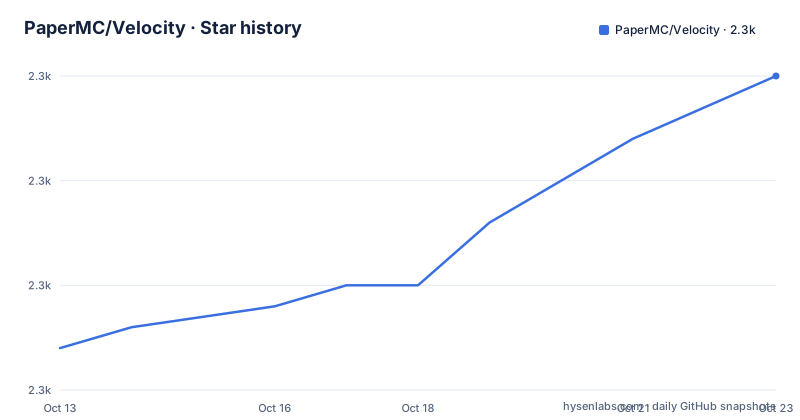
- PaperMC/Velocity2,285 ★ · +13
| Repository | 2026-10-13 | 2026-10-23 |
|---|---|---|
| PaperMC/Velocity | 2.3k | 2.3k |
13 Stars in the last 10 days, measured from the daily GitHub snapshot. Compare with other projects
Editorial analysis
One proxy in front of four server implementations
Velocity describes itself as the modern, next-generation Minecraft server proxy, and its goals name Paper, Sponge, Fabric and Forge as the implementations it supports specifically, adding that other implementations may work. That list is the reason a proxy exists at all: a player connects to one address, and the proxy decides which backend carries the connection. The person who installs this is therefore the server operator, not the player, and the second goal, handling thousands of players on one proxy, is aimed at the same reader.
No figure is attached to that capacity claim. There is no hardware profile, no player-to-core ratio, no test rig and no measurement script anywhere in the repository. Read it as a design target recorded in a bullet list rather than a number you can plan against, and measure your own topology if sizing decides whether you want the extra JVM between players and servers.
The api and proxy modules split plugin code from the server
The repository is a multi-module Gradle project with a flat top level, and its layout carries more information than the README does. `api/` sits beside `proxy/`, so third-party code written against the Velocity API is compiled separately from the proxy binary. `proxy/` is the module that produces the runnable artifact, which is why the instructions point at a directory inside it. Around them sit `build-logic/` for shared build configuration, `gradle/` for the wrapper, `build.gradle.kts` and `settings.gradle.kts` for the build itself, `crowdin.yml` for translations, and `CONTRIBUTING.md` for contributors. Two files sit there with no stated purpose at all, `HEADER.txt` and `gradle.properties`.
Two consequences follow from that split. Anything you write against Velocity's API depends on the `api/` module alone, so a backend plugin is not welded to the proxy version that happens to be running. And the repository is laid out as something to compile rather than something to unpack: there is no installer and no service unit at the top level, which leaves packaging decisions to the operator.
Building from source with the Gradle wrapper script
The README says Velocity is built with Gradle, recommends the wrapper script because its CI uses it, and states that one command runs the full build cycle:
./gradlew buildTwo things are missing from that instruction and both matter on a fresh machine. No Java version is named anywhere in the README, so whatever JDK you have is the JDK you use. And no flag is given for producing a runnable proxy JAR on its own, so a green build is not the same thing as a build that hands you the file you need in the next step. On Linux and macOS the wrapper is `./gradlew`, and the tree also carries `gradlew.bat` for Windows.
The runnable JAR hides inside proxy/build/libs
Once the build finishes, the README says you can copy and run the `-all` JAR from `proxy/build/libs`:
proxy/build/libsThat path is the entire instruction, and Velocity generates a default configuration file on first run which you then edit. No command line is printed for that first run, no JVM flags, no memory setting, and no listing of what the generated file contains. A first run therefore ends with a directory listing and a configuration file rather than with a listening proxy, and anyone writing a deployment script has to fill that gap from experience or from other sources. The `-all` suffix tells you the artifact bundles its dependencies, yet the README never spells out what is inside it.
The downloads page replaces the build for most operators
The README gives 2 documented routes to the same artifact, and the second one is a proxy JAR from the project's downloads page:
https://papermc.io/downloads/velocityFor most operators that page is the practical starting point, and the project presents itself at https://papermc.io/software/velocity. What the README never connects is the build on that page with the build you get from `./gradlew build`: the repository names `dev/4.0.0` as its default branch, its last push landed on 2026-09-27, and it publishes no GitHub releases, so nothing in the repository lines a downloaded JAR up with a commit. Compile from source and you cannot confirm your JAR matches the one the page serves, and nothing explains a behaviour difference afterwards.
The native directory has no explanation anywhere
`native/` is one of the top-level entries, sitting beside `api/`, `proxy/`, `build-logic/` and `config/`. Nothing in the README says anything about native code, a platform-specific binary, or a switch that turns it on, and no build instruction references it. The build step is one `./gradlew build` for every platform, which leaves 2 readings: either the native module builds everywhere, or the proxy runs fine without it. The repository does not say which. `config/` is equally unexplained at that level of detail, since the README confirms a default configuration file is generated but never says where the file is written or which keys it holds.
That gap is the shape of this documentation: exact about the 2 commands you need, quiet about everything around them.
Four stated goals against two Forge topic tags
The goals section lists 4 items, and the first promises first-class support for Paper, Sponge, Fabric and Forge, adding that other implementations may work while the project makes every endeavour to support those 4 specifically. The repository's own topic tags tell a different story: forge, java, minecraft, minecraft-forge, minecraft-server-proxy, server-proxy and velocity. Forge appears twice. Paper, Sponge and Fabric appear not at all. Tags only control discoverability, so the mismatch is cosmetic rather than a claim about capability, but it is a fair signal of where the audience is concentrated.
The goal of a codebase that is easy to dive into is not backed by an architecture document. There is no module guide, no plugin lifecycle description and no example plugin, and the tree's `CONTRIBUTING.md` is not summarized anywhere in the README. Expecting the documented onboarding path of a large plugin platform will not find one here.
Choosing between a proxy and a plain port forward
The README never names a competing proxy. Its API goal is to avoid the design mistakes and suboptimal designs of unnamed other proxies, and no comparison table, benchmark or migration guide exists in the repository, so a side-by-side evaluation has to be assembled elsewhere. The structural difference is still clear from what Velocity claims. A plain port forward sends each connection to one address and one server, which suits a single network where players never change servers. A proxy earns its cost when players move between implementations, because stated support for Paper, Sponge, Fabric and Forge is what lets one login and one address sit in front of several backend types.
Velocity is under GPL-3.0 with the full LICENSE text at the top of the tree, which is the first thing to settle before running a modified build in front of players. Nothing else in the README asks you to preserve a notice or an attribution, and no trademark policy is stated.
Editorial conclusion
Velocity earns its place for an operator already running several Minecraft backends who wants one address in front of them, and it is dead weight for a single small server where a plain port forward does the same job. Check two things before you adopt it: the JDK version, which the README never names, and whether the JAR on the downloads page matches the dev/4.0.0 branch you would compile from. Neither is documented, and the build itself is 1 Gradle command. What you are really buying is stated support for 4 server implementations, which you still have to verify yourself.
Frequently asked questions
How do you build Velocity from source?
The README names Gradle as the build tool, recommends the wrapper script because its CI uses it, and says running ./gradlew build is sufficient for the full build cycle. No Java version is specified anywhere in the documentation, so you supply the JDK yourself.
Where do I get a Velocity proxy JAR?
Two routes are documented: build it and copy the -all JAR from proxy/build/libs, or take the JAR from the project's downloads page at papermc.io/downloads/velocity. The documentation never states which build the downloads page serves.
Which Minecraft server implementations does Velocity support?
The goals name Paper, Sponge, Fabric and Forge as first-class, and add that other implementations may work while the project supports those four specifically.
What happens when you start Velocity for the first time?
It generates a default configuration file that you then configure. The README does not say where that file is written or which keys it contains.
How are Velocity translations handled?
Through Crowdin, with the project asking people to ask in its Discord for any language not yet available there.
Official sources
Add this badge to your README
If you maintain this project, the badge below links readers to this analysis and shows its maintenance status from the daily GitHub snapshot. Paste the markdown into your README; add ?metric=license or ?metric=stars to the image URL for a different field.

[](https://hysenlabs.com/projects/papermc-velocity)Star history chart for your README
[](https://hysenlabs.com/projects/papermc-velocity)Was this useful?