Universal G-Code Sender: four controller dialects, six archives, one start script
A cross-platform G-Code sender for GRBL, Smoothieware, TinyG and G2core.
At a glance
- What is it?
- Universal G-Code Sender is a Java desktop program that sends G-code to GRBL, TinyG, g2core and Smoothieware controllers, packaged as six platform archives on top of a Maven build. Its download table, build scripts and documentation disagree in small ways that matter once a machine is attached.
- Who is it for?
- Universal G-Code Sender suits hobby and small shop machines running GRBL, TinyG, g2core or Smoothieware when one desktop program should cover drawing, loading and sending. It is the wrong tool for unattended batch running, headless automation, or a plugin API you can read before you install anything.
- Can I use it commercially?
- Yes, with conditions. GPL-3.0 is a copyleft licence: if you distribute software that includes it, you must release that software's source code under the same licence. Running it internally without distributing it does not trigger that obligation.
- Is it still maintained?
- Yes. The repository last received commits 1 day ago.
- What is it written in?
- Mainly Java, according to GitHub's language statistics.
Answers come from the project's GitHub data, last synced on October 23, 2026, and from our analysis. They are not legal advice.
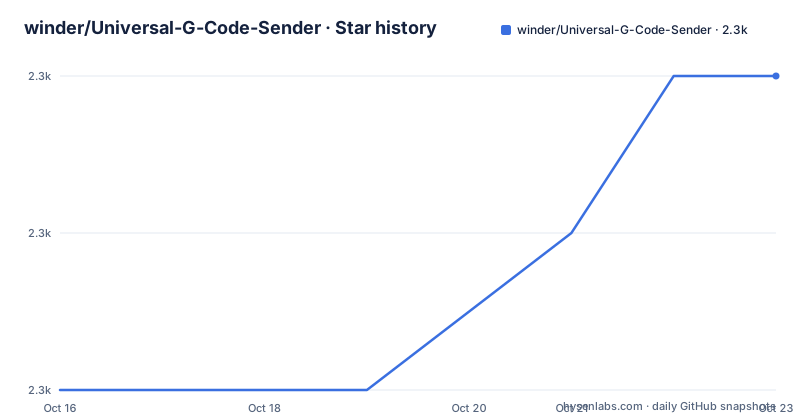
Star history
- winder/Universal-G-Code-Sender2,273 ★ · +2
| Repository | 2026-10-16 | 2026-10-23 |
|---|---|---|
| winder/Universal-G-Code-Sender | 2.3k | 2.3k |
2 Stars in the last 7 days, measured from the daily GitHub snapshot. Compare with other projects
Editorial analysis
One desktop window over four controller dialects
UGS is a desktop program for people who already own a small CNC machine: a GRBL board on a bench, a TinyG or g2core controller, or a Smoothieware board, and a USB serial cable to the controller. Its one-line description calls it a Java based, cross platform G-Code sender compatible with those four firmware families, and the topic tags add grbl-control, gcode-parser and gcode-viewer. Parsing and viewing ship inside the same project as sending, which fixes the scope: connect, load a program or draw one, read the toolpath in 3D, run it, watch the state come back.
That split matters because the firmware does the real time work. Your board interprets each line and decides where the axes go, while the sender hands it well formed lines, watches the replies, and keeps a person in the loop. The screenshot captions name what a user actually touches: the UGS Platform main window, a customizable panel layout, menu actions with customizable keybindings, a basic gcode editor, and a vector graphics designer for generating GCode toolpaths.
JSSC and JSerialComm sit behind one connection seam
The dependency list is unusual for a program whose main job is a serial port. Two interchangeable serial libraries are named, JSSC and JSerialComm, which means the connection layer was built as a seam rather than a fixed choice. JogAmp supplies OpenGL, so the toolpath view is not tied to whatever driver the operating system happens to expose. Netbeans Platform is the application shell, JTS does geometric transformations, and Batik reads SVG.
Read those three together and a pipeline becomes visible. A drawing arrives as SVG, Batik turns it into geometry, JTS transforms that geometry, and the designer emits GCode. That chain is why a vector graphics designer exists at all, and it also explains why the dependency list runs longer than a typical sender would: neither JTS nor Batik matters if you import a finished program and never draw one.
What the page does not say is which serial library a given build uses, or how to switch between them. Nor does it document a fallback for when neither can claim the port on Windows. For a tool that will sit next to a powered machine for hours, that gap belongs in your own fork before the first long job.
Classic or Platform: one core, two launch targets
Two front ends ship from one core, and picking between them is the first decision a new user makes. UGS Classic launches as an ordinary main class inside ugs-core, while the NetBeans Platform build is assembled by the nbm tooling from ugs-platform/application:
./mvnw install
./mvnw exec:java -Dexec.mainClass="com.willwinder.universalgcodesender.MainWindow" -pl ugs-core
The platform route matches what the download table actually ships:
./mvnw install
./mvnw nbm:run-platform -pl ugs-platform/application
Both start with a full reactor install, so a first build compiles every module in the tree rather than the one you intend to run. Every published archive name begins ugs-platform, so Classic reaches a user only through a source build, while the plugins menu screenshot belongs to the Platform set. This is the real difference in approach between the two, and it is larger than a preference between two interfaces.
Six archives, one unpack step, one start script
The download table offers six archives: Windows 64-bit, Mac OSX, Mac OSX ARM64, Linux x64, Linux ARM64, and an all platforms zip, each paired with a nightly counterpart. A Linux x64 user fetches this:
https://github.com/winder/Universal-G-Code-Sender/releases/download/v2.1.27/linux-x64-ugs-platform-app-2.1.27.tar.gzAfter unpacking, one command starts the program, and no second step is documented:
bin/ugsplatformThat single instruction covers all six archives. The repository root also carries run_platform.sh, run_platform.bat and run_classic.sh, and nothing on the page maps any of those scripts to a specific archive, so the extensionless entry above is the only start path the documentation names for a Linux tar.gz or a macOS disk image. Keep the build time step apart from this one: the sole platform specific setup line in the whole README sits under development, where Windows users are told they might need a zip tool.
winget install -e --id GnuWin32.ZipPublished archives are prebuilt; nothing else about a machine is configured from the command line.
Maven wrapper, Java 25, and a nightly workflow
Build requirements are short and specific: Maven and Java 25, with the wrapper committed so no separate Maven install is needed. The root holds mvnw, mvnw.cmd and a .mvn/ directory, and the whole test suite runs with one command:
./mvnw testAutomation around that build is split across two eras. The build badge points at a GitHub Actions workflow file, nightly.yaml, on the master branch, while a .travis.yml still sits at the repository root. Coverage and static analysis have their own configuration through .codecov.yml and .codebeatignore, and crowdin.yml drives the translation project hosted at translate.universalgcodesender.com. An OpenGL view, a plugin menu and a translation platform give CI a wide surface to break, and one nightly workflow is the net the page offers.
Alongside the module directories sit models/, pictures/, scripts/ and test_files/, a footprint consistent with a project that ships designer artwork and sample programs rather than a library jar.
Nightly files still named 2.0-SNAPSHOT next to 2.1.27
Here is the detail a skim misses. The left column of the download table is headed with v2.1.27 and its file names carry that same number. The nightly column, built from the same master branch, ships files whose version string is 2.0-SNAPSHOT: win64-ugs-platform-app-2.0-SNAPSHOT.zip, macosx-aarch64-ugs-platform-app-2.0-SNAPSHOT.dmg, linux-aarch64-ugs-platform-app-2.0-SNAPSHOT.tar.gz, and ugs-platform-app-2.0-SNAPSHOT.zip.
So the nightly version string never moved past 2.0 while the numbered builds moved through v2.1.25 on 2026-07-27, v2.1.26 on 2026-08-11 and v2.1.27 on 2026-09-10. Someone reading a nightly file name to identify what they are testing is reading a number that matches nothing the project publishes. The last push landed on 2026-09-28, later than the 2026-09-10 build the table advertises, which is the gap the nightly column exists to cover.
For software tested against real hardware, that string is not cosmetic. It is how you answer a stranger on the Discord channel about which build they are running.
Modules in the tree with no archive of their own
The tree lists ugs-classic, ugs-cli, ugs-core, ugs-designer, ugs-fx, ugs-pendant and ugs-platform as modules, next to new-module-archetype/ and the flat directories models/, pictures/, scripts/ and test_files/. Every archive name in the download table begins ugs-platform. A command line interface, a JavaFX front end and a pendant display are therefore reachable from the Maven reactor and from nowhere else, and the README gives no CLI invocation at all. Anyone wanting headless sending must build ugs-cli and then discover its interface on their own.
new-module-archetype/ is the more telling entry: a template for generating another Maven module. Extending this project starts inside the Maven world rather than inside a plugin API, which is a good structure for a fork and a poor one for repackaging, since a module built this way inherits the entire reactor build.
Adoption also carries one cost that a technical read tends to skip. The project is published under GPL-3.0 with the licence text in COPYING at the root, and every module in the reactor sits under it, so a front end that links ugs-core and stays closed is a decision to settle before writing code rather than after.
A plugins menu with no plugin documentation
The screenshot set captions a plugins menu and one plugin, the Dowel Maker, described only as one of many. That is the whole of what the page says about extensibility: no installation step, no API description, no catalogue. The realistic route for a feature that does not exist yet is the GitHub discussions or the Discord chat at discord.com/invite/4DYywtyGYK, which is a different decision from adopting a documented API.
Other gaps are equally concrete. Nothing states how streaming is buffered or what happens when a job is aborted mid run. Nothing lists a real time command surface such as feed override. Nothing names the serial library a build uses, nothing describes a headless mode, and nothing covers restoring a machine state after a failed job. A shop that needs unattended batch running with a queue will not find that here, and a user who only wants to check a toolpath pays for an entire Java application to do it.
Two routes around the gaps are documented and real: the translation platform at translate.universalgcodesender.com for the interface language, and the discussion forum for the behaviour of any command not written down.
Editorial conclusion
Universal G-Code Sender suits hobby and small shop machines running GRBL, TinyG, g2core or Smoothieware when one desktop program should cover drawing, loading and sending. It is the wrong tool for unattended batch running, headless automation, or a plugin API you can read before you install anything. A nightly archive is still named 2.0-SNAPSHOT while the numbered builds sit at 2.1.27, so never identify a machine's behaviour from the file name alone. Check first that bin/ugsplatform resolves inside the archive you unpack, decide whether you need the Classic or the Platform build, then read COPYING to settle what you may ship.
Frequently asked questions
Which CNC controllers does Universal G-Code Sender support?
It targets GRBL, TinyG, g2core and Smoothieware, and the project describes itself as a Java based, cross platform G-Code sender for those four firmware families. The README also shows a basic gcode editor and a vector graphics designer for drawing toolpaths before they are sent.
Does Universal G-Code Sender run on Linux, macOS and Windows?
The download table lists Windows 64-bit, Mac OSX, Mac OSX ARM64, Linux x64, Linux ARM64 and an all platforms zip, each with a nightly counterpart. After unpacking an archive, the only start command the documentation gives is `bin/ugsplatform`.
How do you build Universal G-Code Sender from source?
The project uses Maven and Java 25, and the wrapper is committed so no separate Maven install is needed. Run `./mvnw install`, then start UGS Classic through the MainWindow main class in ugs-core or the Platform build with `nbm:run-platform` in ugs-platform/application, and `./mvnw test` for the suite.
Is there a command line version of Universal G-Code Sender?
The repository contains a ugs-cli module, but the download table publishes only ugs-platform archives and the README documents no CLI invocation. Building ugs-cli from the Maven reactor is the only route the repository layout describes.
Which serial library does Universal G-Code Sender use?
The README names two libraries for serial communication, JSSC and JSerialComm, and does not say which one a given build uses or how to switch between them. Connection problems on a specific machine may need checking inside your own build.
Official sources
Add this badge to your README
If you maintain this project, the badge below links readers to this analysis and shows its maintenance status from the daily GitHub snapshot. Paste the markdown into your README; add ?metric=license or ?metric=stars to the image URL for a different field.

[](https://hysenlabs.com/projects/winder-universal-g-code-sender)Star history chart for your README
[](https://hysenlabs.com/projects/winder-universal-g-code-sender)Was this useful?