lollms-webui: three version numbers, a default branch clone in the Docker image, and a project that says it will be replaced
Lord of Large Language and Multi modal Systems Web User Interface
At a glance
- What is it?
- LoLLMs WEBUI is a Python interface for running chat models through pluggable bindings, with personalities, extensions and image, video and music generation. Its own README says a newer project will replace it, its packaging metadata disagrees with its release tags, and its Docker image forces remote access on.
- Who is it for?
- LoLLMs WEBUI fits someone who wants one local interface over several model backends, local files and hosted services, with a personality layer on top and no cloud dependency for the chat path. Three things decide it.
- Can I use it commercially?
- Yes. Apache-2.0 is a permissive licence: you can use, modify and sell software built on it, as long as you keep its copyright and licence notices.
- Is it still maintained?
- Yes. The repository last received commits 12 days ago.
- What is it written in?
- Mainly Python, according to GitHub's language statistics.
Answers come from the project's GitHub data, last synced on November 13, 2026, and from our analysis. They are not legal advice.
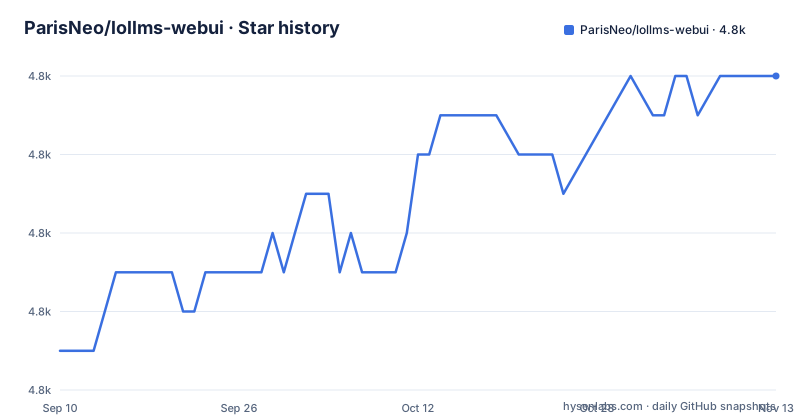
Star history
- ParisNeo/lollms-webui4,794 ★ · +7
| Repository | 2026-09-10 | 2026-11-13 |
|---|---|---|
| ParisNeo/lollms-webui | 4.8k | 4.8k |
7 Stars in the last 64 days, measured from the daily GitHub snapshot. Compare with other projects
Editorial analysis
The README says this project will be replaced by another one
The first lines of the README are a maintenance notice, and it is the most useful thing in the file. A new lollms project is at a different repository, described as a more advanced version with multi users and MCP compatibility. This webui, the file says, keeps a minimal support and will eventually be completely replaced by the new project. Everything else in the README is written around that: the project is framed as a hub for large language and multimodal models with over 500 expert conditionings and more than 2500 fine tuned models, feature lists that run to a dozen bullets, a star history badge shared across five related repositories, and a paragraph of prose about what the personalities can do for you. The sensible reading for anyone evaluating this today is that the interesting engineering question is which of the two repositories to adopt, and the answer is the newer one. This one is worth reading as a reference for how the bindings, personalities and extension model were put together, and as a warning about what its configuration still does.
Three version numbers for one project
Pick any version identifier and the repository gives you a different answer. The packaging metadata in `setup.py` declares the version as 5.0.2, with the distribution named `Lollms-webui` and the author as Saifeddine ALOUI. The release tags are on a completely different scale: v12, v13 and v14, each with a codename, Strawberry, feather and Saïph respectively. And the README's own installation notes refer to a third scheme, saying that since version 10.14 manual installation is back. So a bug report saying 5.0.2, a release announcement saying v14 and an installation guide citing 10.14 can all describe the same tree. The tree itself compounds the confusion, carrying both a `lollms/` directory and a `lollms_core/` that the install instructions add as an editable package. Anyone pinning this project needs to decide which of the three identifiers their tooling keys on, and the answer is probably not the one the README assumes.
Releases stopped in November 2024 while the branch kept moving
The release list is three tags: v12 on 2024-09-01, v13 on 2024-10-07 and v14 on 2024-11-11, each with a codename in the release name. After that, nothing. The repository's last push was on 2026-11-02, so almost two years of commits sit above the newest tag, on a branch whose README says the project is being superseded. That combination is not a contradiction, and it changes how you should read everything else in the file. The automatic route is an installation script from the scripts folder, in three variants for Windows, Linux and Mac, and two Inno Setup definitions for a Windows installer, one of them built for a CPU-only machine. A `CHANGELOG.md` and an `update_script.py` sit at the root for keeping an install current. All of that machinery is real, and all of it is pointed at a branch rather than at a release, which is the least convenient arrangement of the two options available.
A binding is installed by executing its __init__.py
The binding mechanism is the part of the installation that will surprise you. After creating the environment and installing requirements, the instructions say to install the bindings you want, and the example given is running a Python file inside the bindings zoo:
python zoos/bindings_zoo/ollama_ai/__init__.pyfollowed by a table of available bindings and their commands, where the entries are a name and a path such as `elf`, `openrouter` and `openai`, each mapped to a file under the same zoo directory. Executing a package's initialiser as a script is not how a Python package is normally installed, and the README says you can set environment variables to select which bindings to install. The supported set as described in the features list is wide: local Hugging Face models, GGUF and GGML files, EXLLama v2 in its EXT, AWQ and GPTQ quantisations, and then the service bindings for Ollama, vLLM, OpenAI, Anthropic, OpenRouter and Novita, with prompt routing that picks a model by task complexity. That breadth is the project's real feature, and the install mechanism is the weakest link in it.
The container clones the default branch and forces remote access
Two lines of the Dockerfile decide how much you can trust the image. The first is the source: the image does not copy a build context, it clones the repository from GitHub with submodules at build time, against whatever the default branch happens to be that day. So an image tagged locally this afternoon and one built next month can differ substantially while carrying the same name, and there is no commit in the build to compare against. The second is the command it starts:
EXPOSE 9600
CMD ["python", "/app/app.py", "--host", "0.0.0.0", "--force-accept-remote-access"]
Binding to all interfaces is one decision, and forcing remote access is a second, separate one that is switched on by default rather than off. What stands between that and an open service is the environment: the compose file sets a single allowed client address, which is the kind of allow-list that works on one machine behind one network and nowhere else. There is a third small inconsistency in the same file. The clone lands in the working directory, while the configuration the image writes for the core path points inside a directory named after the repository, so the two paths in the image are not the same path.
The compose file publishes 9621 and the image exposes 9600
Ports are where a container deployment fails first, and this one has two answers. The compose file publishes a configurable host port with a default of 9621, mapped to the container's 9621. The Dockerfile exposes 9600. Neither file sets `PORT`, so the defaults disagree and nothing in either file resolves it, which means the port you reach depends on which of the two artefacts you started from. The compose file is otherwise careful. It mounts three host directories into the container, one for configuration and user data, one for model storage and one for custom personalities, which is the right way to keep prompts, personalities and downloaded weights outside the container lifecycle. It sets a restart policy, and it reserves GPU devices through the deploy block with the nvidia driver and all GPUs. The version key is `3.10`, and the service builds from the repository Dockerfile rather than pulling a published image.
Three Python versions claimed, one version pin in the requirements
The Python version is stated three ways. The README says to ensure Python 3.11 is installed and links a specific 3.11.8 download. The Dockerfile is built on `python:3.11-slim`. The packaging classifier says Python 3.10. Those are not equally authoritative, but the first two agree, so a 3.11 environment is the intended one and the classifier is the outlier. The dependency list is where the looseness shows. `requirements.txt` names around forty packages, and exactly one is pinned, `numpy==1.26.*`; a few others such as `Pillow>=9.5.0` and `lollms_client>=1.6.10` have only lower bounds. The rest float, including fastapi, uvicorn, pydantic, requests, rich and scipy. The list also mixes categories that would normally be separated: pytest for testing, selenium for browser automation, PyQT5 for a desktop toolkit inside a web application, and lxml, einops and datasets for heavier work. `python-multipart` appears twice. If you deploy this, resolve and freeze the set yourself, because the file as written will pick up whatever the index serves on the day you install.
Personalities that offer diagnoses and contract readings
One section of the README deserves a plain reading. The personality layer is described as named assistants, and the examples include a medical one that offers a potential diagnosis and guidance to seek the right care, and a Lawyer personality for contract interpretation. Those are personas over a general-purpose language model, configured by the project and the user, with no validation, no clinical or legal standard behind them, and the README's own framing is promotional rather than cautious. The rest of the personalities are harmless in the same way: a Laughter Bot, a Creative Story Generator for stories and Dungeons and Dragons play, Artbot for illustration, and LordOfMusic for music generation. Each personality has a predefined welcome message, and the interface adds thumb up and thumb down ratings on generated answers, and discussions are kept in local database storage. The list also names the generation backends behind those features, from stable diffusion, flux, comfyui and DALL-E through to Midjourney and Novita for images, lumalabs, cogvideo_x and runwayml for video, musicgen for music, and a peer to peer path through Lollms Nodes and Petals.
Editorial conclusion
LoLLMs WEBUI fits someone who wants one local interface over several model backends, local files and hosted services, with a personality layer on top and no cloud dependency for the chat path. Three things decide it. The project is in maintenance by its own account, since the README says it keeps minimal support and will eventually be completely replaced by a newer repository, and the newest release tag here is v14 from 2024-11-11. For a new deployment, evaluate the successor rather than this. If you do run this one, read the container before you trust it: the image clones the repository's default branch at build time rather than a tag, so builds are not reproducible, and its command line starts the server bound to all interfaces with remote access forced, with only an environment variable standing between that and the internet. And pin your dependencies yourself, because `requirements.txt` carries a single exact version pin among roughly forty packages. Apache-2.0.
Frequently asked questions
What is LoLLMs WEBUI?
It is a Python web user interface for running chat models through different bindings, with personalities and extensions, described as a hub for large language and multimodal models. Supported bindings include local Hugging Face, GGUF and GGML models, EXLLama v2, and the Ollama, vLLM, OpenAI, Anthropic, OpenRouter and Novita services.
Is LoLLMs WEBUI still being developed?
The README states that a newer lollms project exists as a more advanced version with multi users and MCP compatibility, that this webui keeps minimal support, and that it will eventually be completely replaced. The newest release tag here is v14 from 2024-11-11, while the branch's last push was on 2026-11-02.
How do I install LoLLMs WEBUI manually?
Ensure Python 3.11, clone the repository with submodules, create and activate a virtual environment, then run `pip install --upgrade pip`, `pip install -r requirements.txt` and `pip install -e lollms_core`. A `global_paths_cfg.yaml` file is then created with the path to the core and to your personal data directory.
Which port does the LoLLMs WEBUI container use?
The compose file publishes a host port with a default of 9621 mapped to the container's 9621, while the Dockerfile exposes port 9600 and starts `app.py` with the host set to all interfaces and remote access forced. The compose file also sets `ALLOWED_CLIENT_IP` to a single address.
What does LoLLMs WEBUI require?
About forty packages in `requirements.txt`, including numpy constrained to the 1.26 series, plus fastapi, uvicorn, python-socketio, pydantic, selenium, tiktoken, PyQT5, lxml, einops and datasets. The packaging classifier declares Python 3.10, the README asks for Python 3.11, and the Docker image is built on `python:3.11-slim`.
Official sources
Add this badge to your README
If you maintain this project, the badge below links readers to this analysis and shows its maintenance status from the daily GitHub snapshot. Paste the markdown into your README; add ?metric=license or ?metric=stars to the image URL for a different field.

[](https://hysenlabs.com/projects/parisneo-lollms-webui)Star history chart for your README
[](https://hysenlabs.com/projects/parisneo-lollms-webui)Was this useful?