Foodium: reading a sample Android app from Room back to Retrofit
🍲Foodium is a sample food blog Android application 📱 built to demonstrate the use of Modern Android development tools - (Kotlin, Coroutines, Flow, Dagger 2/Hilt, Architecture Components, MVVM, Room, Retrofit, Moshi, Material Components).
At a glance
- What is it?
- Foodium is a Kotlin food blog sample app built to show modern Android wiring end to end. Its remote source is a statically hosted JSON document, and its injection layer exists in three variants spread across a branch and a fork.
- Who is it for?
- Read Foodium as a compact map of Android layering, not as a base to build on: one content type, a static JSON file standing in for a backend, and injection split across a branch and a fork. Learners get a clean path from repository to view.
- Can I use it commercially?
- Yes. MIT is a permissive licence: you can use, modify and sell software built on it, as long as you keep its copyright and licence notices.
- Is it still maintained?
- Activity is slowing. The repository last received commits 7 months ago.
- What is it written in?
- Mainly Kotlin, according to GitHub's language statistics.
Answers come from the project's GitHub data, last synced on October 23, 2026, and from our analysis. They are not legal advice.
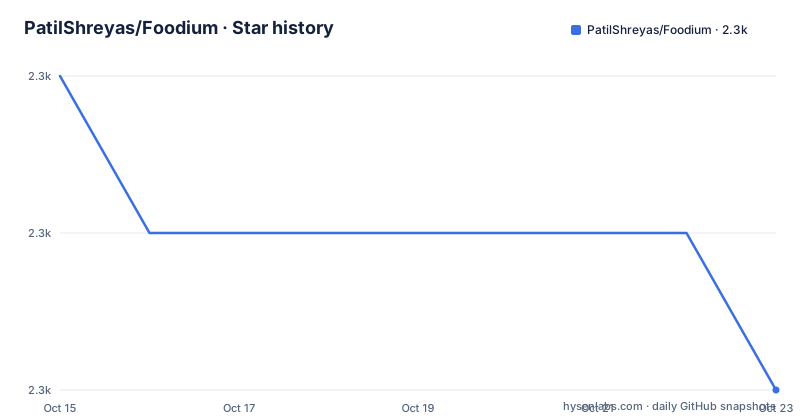
Star history
- PatilShreyas/Foodium2,323 ★ · -2
| Repository | 2026-10-15 | 2026-10-23 |
|---|---|---|
| PatilShreyas/Foodium | 2.3k | 2.3k |
-2 Stars in the last 8 days, measured from the daily GitHub snapshot. Compare with other projects
Editorial analysis
Local-first reading: every post comes out of Room
Foodium is built around one claim about data flow, and everything else follows from it: posts reach the screen from the local database, never straight from the network call. The app pulls a list of posts, writes it into SQLite through Room, and reads from there afterwards. Keeping the two sides synchronised is what makes the sample work with the network switched off. LiveData handles the notification path, described in the project tooling list as data objects that notify views when the underlying database changes, while a ViewModel stores UI state that is not destroyed when the UI changes. Flows sit in the same stack as a cold asynchronous stream that emits values and completes normally or with an exception.
What matters for a reader is that nothing in the package layout shortcuts that order. The remote endpoint lives under the remote package, the Room data access object under the local package, and the repository package is labelled as the single source of data, so a view asking for posts goes through the repository rather than the HTTP client. The cost of that choice is one extra copy of the data and a rule that decides when the copy is refreshed.
A static JSON document is the entire backend
The remote half of that flow has no server behind it. A dummy API is used in this app, and the JSON response is statically hosted on GitHub Pages:
https://patilshreyas.github.io/DummyFoodiumApi/api/posts/Open that address and you get the raw document the Moshi converter deserialises into the model classes, and the same address is what the Retrofit interface points at. Because the payload is a file in a repository rather than an endpoint someone deploys, the sample carries no authentication token, no pagination parameter, no write operation and no error contract. It also means the remote data can only change when someone edits and republishes that file. Coil-kt is in the dependency list to load images on Kotlin Coroutines, and this document is the only data source named anywhere, so text and images trace back to the same static response. A reader who copies the shape will inherit a cache that can only ever hold what one hand-written file contains.
Master runs Hilt while two other DI versions live elsewhere
Dependency injection is where this sample forks, and the forking is not tidy. The default branch `master` uses `Hilt-Dagger`, with `Hilt-ViewModel` handling injection of the ViewModel. Two other wirings are advertised in the same page: the older Dagger 2 style lives on a branch called `dagger2-di`, and a Koin version is a different repository entirely, contributed by Pranay Patel and reached through a badge rather than a branch.
Read the Dagger section closely and the two branch names do not line up. The sentence tells you to look at `dagger2-di`, and the badge immediately below it points at a tree called `dev-hilt-android`. Copy the word out of the text and you get one branch; click the badge and you land on another. For a project whose whole job is teaching structure, that mismatch is the first thing a newcomer hits, and the README does not say which of the two branches is the current one.
The package tree keeps Dagger-era directories under Hilt
Under the root package `dev.shreyaspatil.foodium` the tree still carries three directory names from the older style: builder for the Activity Builder, component for the DI Components, and module for the DI Modules. Current injection runs on Hilt, and that layout survives unchanged, which tells you the folder names outlived the wiring they were invented for.
dev.shreyaspatil.foodium # Root Package
├── data # For data handling.
│   ├── local # Local Persistence Database. Room (SQLite) database
|   │   ├── dao # Data Access Object for Room
│   ├── remote # Remote Data Handlers
|   │   ├── api # Retrofit API for remote end point.
│   └── repository # Single source of data.
├── di # Dependency Injection
│   ├── builder # Activity Builder
│   ├── component # DI Components
│   └── module # DI Modules
├── ui # Activity/View layer
|   │   └── viewmodel # ViewHolder for RecyclerView
└── utils # Utility Classes / Kotlin extensions
One annotation in that block is wrong on its face. The main screen viewmodel folder is described as `ViewHolder for RecyclerView`, while its sibling adapter folder is described as an Adapter for RecyclerView, so two RecyclerView roles sit in sibling directories and one of them is attached to the folder where ViewModels live. The glyphs are inconsistent too, with a plain pipe in some branches and a box drawing vertical bar in others, which is the kind of small sign that the tree was edited over years rather than laid out once.
A hosted APK badge, with no documented build command
There is no install chapter here, and the README is explicit about the substitute. The install path it gives is a badge pointing at an `app.apk` hosted with the project's latest build:
https://github.com/PatilShreyas/Foodium/releases/latest/download/app.apkTesting the sample means downloading a binary somebody else compiled. No Gradle invocation is printed anywhere in the documentation, and no Java or Android SDK level is named. The repository root does carry everything a build would need, including `gradlew.bat`, `build.gradle.kts`, `settings.gradle.kts`, a `buildSrc` directory, `gradle.properties` and an app module, with scripts written in Gradle Kotlin DSL rather than Groovy. So the first real use of the project is a two step path: run the hosted APK on a device to see the list and detail screens, then read the app module to see how that screen is wired. Anything about the build beyond that, including the SDK levels, has to be discovered from the Gradle files.
Three workflow badges and two named linters
Quality gates are visible in the badge row and barely explained below it. Three GitHub Actions workflows are tracked on `master`: Test, Build and Lint. The linting section names GitHub Super Linter as a combination of multiple linters installed as a GitHub Action, then lists exactly two of them as enabled here, LibXML for XML and ktlint for Kotlin.
The page never maps the three workflows to those two linters. A contributor whose build goes red therefore cannot tell from the documentation whether a formatting change or a test run stopped it, and has to read the workflow definitions to find out. A `ktlint` code style badge and a `.editorconfig` at the repository root are the only other signals about house style, and together they cover Kotlin formatting only.
Where Foodium stops short of a production app
Judged as a starting point for real work, the sample runs out of road quickly. There is one content type, posts, with a list screen and a details screen. No accounts, no authentication, no write path and no retry or offline failure behaviour appear anywhere in the documentation, so none of the hard parts of an offline-first app are demonstrated, only the happy path.
The build record makes the timing explicit: v1.1 is dated 2021-01-16, v1.0 is dated 2020-06-19, and the last push was on 2026-03-20. The code is MIT licensed, so lifting it into a commercial product carries no obligation to publish your own source, and the README even carries a badge pointing at Android Weekly issue 406. What you inherit with that permission is a structure last shaped around 2021 libraries, which is fine for learning and dated for anything you intend to maintain.
Dropping the cache leaves a Retrofit and Moshi app
There is a real architectural alternative inside this project itself, and it is the version without the cache. Because the remote payload is one static JSON document that maps to one model class, a team that never needs offline reads can delete the local database package and its Room data access object, keep Retrofit with the Moshi converter, and let the ViewModel publish the response directly.
What disappears is named in the project's own claims: posts would no longer be loaded from the local database, and remote and local data would no longer be synchronised. Fewer moving parts, no offline behaviour. The second choice to make up front is the injection layer, since Hilt, the Dagger 2 branch and the Koin fork cannot all coexist in one application, and this repository already shows what happens when they are attempted, by splitting them across two branches and a third repository. Anyone adapting the sample has to make that cut deliberately rather than inherit it.
Editorial conclusion
Read Foodium as a compact map of Android layering, not as a base to build on: one content type, a static JSON file standing in for a backend, and injection split across a branch and a fork. Learners get a clean path from repository to view. Anyone shipping a real app should copy the layering only, then write their own cache, API contract and failure states. Before reusing the structure, check what your own target SDK does to ViewBinding, whether Room migrations will be yours to own, and whether the cache layer can go entirely.
Frequently asked questions
What does the Foodium Android app actually do?
It loads posts from an API, stores them in a SQLite database through Room, and always reads posts from the local database so the app works offline. Remote and local data are kept in sync, and the UI is Material with a dark theme.
Where does Foodium get its data from?
A dummy API is used and the JSON response is statically hosted on GitHub Pages, so the remote side is a file rather than a deployed service. No authentication, pagination or write endpoint is part of the sample.
Which dependency injection framework does Foodium use?
The default branch master uses Hilt-Dagger with Hilt-ViewModel. The older Dagger 2 wiring lives on the branch called dagger2-di, and a Koin version exists as a separate repository fork contributed by Pranay Patel.
How do I install and test the Foodium app?
The README points at a downloadable APK hosted with the project's latest build, so the fastest route is to install that binary on a device. No Gradle build command is documented, so building from source means reading the Gradle Kotlin DSL scripts in the repository root.
Can I use Foodium as the starting point for a production app?
It is a sample with one content type and a dummy API, and it documents no error states, retries or database migrations. The code is MIT licensed, so copying it carries no source disclosure obligation, but the architecture around the cache is yours to design.
Official sources
Add this badge to your README
If you maintain this project, the badge below links readers to this analysis and shows its maintenance status from the daily GitHub snapshot. Paste the markdown into your README; add ?metric=license or ?metric=stars to the image URL for a different field.

[](https://hysenlabs.com/projects/patilshreyas-foodium)Star history chart for your README
[](https://hysenlabs.com/projects/patilshreyas-foodium)Was this useful?