Seedvault Backup for AOSP: ROM Integration, Encryption, and Recovery
A backup application for the Android Open Source Project.
At a glance
- What is it?
- Seedvault is an Android Open Source Project backup application that must be integrated into a ROM rather than installed as an ordinary app. It uses system permissions and internal APIs to back up application data and files to removable or network storage, with mnemonic-based encryption and automatic daily backups.
- Who is it for?
- Seedvault fits ROM projects that need Android 16 system-level backup and can manage the integration and branch alignment required by the AOSP platform. It does not fit users who expect to install it from an app store or use it independently on an unmodified device.
- Can I use it commercially?
- Not without permission. GitHub finds no licence file in the repository, and without a licence all rights are reserved by default: you may read the code but not reuse it. Check the README, or ask the authors, before using it.
- Is it still maintained?
- Yes. The repository last received commits 7 days ago.
- What is it written in?
- Mainly Kotlin, according to GitHub's language statistics.
Answers come from the project's GitHub data, last synced on October 23, 2026, and from our analysis. They are not legal advice.
Star history
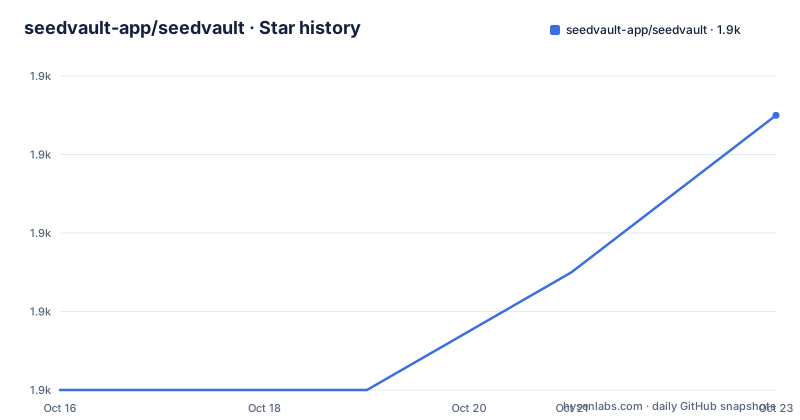
- seedvault-app/seedvault1,875 ★ · +7
| Repository | 2026-10-16 | 2026-10-23 |
|---|---|---|
| seedvault-app/seedvault | 1.9k | 1.9k |
7 Stars in the last 7 days, measured from the daily GitHub snapshot. Compare with other projects
Editorial analysis
Why Seedvault Requires an AOSP ROM
Seedvault solves a different backup problem from most Android applications. It backs up application data and device files through Android system capabilities, so it is intended for devices and ROMs built from the Android Open Source Project. The README states that Seedvault must be integrated into an Android ROM and cannot be installed as a regular app. This is the central adoption boundary for the project. A user cannot download the main Seedvault app and expect it to operate with ordinary application permissions.
The repository lists permissions including `android.permission.BACKUP`, `android.permission.QUERY_ALL_PACKAGES`, `android.permission.INSTALL_PACKAGES`, `android.permission.MANAGE_EXTERNAL_STORAGE`, and `android.permission.WRITE_SECURE_SETTINGS`. These are system-facing permissions, not the usual set that an ordinary user-installed backup utility would request. The application uses internal APIs similar to those used by the deprecated `adb backup` command, according to the README. That API dependence is why ROM integration is part of the product rather than an optional packaging step.
Seedvault is therefore most relevant to ROM maintainers, device integrators, and users of ROMs that have already integrated it. It is not a general-purpose backup client for arbitrary Android phones. The project does not document a standalone installation path for end users. Its instructions point ROM builders to the ROM Integration documentation in the Seedvault wiki.
Seedvault's Main and Supporting Components
The repository is split into several pieces with distinct responsibilities. The `app` directory contains the main Seedvault application, where user-facing backup and restore functions are assembled. The README links to `doc/README.md` for the main application's documentation. The `storage` directory is a file backup library described as handling efficient backup of files, with its design documented in `storage/doc/design.md`. This separation allows storage handling and application integration to evolve as separate Android components.
A second application component, `contactsbackup`, handles backup of local on-device contacts. That is a narrower responsibility than the main application's broader backup flow. The repository layout also includes a `core` directory and platform build files such as `Android.bp`, `build.gradle.kts`, and `settings.gradle.kts`. Those files indicate that Seedvault participates in an Android build system rather than being only a standalone Gradle project assembled independently from the operating system.
The components indicate a system backup stack rather than a single screen that copies selected files. The main application coordinates functionality, while the storage library deals with file backup operations and the contacts component handles local contacts. The README does not provide enough detail to claim a specific internal module dependency graph, so the safe conclusion is limited to these documented boundaries.
Backup Destinations, Encryption, and Restore Flow
Seedvault supports backing up application data to a flash drive and restoring it from a flash drive. The permissions list also mentions network storage and a built-in WebDAV backend, including access to local network servers. This means the destination is not limited to one physical connection model. The README describes flash-drive support as a feature, while the permission set supports network storage checks and WebDAV-related access. The precise user configuration flow is not included in the README, so selecting a destination should be treated as an integration and device-configuration task rather than inferred from the component names.
Encryption is based on a mnemonic phrase using BIP39. The README describes this as user-friendly encryption, but it also warns that disclosing the secret recovery key to other software creates security risks. That warning matters because recovery keys are part of the backup's trust boundary. External tools such as Seednaut and older-version extractors can decrypt and inspect backups, but the project warns users about handing the recovery key to third-party software. The existence of inspection utilities does not remove the key-management risk.
Restoration is presented as application data restore and re-installation support. The permission list includes `INSTALL_PACKAGES`, which is used when apps are reinstalled during restore. The README also identifies local contacts, files, media files, call logs, and user profiles as areas addressed by permissions or feature documentation. Automatic daily backups run in the background according to the feature list. The repository does not document a rollback procedure, retention policy, or recovery guarantee in the README.
Android 16 Branch Alignment and Installation Path
There is no ordinary installation tutorial for Seedvault because the project says it cannot be installed as a regular app. For an end user, the practical first step is to obtain a ROM that has integrated Seedvault. For a ROM developer, the README points to the Seedvault wiki's ROM Integration documentation. No install command, APK installation command, or standalone Gradle invocation is documented in the README, so this article does not invent one.
The branch choice is part of installation correctness. The README identifies the `android16` branch as intended for Android 16 usage. It explains that the branch version name starts with `16` and the version code starts with `36`, corresponding to the Android 16 API version. Older Android versions require older branches. Using an older branch on a newer Android version may cause issues, and the project says that such use is unsupported.
The repository includes `gradlew`, `gradlew.bat`, Gradle files, and `app/development/DEVELOPMENT.md`. Those files point to a development workflow, but the README does not provide the exact commands needed to build, install, or initialize that workflow. A developer following the project should start with `app/development/DEVELOPMENT.md` and the ROM Integration documentation, rather than treating the presence of the Gradle wrapper as proof of a standalone installation path. The first real use after integration is to configure the supported backup destination, protect the mnemonic recovery phrase, and verify that a backup can later be restored. The README does not specify the exact menu sequence.
System Permissions and Operational Constraints
Seedvault's permission model reflects its platform scope. `android.permission.BACKUP` permits backing up application data. `android.permission.QUERY_ALL_PACKAGES` provides information about installed applications for backup selection or processing, while `android.permission.QUERY_USERS` supplies user-profile information. `android.permission.MANAGE_EXTERNAL_STORAGE` supports backing up and restoring device files, and `android.permission.ACCESS_MEDIA_LOCATION` supports preserving access to original media files, including files with metadata that would otherwise be stripped.
The application also needs `android.permission.FOREGROUND_SERVICE` and `android.permission.FOREGROUND_SERVICE_DATA_SYNC` for periodic storage backups without interruption. `android.permission.POST_NOTIFICATIONS` is used to report backup status and errors. Network-related access is represented by `android.permission.ACCESS_NETWORK_STATE` for internet checks and `android.permission.ACCESS_LOCAL_NETWORK` for servers on a local network. `android.permission.MANAGE_USB` is listed for obtaining the serial number of USB mass-storage devices.
These permissions also create constraints. A ROM must grant the relevant permissions, expose the system APIs Seedvault expects, and handle the Android version represented by the selected branch. A build that omits an integration point may fail even if the source compiles. The permission list also includes `android.permission.INSTALL_PACKAGES`, which is relevant during restore and makes package reinstallation part of the platform contract. The README does not claim that Seedvault can degrade cleanly when a particular permission or system service is missing.
Maintenance, Compatibility, and Upgrade Cost
The repository is not archived. The README does not define a release cadence or promise of regular releases. There are no GitHub releases listed in the repository information. That absence matters because Android compatibility is tied to the source branch rather than to a conventional sequence of standalone app releases.
The README says Seedvault is developed alongside AOSP releases and is updated when Google releases a new Android version. Maintainers make changes required for basic functionality and any improvements possible through Android API changes. This implies an ongoing compatibility cost for ROM builders: each Android transition may require a corresponding Seedvault branch, source integration changes, permission review, and restore verification. An upgrade is therefore not merely replacing a downloadable app. The branch and ROM build must be aligned, and the older-branch-on-newer-Android combination is explicitly unsupported.
The project identifies the Calyx Institute as its primary developer and maintainer for use with CalyxOS. It also lists NGI0 PET Fund and NGI0 Entrust Fund funding. These statements provide project context, not a guarantee about support response times or compatibility for every ROM. The Apache-2.0 License is stated in the README and license files are present at the repository root, but organizations should review the actual license text and their distribution obligations before shipping an integrated build.
Why ROM Integration Is the Main Trade-off
The clearest alternative approach for someone who cannot modify the operating system is a conventional Android backup application. Such an application can be installed as a regular package, but it would not gain the system permissions, internal APIs, package reinstallation capability, or cross-user access that Seedvault's permission model assumes. The difference is architectural, not just a difference in user interface.
Another alternative is platform-level backup managed by the ROM or device vendor. Seedvault is relevant when a ROM project wants to ship the Seedvault application and storage library as part of the OS, rather than asking users to install a separate package. For users, this creates a system-integrated experience. For maintainers, it creates a recurring compatibility responsibility tied to Android branches and privileged integration.
The README does not provide a feature-by-feature comparison with a named alternative, so claims about storage formats, performance, retention, or recovery compatibility cannot be made here. The relevant decision is whether system integration is required. If it is not, Seedvault's required ROM build model is a direct limitation. If it is, Seedvault offers a documented combination of application and file backup, mnemonic encryption, flash-drive support, network-storage permissions, restore support, and scheduled background backups within an AOSP build.
Practical Limits of Seedvault Recovery
Seedvault's recovery model depends on preserving the mnemonic phrase and on the existence of a compatible Seedvault build for restoration. The README does not document what happens if the recovery phrase is lost, whether backups can be reset without a device, or whether a backup made on one Android branch can be restored on another branch. It also does not document retention limits, quota handling, partial backup recovery, or a rollback procedure.
The warning about external software is a genuine operational limitation. Seednaut can decrypt and inspect version 2 backups and supports file backups, while the extractor targets older version 1 backups and the parser targets version 0 backups. These tools can help inspect stored data, but disclosure of the secret recovery key to any external software can expose that data. Users who need a verifiable, documented recovery process should not assume that a backup utility alone proves recoverability.
The project should be judged as an AOSP-integrated backup system rather than a standalone Android backup app. Its advantages come from privileged access and platform integration. Its cost is that deployment, Android branch selection, permissions, recovery-key handling, and restoration checks all belong to the ROM project and its users.
Editorial conclusion
Seedvault fits ROM projects that need Android 16 system-level backup and can manage the integration and branch alignment required by the AOSP platform. It does not fit users who expect to install it from an app store or use it independently on an unmodified device. Verify first that your ROM uses the matching Android branch, can provide the documented system permissions and internal APIs, and has a tested recovery-key workflow before enabling backups.
Frequently asked questions
Can Seedvault be installed as a regular Android app?
No. The README explicitly says Seedvault must be integrated into an Android ROM and cannot be installed as a regular app. The ROM Integration documentation in the project wiki is the relevant starting point for builders.
Which Seedvault branch should I use for Android 16?
The README identifies the `android16` branch as the branch intended for Android 16 usage. It warns that using an older branch on a newer Android version may lead to issues and is unsupported.
Where does Seedvault store backups, and how is recovery protected?
The README lists flash-drive backup and restore, while the permissions also cover network storage and a built-in WebDAV backend. Seedvault uses a BIP39 mnemonic phrase for encryption, and the project warns that disclosing the secret recovery key to other software creates security risks.
Official sources
Add this badge to your README
If you maintain this project, the badge below links readers to this analysis and shows its maintenance status from the daily GitHub snapshot. Paste the markdown into your README; add ?metric=license or ?metric=stars to the image URL for a different field.

[](https://hysenlabs.com/projects/seedvault-app-seedvault)Star history chart for your README
[](https://hysenlabs.com/projects/seedvault-app-seedvault)Was this useful?