Lue is a terminal eBook reader with two dependency floors and three TTS modes
Terminal eBook Reader with Audiobook-Quality Text-to-Speech — Supports EPUB, PDF, DOCX, HTML, RTF, TXT, and MD.
At a glance
- What is it?
- Lue reads EPUB, PDF, DOCX, HTML, RTF, TXT and Markdown in a terminal, with word-level highlighting locked to speech and two text-to-speech engines behind one flag. The packaging tells you more than the feature table does: the distribution is called lue-reader while the command is lue, the manifest and requirements file disagree on the Edge TTS floor, and the offline engine needs a manual PyTorch install that no dependency list performs.
- Who is it for?
- Take Lue if you read in a terminal, want keyboard-driven navigation with Vim-style bindings, and value a reading position that survives a restart more than a library app. Leave it if you need native Windows, if you need DRM-protected files, or if you want the offline speech engine to install with one command, since it needs espeak, soundfile, huggingface-hub and a PyTorch wheel chosen by hand.
- Can I use it commercially?
- Yes, with conditions. GPL-3.0 is a copyleft licence: if you distribute software that includes it, you must release that software's source code under the same licence. Running it internally without distributing it does not trigger that obligation.
- Is it still maintained?
- Yes. The repository last received commits 129 days ago.
- What is it written in?
- Mainly Python, according to GitHub's language statistics.
Answers come from the project's GitHub data, last synced on November 22, 2026, and from our analysis. They are not legal advice.
Star history
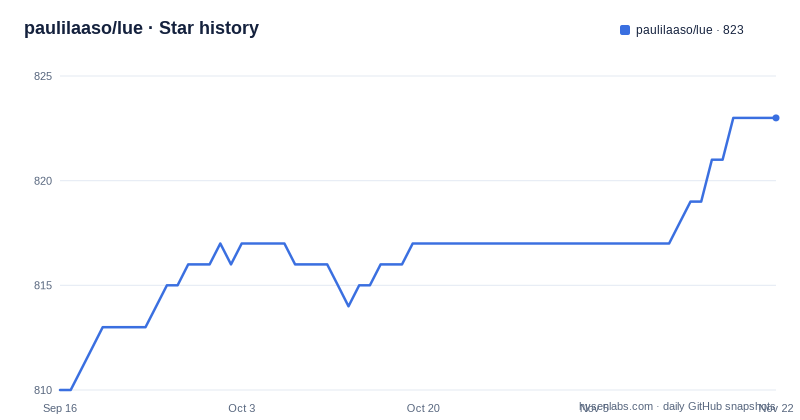
- paulilaaso/lue823 ★ · +13
| Repository | 2026-09-16 | 2026-11-22 |
|---|---|---|
| paulilaaso/lue | 810 | 823 |
13 Stars in the last 67 days, measured from the daily GitHub snapshot. Compare with other projects
Editorial analysis
The distribution is lue-reader and the command you type is lue
Four names for one project, and they are easy to mix up on the way in. The repository is `paulilaaso/lue`, the Python distribution on PyPI is `lue-reader`, the importable package is `lue`, and the console script is `lue`, declared as `lue = "lue.__main__:cli"`. The install line on the page is `pip install lue-reader`, and every example after it calls `lue`.
The Arch package carries a third variant, `lue-reader-git`, installed with yay or paru, which tracks the git version rather than a release. That one is not authored by this project, so the AUR route and the PyPI route can be at different versions with nothing on the page saying so.
Two packaging details in the manifest are worth knowing because they explain how the tool behaves after installation. The package ships `py.typed`, so type information is included, and its package data list includes `guide.txt` and `*.json`. That is what `lue --guide` reads: the navigation guide is a text file carried inside the installed package, so the walkthrough works without network access and without the repository being present.
Voice identifiers are the other data file. A voice is chosen with a name such as `en-US-AriaNeural`, and the repository holds the full list separately in `VOICES.md` at the root.
The manifest says edge-tts 7.2.0 and requirements.txt says 7.2.7
The two dependency declarations in this repository disagree on exactly one package, and it is the one that does the actual talking.
In the project manifest, the runtime dependencies are `edge-tts>=7.2.0`, `python-docx>=1.2.0`, `striprtf>=0.0.29`, `rich>=14.1.0`, `PyMuPDF>=1.26.3`, `Markdown>=3.8.2` and `platformdirs>=4.3.8`. In `requirements.txt`, the same list appears with `edge-tts>=7.2.7`.
So a PyPI install can resolve to 7.2.0 while a source install requires 7.2.7. Nothing explains which one the code needs, and the gap is invisible unless you compare the two files.
The general style of the dependency set is worth naming too: every entry is a lower bound with no upper bound, so a future major release of any of them is admissible to pip. Combined with a requires-python of 3.10 or newer and a classifier list that stops at 3.12, the project is technically open to a Python version it has not been classified for.
The version story is otherwise tidy. The manifest says 0.5.0, matching the newest release tag, v0.5.0 published on 2026-07-08, and the last push to the default branch was 2026-07-16.
Kokoro is an extra in the manifest and a file edit in the instructions
Offline speech is the second engine, and there are two documented ways to turn it on, which is one way too many.
The manifest declares a `kokoro` optional dependency group containing `kokoro>=0.9.4`, `soundfile>=0.13.1` and `huggingface-hub>=0.34.4`. The README instead tells you to edit `requirements.txt` and uncomment the same three lines, install PyTorch separately, then reinstall. The extra is the cleaner route and exists in the package metadata; the page documents the older one.
What neither route does is install PyTorch. It is not a declared dependency in either file, and the page gives you two commands to choose between: a CPU install of torch, torchvision and torchaudio, or a GPU install pointed at the CUDA 12.1 wheel index. So the offline path has four manual steps where the online path has one, plus a system dependency, espeak, which also has to be installed outside pip.
There is a third mode as well. The command reference accepts `--tts` values of edge, kokoro or none, which makes it a read-only mode with no speech at all. The feature table mentions only Edge TTS and Kokoro, so the silent mode exists in the CLI and not in the documentation.
FFmpeg is the dependency you install outside pip, and Windows means WSL
FFmpeg is required for audio processing on every platform, and it is not a Python dependency, so it has to be installed by whatever package manager you already use: `brew install ffmpeg` on macOS, `sudo apt install ffmpeg` on Debian and Ubuntu, and inside a WSL distribution on Windows. espeak is the same, optional but required for the offline engine.
The Windows path is worth stating precisely, because the feature table calls the project cross-platform while the installation section only describes WSL. You run `wsl --install` from an elevated PowerShell, restart if prompted, launch Ubuntu, and install ffmpeg, python3 and python3-pip inside it. That gives you a native macOS build, a native Linux build, and a Linux userspace on Windows. No native Windows binary is offered.
The quick start is correspondingly short, four steps, and the whole thing is these five lines:
brew install ffmpeg
sudo apt install ffmpeg
pip install lue-reader
lue --guide
lue path/to/your/book.epub
It also carries the caveat that matters for planning: the quick start uses Edge TTS, which requires internet, and the offline route is in the longer installation section.
Seven declared formats, four declared parsers
The format list is EPUB, PDF, TXT, DOCX, HTML, RTF and Markdown, and the dependency list maps cleanly onto four of them. `python-docx` for DOCX, `striprtf` for RTF, `PyMuPDF` for PDF, and `Markdown` for Markdown output.
EPUB, HTML and TXT have no third-party parser in the dependency list at all, which means they are handled by the standard library or by code inside the package. That is a reasonable choice for plain text and HTML, and a heavier one for EPUB, which is a zip container with an XML package document. Either way, the page claims format detection happens automatically and gives no statement about what happens when a PDF is image-only or an EPUB is DRM-protected, and neither case is mentioned anywhere on the page.
Two other dependencies have no format attached to them. `rich` is the terminal rendering layer behind the colour schemes and display modes, and `platformdirs` is the cross-platform state directory, which the next section is about.
For rendering, the project uses its own terminal interface rather than a widget toolkit, with configurable keyboard layouts including Vim-style bindings, adjustable UI elements, colours and display modes.
Reading progress lives in an OS directory and quitting with q saves it
Persistence is the quiet mechanism behind the feature table's claim about smart persistence, and it rests on one dependency.
`platformdirs` gives each operating system its conventional user directory, which is where the reading state goes. Three visible behaviours follow from that. Pressing `q` quits and saves the current reading progress automatically, running `lue` with no arguments reopens the last book you were reading, and `r` opens a menu of the five most recently read books.
Navigation is keyboard-first and mnemonic in a way worth learning before anything else, because the guide exists for this reason. `h` and `l` move by paragraph, `j` and `k` by sentence, `z` and `x` by chapter, `i` and `m` by page, `u` and `n` by smaller increments, `y` and `b` jump to the start and end, `c` opens the chapter index, `a` toggles auto-scroll, `p` pauses speech, `,` and `.` change playback speed between 1x and 3x, and `s` and `w` switch between sentence and word highlighting.
That last pair is the feature the project is really about: word-level highlighting synchronised with the speech, so the terminal shows the word currently being spoken rather than the sentence containing it.
The command list ends mid-comment and the key table ends mid-row
Two visible boundaries on the page are worth knowing before you rely on it as reference.
The basic commands block stops partway through, on a comment line reading Seconds of, so whatever options came after the `--lang` example are not on this page. And the keyboard controls table ends on a row that begins with the `v` binding and stops there, with no action text, so the remaining default bindings are not shown either.
The command surface that is visible is still enough to work with: no arguments to resume, `--guide`, `--help`, `--tts` with edge, kokoro or none, `--voice` with a named voice, `--speed` with a value like 1.5, and `--lang` with a language code. One of those examples is odd, since the `--lang` example passes the single letter `a`, which is not a language code, so treat it as a placeholder rather than a value to copy.
The repository itself is small: a `lue/` package, `pyproject.toml`, `requirements.txt`, `MANIFEST.in`, a LICENSE, `VOICES.md`, a `DEVELOPER.md` that the visible page never links to, and an images directory. There is no test directory and no workflows directory, so nothing here runs itself on a commit.
Editorial conclusion
Take Lue if you read in a terminal, want keyboard-driven navigation with Vim-style bindings, and value a reading position that survives a restart more than a library app. Leave it if you need native Windows, if you need DRM-protected files, or if you want the offline speech engine to install with one command, since it needs espeak, soundfile, huggingface-hub and a PyTorch wheel chosen by hand. Three things to check first: which Edge TTS floor your install resolved, since the manifest says 7.2.0 and requirements.txt says 7.2.7, which mode you want, because `none` is accepted by the CLI and absent from the feature table, and whether your Python is 3.13, which the classifier list does not mention even though the floor is 3.10.
Frequently asked questions
How do I install the Lue eBook reader?
Install FFmpeg first with `brew install ffmpeg` or `sudo apt install ffmpeg`, then `pip install lue-reader`. Run `lue --guide` for the navigation guide and `lue path/to/your/book.epub` to start reading. Windows goes through WSL: run `wsl --install` from an elevated PowerShell, then install ffmpeg, python3 and python3-pip inside the distribution.
Does Lue work offline?
Only with the Kokoro engine. Edge TTS is the default and needs internet. Kokoro is local and offline and needs espeak installed, plus soundfile, huggingface-hub and a PyTorch install you run yourself, either the CPU build or the CUDA 12.1 wheel index.
Which file formats can Lue read?
EPUB, PDF, TXT, DOCX, HTML, RTF and Markdown, with format detection described as automatic. Four of those have a declared parser: python-docx for DOCX, striprtf for RTF, PyMuPDF for PDF and Markdown for Markdown. EPUB, HTML and TXT have no third-party dependency declared.
Why is the package called lue-reader when the command is lue?
The PyPI distribution and the project name are lue-reader, while the repository, the importable package and the console script are all lue. The Arch package is a third name, lue-reader-git, which tracks the git version instead of a release.
What are the available TTS modes in Lue?
The `--tts` flag accepts edge, kokoro or none. Edge TTS is the default and requires internet, Kokoro runs locally offline, and none gives a read-only mode with no speech at all. The feature table mentions only the first two.
How do I change the voice or the speed in Lue?
Use `--voice` with a voice name such as `en-US-AriaNeural`, with the full list in VOICES.md, and `--speed` with a value like 1.5. During reading, `,` and `.` change playback speed between 1x and 3x, and `s` and `w` switch between sentence and word highlighting.
Official sources
Add this badge to your README
If you maintain this project, the badge below links readers to this analysis and shows its maintenance status from the daily GitHub snapshot. Paste the markdown into your README; add ?metric=license or ?metric=stars to the image URL for a different field.

[](https://hysenlabs.com/projects/paulilaaso-lue)Star history chart for your README
[](https://hysenlabs.com/projects/paulilaaso-lue)Was this useful?