jrnl: a plain-text journal that lives in your shell
Collect your thoughts and notes without leaving the command line.
At a glance
- What is it?
- jrnl turns a single command line into a timestamped, searchable journal, storing entries as human-readable text or AES-encrypted files. It is a good fit for people who already live in a terminal and want their notes to stay in files they control.
- Who is it for?
- Adopt jrnl if your notes belong in a terminal and you want the files to stay readable, greppable text you own. Skip it if you need a graphical editor, real-time sync between devices, or a team surface.
- Can I use it commercially?
- Yes, with conditions. GPL-3.0 is a copyleft licence: if you distribute software that includes it, you must release that software's source code under the same licence. Running it internally without distributing it does not trigger that obligation.
- Is it still maintained?
- Yes. The repository last received commits 2 days ago.
- What is it written in?
- Mainly Python, according to GitHub's language statistics.
Answers come from the project's GitHub data, last synced on November 14, 2026, and from our analysis. They are not legal advice.
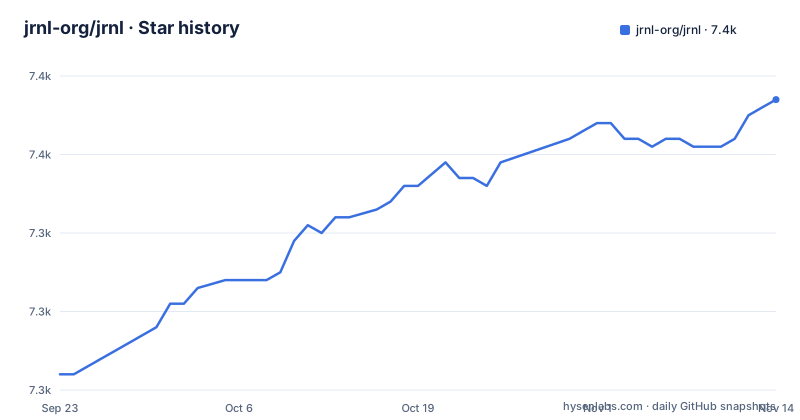
Star history
- jrnl-org/jrnl7,357 ★ · +35
| Repository | 2026-09-23 | 2026-11-14 |
|---|---|---|
| jrnl-org/jrnl | 7.3k | 7.4k |
35 Stars in the last 52 days, measured from the daily GitHub snapshot. Compare with other projects
Editorial analysis
What jrnl solves, and who it is actually for
Most note tools ask you to leave the terminal, open a window, and pick a notebook before you can write a sentence. jrnl removes that step. The README describes it as "a simple journal application for the command line," and the pyproject description is the same idea in one line: "Collect your thoughts and notes without leaving the command line."
The people this suits are narrow and specific. You are already working in a shell, you want a timestamp attached without typing one, and you want the result to be a file you can read with cat, search with grep, or copy to another machine without an export step. That last property is the real differentiator. Journals are stored as human-readable plain text, per the README, and encryption is optional rather than the default.
It is not a task manager, not a wiki, and not a shared workspace. There is no server component described anywhere in the repository. The unit of work is one entry, written by one person, appended to one journal file.
How an entry becomes a file: dates, titles, bodies
The parsing rule is the part worth understanding before you install anything. When you type an entry, jrnl looks for a date expression at the start. The README's example is `jrnl yesterday: Called in sick. Used the time to clean the house and write my book.` Here `yesterday:` is consumed as the timestamp. Everything up to the first sentence ending (a period, question mark, or exclamation point) becomes the title, and the remainder becomes the body.
The stored form is compact. The README shows the result as a bracket-wrapped timestamp followed by the title on the first line and the body on the next line.
Two dependencies do the heavy lifting here. parsedatetime and python-dateutil handle the natural-language dates, which is why `yesterday:` works and why the README calls it "interpreted by jrnl as a timestamp."
The sentence-ending rule has a matching edge. A title like "Called in sick" ends at the period, so a body is optional. But if your first sentence contains an abbreviation or a decimal, the parser may split earlier than you expect. The README states the rule plainly and does not describe an escape hatch for it.
Installing jrnl and writing a first entry
jrnl is a Python package. The pyproject file requires Python `>=3.11.0,<3.15`, so check your interpreter before installing. The package is published to PyPI under the name `jrnl`, and the README also links a Homebrew formula badge, so a Homebrew install path exists for macOS users. The project's own documentation lives at jrnl.sh.
With a compatible Python, install from PyPI:
pip install jrnlAfter installation the `jrnl` command is available, mapped in pyproject to `jrnl.main:run`. Create your first entry with an explicit date:
jrnl yesterday: Called in sick. Used the time to clean the house and write my book.The README states that this produces a journal file containing a bracketed timestamp, the title `Called in sick.` and the body on the following line. If you run `jrnl` with no arguments, the README says you are prompted to compose the entry interactively, and that you can configure jrnl to open your external editor instead.
The README frames the tool's purpose as creating, searching, and viewing entries, so the same binary covers all three. Configuration, such as using an external editor, is covered at jrnl.sh rather than documented inline in the README.
Encryption changes your backup story
The README says journals "can also be encrypted using AES encryption." That is a per-journal choice, and it has consequences the README does not spell out. An encrypted journal is no longer greppable with ordinary tools, and it is no longer readable on a machine that lacks the key material. The `cryptography` and `keyring` packages in the dependency list are the components behind this: keyring suggests the key can be held by your operating system's credential store rather than typed each time.
The practical constraint is portability. The plain-text mode is the reason to choose jrnl over a database-backed notes app, and encryption gives that up in exchange for at-rest privacy. If you enable it, your backup strategy has to preserve both the journal file and whatever keyring state or passphrase protects it. Keep the passphrase available separately from the backup; the encrypted file and the correct passphrase are needed for recovery.
The CLI documents both --encrypt and --decrypt. Back up the journal before conversion and follow the instructions for your installed version. The security documentation also notes that editing can create an unencrypted temporary file, so account for that exposure when choosing an editor and storage location.
Where jrnl is the wrong tool
jrnl assumes a single writer. Nothing in the repository describes conflict resolution, locking, or merging, so pointing two machines at the same journal file over a sync service is an invitation to lost entries. If your workflow needs notes that stay consistent across a laptop and a phone, jrnl is not the layer that will give you that.
The second limitation is the parser. The date prefix and the first-sentence title rule are convenient when they match your writing and annoying when they do not. Anyone who writes in short fragments, uses abbreviations, or wants structured fields in each entry will spend time fighting the format rather than using it.
The third is the release cadence visible in the tags. v4.2 shipped in November 2024, and the next listed releases, v4.6-beta and v4.6, arrived in August 2026. The last push to the repository was on 2026-11-01, so the project is not dormant, but the gap between 4.2 and 4.6 is long enough that anyone pinning to a specific version should read the changelog rather than assume incremental fixes. The README's own support instruction is to submit an issue on GitHub.
How jrnl differs from a GUI journal or a notes daemon
The closest comparison is a graphical journal such as RedNotebook, or a sync-backed notes service. Those give you a rendered interface, formatting, and in the service case, automatic multi-device sync. jrnl gives you none of that. What it gives instead is a file format simple enough to read without the application: the README's example output is a timestamp in brackets, a title, and the body on the next line. Any text editor opens it. Any version control system can track it.
That difference matters most at the exit. Leaving a GUI journal usually means exporting, and exports lose structure. Leaving jrnl means stopping the install. The trade you accept is that search, tagging, and display are all mediated by the CLI, and that you are responsible for your own backup and sync.
If what you actually want is a notes system with a web interface and mobile clients, jrnl is the wrong layer even though it is a fine journal. The two solve overlapping problems with opposite priorities.
Licence and the cost of staying current
jrnl is licensed GPL-3.0-only, per the `license` field in pyproject.toml and the LICENSE.md file at the repository root. For personal use that is unremarkable. If you plan to embed jrnl in a product, the copyleft terms apply to distributed derivative work, and that is a question for your own legal review rather than something this article can settle.
Upgrade cost is mostly the Python floor. The project supports Python 3.11 through 3.14, so an environment pinned to 3.10 or earlier cannot run the current release at all. That is the first thing to check on an older machine.
The dependency list is deliberately short and includes a pinned range for `rich (>=15.0.0,<15.1.0)`, which means a future rich 15.1 release will not be pulled in until jrnl widens that bound. The remaining dependencies (colorama, cryptography, keyring, parsedatetime, python-dateutil, pyxdg, ruamel.yaml, ruamel.yaml.clib, tzlocal) are version-ranged rather than pinned, so a fresh install today and a fresh install in six months may not resolve to identical versions. If reproducibility matters, freeze your environment.
Editorial conclusion
Adopt jrnl if your notes belong in a terminal and you want the files to stay readable, greppable text you own. Skip it if you need a graphical editor, real-time sync between devices, or a team surface. Before committing, verify your Python version is inside the 3.11 to 3.14 range and decide whether the journal file will be encrypted, because that choice determines how you back it up and how you read it outside jrnl.
Frequently asked questions
What is jrnl and what does it store?
jrnl is a command-line journal application. Entries are stored as human-readable plain text and can optionally be encrypted with AES, according to the README.
How do I install jrnl?
It is a Python package published to PyPI, so it can be installed with `pip install jrnl`, and the README also links a Homebrew formula. The pyproject file requires Python 3.11 or later and below 3.15.
How does jrnl decide what the title of an entry is?
A leading date expression such as `yesterday:` is read as the timestamp, everything up to the first period, question mark, or exclamation point becomes the title, and the rest is the body. The README gives the example `jrnl yesterday: Called in sick. Used the time to clean the house and write my book.`
Can I use jrnl on more than one computer at once?
The repository does not describe locking, merging, or conflict resolution, so simultaneous writes to the same journal file from two machines are not addressed by the documentation. The README only covers creating, searching, and viewing entries.
What licence is jrnl released under?
GPL-3.0-only, as stated in the `license` field of pyproject.toml and in LICENSE.md at the repository root.
Official sources
Add this badge to your README
If you maintain this project, the badge below links readers to this analysis and shows its maintenance status from the daily GitHub snapshot. Paste the markdown into your README; add ?metric=license or ?metric=stars to the image URL for a different field.

[](https://hysenlabs.com/projects/jrnl-org-jrnl)Star history chart for your README
[](https://hysenlabs.com/projects/jrnl-org-jrnl)Was this useful?