vdirsyncer: Command-Line Calendar and Contact Synchronization
📇 Synchronize calendars and contacts.
At a glance
- What is it?
- vdirsyncer is a Python command-line tool for synchronizing calendars and address books between DAV servers and local folders. It fits users who want filesystem-based data, separate editing software, or direct synchronization between two servers.
- Who is it for?
- Adopt vdirsyncer when local files are an intentional part of your calendar or contact workflow and you can configure DAV endpoints correctly. Do not choose it when you need a complete graphical information manager or an already documented unattended scheduler.
- Can I use it commercially?
- Check first. The repository uses a licence we do not classify automatically, so read its LICENSE file before any commercial use.
- Is it still maintained?
- Yes. The repository last received commits 49 days ago.
- What is it written in?
- Mainly Python, according to GitHub's language statistics.
Answers come from the project's GitHub data, last synced on October 23, 2026, and from our analysis. They are not legal advice.
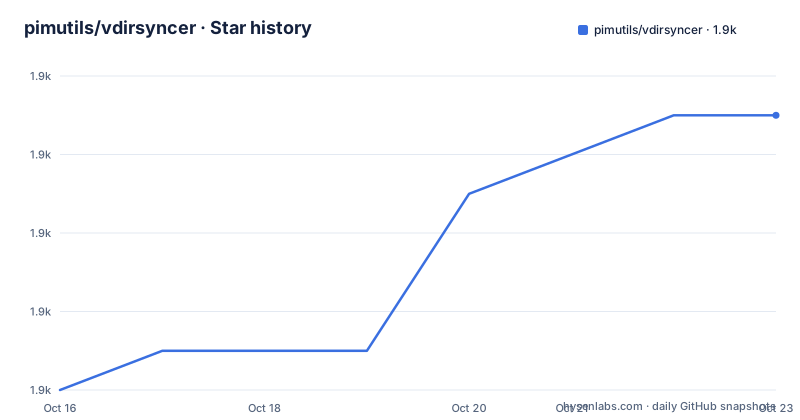
Star history
- pimutils/vdirsyncer1,895 ★ · +7
| Repository | 2026-10-16 | 2026-10-23 |
|---|---|---|
| pimutils/vdirsyncer | 1.9k | 1.9k |
7 Stars in the last 7 days, measured from the daily GitHub snapshot. Compare with other projects
Editorial analysis
vdirsyncer's Local-First Calendar and Contact Workflow
vdirsyncer solves a specific problem: synchronizing calendars and address books while retaining a local copy that other programs can edit. The README describes the common arrangement as synchronizing a server with a local folder, changing local events and contacts through other software, and then sending those changes back to the server. The synchronizer therefore occupies a boundary between remote storage and a separate calendar or contacts application. It does not need to provide the editing interface itself.
That division makes vdirsyncer relevant to users who already organize personal information through filesystem-oriented tools. It also supports a different topology. The README says calendars and address books can be synchronized directly between two servers, so a local working folder is optional rather than part of every synchronization model. This is useful when both endpoints expose compatible DAV collections and direct transfer is preferable to routing every change through one computer.
The project describes itself as being for calendars and contacts what OfflineIMAP is for email. The analogy concerns synchronization, not identical functionality. Email stores messages in mailboxes, while this project works with collections containing formats such as iCalendar and vCard. Repository topics also include `icalendar`, `vcard`, `vevent`, `vtodo`, CalDAV, CardDAV, and WebDAV. These names establish its intended scope, including events and tasks, but they do not by themselves prove support for every server extension.
vdirsyncer is a command-line tool, not a complete calendar suite. That is its central benefit for engineers and technical users who want explicit configuration and filesystem access. It is also a meaningful constraint for someone expecting a graphical scheduler, contact form, reminder interface, or automatic background service. The README supports a composable workflow, but the documentation shown does not claim that vdirsyncer supplies those adjacent products.
Collections, Local Folders, and DAV Endpoints
The repository documentation indicates that synchronization is configuration-driven. The presence of `config.example` suggests that users define collections and associate them with storage backends or remote endpoints. The README does not show a complete configuration in the visible text, so it would be unsafe to invent a server URL, collection path, credential key, or command-line option.
In the local-folder arrangement, the local directory is not merely a cache. The README explicitly presents it as the place where other programs change events and contacts. This gives users a clear separation of responsibility: one program handles the user interface and local edits, while vdirsyncer handles synchronization between that folder and a remote service. The remote endpoint may be a CalDAV calendar, a CardDAV address book, or another compatible collection source described by the project's documentation.
The direct server-to-server mode changes the data path. Instead of requiring a local folder as the editing interface, two remote collections can be paired. This is attractive for administrators or users who want calendar data transferred between services. It also introduces server-specific questions. A provider may implement standard CalDAV or CardDAV operations while differing in authentication, discovery, collection naming, or extension behavior. The project topics show protocol intent, but the README does not provide a complete compatibility matrix.
The repository layout also contains tests, documentation, contribution files, and a release script. That indicates a software package rather than a single-purpose script. Still, repository organization does not prove operational compatibility with a particular provider. A user should read the tutorial and server-specific documentation before assuming that any DAV endpoint can be used unchanged.
Installing vdirsyncer and Preparing the First Use
The README directs users to the project documentation for basic usage and the packaging page for installation. The package metadata specifies Python `>=3.9` and exposes a command named `vdirsyncer` through `vdirsyncer.cli:app`. It also lists `click`, `click-log`, `requests`, `aiohttp`, `aiostream`, and `tenacity` as runtime dependencies. Optional groups add Google OAuth support, test dependencies, documentation tools, and code-checking tools.
The visible README does not include the exact installation command, so no command is reproduced here. The first step is to follow the project's packaging documentation, create an appropriate Python environment, and install the package using the procedure documented there. After installation, the next documented starting point is the stable tutorial linked from the README. That tutorial should provide the authoritative first synchronization workflow, including configuration and authentication details specific to the selected service.
A first real use is not complete until the user has identified which collection is local and which is remote. The local folder should be accessible to the calendar or contact program that will edit it. The remote endpoint must expose the corresponding calendar or address-book collection. The user then follows the tutorial's configuration process and invokes the `vdirsyncer` command as documented there. The repository excerpt does not state the exact invocation syntax, so inventing a flag would make the example unreliable.
The README also points to tutorials for programs that work with the local data. This confirms that the intended workflow is intentionally modular. A separate editor is part of normal use, not an optional feature that vdirsyncer secretly replaces.
Packaging, Dependencies, and Upgrade Cost
The `pyproject.toml` file defines vdirsyncer as a console application built with `setuptools` and `setuptools_scm`. It declares support for Python 3.9 and later, including classifiers through Python 3.14. Runtime dependency ranges include `click>=5.0,<9.0`, `requests>=2.20.0`, `aiohttp>=3.9.0,<4.0.0`, `aiostream>=0.4.3,<0.8.0`, and `tenacity>=9.0.0`. These ranges matter during installation because they determine which dependency versions the package permits.
The repository is not archived, and the last push was on 2026-09-04. A listed release is `0.16.8`, dated 2020-06-09. The release date and repository activity are separate facts. Recent repository work does not by itself establish that every old release configuration remains valid, and the visible release history does not document a current migration procedure. Users should review the changelog and packaging documentation before upgrading a deployment that handles active contacts or calendars.
The project is licensed under the 3-clause BSD license according to the README and package metadata. The repository classification reports a custom license classification, so the `LICENSE` file should be consulted for the exact terms. This is especially relevant when redistributing the package or embedding it in an internal distribution. The license does not answer operational questions such as whether a particular provider will continue accepting the synchronization requests made by a given configuration.
For contributors, the Makefile provides targets such as `check`, `ci-test`, and `install-dev`. It warns that the `CI` workflow is intended for a virtual machine and can pollute the system. The target details are not needed for ordinary synchronization, but they show that development and release maintenance are separate from end-user installation.
Limitations and the Wrong Deployment Shape
vdirsyncer is the wrong tool when the requirement is a complete graphical calendar or contacts application. The README describes synchronization, not event editing, contact forms, reminders, or account management. Choosing vdirsyncer on the expectation that it will replace a full information manager would leave essential parts of the workflow unimplemented.
It can also be unsuitable when synchronization must run continuously without an external process. The documentation describes a command-line tool and points to a tutorial for basic usage. The visible repository text does not document a daemon, scheduler, or guaranteed unattended deployment. A deployment requiring automatic execution therefore needs a separate operating-system mechanism or another tool whose documented service model covers that requirement.
Provider behavior remains a practical limitation. CalDAV, CardDAV, and WebDAV are project topics, but that does not mean every server implementation behaves identically. Authentication requirements, collection discovery, vendor extensions, and failure responses can affect a setup. The README does not provide a universal server compatibility statement, so a new provider should be tested with non-critical data first.
The local-folder design also creates operational responsibilities. The user must protect credentials, back up local collections, and decide how changes are applied when both sides differ. The visible README does not document rollback, automatic conflict resolution, or recovery guarantees. These are not reasons to reject the project, but they are boundaries that should be checked before adoption.
vdirsyncer Compared with Native DAV Clients
The README's comparison with OfflineIMAP is conceptual. OfflineIMAP focuses on email synchronization, whereas vdirsyncer focuses on calendars and address books. The practical distinction is the data format and service model: vdirsyncer deals with collections involving iCalendar, vCard, CalDAV, and CardDAV rather than mailboxes.
A native server-specific calendar client is a real alternative. Such a client usually provides a complete interface and connects directly to one provider. Choosing it can reduce configuration work and remove the need for a separate local editor. Vdirsyncer becomes more compelling when local files are required, when multiple programs should operate on those files, or when the user wants a command-line process that can be inspected and scheduled externally.
A general-purpose file synchronization tool is a different alternative, but it does not provide vdirsyncer's calendar and contact collection model. It may copy files without understanding which calendar or address-book collection is being changed. Vdirsyncer's protocol and collection orientation are therefore a meaningful distinction, not merely a different spelling of file copying.
The direct server-to-server mode is the clearest project-specific alternative to the usual local-folder workflow. It removes the local editor from the path, but it still depends on compatible endpoints and correct configuration. Neither approach should be selected solely from a general claim about flexibility. The decision depends on whether local control or a complete remote application is the primary requirement.
Editorial conclusion
Adopt vdirsyncer when local files are an intentional part of your calendar or contact workflow and you can configure DAV endpoints correctly. Do not choose it when you need a complete graphical information manager or an already documented unattended scheduler. Verify first that your provider supports the required CalDAV or CardDAV operations, then confirm that the configuration recognizes both collections before synchronizing important data.
Frequently asked questions
What does vdirsyncer synchronize?
It synchronizes calendars and address books between DAV servers and local folders. The README also says that calendars or address books can be synchronized directly between two servers.
How do I install vdirsyncer?
The README directs users to the packaging page and stable tutorial. The package metadata requires Python 3.9 or newer, but the visible README does not include the exact installation command.
Does vdirsyncer include a graphical calendar editor?
No graphical editor is described in the README. Its documented workflow uses other programs to edit local events and contacts, while vdirsyncer handles synchronization.
Which license applies to vdirsyncer?
The README and `pyproject.toml` identify BSD-3-Clause. The repository classification reports a custom license classification, so the `LICENSE` file is the authoritative source for exact terms.
What maintenance information is available?
The repository is not archived, and its last push was on 2026-09-04. The latest listed release is `0.16.8`, dated 2020-06-09.
Official sources
Add this badge to your README
If you maintain this project, the badge below links readers to this analysis and shows its maintenance status from the daily GitHub snapshot. Paste the markdown into your README; add ?metric=license or ?metric=stars to the image URL for a different field.

[](https://hysenlabs.com/projects/pimutils-vdirsyncer)Star history chart for your README
[](https://hysenlabs.com/projects/pimutils-vdirsyncer)Was this useful?