PyUIBuilder is a JavaScript app that outputs Python, and its development now lives in a private repository
Python GUI builder. GUI builder for Tkinter, CustomTkinter, Kivy(upcoming) and PySide [Project is being updated in private repo]
At a glance
- What is it?
- PaulleDemon/PyUIBuilder ships a drag and drop editor for Tkinter and CustomTkinter as a React and webpack front end with version 0.1.0 and no releases. The public repository is the landing surface: the project states it is maintained in private, and premium features are too.
- Who is it for?
- PyUIBuilder is worth a look if you want Tkinter layout code written for you and are willing to treat the tool as a service rather than a dependency. Four things to check before you build on it.
- Can I use it commercially?
- Check first. The repository uses a licence we do not classify automatically, so read its LICENSE file before any commercial use.
- Is it still maintained?
- Yes. The repository last received commits 110 days ago.
- What is it written in?
- Mainly JavaScript, according to GitHub's language statistics.
Answers come from the project's GitHub data, last synced on November 25, 2026, and from our analysis. They are not legal advice.
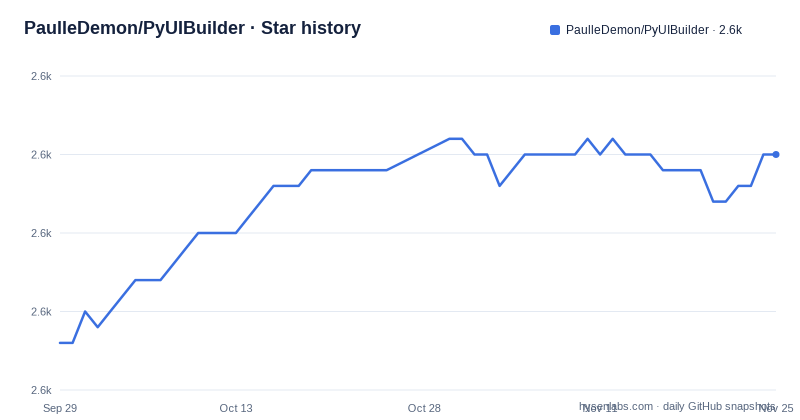
Star history
- PaulleDemon/PyUIBuilder2,630 ★ · +12
| Repository | 2026-09-29 | 2026-11-25 |
|---|---|---|
| PaulleDemon/PyUIBuilder | 2.6k | 2.6k |
12 Stars in the last 57 days, measured from the daily GitHub snapshot. Compare with other projects
Editorial analysis
A JavaScript front end whose output is Python
The repository's recorded language is JavaScript, and nothing in the dependency list argues otherwise: react and react-dom at 18.3.1, antd for the interface, the dnd-kit packages for drag and drop, reduxjs toolkit with react-redux and react-query for state, react-router-dom for routing, fabric as the canvas library, dom-to-image-more and file-saver for export, and jszip for packaging a download. What it produces is Python. The package manifest is marked private with version 0.1.0, a placeholder that has no relationship to the released product, and there are no GitHub releases at all, so the version number in the tree is the only version a reader can find and it never moves. The consequence is worth stating plainly: nobody installs this as a library. The editor runs as a web application, the generated Python is the artifact that leaves the building, and the repository is the application rather than a package anyone depends on.
The public repository is now a landing page for a private one
The most important line on the page is a callout near the top: the project is now being maintained in a private repository and is being continuously updated. A second note says premium features are being added and maintained in private. Everything else on the page points outward rather than inward, to a hosted editor, a separate about site, a docs subdomain, a roadmap on a third party workspace, a what is new page on the same workspace, a video playlist, a blog post about building a sign up form, and a Discord invite. The tree matches that shape. Alongside `src/` and `public/` sit `landingpages/`, `repo-assets/`, `demos/`, `docs/`, plus a `notes.md` and a `roadmap.md` at the root, which is the residue of a working repository rather than a published one. So the public code is what a visitor's browser runs, and the product decisions live somewhere a reader cannot inspect.
The build script drops cross-env while the other two keep it
Three scripts set the environment differently, and the inconsistency is in the middle one. The development server loads an env file through env-cmd and sets the variable through cross-env before webpack serves. The local production build does the same thing with the production env file. The plain build sets the variable inline and calls webpack directly, with no cross-env:
NODE_ENV=production webpackThat form works in a POSIX shell and fails on a Windows command prompt or PowerShell, which is exactly the case cross-env exists to handle, and the same manifest uses cross-env in the two neighbouring scripts and in both tailwind scripts. The tailwind pair also reveal where the styling lives: input is a stylesheet inside `landingpages/tailwind/`, and the watch mode writes a runtime file while the production mode writes a minified build file, both generated rather than committed. The docs have their own script, serving the `docs/` directory through docsify, which is the same content the hosted docs subdomain serves.
react-scripts survives for tests and eject only
Create React App is still a dependency, pinned to exactly 5.0.1 while almost everything else in the manifest carries a caret range, and it is used by exactly two scripts: the test script and the eject script. Everything that actually builds the application goes through webpack directly, with a webpack config file, a postcss config file and a tailwind config file at the root. That arrangement is what happens when a project starts on Create React App, moves to its own bundler, and keeps the old tool only for its test runner. The testing packages sit alongside it: jest-dom, react at 13.4.0 and user-event at 13.5.0, which are the Create React App generation of testing libraries rather than the current one. So the test path runs on a five year old framework scaffold while the shipping path runs on a hand configured bundle, and a contributor has to understand both to work on either.
Two overrides pin transitive packages the manifest never names
The dependency block is followed by an overrides block that forces two transitive packages to specific versions: picomatch at 3.0.0 and postcss-selector-parser at 7.1.0. Neither package appears in the direct dependencies, and neither is a plugin or a widget library, so both arrive through something else, picomatch through the file matching that build tooling does and the selector parser through the CSS pipeline. Pinning them at the top level is how a project neutralises a resolution it does not control, and the manifest does not say why, so a reader cannot tell whether this is a security response, a build fix, or a compatibility shim. The engines field requires Node 18 or above and a `.nvmrc` file sits in the root, which is the second place the same fact is recorded. Locking one copy of a node and package-lock.json for the rest is coherent; overriding two transitive packages without a note about why is the loose end.
The generated Tkinter sample is absolute positioned and stops mid line
The one piece of output the documentation shows is generated tkinter code with a header comment naming the generator and its repository. It creates a root window with a hard coded background colour and a title, then places a time picker and a map view with explicit coordinates and sizes, using the place geometry manager rather than pack or grid. That matters against the feature list, which claims support for layout managers including flex, grid and absolute positioning: the only sample available demonstrates the last of the three. The imports are the second thing to notice, since the sample pulls in an analog picker from a time picker package and a map view widget that Tkinter does not ship, which is how the builder's pre-built widget library reaches generated code and why the manifest promises a requirements file when one is needed. The sample itself ends partway through a line creating a label widget, and a note below it says Tkinter output varies by operating system.
Two of four frameworks are unchecked boxes
The support list is a four item checklist: Tkinter and CustomTkinter ticked, Kivy and PySide left open and labelled work in progress, which matches the repository description's own parenthesis about Kivy being upcoming. The roadmap names three things next: event handlers for wiring behaviour to widgets, PyQt and PySide support, and a downloadable Electron app, with the page pointing at a roadmap document in the repository for the rest. The pricing table agrees with that ordering, where the downloadable Electron app row is marked upcoming for both paid tiers and unavailable on the free one. So a buyer is being asked to pay for a desktop application that does not exist yet, while the free tier covers the web editor that does. That is an ordinary arrangement for a young product, and it is also the clearest signal in the documentation about which half of the roadmap is funded work and which is not.
Three licence stories and no recorded licence identifier
Repository metadata carries no licence identifier, a file named License.txt sits at the root, and the documentation's licence section splits terms three ways: a web based editor, an Electron app under a hobbyist licence, and an Electron app under a commercial licence, with a per user framing for the two paid tiers. Nothing in the documentation reconciles those with the file in the root, so a reader has to work out which set applies to which form of the tool. The funding section is separate again: a solo developer asks for a one time payment for a licence that gives instant access to premium features for life, with discounts described as available for a limited time on pre-orders, alongside a note that the developer handles design, coding and maintenance alone. That paragraph spells maintaining as maintaing, which is a fair signal of how much editing the rest of the page has had.
Editorial conclusion
PyUIBuilder is worth a look if you want Tkinter layout code written for you and are willing to treat the tool as a service rather than a dependency. Four things to check before you build on it. The generated output is absolute positioning in the only sample available, so the flex and grid support claimed in the feature list is not demonstrated. The generated code imports third party widget packages, which means your requirements file is decided by the builder. The repository carries no licence identifier in its metadata and splits its terms by delivery channel, so read the terms for the editor you actually use. And the work has moved to a private repository, which means the public one can stop changing without a signal in it. Anyone who needs the builder's source to be auditable, or who needs Kivy or PySide output, should decide that before starting a project on it.
Frequently asked questions
Is PyUIBuilder free?
There is a free tier and paid tiers. A pricing table lists a free column beside a per user hobbyist licence and a per user commercial licence, sold as a one time payment, and the paid tiers add early access, priority support and a downloadable Electron app that is marked upcoming.
Which Python GUI frameworks does PyUIBuilder support?
Tkinter and CustomTkinter are ticked as supported, while Kivy and PySide are marked as work in progress. The project does not compare itself with other GUI builders or claim to be the best one for Python.
Does PyUIBuilder generate Tkinter code?
Yes, and the sample output in the documentation is Tkinter. It creates a root window, then places a time picker and a map view with explicit coordinates, importing two third party widget packages that Tkinter does not provide on its own.
Where is the PyUIBuilder source code now?
The project states that it is being maintained in a private repository and continuously updated, and that premium features are added and maintained in private. The public repository is the web editor's front end, with the package marked private and no GitHub releases.
What licence applies to PyUIBuilder?
Repository metadata records no licence identifier, a License.txt file sits at the root, and the documentation splits terms by delivery channel: a web based editor, plus separate hobbyist and commercial licences for an Electron app.
Official sources
Add this badge to your README
If you maintain this project, the badge below links readers to this analysis and shows its maintenance status from the daily GitHub snapshot. Paste the markdown into your README; add ?metric=license or ?metric=stars to the image URL for a different field.

[](https://hysenlabs.com/projects/paulledemon-pyuibuilder)Star history chart for your README
[](https://hysenlabs.com/projects/paulledemon-pyuibuilder)Was this useful?