revpdf-release, a download page that is also a release channel
Official release binaries for RevPDF Editor (Linux AppImage & macOS DMG).
At a glance
- What is it?
- The revpdf-release repository holds the official release artefacts for RevPDF, a native offline PDF editor, and almost nothing else. It is worth understanding as a distribution pattern rather than as a codebase, because the interesting decisions are about which channel each platform gets and what the repository does not contain.
- Who is it for?
- revpdf-release suits anyone who wants to install RevPDF without building it, and it is a clean example of keeping binaries and source apart so that a release tag is a download rather than a build.
- Can I use it commercially?
- Check first. The repository uses a licence we do not classify automatically, so read its LICENSE file before any commercial use.
- Is it still maintained?
- Yes. The repository last received commits 75 days ago.
- What is it written in?
- GitHub does not report a main language for this repository.
Answers come from the project's GitHub data, last synced on November 7, 2026, and from our analysis. They are not legal advice.
Star history
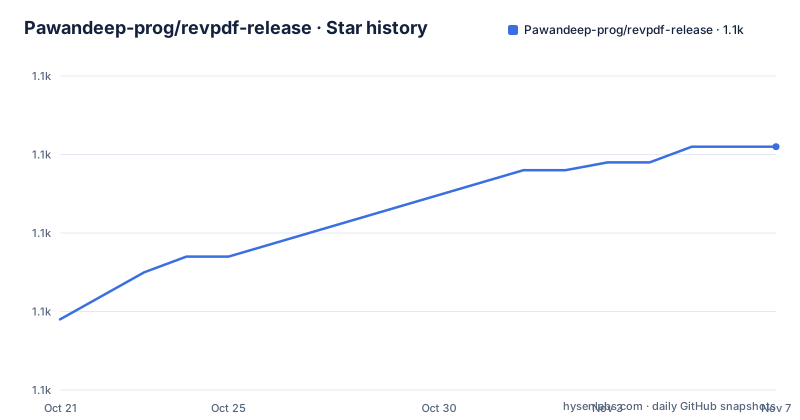
- Pawandeep-prog/revpdf-release1,081 ★ · +22
| Repository | 2026-10-21 | 2026-11-07 |
|---|---|---|
| Pawandeep-prog/revpdf-release | 1.1k | 1.1k |
22 Stars in the last 17 days, measured from the daily GitHub snapshot. Compare with other projects
Editorial analysis
A repository with a README, a licence and a folder of images
The top level of this repository is short enough to list. There is a .gitignore, a LICENSE file, a README.md, a file called com.revpdf.editor.png, and an images/ directory. That com.revpdf.editor.png is not a stray artefact, it is the Android application icon, and its name is the Android package id followed by the icon file name.
So there is no source code here, no build configuration and no CI. The repository is the official release repository for revpdf, described as a fast, native, and privacy-focused offline PDF editor, and the description of the repository itself names the formats explicitly, official release binaries for RevPDF Editor, with Linux AppImage and macOS DMG.
The images/ directory holds the showcase image the README displays, and the README is short by design. Its job is to point at the downloads, describe the feature set and link to the website for support or feedback.
This is a distribution pattern rather than a codebase, and it is a common one for applications that are hard to build. Compiling a native desktop application needs a specific toolchain, a specific SDK and often a signing identity, so the person who wants to use the editor should not have to solve that. Keeping the artefacts in a separate repository also means the source repository can be cloned by someone who wants to read the code without pulling a few hundred megabytes of binaries, and it means the release tag points at something downloadable rather than at a commit.
The homepage field is empty and there is no documentation directory, which is consistent with that scope. The last push was on 2026-08-25, the default branch is main, and the release tags are v5.0.0 from that date, v4.6.5 from 2026-07-05 and v4.5.0 from 2026-06-13.
The download table, and why Windows is different
The downloads section is a table of platform, label and link, and the labels are the interesting part.
Linux is the Latest AppImage, macOS is the Latest DMG, and Windows is the Latest Beta with the exe extension named. All three links point at the same URL, the repository's releases/latest page, so the platform distinction is carried by the label and by whatever the release assets turn out to contain rather than by three separate links.
The Windows label is the one to notice. Two of the three platforms are described as the latest release, and the third is explicitly the latest beta. That is a deliberate channel decision rather than an accident of packaging, and it says something about where the project thinks its Windows users are. A Windows build is the easiest to distribute and the most likely to be caught by antivirus heuristics, so a beta channel on that platform is a reasonable way to get builds in front of users while the packaging settles, and it also means the Windows label is not a promise of stability.
The AppImage and the DMG are both single-file distribution formats, which is the same philosophy applied across the two: download one file, make it executable, run it. The AppImage bundles its dependencies and carries the interpreter, and the DMG is a macOS disk image you drag an application out of. Both avoid an installer, and both avoid requiring the user to have any system libraries in place, which is the same problem an offline, self-contained application is trying to solve.
The README also lists a download for Android, linking to the Google Play listing under the name com.revpdf.editor, which is the same package id as the icon file in the repository root. So the project is not desktop only, and the Play Store build is a normal application distribution rather than a sideloaded artefact.
What the editor does, and what the privacy claim commits to
The features are listed as two platform claims and then a set of tools. The platform claims are that it is fast and native, built for performance with a clean, intuitive editor, and that it is privacy first with offline processing, no sign-up, no cloud and no data tracking.
The tools are the ones you would expect from a PDF utility and they are the reason someone would download a native application rather than use a web page. Split extracts pages or splits by range. Merge combines multiple PDFs into one. Compress reduces file size without losing quality, and the without losing quality part is a claim rather than a guarantee. Export to Images converts PDF pages to high-quality images. From Images creates PDFs from your photos. And there is an ellipsis after that, meaning more exist than the README lists.
The privacy claim is specific enough to be testable, which is unusual and worth reading carefully. Offline processing means the file operations happen on the device. No sign-up means there is no account to create. No cloud means the files do not go to a server. And no data tracking means the application is not reporting usage. For a tool that handles documents that often contain personal or commercial information, that combination is the reason to prefer a native application over a web service, and it is the claim the project is making about how it works rather than a policy statement about what it might do.
A reader should notice what is not claimed. There is no mention of a document redaction feature, no signature handling, no form filling and no OCR. The list is about rearranging, converting and shrinking files, which is a narrower feature set than the words a PDF editor usually imply, and that is a fair expectation to set before downloading.
The version numbering, and the licence question
The release tags follow a scheme that mixes patch and minor releases in a slightly unusual way, and the three most recent are enough to see it. v5.0.0 is a major version, dated 2026-08-25. v4.6.5 is a patch release, dated 2026-07-05. v4.5.0 is a minor version, dated 2026-06-13.
So the project has been doing frequent patch releases within a minor line, and has just made a major version jump. The tag naming is the RevPDF version with a v prefix, and the release assets are named after the same version, which is a convention that makes it easy to match a running installation to a tag.
The one thing a reader cannot settle from the repository is the licensing situation, and it is worth being precise about why. The repository's own licence metadata is not classified by GitHub, which means the licence file does not fall into one of the standard buckets. That is unusual for a release repository, because a release repository is exactly the place where the terms matter most: the source may be open while the binaries are not, or the binaries may carry additional terms such as a trademark or an end-user licence, and the source repository's licence file does not settle that.
The LICENSE file is present at the root, so the answer exists, and reading it is the only way to know. What the README does establish is the distribution channel and the download links, and what it does not do is claim an open source licence for the application itself.
The remaining detail is the feedback route. The README points to revpdf.com for support or feedback, which is the right place to raise a bug in a project whose code lives elsewhere.
Editorial conclusion
revpdf-release suits anyone who wants to install RevPDF without building it, and it is a clean example of keeping binaries and source apart so that a release tag is a download rather than a build. It is the wrong place to look for the editor's implementation, because this repository contains only artefacts, a README and a licence, and it is the wrong expectation to have of a Windows user who wants a stable build, since the README points that platform at the latest beta rather than the latest stable. Before downloading, check the release notes for the version you pick, since the tag naming moves between patch, minor and major versions, and read the LICENSE file directly, because the repository's licence is not classified while the project distributes closed binaries.
Frequently asked questions
Where do I download RevPDF for Linux and macOS?
The README lists the Latest AppImage for Linux and the Latest DMG for macOS, with both links pointing at the repository's releases/latest page. Windows is listed separately as the Latest Beta with the exe extension named.
Is there a source code repository in revpdf-release?
No. The top level of this repository contains a .gitignore, a LICENSE file, a README.md, a com.revpdf.editor.png file and an images/ directory. It is the artefact repository for the RevPDF Editor, not the codebase.
What can RevPDF do with PDF files?
The README lists split for extracting pages or splitting by range, merge to combine multiple PDFs into one, compress to reduce file size without losing quality, export to images to convert PDF pages to high-quality images, and from images to create PDFs from photos, with more tools beyond those listed.
What does the privacy claim mean for RevPDF?
The README states offline processing, no sign-up, no cloud and no data tracking, meaning the document operations run on the device and the files are not sent to a server.
Is RevPDF available on Android?
Yes. The README links a download for Android to the Google Play listing under the package id com.revpdf.editor, which is the same id as the icon file committed to the repository root.
Official sources
Add this badge to your README
If you maintain this project, the badge below links readers to this analysis and shows its maintenance status from the daily GitHub snapshot. Paste the markdown into your README; add ?metric=license or ?metric=stars to the image URL for a different field.

[](https://hysenlabs.com/projects/pawandeep-prog-revpdf-release)Star history chart for your README
[](https://hysenlabs.com/projects/pawandeep-prog-revpdf-release)Was this useful?