DSH Hub CLI turns a DeepSeek Harness setup into a content hash, and refuses patches that look like credentials
Open-source CLI, schemas, resolver, and DSH agent tools for DSH Plugin Hub
At a glance
- What is it?
- The DSH Hub CLI is the open-source client for a plugin hub: it captures a local DeepSeek Harness profile, publishes it as an immutable, content-addressed Release, and applies someone else's Release with the plugin versions and load order the author recorded. What it actually guarantees is narrower than the marketing table suggests, and the walkthrough for applying a Release stops one step before the confirmation it asks you to give.
- Who is it for?
- DSH Hub CLI suits teams already running DeepSeek Harness who want one teammate's working arrangement to become a reviewable artifact instead of a wiki page. Before you adopt it, decide where the credential check belongs to your process, because the refusal runs at share time and not at apply time, and check that a GitHub-sourced plugin points at a full commit rather than a branch.
- Can I use it commercially?
- Yes. MIT is a permissive licence: you can use, modify and sell software built on it, as long as you keep its copyright and licence notices.
- Is it still maintained?
- Yes. The repository last received commits 5 days ago.
- What is it written in?
- Mainly TypeScript, according to GitHub's language statistics.
Answers come from the project's GitHub data, last synced on November 15, 2026, and from our analysis. They are not legal advice.
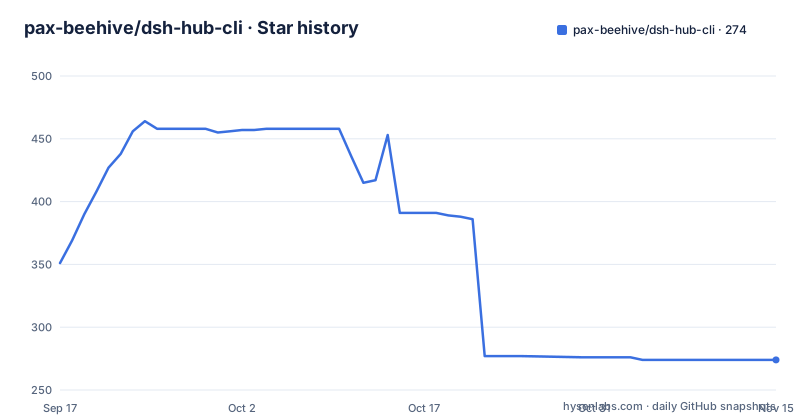
Star history
- pax-beehive/dsh-hub-cli274 ★ · -77
| Repository | 2026-09-17 | 2026-11-15 |
|---|---|---|
| pax-beehive/dsh-hub-cli | 351 | 274 |
-77 Stars in the last 59 days, measured from the daily GitHub snapshot. Compare with other projects
Editorial analysis
Every Release is a content hash the CLI checks before touching your machine
A Preset Release is described as a small, content-addressed document, and the CLI verifies its hash before doing anything with it. The schema has four parts. Runtime pins the exact DSH version the author verified against, shown as @deepseek-ai/dsh 4.2.1. Patch is the author's `cordis.patch.yml`, published verbatim rather than regenerated by the hub. Inputs declare which environment variables the Preset needs. Bundles are an ordered list that starts at 1.
The payload carries a sha256 content hash, which is what makes a published version fixed from the client's side. The slug plus version is a name; the hash is the thing actually checked. Applying one resolves to exactly one document, and the apply flow is described as staged, validated, then swapped in atomically. The claim made for that command is that it installs the exact plugin versions, in the exact order, with the exact patch the author published, rather than whatever is latest that day, and the table of before-and-after cases puts it plainly: direct versions drift within days, while the Release records exact direct versions and sources.
npm bundles carry integrity hashes, GitHub bundles must name a commit
Bundle sources are treated differently depending on where they come from. npm entries carry a sha512 integrity hash, which is the value npm itself verifies at install time, so the hub is recording something the package manager will check again rather than inventing a trust mechanism of its own. GitHub entries are held to a stricter rule: a GitHub source must point at a full 40-character commit and never a branch.
That rule exists because a branch name is a moving target, which would quietly undo the content hash the whole scheme rests on. The ordered list in the schema example runs from a builtin base package at position 1, through two npm plugins at 0.15.2 and 2.1.0, to a GitHub source at position 4. Order is part of the Release and is validated on apply, so a Preset records not only which plugins take part but the sequence they load in.
The single-plugin path skips all of that machinery:
dsh-hub search memory
dsh-hub info dsh-context --version 1.2.3
dsh-hub install dsh-context --version 1.2.3 --profile web
A version and a profile are named there, but no order and no patch, which is the difference between adding one plugin and adopting someone else's whole arrangement.
The credential check is a refusal at share time, not a warning at apply time
The secret policy is drawn as a hard stop. Only `${ENV_VAR}` references are published and the values stay local, and the CLI refuses to publish a patch that contains a credential-looking value. So the boundary is enforced on the way out: you discover your patch is unsafe when you try to share it, not when a colleague pulls it.
That placement is a consequence of the patch being published verbatim. Whatever sits in `cordis.patch.yml` goes into the Release as written, which is why a check at share time is the only place a check can happen. There is no documented second pass on the receiving machine.
The Inputs list is the readable side of the same rule. In the schema example, OPENAI_API_KEY is marked as a secret and SEARCH_ENDPOINT sits beside it as a plain value, so someone reading a Release can see which variables their machine needs without seeing anybody's key. The environment file for the CLI follows the same shape, with a provider key and a base URL to fill in before anything runs.
The CLI mutates immediately; the agent tools have to go through a plan
There are two mutation paths, and they behave differently on purpose. Direct CLI mutation commands execute immediately unless you request `--plan` or `--dry-run`, while the agent tools use the plan and apply flow. The same registry is therefore reachable from a person at a terminal, from a CI job, and from an AI agent, with different safety properties on each route.
A plan is a saved, reviewable description with a fingerprint of the current state and an expiry. The walkthrough shows what gets created:
# Sign in once, then publish an immutable Release
dsh-hub login
dsh-hub profile share my-stack --version 1.0.0 --profile web
On the publishing side, the same command exists in a preview form with `--dry-run` to show what would be captured from ~/.dsh/profiles/web, and for CI a token can be supplied inline instead of an interactive login. That is the mechanism the walkthrough leans on when it describes applying a teammate's Preset as staged, validated, then swapped in atomically.
A plan expires, and a changed profile invalidates it
The plan is not a ticket you can hold for a week. You apply it by ID after review, and if the local Profile changed or the plan expired you create a fresh one. Two independent staleness checks are therefore in play: an expiry timestamp stored inside the plan, and the fingerprint the plan recorded against your Profile when it was made. Any plugin change, any manual edit, any other apply, and the fingerprint no longer matches.
The artifacts you actually read are the plan JSON and a separate diff command, `dsh-hub profile diff dsh-web-workspace --version 0.1.0 --profile web`, which shows what would change on your machine before anything moves. `--dry-run` on share and on upgrade gives the same guarantee on the publishing side, and `dsh-hub profile doctor --profile web` is the after-the-fact check that everything is healthy.
Upgrade and rollback are two more commands over the same profile:
dsh-hub profile upgrade --version 0.2.0 --profile web --dry-run   # review the diff
dsh-hub profile upgrade --version 0.2.0 --profile web             # apply it
dsh-hub profile history --profile web                             # see saved revisions
dsh-hub profile rollback --profile web                            # restore the previous one
Rollback is described as restoring the previous complete revision rather than undoing a single step, so history is the list you read before you use it.
The quick start asks for pnpm and then installs with npm
The prerequisites line asks for Node.js 22.13+ and pnpm on your PATH. The install command two lines below it is `npm install --global @dsh-plugin-hub/cli`. Both can hold on a machine that keeps pnpm for other work, but nothing in the quick start says pnpm is optional for end users or what fails without it, so the two requirements sit side by side without an explanation of which one the published package actually needs:
npm install --global @dsh-plugin-hub/cli
dsh-hub --help
The package manifest tells a second story. The file at the repository root is the workspace root of a monorepo, marked private, named dsh-hub-cli-workspace, pinning its package manager to [email protected] with engines requiring node >=22.13.0. So pnpm governs development of the repository, while npm installs the published CLI. The version in that root file is 0.5.0, matching the v0.5.0 tag dated 2026-09-19; the earlier tag on record is v0.2.0 from 2026-09-01, three weeks and four minor versions before it.
The check script builds the tree twice and skips the release version check
The root scripts show a three-package workspace built in dependency order: schemas, then registry, then cli, each step chained with pnpm --filter. Typecheck runs the whole build first and then typechecks each package in turn. Tests run through the Node test runner over `packages/*/tests/*.test.ts` and `packages/*/tests/*.test.mjs`, so both module formats are exercised, and the test script builds before testing.
That is why the aggregate check command builds the tree twice: it chains typecheck, which builds, then the tests, which build again. A third-party script named `verify-package-contents.mjs` backs pack:check and another named `verify-repository-governance.mjs` backs governance:check. A release:check script exists alongside them, wired to `verify-release-version.mjs`, and the aggregate check does not call it, so version verification before a release is a step someone has to remember.
The layout around those scripts is unusually wide for a CLI: docs/, skills/ and scripts/ directories, a pnpm-workspace.yaml, a pnpm-lock.yaml, an .npmrc, and a tsconfig.packages.json. Policy files come in pairs, with README.zh-CN.md beside README.md and zh-CN twins of the code of conduct, contributing, governance, security and support documents. Dev dependencies are five entries declared through the pnpm catalog protocol, including typescript and zod.
The apply walkthrough ends one step before the confirmation it asks for
The how-it-works page is a sequence diagram that covers the first half of an apply. You send profile apply with --plan and --json, the CLI fetches the Release and resolves bundles, the hub returns the Release with the hash verified, the CLI writes a plan holding an id, an expiresAt and a precondition into the ~/.dsh directory, and the CLI hands back plan JSON with exact versions, sources and inputs. The final annotation on that page is a note addressed to you saying to review and confirm.
What follows the confirmation is not there. The call that consumes the plan ID, the handling of the staged directory at the swap, and the behaviour when the precondition fails all sit past the end of the diagram. So the part a cautious reader would want before approving a teammate's Preset is the part that stops, while the atomic swap itself is only asserted in a comment beside the apply command.
The earlier diagram is complete and answers a different question: the author's machine holds a profile, `dsh-hub profile share` produces a Release with a sha256 content hash, and three consumers, a teammate, a CI runner and an AI agent, all reach it through `dsh-hub profile apply`. That third consumer is why the plan and apply flow exists for agent tools while direct CLI commands still execute immediately.
Editorial conclusion
DSH Hub CLI suits teams already running DeepSeek Harness who want one teammate's working arrangement to become a reviewable artifact instead of a wiki page. Before you adopt it, decide where the credential check belongs to your process, because the refusal runs at share time and not at apply time, and check that a GitHub-sourced plugin points at a full commit rather than a branch. Read the plan JSON and the diff before confirming, and remember that a plan expires and a changed profile invalidates it, so a plan reviewed last week is not a plan you can still apply today.
Frequently asked questions
What does DSH stand for in dsh-hub-cli?
The README expands it as DeepSeek Harness. A DSH setup is described as a runtime version, plugins at specific versions, the order they load in, a cordis.patch.yml wiring them together, and environment variables that hold your keys.
What is inside a DSH Hub Preset Release?
A small content-addressed document: the runtime version the author pinned, an ordered list of bundles, the author's cordis.patch.yml published verbatim, and the input environment variables the Preset needs. The CLI verifies the sha256 hash before acting on it.
Does dsh-hub publish API keys or other secrets?
Only ENV_VAR style references are published and the values stay local. The CLI refuses to publish a patch containing a credential-looking value, so the check runs when you share rather than when someone applies.
Does installing the DSH Hub CLI require pnpm?
The quick start lists Node.js 22.13+ and pnpm on your PATH, then installs with npm install --global @dsh-plugin-hub/cli. [email protected] is pinned as the package manager for the repository itself, which is a separate concern from the published package.
How do I review or undo a DSH Hub profile apply?
profile diff shows what would change first, profile apply --plan saves a reviewable plan with an expiry and a fingerprint of your current Profile, and profile history with profile rollback restores the previous complete revision.
Official sources
Add this badge to your README
If you maintain this project, the badge below links readers to this analysis and shows its maintenance status from the daily GitHub snapshot. Paste the markdown into your README; add ?metric=license or ?metric=stars to the image URL for a different field.

[](https://hysenlabs.com/projects/pax-beehive-dsh-hub-cli)Star history chart for your README
[](https://hysenlabs.com/projects/pax-beehive-dsh-hub-cli)Was this useful?