universal-analytics for Node.js: a legacy Universal Analytics client
A node module for Google's Universal Analytics and Measurement Protocol
At a glance
- What is it?
- universal-analytics is a Node.js client for the retired Universal Analytics Measurement Protocol. Google stopped processing standard Universal Analytics data in 2023, and the 360 extension ended in 2024; use a Google Analytics 4 integration for new measurement.
- Who is it for?
- Treat this package as a historical reference or part of a migration audit, not a way to collect new Google Analytics data. Standard Universal Analytics stopped processing data in 2023 and the 360 extension ended in 2024.
- Can I use it commercially?
- Not without permission. GitHub finds no licence file in the repository, and without a licence all rights are reserved by default: you may read the code but not reuse it. Check the README, or ask the authors, before using it.
- Is it still maintained?
- Yes. The repository last received commits 56 days ago.
- What is it written in?
- Mainly JavaScript, according to GitHub's language statistics.
Answers come from the project's GitHub data, last synced on November 7, 2026, and from our analysis. They are not legal advice.
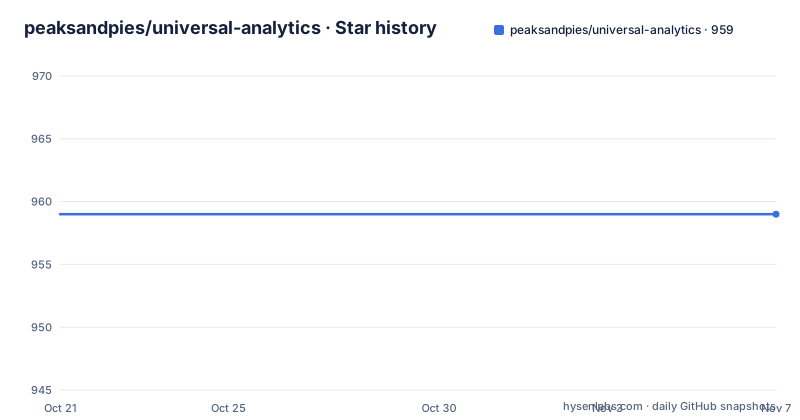
Star history
- peaksandpies/universal-analytics959 ★ · +0
| Repository | 2026-10-21 | 2026-11-07 |
|---|---|---|
| peaksandpies/universal-analytics | 959 | 959 |
0 Stars in the last 17 days, measured from the daily GitHub snapshot. Compare with other projects
Editorial analysis
Tracking that starts on the server and never touches the browser
Google stopped processing standard Universal Analytics data in July 2023, and its 360 processing extension ended in July 2024. This package targets the retired Universal Analytics Measurement Protocol and is useful as a historical reference when reviewing or migrating old code. For new measurement, use a Google Analytics 4-compatible implementation and follow the current GA4 Measurement Protocol documentation.
universal-analytics is a Node.js module for Google Universal Analytics tracking through the Measurement Protocol. The readme states the point of the design directly: it allows tracking data, or rather users, from within a Node.js application, tracking is initiated on the server side, and if required it does not require any more tracking in the browser.
That last clause is what separates this from the usual analytics snippet. There is no gtag or analytics.js tag to install on a page, no cookie to worry about on the client, and no waiting for the browser to fire a hit. Your server sends the request itself.
The problem this solves is real but narrower than it first appears. Server side tracking suits applications where the interesting event happens on the server: a job that completes, a payment that is processed, a command that runs. It also suits teams that want one reporting path for both web and non-web clients. What it does not give you is client side behaviour such as scroll depth or time on page, because no browser code runs.
The readme points to the Measurement Protocol as the transport, and at the start of the document it links to Google's instructions for obtaining a UA-xxxx code when setting up a new property. That property identifier is the first thing your code needs, and the module treats it as a required argument rather than something read from configuration.
A Visitor instance owns the client ID, and UUID v4 is the format it wants
Everything starts with a Visitor. Calling the module with a tracking id returns an instance that you keep around to track one specific client.
var visitor = ua('UA-XXXX-XX');The readme is careful about the word client here, warning the reader not to confuse this with the Google Analytics User ID. If no client id is passed to the constructor, a random UUID is generated. If you already have one, you can pass it in.
var visitor = ua('UA-XXXX-XX', '6a14abda-6b12-4578-bf66-43c754eaeda9');Starting with Universal Analytics, the readme says a UUID v4 is the preferred client id format and that it is therefore necessary to provide a UUID of that type. There is an escape hatch for the cases where you cannot, and it is an option rather than a separate method.
var visitor = ua('UA-XXXX-XX', 'CUSTOM_CLIENTID_1', { strictCidFormat: false });Two more constructor options appear in the examples. Setting http to true forces the HTTP protocol instead of the default HTTPS, and adding uid sets the Google Analytics User Id, which the readme links to the Measurement Protocol parameter documentation. The User Id is how you tie hits from this server to a known person, which is the reason to set it explicitly rather than accept the generated client id.
send() is fire and forget, the callback is how you find out
Tracking a pageview is a single chained call.
visitor.pageview("/").send()The readme makes one point sharply: calling pageview() on its own does not initiate a tracking request, you have to append send() or pass a callback. That is a small design decision with real consequences, because the send is asynchronous and you will not receive confirmation about whether it worked.
var visitor = ua('UA-XXXX-XX');
visitor.pageview("/", function (err) {
  // Handle the error if necessary.
  // In case no error is provided you can be sure
  // the request was successfully sent off to Google.
});
The callback form is the one to use in a server path where losing a hit matters, such as a checkout completion. It is invoked once the request has finished and receives any error that occurred during it, and when you use it the extra send() call is no longer needed.
The shape is consistent across the other hit types as well. Screenview tracking takes a screen name and an app name, and the readme lists the available signatures for it, ending with variants that add an app version and an app id before the optional callback.
visitor.screenview("Home Screen", "App Name").send()The same optional-last-argument pattern appears for pageview, where the hostname and title can be added as further positional arguments.
visitor.pageview("/", "http://peaksandpies.com", "Welcome").send();pageview accepts positional arguments or a Measurement Protocol params object
There are two ways to describe a pageview, and the readme is explicit that they produce the same effect. The first is positional, path then hostname then title. The second is a params object keyed by the Measurement Protocol attribute names.
visitor.pageview({dp: "/", dt: "Welcome", dh: "http://peaksandpies.com"}).send();Here dp, dt and dh stand for document path, document title and document hostname, which are the names the Measurement Protocol uses. If you are porting a payload from another implementation, that mapping is the reason the object form exists, and the readme points to a separate file, AcceptableParams.md, for the list of acceptable params.
The module enforces one constraint for you. It is mandatory to specify either the page path, dp, or the document location, dl, because Google Analytics cannot track a pageview without a path. Rather than letting an invalid request go out, universal-analytics denies the pageview() tracking when those required parameters are missing, and the callback receives an error.
var pagePath = null;

visitor.pageview(pagePath, function (err) {
  // This callback will receive an error
});
That guard is the most useful behaviour in the module for anyone wiring it into a request handler, since a missing path is the easiest mistake to make when the path comes from a route parameter.
Installing and sending the first hit
The following commands describe the historical package API. A successful request or callback does not mean retired Universal Analytics properties will process new data; use a GA4-compatible integration for new tracking.
The package is installed like any other Node module.
$ npm install universal-analyticsIt is then required, or imported if you are using ES6 modules.
var ua = require('universal-analytics');

// Or with ES6 import
import ua from 'universal-analytics'
The published version in package.json is 0.5.4, the entry point is index.js, and the package declares that it needs Node 22.0.0 or newer. The module itself pulls in only two runtime dependencies, debug for logging and uuid for client id generation, which is a light footprint for something that talks to an external API.
With the visitor created, a first hit is one line, and the callback variant is the one to use while you are still checking that hits arrive.
var visitor = ua('UA-XXXX-XX');
visitor.pageview("/", function (err) {
  // Handle the error if necessary.
});
The repository also ships a Makefile whose test target runs mocha from the local node_modules, and the package.json test script calls make test. The test directory and the mocha, should and sinon dev dependencies sit alongside it, so running the suite is the same command a contributor would run.
Daisy-chaining, filters and debug mode are listed but barely explained
The readme's table of contents is wider than the documentation that follows it. Beyond getting started and the hit types, it lists daisy-chaining tracking calls, setting persistent parameters, filter application tracking data, session-based identification, debug mode, request options and shortcuts.
These are the features you would expect from a mature analytics client, and their presence in the table of contents tells you the module has them. What the readme text does not do is spell out the argument shapes, the option names or the expected output for most of them. If you are evaluating this package, treat those sections as a list of topics to verify in the source under lib rather than as documented behaviour you can rely on.
The same applies to the hit types beyond pageview and screenview. The table of contents lists events, exceptions, user timings, transactions and transaction items, and the visible text confirms that event tracking, exception tracking, user timing tracking and transaction tracking are supported areas of the API, with a dedicated section for transaction items. The signature tables for those types are cut off in the visible portion of the readme.
There is a HISTORY.md in the repository, which is where a changelog for a module without GitHub releases would live. Its contents are not described in the readme, so it is the right file to open if you are curious what changed in 0.5.4.
A last push in 2026 with no GitHub releases, and a dependency floor that moves
The repository has no GitHub releases, so version history lives in the npm package and in HISTORY.md. The published version is 0.5.4 and the last push was on 2026-09-13. The repository is not archived, and the package declares Node 22.0.0 as its minimum, which tells you the module is being kept compatible with current Node releases.
Two things about the dependency list are worth a second look. The uuid dependency is declared at a major version far ahead of what the client id format from the readme's Universal Analytics era would suggest, and sinon is pinned at 1.x in devDependencies while mocha and should are wildcards. Wildcard dev dependencies mean a fresh install can pull a different test stack than the one a contributor used, which occasionally shows up as a test failure that has nothing to do with your change.
The licence is MIT, declared in package.json under author Jörg Tillmann. No LICENSE file is listed among the top level entries, so if your compliance process wants the licence text rather than the SPDX identifier in package.json, that is a file you will need to track down separately.
The honest summary of the maintenance picture is a small, focused package with a current Node floor and recent commits, but with no release notes on GitHub and a readme that was clearly written for an earlier era of Google Analytics. Both of those are arguments for checking the specific facts you depend on rather than trusting the package version number.
Editorial conclusion
Treat this package as a historical reference or part of a migration audit, not a way to collect new Google Analytics data. Standard Universal Analytics stopped processing data in 2023 and the 360 extension ended in 2024. For new server-side measurement, implement the Google Analytics 4 Measurement Protocol and verify its requirements against Google’s current documentation.
Frequently asked questions
How do I install universal-analytics and send my first pageview?
The package README shows npm install universal-analytics and a UA tracking ID, but Universal Analytics properties no longer process new data. For a new implementation use a GA4-compatible integration and the current GA4 Measurement Protocol documentation instead.
What client id format does universal-analytics expect?
The readme says a UUID v4 is the preferred client id format since Universal Analytics, and that providing such a UUID is necessary. A custom client id can be forced by passing the strictCidFormat: false option to the constructor.
Does universal-analytics need browser tracking code?
No. The readme states that tracking is initiated on the server side and, if required, does not require any more tracking in the browser, since the module sends hits itself through the Measurement Protocol.
What happens if I call pageview() without a path?
It is mandatory to specify either the page path, dp, or the document location, dl. When those required parameters are omitted, universal-analytics denies the pageview tracking and the callback receives an error instead of an invalid request being sent.
How do I run the tests for universal-analytics?
The package.json test script calls make test, and the Makefile test target runs ./node_modules/.bin/mocha. The test directory at the root holds the suite, with mocha, should and sinon listed as dev dependencies.
Which Node version does universal-analytics support?
The package.json engines field requires Node 22.0.0 or newer, and the published version is 0.5.4 with index.js as the entry point. The last push to the repository was on 2026-09-13.
Official sources
Add this badge to your README
If you maintain this project, the badge below links readers to this analysis and shows its maintenance status from the daily GitHub snapshot. Paste the markdown into your README; add ?metric=license or ?metric=stars to the image URL for a different field.

[](https://hysenlabs.com/projects/peaksandpies-universal-analytics)Star history chart for your README
[](https://hysenlabs.com/projects/peaksandpies-universal-analytics)Was this useful?