PeaZip: a cross-platform archive manager built in Free Pascal on borrowed codecs
Free Zip / Unzip software and Rar file extractor. Cross-platform file and archive manager. Features volume spanning, compression, authenticated encryption. Supports 7Z, 7-Zip sfx, ACE, ARJ, Brotli, BZ2, CAB, CHM, CPIO, DEB, GZ, ISO, JAR, LHA/LZH, NSIS, OOo, PAQ/LPAQ, PEA, QUAD, RAR, RPM, split, TAR, Z, ZIP, ZIPX, Zstandard.
At a glance
- What is it?
- PeaZip is a GUI archive manager for Windows, macOS, Linux and BSD that wraps codecs from 7-Zip, PAQ, Brotli and Zstandard, with encryption, hashing and secure deletion on top. Here is what the project is really made of, and where a shell user should look instead.
- Who is it for?
- PeaZip is the right pick when one person needs to open, create and inspect archives on several operating systems and wants the same interface and the same feature set everywhere, including encryption, hashing, duplicate detection and secure deletion in one window. It is the wrong dependency for a build script, because the documented interface is a desktop application and the CLI story is a feature you export from the GUI rather than a tool you drive.
- Can I use it commercially?
- Yes, with conditions. LGPL-3.0 is a weak copyleft licence: you can use it inside commercial and closed-source software, but if you distribute changes to its own files, you must publish those changes under the same licence.
- Is it still maintained?
- Yes. The repository last received commits 3 days ago.
- What is it written in?
- Mainly Pascal, according to GitHub's language statistics.
Answers come from the project's GitHub data, last synced on October 20, 2026, and from our analysis. They are not legal advice.
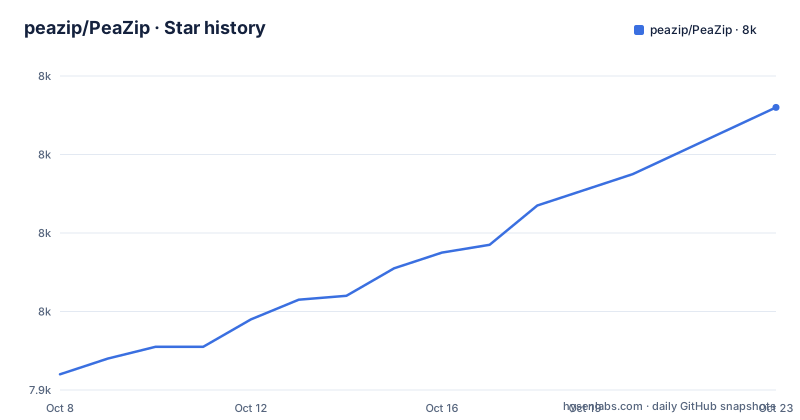
Star history
- peazip/PeaZip7,995 ★ · +51
| Repository | 2026-10-08 | 2026-10-20 |
|---|---|---|
| peazip/PeaZip | 7.9k | 8k |
51 Stars in the last 12 days, measured from the daily GitHub snapshot. Compare with other projects
Editorial analysis
The default branch is called sources
Before anything else, the repository's shape is unusual in a way that will confuse you if you arrive expecting a normal application tree. The default branch is `sources`, not `main`, and the top level contains a small number of directories: `peazip-sources/`, `use/`, `PeaZip.ShellEx/` and `images/`, alongside `README.md`, `CHANGELOG.md`, `CODE_OF_CONDUCT.md`, `CONTRIBUTING.md`, `SECURITY.md` and a Chinese `README.zh.md`.
So there are two nested source locations, and the README's build instructions treat them differently. It says sources are available in the `peazip-sources` Git directory and from a separate sources webpage, alongside detailed instructions for compiling binaries and building installable and portable packages. That link points at a subdirectory of the same repository on the `sources` branch, which means the directory you can see at the top level of a clone is the same place the instructions are telling you to look. If you want release snapshots rather than the moving branch, the README points elsewhere: source snapshots for each release are attached to Releases as `peazip-x.y.z.src.zip` packages.
The `use/` directory is the one the README never mentions. Whatever is in it, it is not part of the documented build. `PeaZip.ShellEx/` is more self explanatory from its name, a Windows shell extension, which is how the file manager integration on Windows is delivered. The presence of a `.gitmodules` file means at least one dependency is pulled in as a submodule rather than vendored, and for a project that otherwise ships its codecs inside itself, that is worth knowing before you try to build offline.
For orientation, releases are frequent and numbered plainly: 11.2.0 on 2026-07-12, 11.1.0 on 2026-05-11 and 11.0.0 on 2026-04-06. The last push was on 2026-09-17 and the repository is not archived.
The codecs come from other people's projects
PeaZip's compression performance is not its own invention, and the README is upfront about that. It says PeaZip uses open source technologies from 7-Zip/p7zip, FreeArc, PAQ/ZPAQ, PEA, UPX, Brotli and Zstd. The project links a maximum compression benchmark image in its own documentation, which is a fair thing for a project to publish, but the important context is that most of the ranking you would see in such a chart belongs to the upstream codecs rather than to the wrapper around them.
This is the single most useful thing to understand about the comparison with 7-Zip, and it cuts an unusual way. PeaZip is not a competitor to 7-Zip's compression engine; it contains it. So the question of which one compresses better has a fairly predictable answer for any format they share, and the more useful question is what you get on top of the compression. You get the same archive handling plus encryption options, hashing, a password manager, secure deletion, and a file manager with duplicate detection and built-in viewers.
The format list is where the project's own records get loose. The README advertises 200+ archive types and variants, then gives a short parenthetical sample: 7z, ace, arc, brotli, bz2, cab, gz, iso, pea, rar, tar, wim, zip, zipx, zpaq, zstandard. The repository description gives a considerably longer and different list, adding formats the README does not mention at all: 7-Zip sfx, ARJ, CHM, CPIO, DEB, JAR, LHA/LZH, NSIS, OOo, PAQ/LPAQ, QUAD, RPM, split and Z. Both are in the project, and they disagree on the specifics. The README's sample is explicitly an ellipsis rather than a complete list, so the two are reconcilable, but if you are deciding whether PeaZip handles a specific format then the README's headline number is not the thing to check. The project's own format documentation is.
Spanned archives are called out separately, with the 001, r01, z01 naming scheme, which is the feature that matters when you need to split a large archive across removable media or upload limits.
Written in Lazarus, shipped with InnoSetup
GitHub reports Pascal as the primary language, and the README explains why that is a slightly unusual answer: PeaZip is written in Lazarus/FreePascal, and Windows installers are scripted using InnoSetup, also using a Delphi/Pascal-like syntax. So the Pascal footprint covers both the application and its packaging.
Lazarus is the free Pascal IDE that targets multiple platforms from one codebase, which is the mechanism behind the cross-platform claim. The application runs natively on BSD on x86-64, Linux on x86-64 and aarch64, macOS on both Intel x86-64 and aarch64 for Apple Silicon, and Windows on x86 and x86-64 where it is described as compatible with Wine and ReactOS. Those are the actual supported targets, and the Apple Silicon entry matters because native aarch64 builds on macOS are a common source of complaints about slow performance from cross-platform tools that ship only Intel binaries.
There is no build command in the README to copy. That is not an omission so much as a boundary. The README sends you to the sources directory and a separate webpage for detailed instructions on compiling the binaries and building installable and portable packages for various target systems, and it offers the per-release source zip as the other option. If you need a reproducible headless build, that instruction set is the document to read, and it lives outside this repository's README.
Installation, by contrast, needs none of that. There are Flathub and SourceForge distributions alongside the GitHub releases, and the application is also available as a portable package that requires no installation, which is the practical route for testing it on a locked down machine. The Flathub identifier is io.github.peazip.PeaZip.
Encryption, hashing and secure deletion in one window
The features list that goes beyond archiving is what distinguishes this from a plain file manager with archive support. PeaZip describes itself as security focused, with strong encryption, two-factor authentication, an encrypted password manager and secure deletion. It supports multiple archive encryption standards, provides file hashing tools, and can export GUI tasks as CLI scripts.
Two-factor authentication inside an archiver deserves a second look, because it is unusual in a desktop utility. It implies the password manager is protecting stored credentials with a second factor rather than a single master password, which is a meaningful difference from a utility that stores passwords in a config file. Combined with secure deletion and file hashing, the project is aiming at people who handle archives as a security boundary rather than as a convenience. Note that hashing and secure deletion are separate features from encryption: hashing verifies an archive you received, and secure deletion overwrites files you want gone, neither of which protects an archive in transit.
The file manager side is substantial too. Bookmarking, search, an instant content filter, duplicate file detection, and integrated text, hex and image viewers. The duplicate detection is the feature that pays for itself first for most people, because it needs no explanation of archive formats at all. The hex viewer is what you use when an archive is corrupt and you need to see why.
One capability is easy to overlook and worth calling out for anyone who scripts around the application: exporting GUI tasks as CLI scripts. That is the only CLI story the README offers. It is a bridge from the interface to a script rather than a documented command line you drive directly, which is the main practical gap between PeaZip and the tools below.
A GUI first tool in a shell first world
The honest comparison is not PeaZip against 7-Zip on compression ratios. It is PeaZip against whatever you currently use to open files, with the caveat that it is a desktop application first.
For a person who wants a window, PeaZip's case is completeness and consistency. The same interface on Windows, macOS, Linux and BSD, with the same encryption, hashing and file management features, and a portable build that needs no installation. That is a real advantage over picking 7-Zip on Windows and Keka on macOS and xarchiver on Linux and reconciling three sets of features.
For a shell, the comparison is thinner. A build script or a CI job that needs to create a `.tar.zst` or extract a `.7z` does not want a desktop application, and the README documents no command line interface for driving one. On Linux and macOS the standard library already covers most of it, with `bsdtar` reading most archive formats including 7z and zstd, and the compression tools themselves available as packages. On Windows, 7-Zip's own `7z` executable is the scriptable counterpart to the same engine PeaZip embeds. Choosing PeaZip in those situations means adding a GUI dependency to do work that an existing tool does without one.
The counterargument the project would make is the file management and secure deletion work, and that is fair in a desktop context. It is not a fair argument for a server.
On licensing, the project is LGPLv3 and GitHub records the same. That suits use inside an organisation and modification for your own purposes, and it carries obligations that matter if you redistribute a modified build, which is a question to answer for yourself rather than from this article. Dependencies carry their own terms, as with any LGPL codebase, and the LICENSE file in the repository is the text that governs.
Three distribution channels that can disagree
The README's header is a download count table with four columns: GitHub all releases, GitHub latest, SourceForge and Flathub. That is four counters for what is conceptually one application, and it is a small signal about something that matters more than it looks.
Any project published through several channels ends up with builds of different vintages, because each channel is updated on its own schedule. GitHub releases get 11.2.0 from 2026-07-12. SourceForge and Flathub have their own release processes, and Flathub in particular runs review and packaging steps of its own, so a given version can appear on one channel well before or after another. The project does not document a policy stating that all four are in lockstep, and the README does not say which channel is authoritative when they disagree.
For a user this is mostly harmless, since any of the four is a recent enough build for archive work. For someone who wants to know exactly which version they have, it is a reason to check the about or version dialog against the release list rather than trusting the badge on a download page. The same caution applies to the security features, since the version that shipped a fix is not necessarily the version your package manager handed you.
The documentation follows the same pattern. Downloads, themes and screenshots live on the peazip.github.io site, translations live in a separate PeaZip-Translations repository, and support and issue tracking are pointed at pages on the same site rather than at GitHub issues. There is a CHANGELOG in the repository, so the version history is available in one place, and the CONTRIBUTING and CODE_OF_CONDUCT files sit alongside it. For a project with this much going on across channels, the changelog is the file to read when you want to know what a given version changed.
Editorial conclusion
PeaZip is the right pick when one person needs to open, create and inspect archives on several operating systems and wants the same interface and the same feature set everywhere, including encryption, hashing, duplicate detection and secure deletion in one window. It is the wrong dependency for a build script, because the documented interface is a desktop application and the CLI story is a feature you export from the GUI rather than a tool you drive. Two things to check in your own workflow. First, whether the archive format you actually produce is one the README lists, since the headline claim is 200+ types while the project's own format list is much shorter than that. Second, the licensing, since LGPLv3 suits internal use and redistribution differently depending on whether you modify the code, and the Flathub and SourceForge packages alongside the GitHub releases are three separate distribution channels that can lag each other.
Frequently asked questions
What is PeaZip used for?
PeaZip is an archive manager for creating, opening and inspecting archives, and it also works as a file manager with bookmarking, search, duplicate file detection and built-in text, hex and image viewers. It runs on Windows, macOS, Linux and BSD, and is available as a portable package that needs no installation.
Which is better for compression, 7-Zip or PeaZip?
For any format they share, the compression comes from the same upstream engine, because the README says PeaZip uses open source technologies from 7-Zip/p7zip along with FreeArc, PAQ/ZPAQ, PEA, UPX, Brotli and Zstd. The difference is the application around it: PeaZip adds encryption, hashing, secure deletion and file management in one interface across four operating systems.
Is PeaZip better than WinRar?
The README positions PeaZip as a cross-platform open source alternative to proprietary software including WinZip and WinRar, and it is licensed LGPLv3 rather than proprietary. It also reads RAR archives, which it lists among its supported types, so an existing WinRAR archive is not a reason to stay.
Official sources
Add this badge to your README
If you maintain this project, the badge below links readers to this analysis and shows its maintenance status from the daily GitHub snapshot. Paste the markdown into your README; add ?metric=license or ?metric=stars to the image URL for a different field.

[](https://hysenlabs.com/projects/peazip-peazip)Star history chart for your README
[](https://hysenlabs.com/projects/peazip-peazip)Was this useful?